
Open-source AI augmentation layer for search engines — adds intelligent query planning and result verification to any search backend

Project description






Open-source AI augmentation layer that adds intelligent query planning and result verification to any search backend.
OpenSift is born from WisPaper, an AI-powered academic search platform developed by Fudan NLP Lab and WisPaper.ai. The core search-verification paradigm — AI query planning + LLM-based result verification — is described in the research paper WisPaper: Your AI Scholar Search Engine. OpenSift extracts this proven paradigm into a universal, open-source middleware that can be plugged into any search backend, bringing the same AI capabilities to every search engine.
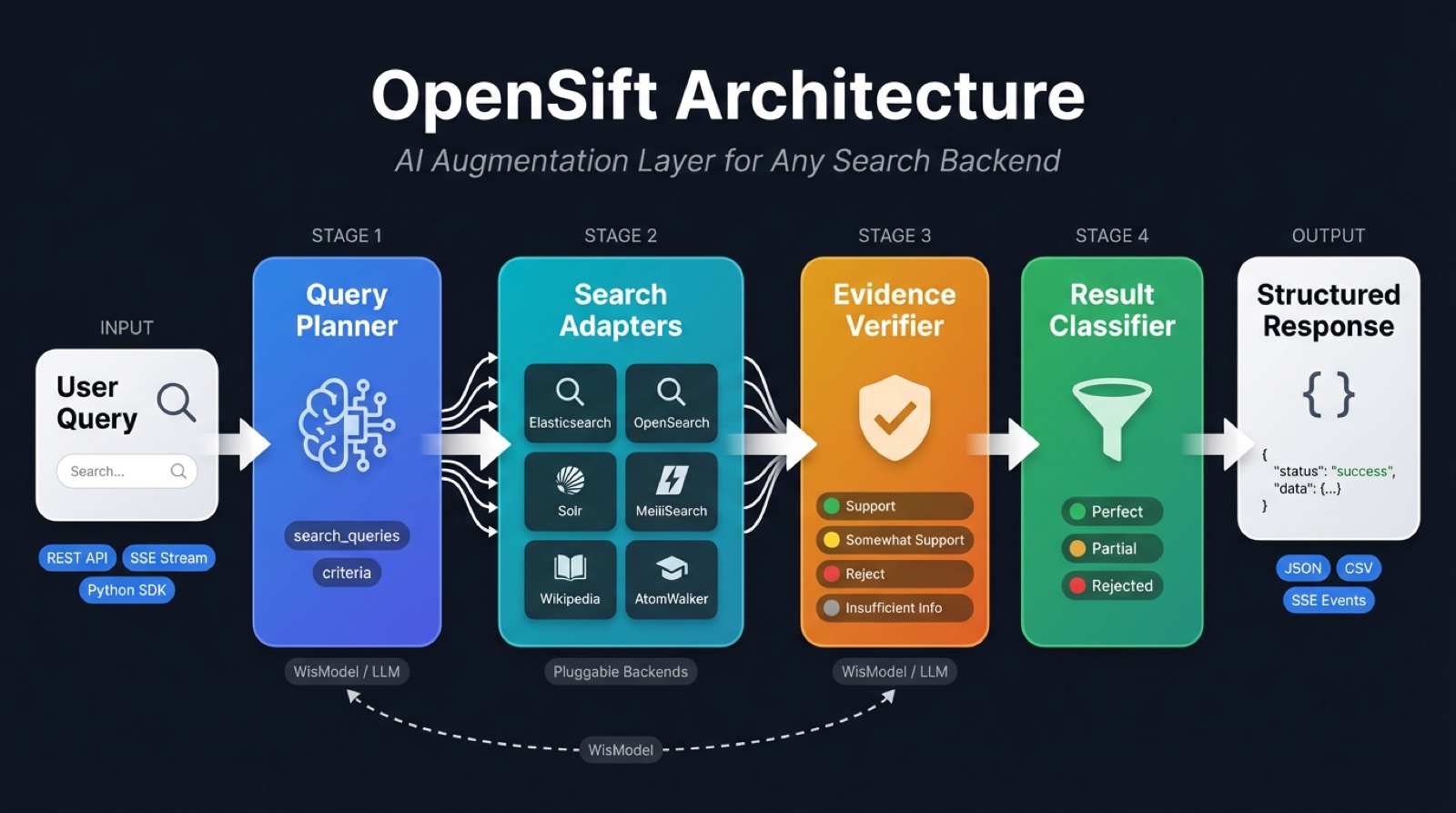
OpenSift is not a search engine or a Q&A system. It is a lightweight AI middleware that plugs into your existing search backend (Elasticsearch, OpenSearch, Solr, MeiliSearch, Wikipedia, AtomWalker, or any custom API) and injects two core AI capabilities:
- Query Planning — Decomposes natural language questions into precise search queries and quantified screening criteria
- Result Verification — Uses LLM to verify each search result against the criteria, with evidence and reasoning
What Problem Does It Solve?
Traditional search systems return keyword-matched results, leaving users to manually read and filter them. OpenSift automatically performs AI-powered filtering after results are returned, classifying them into:
- Perfect — All criteria fully satisfied
- Partial — Some criteria met, for human review
- Rejected — Filtered out automatically
Quick Start
Requirements
- Python 3.11+
- Poetry 2.0+
Installation
git clone https://github.com/AtomInnoLab/OpenSift.git
cd opensift

# Development environment
make dev-setup

# Or directly with Poetry
poetry install
Configuration
cp opensift-config.example.yaml opensift-config.yaml
cp .env.example .env

# Configure WisModel API Key (the only supported LLM)
# Edit .env: OPENSIFT_AI__API_KEY=your-wismodel-key

# Configure search backend (default: AtomWalker academic search)
# Edit .env: OPENSIFT_SEARCH__ADAPTERS__ATOMWALKER__API_KEY=wsk_xxxxx
Start
# Development mode (auto-reload)
make run

# Production mode
make run-prod
- API:
http://localhost:8080 - Docs:
http://localhost:8080/docs - Debug Panel:
http://localhost:8080/debug
API Usage
The /v1/search endpoint supports two output modes:
| Mode | Parameter | Content-Type | Description |
|---|---|---|---|
| Complete (default) | stream: false |
application/json |
Returns after all results are verified |
| Streaming | stream: true |
text/event-stream (SSE) |
Pushes each result as soon as it is verified |
Complete Mode (Default)
curl -X POST http://localhost:8080/v1/search \
  -H "Content-Type: application/json" \
  -d '{
    "query": "Deep learning papers on solar nowcasting",
    "options": {
      "max_results": 10,
      "verify": true
    }
  }'
Response (simplified):
{
  "request_id": "req_a1b2c3d4e5f6",
  "status": "completed",
  "processing_time_ms": 3200,
  "criteria_result": {
    "search_queries": [
      "\"solar nowcasting\" deep learning",
      "solar irradiance forecasting neural network"
    ],
    "criteria": [
      {
        "criterion_id": "c1",
        "type": "task",
        "name": "Solar nowcasting research",
        "description": "The paper must address solar irradiance nowcasting",
        "weight": 0.6
      },
      {
        "criterion_id": "c2",
        "type": "method",
        "name": "Deep learning methods",
        "description": "The paper must use deep learning or neural network methods",
        "weight": 0.4
      }
    ]
  },
  "perfect_results": [
    {
      "result": {
        "source_adapter": "wikipedia",
        "title": "Solar nowcasting with CNN",
        "content": "...",
        "source_url": "https://..."
      },
      "validation": { "criteria_assessment": [...], "summary": "..." },
      "classification": "perfect",
      "weighted_score": 0.95
    }
  ],
  "partial_results": [ ... ],
  "rejected_results": [ ... ],
  "rejected_count": 5,
  "total_scanned": 20
}
Streaming Mode (SSE)
Add "stream": true to enable streaming. The pipeline stages are emitted as separate SSE events so the client can render progress in real time:
Pipeline:  criteria → search_complete → result × N → done
                                                    (or error)
Request:
curl -N -X POST http://localhost:8080/v1/search \
  -H "Content-Type: application/json" \
  -d '{
    "query": "Deep learning papers on solar nowcasting",
    "options": {
      "max_results": 10,
      "verify": true,
      "stream": true,
      "adapters": ["wikipedia"]
    }
  }'
SSE Event Stream (full example):
event: criteria
data: {"request_id":"req_a1b2c3d4e5f6","query":"Deep learning papers on solar nowcasting","criteria_result":{"search_queries":["\"solar nowcasting\" deep learning","solar irradiance forecasting neural network"],"criteria":[{"criterion_id":"c1","type":"task","name":"Solar nowcasting","description":"The paper must address solar irradiance nowcasting","weight":0.6},{"criterion_id":"c2","type":"method","name":"Deep learning","description":"The paper must use deep learning methods","weight":0.4}]}}

event: search_complete
data: {"total_results":15,"search_queries_count":2,"results":[{"source_adapter":"wikipedia","title":"Solar nowcasting","content":"Solar nowcasting refers to...","source_url":"https://en.wikipedia.org/wiki/Solar_nowcasting"},{"source_adapter":"wikipedia","title":"Deep learning for weather prediction","content":"...","source_url":"https://..."}]}

event: result
data: {"index":1,"total":15,"scored_result":{"result":{"source_adapter":"wikipedia","title":"Solar nowcasting","content":"...","source_url":"https://..."},"validation":{"criteria_assessment":[{"criterion_id":"c1","assessment":"support","explanation":"Directly addresses solar nowcasting"},{"criterion_id":"c2","assessment":"support","explanation":"Discusses CNN-based methods"}],"summary":"Highly relevant paper on solar nowcasting using deep learning"},"classification":"perfect","weighted_score":0.95}}

event: result
data: {"index":2,"total":15,"scored_result":{"result":{"source_adapter":"wikipedia","title":"Weather forecasting","content":"...","source_url":"https://..."},"validation":{"criteria_assessment":[{"criterion_id":"c1","assessment":"somewhat_support","explanation":"Mentions solar but focuses on general weather"},{"criterion_id":"c2","assessment":"support","explanation":"Uses neural network methods"}],"summary":"Partially relevant — general weather forecasting"},"classification":"partial","weighted_score":0.5}}

...

event: done
data: {"request_id":"req_a1b2c3d4e5f6","status":"completed","total_scanned":15,"perfect_count":3,"partial_count":4,"rejected_count":8,"processing_time_ms":5200}
Event Types:
| Event | Emitted | Payload Fields | Description |
|---|---|---|---|
criteria |
once | request_id, query, criteria_result |
Planning complete — contains generated search queries and screening criteria |
search_complete |
once | total_results, search_queries_count, results |
Search finished — results contains all raw search results (before verification), each with source_adapter |
result |
N times | index, total, scored_result or raw_result |
One result verified — scored_result when classify=true (includes classification + weighted_score), raw_result when classify=false |
done |
once | request_id, status, total_scanned, perfect_count, partial_count, rejected_count, processing_time_ms |
All results processed — final summary statistics |
error |
0–1 | request_id, error, processing_time_ms |
Unrecoverable error — contains error message |
Client-side handling (JavaScript):
const resp = await fetch("/v1/search", {
  method: "POST",
  headers: { "Content-Type": "application/json" },
  body: JSON.stringify({
    query: "solar nowcasting deep learning",
    options: { stream: true, max_results: 10 }
  })
});

const reader = resp.body.getReader();
const decoder = new TextDecoder();
let buffer = "";

while (true) {
  const { done, value } = await reader.read();
  if (done) break;

  buffer += decoder.decode(value, { stream: true });
  const parts = buffer.split("\n\n");
  buffer = parts.pop();

  for (const part of parts) {
    let eventType = "", dataStr = "";
    for (const line of part.split("\n")) {
      if (line.startsWith("event:")) eventType = line.slice(6).trim();
      else if (line.startsWith("data:")) dataStr = line.slice(5).trim();
    }
    if (!eventType || !dataStr) continue;
    const data = JSON.parse(dataStr);

    switch (eventType) {
      case "criteria":
        console.log("Criteria:", data.criteria_result);
        break;
      case "search_complete":
        console.log(`Found ${data.total_results} results, verifying...`);
        break;
      case "result":
        const r = data.scored_result;
        console.log(`[${r.result.source_adapter}] [${r.classification}] ${r.result.title}`);
        break;
      case "done":
        console.log(`Done: ${data.perfect_count} perfect, ${data.partial_count} partial in ${data.processing_time_ms}ms`);
        break;
      case "error":
        console.error("Error:", data.error);
        break;
    }
  }
}
Python SDK (sync):
from opensift.client import OpenSiftClient

client = OpenSiftClient("http://localhost:8080")
for event in client.search_stream("solar nowcasting deep learning"):
    evt = event["event"]
    data = event["data"]

    if evt == "criteria":
        print(f"Queries: {data['criteria_result']['search_queries']}")
    elif evt == "search_complete":
        print(f"Found {data['total_results']} results from {len(data['results'])} items")
    elif evt == "result":
        r = data["scored_result"]
        print(f"  [{r['result']['source_adapter']}] [{r['classification']}] {r['result']['title']}")
    elif evt == "done":
        print(f"Done: {data['perfect_count']}P / {data['partial_count']}A / {data['rejected_count']}R in {data['processing_time_ms']}ms")
Python SDK (async):
from opensift.client import AsyncOpenSiftClient

async with AsyncOpenSiftClient("http://localhost:8080") as client:
    async for event in client.search_stream("solar nowcasting"):
        if event["event"] == "result":
            r = event["data"]["scored_result"]
            print(f"[{r['result']['source_adapter']}] {r['result']['title']}")
Standalone Plan (Query Planning Only)
The /v1/plan endpoint exposes the Planner as an independent capability — generate search queries and screening criteria without running search or verification:
curl -X POST http://localhost:8080/v1/plan \
  -H "Content-Type: application/json" \
  -d '{
    "query": "Deep learning papers on solar nowcasting"
  }'
Response:
{
  "request_id": "plan_a1b2c3d4e5f6",
  "query": "Deep learning papers on solar nowcasting",
  "criteria_result": {
    "search_queries": [
      "\"solar nowcasting\" deep learning",
      "solar irradiance forecasting neural network"
    ],
    "criteria": [
      {
        "criterion_id": "c1",
        "type": "task",
        "name": "Solar nowcasting research",
        "description": "The paper must address solar irradiance nowcasting",
        "weight": 0.6
      },
      {
        "criterion_id": "c2",
        "type": "method",
        "name": "Deep learning methods",
        "description": "The paper must use deep learning or neural network methods",
        "weight": 0.4
      }
    ]
  },
  "processing_time_ms": 850
}
Use this for:
- Inspecting and debugging planner output
- Feeding generated queries into your own search pipeline
- Pre-computing criteria for batch or incremental workflows
Skip Classification (Raw Verification Output)
Set "classify": false to skip the final classifier and get raw verification results directly. Each result includes the LLM assessment but no perfect/partial/reject label:
curl -X POST http://localhost:8080/v1/search \
  -H "Content-Type: application/json" \
  -d '{
    "query": "Deep learning papers on solar nowcasting",
    "options": { "classify": false, "max_results": 10 }
  }'
Response (simplified):
{
  "request_id": "req_abc123",
  "status": "completed",
  "criteria_result": { ... },
  "raw_results": [
    {
      "result": { "source_adapter": "wikipedia", "title": "...", "content": "..." },
      "validation": {
        "criteria_assessment": [
          { "criterion_id": "c1", "assessment": "support", "explanation": "..." }
        ],
        "summary": "..."
      }
    }
  ],
  "perfect_results": [],
  "partial_results": [],
  "rejected_results": [],
  "total_scanned": 10
}
Skip Verification (Search without LLM Verification)
curl -X POST http://localhost:8080/v1/search \
  -H "Content-Type: application/json" \
  -d '{
    "query": "RAG retrieval augmented generation survey",
    "options": { "verify": false, "max_results": 20 }
  }'
Health Check
curl http://localhost:8080/v1/health
curl http://localhost:8080/v1/health/adapters
Project Structure
opensift/
├── src/opensift/
│   ├── core/                     # Core AI pipeline
│   │   ├── engine.py             # Orchestrator (Plan → Search → Verify → Classify)
│   │   ├── planner/planner.py    # Query planning: generates search queries + criteria
│   │   ├── verifier/verifier.py  # Result verification: LLM validates against criteria
│   │   ├── classifier.py         # Classification: Perfect / Partial / Reject
│   │   └── llm/                  # LLM client + prompt templates
│   │       ├── client.py
│   │       └── prompts.py
│   ├── adapters/                 # Search backend adapters (pluggable)
│   │   ├── base/                 # Abstract interface + registry
│   │   ├── atomwalker/           # AtomWalker academic search adapter
│   │   ├── elasticsearch/        # Elasticsearch adapter
│   │   ├── opensearch/           # OpenSearch adapter
│   │   ├── solr/                 # Apache Solr adapter
│   │   ├── meilisearch/          # MeiliSearch adapter
│   │   └── wikipedia/            # Wikipedia adapter
│   ├── models/                   # Data models (Pydantic)
│   │   ├── criteria.py           # Criteria models (Criterion, CriteriaResult)
│   │   ├── assessment.py         # Validation models (ValidationResult, ScoredResult)
│   │   ├── result.py             # Generic search result model (ResultItem)
│   │   ├── paper.py              # Paper metadata model (PaperInfo → ResultItem)
│   │   ├── query.py              # Request models
│   │   └── response.py           # Response models
│   ├── client/                   # Python SDK (sync/async clients)
│   │   └── client.py
│   ├── api/                      # REST API (FastAPI)
│   │   ├── static/debug.html     # Web UI debug panel
│   │   └── v1/endpoints/
│   │       ├── search.py         # Search (complete + streaming)
│   │       └── batch.py          # Batch search + export
│   ├── config/                   # Config management (YAML + env vars)
│   └── observability/            # Logging
├── tests/                        # Tests
├── deployments/docker/           # Docker deployment
├── pyproject.toml
└── opensift-config.example.yaml
Core Concepts
Query Planner
Takes a natural language question and generates via LLM:
- Search queries (
search_queries) — 2-4 precise keyword phrases for the search backend - Screening criteria (
criteria) — 1-4 quantified rules, each with type, description, and weight
Result Verifier
Verifies each search result against each criterion (works with any search object: papers, products, news, etc.):
- Support — Criterion clearly met, with cited evidence
- Somewhat Support — Partially relevant but not fully met
- Reject — Clearly does not meet the criterion
- Insufficient Information — Not enough information to judge
Classifier
Automatically classifies based on verification results:
| Classification | Rule |
|---|---|
| Perfect | All criteria are Support |
| Partial | At least one non-time criterion is Support or Somewhat Support |
| Reject | All criteria are Reject, or only time criteria pass |
Adapters
Plug into any search backend via the adapter pattern. 5 built-in adapters:
| Adapter | Backend | Extra Dependency | Description |
|---|---|---|---|
| AtomWalker | AtomWalker ScholarSearch | — | Academic paper search with full JCR/CCF metadata |
| Elasticsearch | Elasticsearch v8+ | pip install opensift[elasticsearch] |
BM25 full-text search + highlighting |
| OpenSearch | OpenSearch v2+ | pip install opensift[opensearch] |
AWS-compatible Elasticsearch fork |
| Solr | Apache Solr v8+ | — (uses httpx) | edismax full-text search + JSON Request API |
| MeiliSearch | MeiliSearch | — (uses httpx) | Instant, typo-tolerant search |
| Wikipedia | Wikipedia (all languages) | wikipedia-api |
Multi-language encyclopedia article search |
Implement the SearchAdapter interface to connect your own search backend.
Configuration example (opensift-config.yaml):
search:
  default_adapter: meilisearch    # or: wikipedia
  adapters:
    meilisearch:
      enabled: true
      hosts: ["http://localhost:7700"]
      index_pattern: "documents"
      api_key: "your-master-key"
    solr:
      enabled: true
      hosts: ["http://localhost:8983/solr"]
      index_pattern: "my_collection"
Result Fields
Every result item includes a source_adapter field indicating which adapter produced it:
| Field | Type | Description |
|---|---|---|
source_adapter |
string |
Name of the search adapter that returned this result (e.g. "wikipedia", "atomwalker") |
result_type |
string |
Result type for prompt template selection ("paper", "generic") |
title |
string |
Title or heading |
content |
string |
Main text body (abstract, description, etc.) |
source_url |
string |
Source URL |
fields |
object |
Additional domain-specific metadata |
The source_adapter field is present in perfect_results, partial_results, rejected_results, raw_results, and streaming result events. Use it to distinguish results from different backends when multiple adapters are active.
Python SDK
OpenSift ships with a Python client library supporting both sync and async modes:
from opensift.client import OpenSiftClient

client = OpenSiftClient("http://localhost:8080")

# Standalone planning — get search queries + criteria only
plan = client.plan("solar nowcasting deep learning")
print(plan["criteria_result"]["search_queries"])
print(plan["criteria_result"]["criteria"])

# Complete mode — full search + verification pipeline
response = client.search("solar nowcasting deep learning")
for r in response["perfect_results"]:
    print(f"[{r['result']['source_adapter']}] {r['result']['title']} — {r['classification']}")

# Streaming mode — results arrive one by one
for event in client.search_stream("solar nowcasting deep learning"):
    if event["event"] == "result":
        scored = event["data"]["scored_result"]
        print(f"[{scored['result']['source_adapter']}] [{scored['classification']}] {scored['result']['title']}")

# Batch search + CSV export
batch = client.batch_search(
    ["solar nowcasting", "wind power forecasting", "battery degradation"],
    max_results=5,
    export_format="csv",
)
print(batch["export_data"])  # CSV text
Async version:
from opensift.client import AsyncOpenSiftClient

async with AsyncOpenSiftClient("http://localhost:8080") as client:
    # Standalone planning
    plan = await client.plan("solar nowcasting")
    print(plan["criteria_result"])

    # Full search
    response = await client.search("solar nowcasting")

    # Streaming
    async for event in client.search_stream("solar nowcasting"):
        print(event)
WisModel — Purpose-Built AI for Search Verification
OpenSift is powered exclusively by WisModel, a model specifically trained for the two core tasks of the search-verification paradigm: query understanding & criteria generation and paper-criteria matching. WisModel is trained via supervised fine-tuning (SFT) followed by Group Relative Policy Optimization (GRPO) on expert-annotated data spanning 10 academic disciplines (2,777 queries, 5,879 criteria).
Query Understanding & Criteria Generation
WisModel significantly outperforms all baseline models (including GPT-5, GPT-4o, DeepSeek-V3.2) in generating search queries and screening criteria from natural language queries:
| Model | Semantic Similarity | ROUGE-1 | ROUGE-2 | ROUGE-L | BLEU | Length Ratio |
|---|---|---|---|---|---|---|
| Qwen-Max | 78.1 | 43.2 | 23.1 | 35.8 | 11.8 | 168.9 |
| GPT-4o | 91.3 | 64.0 | 39.4 | 52.6 | 21.5 | 142.2 |
| GPT-5 | 87.0 | 53.8 | 27.6 | 41.8 | 13.2 | 163.3 |
| GLM-4-Flash | 82.2 | 50.0 | 25.8 | 42.1 | 9.9 | 167.1 |
| GLM-4.6 | 84.8 | 55.5 | 30.2 | 44.5 | 14.4 | 168.1 |
| DeepSeek-V3.2-Exp | 90.2 | 59.3 | 32.4 | 48.0 | 14.4 | 153.5 |
| WisModel | 94.8 | 74.9 | 54.4 | 67.7 | 39.8 | 98.2 |
Paper-Criteria Matching (Verification)
WisModel achieves 93.70% overall accuracy, surpassing the next best model (Gemini3-Pro, 73.23%) by over 20 percentage points. Its advantage is most pronounced on the hardest category, "somewhat support", where baseline models struggle (15.9%-45.0%) while WisModel reaches 91.82%:
| Model | insufficient information | reject | somewhat support | support | Overall Accuracy |
|---|---|---|---|---|---|
| GPT-5.1 | 64.30 | 63.10 | 31.40 | 85.40 | 70.81 |
| Claude-Sonnet-4.5 | 46.00 | 66.50 | 33.30 | 87.00 | 70.62 |
| Qwen3-Max | 40.80 | 72.00 | 44.20 | 87.20 | 72.82 |
| DeepSeek-V3.2 | 57.90 | 49.20 | 45.00 | 87.00 | 66.82 |
| Gemini3-Pro | 67.40 | 66.80 | 15.90 | 91.10 | 73.23 |
| WisModel | 90.64 | 94.54 | 91.82 | 94.38 | 93.70 |
WisModel is available via the WisPaper API Hub. Contact the team to obtain your API key.
Web UI Debug Panel
OpenSift includes a built-in Web debug panel. After starting the server, visit:
http://localhost:8080/debug
| Tab | Functionality |
|---|---|
| Search | Single query (complete mode), pipeline visualization, criteria, result cards with assessments |
| Stream | Streaming query (SSE), real-time result-by-result display |
| Batch | Batch queries, CSV/JSON export |
| Event Log | Real-time log of all API interactions for debugging |
Features:
- Zero dependencies — pure HTML/CSS/JS, no Node.js or build tools needed
- Pipeline visualization — shows Planning → Searching → Verifying → Classifying stages with timing
- Health check — live server status and version in the top-right corner
- Dark theme — developer-friendly dark interface
Development
make test          # Run all tests
make test-unit     # Run unit tests only
make lint          # Lint (ruff)
make lint-fix      # Auto-fix lint issues
make format        # Format code
make check         # Full CI check (lint + format + typecheck + test)
make clean         # Clean build artifacts
Integration Tests
Integration tests run each adapter against a real search backend via Docker. You can test a single adapter or all of them.
Test a single adapter (only starts the required Docker container):
make test-es          # Elasticsearch
make test-opensearch  # OpenSearch
make test-solr        # Solr
make test-meili       # MeiliSearch
make test-wikipedia   # Wikipedia (no Docker needed)

# Or use the generic form:
make test-adapter ADAPTER=elasticsearch
Test all adapters at once:
make test-backends-up    # Start all 4 Docker backends
make test-integration    # Run all integration tests
make test-backends-down  # Stop and remove containers
You can also use pytest markers directly:
# Single adapter
pytest tests/integration/ -m elasticsearch

# Multiple adapters
pytest tests/integration/ -m "solr or meilisearch"
| Adapter | Docker Image | Port | Marker |
|---|---|---|---|
| Elasticsearch | elasticsearch:8.17.0 |
9200 | elasticsearch |
| OpenSearch | opensearch:2.18.0 |
9201 | opensearch |
| Solr | solr:9.7 |
8983 | solr |
| MeiliSearch | meilisearch:v1.12 |
7700 | meilisearch |
| Wikipedia | (live API) | — | wikipedia |
Configuration Reference
OpenSift supports three layers of configuration (highest to lowest priority):
- Environment variables —
OPENSIFT_prefix, nesting with double underscores - YAML file —
opensift-config.yaml - Defaults
Key Environment Variables
| Variable | Description | Default |
|---|---|---|
OPENSIFT_AI__API_KEY |
WisModel API Key | — |
OPENSIFT_AI__BASE_URL |
WisModel API endpoint | WisPaper API Hub |
OPENSIFT_AI__MODEL_PLANNER |
WisModel version for planning | WisModel-20251110 |
OPENSIFT_AI__MODEL_VERIFIER |
WisModel version for verification | WisModel-20251110 |
OPENSIFT_SEARCH__DEFAULT_ADAPTER |
Default search backend | atomwalker |
Docker
# Minimal deployment
docker-compose -f deployments/docker/docker-compose.minimal.yml up

# Development environment (OpenSift + Elasticsearch)
docker-compose -f deployments/docker/docker-compose.dev.yml up
Roadmap
- LLM query planning (search queries + screening criteria generation)
- LLM result verification (each result x each criterion)
- Result classifier (Perfect / Partial / Reject)
- AtomWalker academic search adapter
- Elasticsearch adapter
- REST API (FastAPI)
- Streaming output (SSE)
- Python SDK (sync + async)
- Batch search with export (CSV / JSON)
- Web UI debug panel
- More search backend adapters (OpenSearch, Solr, MeiliSearch, Wikipedia)
- Docker-based integration tests for all adapters
- Interactive demo on GitHub Pages
- Web UI for non-technical users
- Multi-language support (i18n)
- Plugin system for custom verification logic
Citation
If you use OpenSift or the search-verification paradigm in your research, please cite the WisPaper paper:
@article{ju2025wispaper,
  title={WisPaper: Your AI Scholar Search Engine},
  author={Li Ju and Jun Zhao and Mingxu Chai and Ziyu Shen and Xiangyang Wang and Yage Geng and Chunchun Ma and Hao Peng and Guangbin Li and Tao Li and Chengyong Liao and Fu Wang and Xiaolong Wang and Junshen Chen and Rui Gong and Shijia Liang and Feiyan Li and Ming Zhang and Kexin Tan and Jujie Ye and Zhiheng Xi and Shihan Dou and Tao Gui and Yuankai Ying and Yang Shi and Yue Zhang and Qi Zhang},
  journal={arXiv preprint arXiv:2512.06879},
  year={2025}
}
License
OpenSift — Born from WisPaper, built for every search engine. Inject AI intelligence into your existing search systems.
Release history Release notifications | RSS feed

Download files
Download the file for your platform. If you're not sure which to choose, learn more about installing packages.
Source Distribution
Built Distribution
Filter files by name, interpreter, ABI, and platform.
If you're not sure about the file name format, learn more about wheel file names.
Copy a direct link to the current filters
File details
Details for the file opensift-0.1.1.tar.gz.
File metadata
- Download URL: opensift-0.1.1.tar.gz
- Upload date:
- Size: 91.8 kB
- Tags: Source
- Uploaded using Trusted Publishing? No
- Uploaded via: twine/6.2.0 CPython/3.12.4
File hashes
| Algorithm | Hash digest | |
|---|---|---|
| SHA256 |
60903a864b2dc18ffb3b05a418dbec9906e91901fc93902fa38b621347565764
|
|
| MD5 |
b27d45f38f90900579216c9392eba2d0
|
|
| BLAKE2b-256 |
99abe32ede5f245f9f118b18d6b2baaf37fc8ae5f125ab0d7e97b3076411ec75
|
File details
Details for the file opensift-0.1.1-py3-none-any.whl.
File metadata
- Download URL: opensift-0.1.1-py3-none-any.whl
- Upload date:
- Size: 111.4 kB
- Tags: Python 3
- Uploaded using Trusted Publishing? No
- Uploaded via: twine/6.2.0 CPython/3.12.4
File hashes
| Algorithm | Hash digest | |
|---|---|---|
| SHA256 |
66f0199fa91f01072134fddace13354e74eaa843297e97432c79ac563a305132
|
|
| MD5 |
8a2c969d8255518eae2d2c3b46024f7c
|
|
| BLAKE2b-256 |
20466e31ff48784958ec421f5b8302e535ea171f23259e7e75e833ae24579e6d
|






