
Open-source SRE agent for automated incident investigation and root cause analysis. Automatically analyzes alerts from Slack, Grafana, Datadog, and other tooling.

Project description

OpenSRE: Build Your Own AI SRE Agents
The open-source framework for AI SRE agents, and the training and evaluation environment they need to improve. Connect the 60+ tools you already run, define your own workflows, and investigate incidents on your own infrastructure.






Quickstart · Docs · FAQ · Security
🚧 Public Alpha: Core workflows are usable for early exploration, though not yet fully stable. The project is in active development, and APIs and integrations may evolve
Why OpenSRE?
When something breaks in production, the evidence is scattered across logs, metrics, traces, runbooks, and Slack threads. OpenSRE is an open-source framework for AI SRE agents that resolve production incidents, built to run on your own infrastructure.
We do that because SWE-bench1 gave coding agents scalable training data and clear feedback. Production incident response still lacks an equivalent.
Distributed failures are slower, noisier, and harder to simulate and evaluate than local code tasks, which is why AI SRE, and AI for production debugging more broadly, remains unsolved.
OpenSRE is building that missing layer:
an open reinforcement learning environment for agentic infrastructure incident response, with end-to-end tests and synthetic incident simulations for realistic production failures
We do that by:
- building easy-to-deploy, customizable AI SRE agents for production incident investigation and response
- running scored synthetic RCA suites that check root-cause accuracy, required evidence, and adversarial red herrings (tests/synthetic)
- running real-world end-to-end tests across cloud-backed scenarios including Kubernetes, EC2, CloudWatch, Lambda, ECS Fargate, and Flink (tests/e2e)
- keeping semantic test-catalog naming so e2e vs synthetic and local vs cloud boundaries stay obvious (tests/README.md)
Our mission is to build AI SRE agents on top of this, scale it to thousands of realistic infrastructure failure scenarios, and establish OpenSRE as the benchmark and training ground for AI SRE.
1 https://arxiv.org/abs/2310.06770
Install
curl -fsSL https://raw.githubusercontent.com/Tracer-Cloud/opensre/main/install.sh | bash
brew install Tracer-Cloud/opensre/opensre
irm https://raw.githubusercontent.com/Tracer-Cloud/opensre/main/install.ps1 | iex
Quick Start
opensre onboard
opensre investigate -i tests/e2e/kubernetes/fixtures/datadog_k8s_alert.json
opensre update
Railway Deployment
Before running opensre deploy railway, make sure the target Railway project has
both Postgres and Redis services, and that your OpenSRE service has DATABASE_URI
and REDIS_URI set to those connection strings. The containerized LangGraph
runtime will not boot without those backing services wired in.
# create/link Railway Postgres and Redis first, then set DATABASE_URI and REDIS_URI
opensre deploy railway --project <project> --service <service> --yes
If the deploy starts but the service never becomes healthy, verify that
DATABASE_URI and REDIS_URI are present on the Railway service and point to the
project Postgres and Redis instances.
Remote Hosted Ops
After deploying a hosted service, you can run post-deploy operations from the CLI:
# inspect service status, URL, deployment metadata
opensre remote ops --provider railway --project <project> --service <service> status

# tail recent logs
opensre remote ops --provider railway --project <project> --service <service> logs --lines 200

# stream logs live
opensre remote ops --provider railway --project <project> --service <service> logs --follow

# trigger restart/redeploy
opensre remote ops --provider railway --project <project> --service <service> restart --yes
OpenSRE saves your last used provider, so you can run:
opensre remote ops status
opensre remote ops logs --follow
Development
New to OpenSRE? See SETUP.md for detailed platform-specific setup instructions, including Windows setup, environment configuration, and more.
git clone https://github.com/Tracer-Cloud/opensre
cd opensre
make install
# run opensre onboard to configure your local LLM provider
# and optionally validate/save Grafana, Datadog, Honeycomb, Coralogix, Slack, AWS, GitHub MCP, and Sentry integrations
opensre onboard
opensre investigate -i tests/e2e/kubernetes/fixtures/datadog_k8s_alert.json
If you use VS Code, the repo now includes a ready-to-use devcontainer under .devcontainer/devcontainer.json. Open the repo in VS Code and run Dev Containers: Reopen in Container to get the project on Python 3.13 with the contributor toolchain preinstalled. Keep Docker Desktop, OrbStack, Colima, or another Docker-compatible runtime running on the host, since VS Code devcontainers rely on your local Docker engine.
How OpenSRE Works
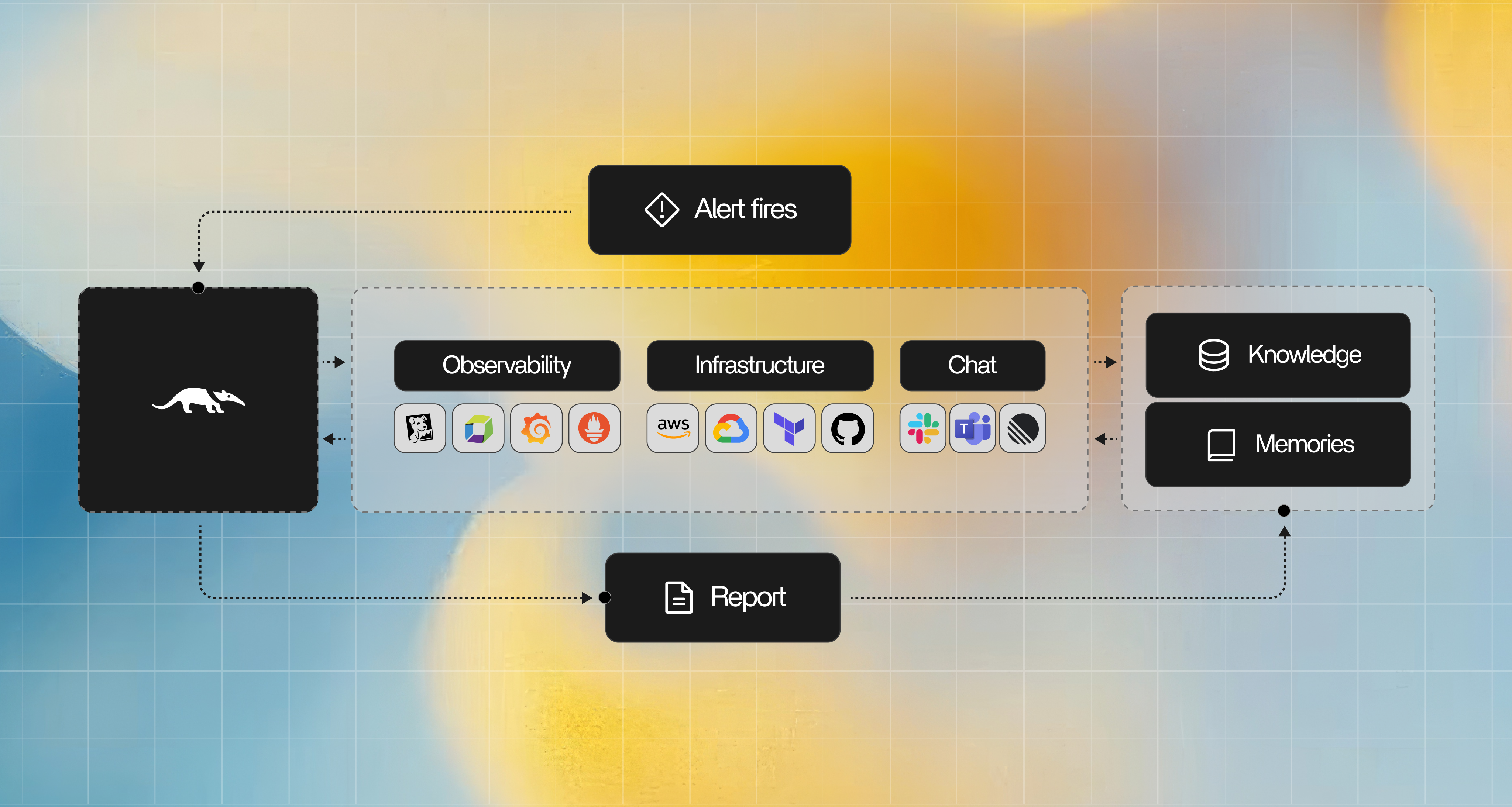
Investigation Workflow
When an alert fires, OpenSRE automatically:
- Fetches the alert context and correlated logs, metrics, and traces
- Reasons across your connected systems to identify anomalies
- Generates a structured investigation report with probable root cause
- Suggests next steps and, optionally, executes remediation actions
- Posts a summary directly to Slack or PagerDuty - no context switching needed
Benchmark
Generate the benchmark report:
make benchmark
Capabilities
| 🔍 Structured incident investigation | Correlated root-cause analysis across all your signals |
| 📋 Runbook-aware reasoning | OpenSRE reads your runbooks and applies them automatically |
| 🔮 Predictive failure detection | Catch emerging issues before they page you |
| 🔗 Evidence-backed root cause | Every conclusion is linked to the data behind it |
| 🤖 Full LLM flexibility | Bring your own model — Anthropic, OpenAI, Ollama, Gemini, OpenRouter, NVIDIA NIM |
Integrations
OpenSRE connects to 60+ tools and services across the modern cloud stack, from LLM providers and observability platforms to infrastructure, databases, and incident management.
| Category | Integrations | Roadmap |
|---|---|---|
| AI / LLM Providers | Anthropic · OpenAI · Ollama · Google Gemini · OpenRouter · NVIDIA NIM · Bedrock | |
| Observability |  Grafana (Loki · Mimir · Tempo) · Grafana (Loki · Mimir · Tempo) ·  Datadog · Honeycomb · Coralogix · Datadog · Honeycomb · Coralogix ·  CloudWatch · CloudWatch ·  Sentry · Elasticsearch · Better Stack Telemetry Sentry · Elasticsearch · Better Stack Telemetry |
Splunk · New Relic · Victoria Logs |
| Infrastructure |  Kubernetes · Kubernetes ·  AWS (S3 · Lambda · EKS · EC2 · Bedrock) · AWS (S3 · Lambda · EKS · EC2 · Bedrock) ·  GCP · GCP ·  Azure Azure |
Helm · ArgoCD |
| Database | MongoDB · ClickHouse | PostgreSQL · MySQL · MariaDB · MongoDB Atlas · Azure SQL · RDS · Snowflake |
| Data Platform | Apache Airflow · Apache Kafka · Apache Spark · Prefect · RabbitMQ | |
| Dev Tools |  GitHub · GitHub MCP · Bitbucket GitHub · GitHub MCP · Bitbucket |
GitLab |
| Incident Management |  PagerDuty · Opsgenie · Jira PagerDuty · Opsgenie · Jira |
ServiceNow · incident.io · Alertmanager · Linear · Trello |
| Communication |  Slack · Google Docs Slack · Google Docs |
Discord · Teams · WhatsApp · Confluence · Notion |
| Agent Deployment |  Vercel · Vercel ·  LangSmith · EC2 · ECS LangSmith · EC2 · ECS |
Railway |
| Protocols |  MCP · MCP ·  ACP · ACP ·  OpenClaw OpenClaw |
Contributing
OpenSRE is community-built. Every integration, improvement, and bug fix makes it better for thousands of engineers. We actively review PRs and welcome contributors of all experience levels.

Good first issues are labeled good first issue. Ways to contribute:
- 🐛 Report bugs or missing edge cases
- 🔌 Add a new tool integration
- 📖 Improve documentation or runbook examples
- ⭐ Star the repo - it helps other engineers find OpenSRE
See CONTRIBUTING.md for the full guide.
Thanks goes to these amazing people:




























































Security
OpenSRE is designed with production environments in mind:
- No storing of raw log data beyond the investigation session
- All LLM calls use structured, auditable prompts
- Log transcripts are kept locally - never sent externally by default
See SECURITY.md for responsible disclosure.
Telemetry
opensre collects anonymous usage statistics with Posthog to help us understand adoption
and demonstrate traction to sponsors and investors who fund the project.
What we collect: command name, success/failure, rough runtime, CLI version,
Python version, OS family, machine architecture, and a small amount of
command-specific metadata such as which subcommand ran. For opensre onboard
and opensre investigate, we may also collect the selected model/provider and
whether the command used flags such as --interactive or --input.
A randomly generated anonymous ID is created on first run and stored in
~/.config/opensre/. We never collect alert contents, file contents,
hostnames, credentials, or any personally identifiable information.
Telemetry is automatically disabled in GitHub Actions and pytest runs.
To opt out locally, set the environment variable before running:
export OPENSRE_NO_TELEMETRY=1
The legacy alias OPENSRE_ANALYTICS_DISABLED=1 also still works.
To inspect the payload locally without sending anything, use:
export OPENSRE_TELEMETRY_DEBUG=1
License
Apache 2.0 - see LICENSE for details.
Citations
Release history Release notifications | RSS feed

Download files
Download the file for your platform. If you're not sure which to choose, learn more about installing packages.
Source Distribution
Built Distribution
Filter files by name, interpreter, ABI, and platform.
If you're not sure about the file name format, learn more about wheel file names.
Copy a direct link to the current filters
File details
Details for the file opensre-2026.4.5.tar.gz.
File metadata
- Download URL: opensre-2026.4.5.tar.gz
- Upload date:
- Size: 1.2 MB
- Tags: Source
- Uploaded using Trusted Publishing? No
- Uploaded via: twine/6.2.0 CPython/3.12.3
File hashes
| Algorithm | Hash digest | |
|---|---|---|
| SHA256 |
5e6d14369a7066005bf4f6123a3e44c73daf75b83f957f0f1472b8a99ffc1f9b
|
|
| MD5 |
c78b8aca1690e94299dfd73c73e2a74c
|
|
| BLAKE2b-256 |
0bad0467566d0f0b371e7d0732c34b6efcac7c072c7ea0a009e9c1d6d6ce1922
|
File details
Details for the file opensre-2026.4.5-py3-none-any.whl.
File metadata
- Download URL: opensre-2026.4.5-py3-none-any.whl
- Upload date:
- Size: 1.6 MB
- Tags: Python 3
- Uploaded using Trusted Publishing? No
- Uploaded via: twine/6.2.0 CPython/3.12.3
File hashes
| Algorithm | Hash digest | |
|---|---|---|
| SHA256 |
17e9a55c5153a0765279a237e9aeccf2029a7d66eea323efb7d27005ffba2e80
|
|
| MD5 |
5994c998ba69571e902f4d23897177e3
|
|
| BLAKE2b-256 |
8a5ce21cdf7175898cfc5c78f3595322b2aed026162686b512bc204fffc73400
|






