
Portfolio analytics for quants — a modern rebuild of QuantStats with a fast pandas+Numba core and an optional web UI

Project description
OpenStatz
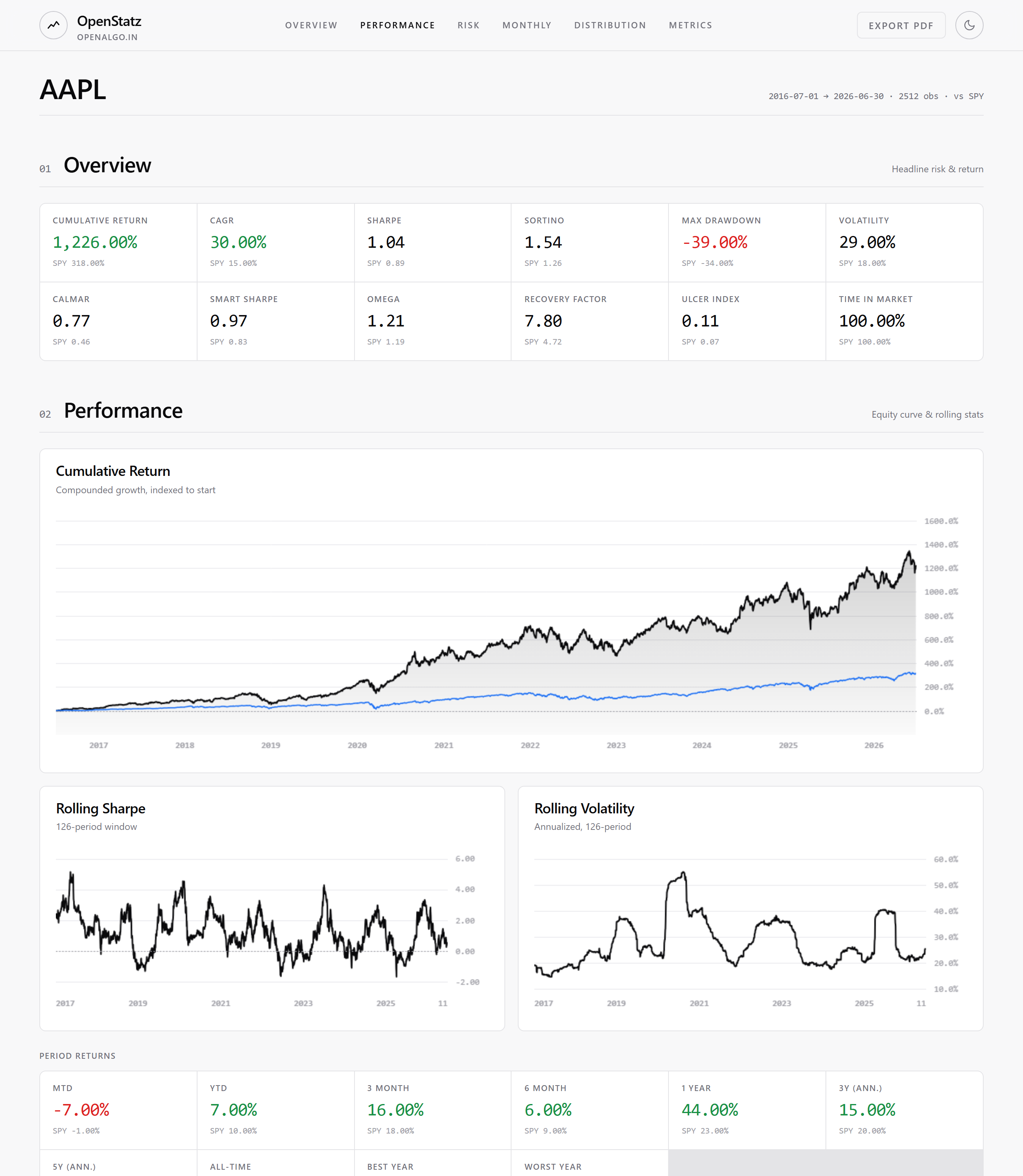
OpenStatz is a modern rebuild of QuantStats. It gives you the same portfolio analytics and the same numbers, plus an optional web tearsheet you can open in a browser.
What you can do
- Use it in Python as a drop-in for QuantStats.
- Open a web tearsheet in your browser. No Node.js needed.
- Send your backtest returns (a CSV file or a pandas Series) and get a full report.
Install
pip install openstatz          # the library
pip install "openstatz[app]"   # also installs the web app and API
Use it in Python
It works like QuantStats. You only change the import.
import openstatz as os

returns = my_backtest.returns                 # a pandas Series of daily returns
benchmark = os.utils.download_returns("SPY")

os.reports.html(returns, benchmark=benchmark, output="tearsheet.html")
os.reports.metrics(returns, mode="full", display=True)

os.extend_pandas()
returns.sharpe()
The qs alias also works. Note that the os alias hides Python's built-in os inside files that
use it, so write import os as _os if you need both.
Open the web tearsheet
pip install "openstatz[app]"
openstatz serve        # opens the API and UI at http://127.0.0.1:8000
To run on a different port:
openstatz serve --port 8200            # http://127.0.0.1:8200

# or without installing the command:
python -m openstatz serve --port 8200
In the browser you can:
- Type a ticker and a benchmark, for example RELIANCE.NS and ^NSEI.
- Or upload a CSV of your own returns. Columns: date, return, and an optional benchmark. See docs/example_returns.csv for the format.
The page shows the cumulative return, drawdown, monthly and weekly heatmaps, yearly returns, the return distribution, and a full table of metrics. It has light and dark themes and a PDF export.
Send a backtest with the API
curl -X POST http://127.0.0.1:8000/api/analyze \
  -H "Content-Type: application/json" \
  -d '{"dates": ["2024-01-02", "..."], "returns": {"Strategy": [0.001, "..."]}}'
Endpoints:
GET /api/healthPOST /api/analyzefor your own returnsPOST /api/analyze/symbolfor a ticker the server fetches for you
The same numbers as QuantStats
OpenStatz reuses the QuantStats math without changes, so the results are the same. A test suite checks this on every change. It runs the real QuantStats and OpenStatz side by side and fails if any number, table, or chart differs (to within 1e-9). It has been verified to match exactly, even on live market data.
python tests/parity/generate_fixtures.py   # build the reference output from QuantStats
pytest tests/parity -q                       # run the check
Data sources
openstatz.providers fetches returns for a symbol. yfinance is the default. OpenAlgo is an optional
source for users on that platform.
Run old QuantStats code unchanged
import openstatz.compat
openstatz.compat.install_quantstats_shim()

import quantstats as qs        # this is now OpenStatz
Project layout
openstatz/         the library (drop-in for quantstats)
  app/             optional FastAPI server and JSON serializers
  app/static/      the built web UI, shipped inside the package
app/               web UI source (React, Vite, Tailwind)
tests/parity/      the check against QuantStats
Build the web UI (for contributors)
The shipped app is pre-built, so users need no Node.js. To rebuild it from source:
cd app && npm ci && npm run build
cp -r dist/* ../openstatz/app/static/
License
Apache 2.0. See LICENSE.txt and NOTICE.
OpenStatz is built on QuantStats (Copyright 2019 to 2025, Ran Aroussi, Apache 2.0). The portfolio math is reused without changes. Thanks to Ran Aroussi and the QuantStats contributors.


Download files
Download the file for your platform. If you're not sure which to choose, learn more about installing packages.
Source Distribution
Built Distribution
Filter files by name, interpreter, ABI, and platform.
If you're not sure about the file name format, learn more about wheel file names.
Copy a direct link to the current filters
File details
Details for the file openstatz-0.1.0.tar.gz.
File metadata
- Download URL: openstatz-0.1.0.tar.gz
- Upload date:
- Size: 722.5 kB
- Tags: Source
- Uploaded using Trusted Publishing? No
- Uploaded via: twine/6.2.0 CPython/3.14.4
File hashes
| Algorithm | Hash digest | |
|---|---|---|
| SHA256 |
f10308a23b666d9915f71531391f1aee4533e7911158f9b4072999a4acae8e9b
|
|
| MD5 |
53c52fa08f0bcb7be087af9195691daf
|
|
| BLAKE2b-256 |
804c7f180dc1164763445db736b2cce99a9165c94d0b90bc7b86f3015cc705c2
|
File details
Details for the file openstatz-0.1.0-py3-none-any.whl.
File metadata
- Download URL: openstatz-0.1.0-py3-none-any.whl
- Upload date:
- Size: 736.5 kB
- Tags: Python 3
- Uploaded using Trusted Publishing? No
- Uploaded via: twine/6.2.0 CPython/3.14.4
File hashes
| Algorithm | Hash digest | |
|---|---|---|
| SHA256 |
fefa6802bf6912f409d5fd08d0546dbb0c19a40eb8e595a56cd571e50d94eeec
|
|
| MD5 |
00cc50826cb5d05ee8b3b2e95c59f0b4
|
|
| BLAKE2b-256 |
c670309a275bc085ae0060b8ce53ebb1838f26e66ff678a7acf0ed7e4e0920ec
|






