
A lazygit-style terminal UI to browse your AI coding spend across OpenCode, Claude Code, Codex, Copilot, and more.
Verified details
These details have been verified by PyPIProject links
GitHub Statistics
Maintainers

Project description
OpenTab
Your AI coding tools keep a tab. OpenTab opens it.
Anonymized demo data — click the reel for the full-quality video.
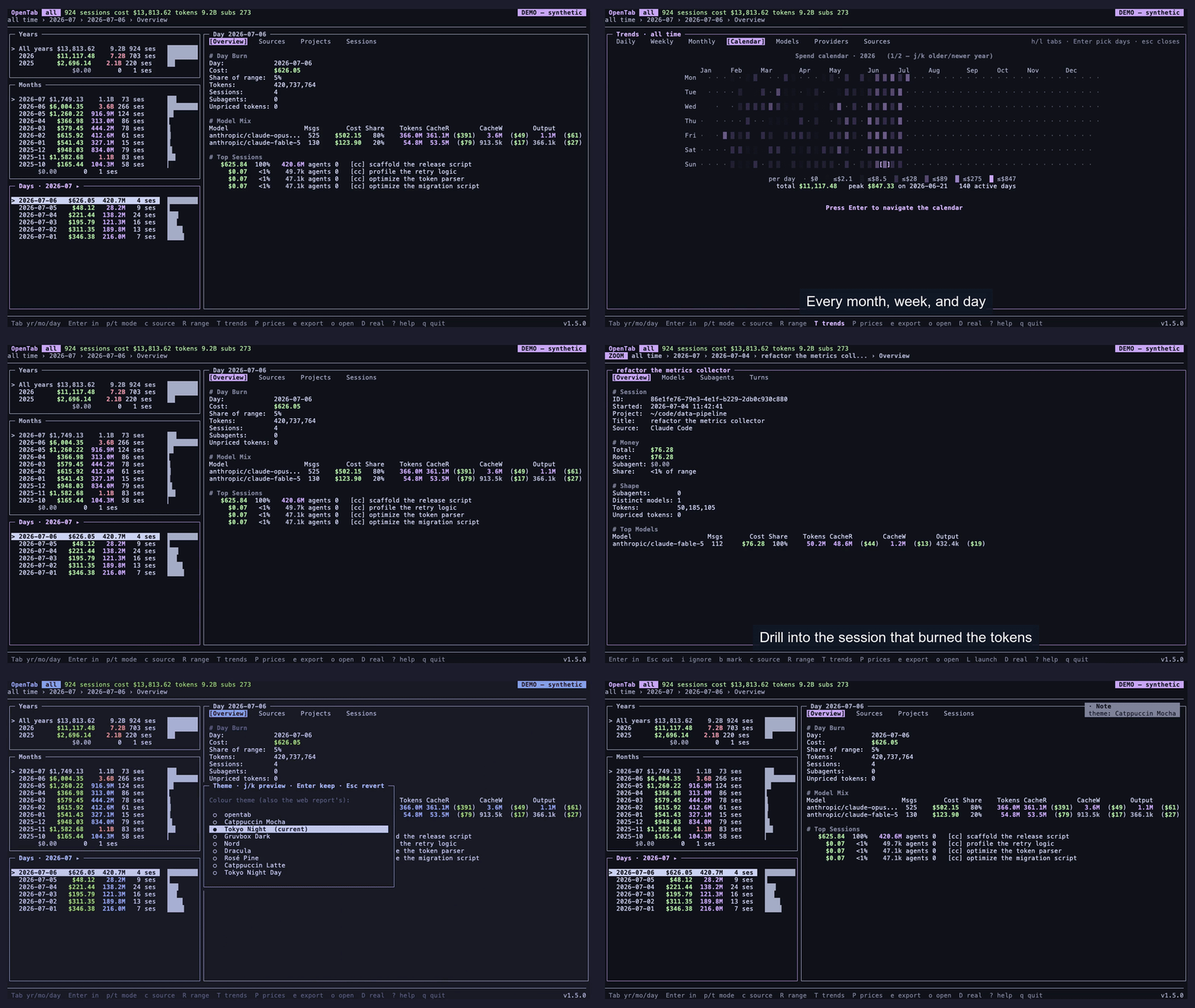
One reel, every view — trends, a calendar spend heatmap, drill from a month down to a single session, and live theming

Also a web browser — opentab --web renders the same data as one self-contained, shareable page
A local, standard-library terminal UI for your AI coding spend. It reads the records your coding tools already keep on disk and shows where your tokens and money went: by month, day, project, session, and model, down to the subagent tree. Browse one tool at a time, or merge them all.
Your tools already keep this ledger; OpenTab is just the reader. No backend, no telemetry,
no accounts — it opens those files read-only. Standard-library-only at runtime
(curses + sqlite3): pipx install opentab-ai and there's nothing else to pull in.
Features
- One tab for every tool — OpenCode, Claude Code, Codex, Hermes, GitHub Copilot (its CLI and Copilot Chat in VS Code), pi-agent, OpenClaw, zaly, and CSV/JSONL logs of your own API requests — each detailed below.
- Drill, don't scroll — month → day → project → session → model, down the recursive subagent tree, with a live fuzzy filter (fzf-style) and live date-range scoping.
- Trends — daily / weekly / monthly charts, a calendar spend heatmap, and model / provider / source rankings; every one navigable down to a single session.
- Turns and Tools — per-turn cost over time inside a session, and token attribution per tool call.
- Honest
$what-if — subscription usage shows its true$0, and$reprices it at API list rates;Pshows the exact per-model table behind the estimate. - A web twin — the same browser as one self-contained HTML file (
--html), or served live with per-session drill-in (--serve,--web). - Lazygit-style driving — keyboard and mouse: scroll, click to select, double-click to drill, click a column header to sort.
- Themes — Catppuccin, Tokyo Night, Gruvbox, Nord, Dracula, Rosé Pine and more, light
and dark, shared by the TUI (
C) and the web page. - Quality of life — git worktrees fold into their repo, CSV export of any view, and
your source, range, sort, and
$view are remembered between runs. - Private by construction — local-only, read-only, no telemetry, no accounts; a demo mode anonymizes everything for screenshots and live demos.
Install
Python 3.9+ and a terminal — nothing else. Already true on macOS, Linux, and WSL; native Windows works too (see Windows).
Try it first, nothing installed:
uvx --from opentab-ai opentab --demo # or: pipx run --spec opentab-ai opentab --demo
--demo runs the full TUI on your real usage, anonymized in memory — titles, paths, and
absolute numbers replaced with synthetic ones — so trying it out (and sharing the screen)
is safe. It reads your tools' own records, so it needs at least one AI coding tool's
history on disk. Drop --demo to see the real numbers.
Then install for real:
pipx install opentab-ai
The PyPI distribution is opentab-ai; the command it installs is opentab.
Upgrade later with pipx upgrade opentab-ai.
Other ways to install — Homebrew, install script, pip, from source
Homebrew (macOS / Linux):
brew install hamidi-dev/tap/opentab # upgrade later with `brew upgrade opentab`
Install script (installs via pipx; re-run to update):
curl -fsSL https://raw.githubusercontent.com/hamidi-dev/opentab/main/install.sh | bash
pip: plain pip install --user opentab-ai works too.
From source:
git clone https://github.com/hamidi-dev/opentab && cd opentab
pipx install .        # or `pip install -e .` for a live-editable checkout
Usage
opentab                          # open the browser, all time
opentab --days 30                # start within a window (rescope live with R)
opentab --since 2026-05-01 --until 2026-05-31
opentab --source claude          # one tool only (switch live with c)
opentab --demo                   # safe for live demos / screenshots
opentab --web                    # the same browser, in your web browser
Everything is discoverable in-app — ? shows the full keymap, every panel and
overlay documented.
Data sources
OpenTab reads the local records each AI coding tool keeps. Pick one with --source,
point its flag at a non-default location, or just pass a file path (opentab requests.csv, opentab path/to/opencode.db) and the source is inferred:
opentab --source opencode                    # OpenCode only
opentab --source claude --claude-dir /path   # Claude Code (default ~/.claude/projects)
opentab --source codex --codex-dir /path     # Codex (default ~/.codex/sessions)
opentab --source hermes                      # Hermes Agent (default ~/.hermes/state.db)
opentab --source copilot                     # GitHub Copilot CLI (default ~/.copilot/otel)
opentab --source vscode                      # Copilot Chat in VS Code (every installed variant)
opentab --source pi                          # pi-agent (default ~/.pi/agent/sessions)
opentab --source openclaw                    # OpenClaw gateway (default ~/.openclaw)
opentab --source zaly                        # zaly (default ~/.local/share/zaly)
opentab --csv requests.csv                   # a CSV of logged API requests (or --jsonl)
opentab --source all                         # all present sources, merged
Every source feeds the same browser — months, days, projects, sessions, models, trends. What each tool's records support on top:
| Source | Cost | Subagent tree | Turns | Tools |
|---|---|---|---|---|
| OpenCode | real recorded | ✓ | ✓ | ✓ |
| Claude Code | tokens only — $ estimates |
✓ | ✓ | ✓ |
| Codex CLI | tokens only — $ estimates |
✓ | ✓ | ✓ |
| Hermes Agent | mixed — metered real, rest estimated | ✓ | — | — |
| GitHub Copilot CLI | tokens only — $ estimates |
— | ✓ ¹ | — |
| Copilot Chat in VS Code | tokens only — $ estimates |
— | ✓ | — |
| pi-agent | mixed — metered real, rest estimated | — | ✓ | ✓ |
| OpenClaw | mixed — metered real, rest estimated | — | ✓ | — |
| zaly | mixed — metered real, rest estimated | — | ✓ | ✓ |
| CSV / JSONL request logs | mixed — per-row cost column | — | ✓ | ✓ ² |
Subagent tree — recursive per-subagent cost under the session that delegated ·
Turns — the per-turn cost timeline inside a session · Tools — token attribution
per tool call and MCP server · ¹ headerless: the OTEL export captures no prompt text ·
² with the optional tool column.
Where each tool's records live, and their quirks:
OpenCode — SQLite database · records real cost
- Reads
~/.local/share/opencode/opencode.db, read-only (--db, or justopentab path/to.db). Adapts to OpenCode's schema across versions. - Cost: OpenCode records real per-message cost, so metered spend is real recorded
money; subscription sessions record a truthful
$0and get the$estimate. - Extras: the recursive subagent cost tree, and the Tools tab's token attribution per tool call and MCP server.
Claude Code — JSONL transcripts · tokens only, $ estimates
- Reads
~/.claude/projects/**/*.jsonl(--claude-dir). - Cost: Claude Code records tokens but no per-message cost — sessions show
$0recorded, and the$view (on by default here) estimates them at API list rates. - Notes: subagent (Task) work shows as a cost tree under its session; resumed and forked sessions are deduplicated instead of double-counted; projects roll up to their git root.
Codex CLI — rollout JSONL · tokens only, $ estimates
- Reads
~/.codex/sessions/**/rollout-*.jsonl(--codex-dir). - Cost: tokens only, like Claude Code —
$0recorded, estimated under$. - Notes: Codex logs a cumulative token counter, twice per turn — OpenTab derives per-turn deltas from it, skips the duplicate echoes, and detects context-compaction resets, so turns sum exactly to the session total. Threads spawned by Codex's collab/multi-agent mode fold into a subagent cost tree under the session that spawned them, labeled with each agent's nickname.
Hermes Agent — SQLite database · mixed: metered real, subscription estimated
- Reads
~/.hermes/state.db, read-only (--hermes-db). - Cost: mixed per session — metered routes carry Hermes' real recorded cost;
subscription routes record
$0and get the$estimate. - Notes: multi-provider, with Hermes' own normalized token accounting; subagent sessions form a cost tree. No Turns tab (Hermes stores no per-message usage).
GitHub Copilot CLI — OpenTelemetry export · opt-in · tokens only, $ estimates
-
Reads
~/.copilot/otel/**/*.jsonl(--copilot-dir), plus the file named by$COPILOT_OTEL_FILE_EXPORTER_PATH. -
Enable it: the CLI records usage only when its OpenTelemetry export is on. Set the env var before launching/resuming a session — sessions after that show up:
export COPILOT_OTEL_FILE_EXPORTER_PATH=~/.copilot/otel/usage.jsonl
-
Cost: the export carries tokens but no cost —
$0recorded, estimated under$. -
Notes: OTEL logs one call up to four ways across spans and logs; OpenTab deduplicates them and keeps the highest-fidelity record. Turns are headerless (the export captures no prompt text by default).
Copilot Chat in VS Code — VS Code's chat-session store · nothing to enable · tokens only
- Reads VS Code's own store,
<User>/workspaceStorage/*/chatSessionsplus empty-window sessions, across Code, Code - Insiders, and VSCodium. Point--vscode-dirat one User directory for a portable/remote copy — from WSL, at the Windows-side store (see Windows). - Cost: no dollar cost is recorded (Copilot credits are a quota unit, not USD) —
$0recorded, estimated under$. - Notes: token figures are VS Code's own; the recorded input covers a turn's final tool round, so long agentic turns under-count input. Projects come from each workspace's folder; sessions the panel merely opened (no tokens) are ignored.
pi-agent — session JSONL · mixed: metered real, subscription estimated
- Reads
~/.pi/agent/sessions/**/*.jsonl(--pi-dir, honors$PI_AGENT_DIR). - Cost: pi writes a list-price figure for every route, so OpenTab counts only
metered routes (OpenRouter, a direct API key) as real spend; OAuth/subscription
routes stay
$0and are estimated under$. The split is read from pi'sauth.json, read-only.
OpenClaw — gateway session JSONL · mixed: metered real, plan routes estimated
- Reads
~/.openclaw/agents/<agent>/sessions/*.jsonl(--openclaw-dir, honors$OPENCLAW_DIR) — point it at a mounted copy if OpenClaw runs on a server. - Cost: like pi, per-message cost is list-price for every provider — only metered
routes (a direct Anthropic/OpenRouter key) count as real spend; plan routes
(openai-codex, github-copilot) are estimated under
$. The split is read fromopenclaw.json, read-only. - Notes: one project per agent; archived sessions are included and deduplicated.
zaly — session JSONL · mixed: metered real, plan routes estimated
- Reads
~/.local/share/zaly/sessions/*/*/session.jsonl(--zaly-dir, honors$ZALY_DATAand$ZALY_ROOT). - Cost: zaly prices every message from its model catalog regardless of route, so —
like pi and OpenClaw — only metered routes (a direct API key) count as real
spend; OAuth/plan logins (a ChatGPT-plan
openai-codex, Claude Pro/Max) and local models stay$0and are estimated under$. The split is read from zaly'sauth.json, read-only. - Notes: projects fold to the workspace's git root; resume/fork append to the same file, so nothing double-counts. Subagent transcripts are not persisted by zaly (they live in the temp dir), so their usage can't be shown.
CSV / JSONL request logs — bring your own ledger · mixed per row
- Reads any CSV (
--csv) or NDJSON (--jsonl) of logged API requests, one request per row/line — auto-discovered at~/.config/opentab/requests.csv/requests.jsonlif present. Log your own gateway or proxy traffic and browse it like any other source. - Schema: headers/keys match case-insensitively with aliases. Required: a timestamp
(ISO-8601 or epoch),
model, and input/output token counts. Optional:cached_tokens,session_id,request_id,prompt,project,title,cost_usd(orcredits, × $0.01), andtool— the call(s) a request made (Bash;Read, or a JSON list in JSONL), feeding the Tools tab. The full alias table is in theJsonlStoredocstring. - Cost: per row — a populated cost column is real spend; rows without one are
estimated under
$. - Notes: each request is one turn on the Turns tab, grouped under its
prompt; a stablerequest_iddeduplicates regenerated/appended files; malformed rows are skipped, never a crash.
--source auto (the default) restores your last-used source, else merges every present
source when more than one exists. The active source shows as a header chip; switch
live with c. The whole TUI works the same everywhere — with two differences for the
token-only tools (Claude Code, Codex, and Copilot, CLI and VS Code alike):
- Their sessions work like OpenCode subscription sessions: $0 in normal mode and an
estimate (tokens × API list price) under the
$view. Since that view would otherwise be a wall of$0.00, the estimate starts on by default there (header tag:ESTIMATED); press$for the recorded numbers, and your choice is remembered. - Projects roll up to their git root, so sessions started in subdirectories group under the repo instead of bare folder names.
--source all merges every present source: the same repo across tools rolls up into one
project row, every session row shows its origin (a Src column, [oc]/[cc]/[cx]/[cp]/[vs]/[pi]/[ocl]/[csv]/[jl]
tags elsewhere), and Trends gains a Sources tab. $ reprices the unpriced usage across
all of them. (With more than one source present, --demo defaults to this merged view
and anonymizes every backend under one shared scale so the cross-tool proportion stays
truthful.)
Keys
OpenTab opens on a stacked Months / Days (or Projects) sidebar, lazygit-style:
drill from a month or day into its detail tabs, from the Sessions tab into a
single session — cost split, model mix, subagent tree — and step back out with
Esc. The short version:
| Key | Action |
|---|---|
j/k · h/l · Enter · Esc |
Move · switch tabs · drill in · step back out (Tab flips the sidebar panels) |
+ |
Maximize / restore the drilled-in detail pane (the sidebar stays clickable beside it) |
| Mouse | Wheel scrolls, click selects, double-click drills, a column-header click sorts |
T |
Trends — cost charts, the calendar heatmap, model/provider/source rankings; every tab drills down to a session |
$ / P |
What-if pricing at API list rates, and the price table behind it |
R / a |
Scope to a date range (30d, 2026-05, start..end, …) / back to all time |
f |
Live fuzzy filter, fzf-style |
c / C / D |
Switch data source · colour theme · demo mode — from anywhere, overlays included |
L |
Relaunch the session in its own tool — tmux window/split/popup, or your own launcher |
e / o |
Export the current view to CSV / open the project's directory |
? / q |
Help / quit |
The active source, range, sort, ignored projects, and $ what-if view are
remembered between runs (stored in ~/.config/opentab/state.json; pass --no-state
to disable, and --demo does not persist). Sub-cent costs render as <$0.01 so
they aren't confused with a red $0.00, which means unpriced (tokens with no
local price).
Custom launchers
If an executable exists at ~/.config/opentab/launcher (or $OPENTAB_LAUNCHER
points at one), every L-menu launch is handed to it instead of the built-in
tmux commands — git-hooks style. It's called as
launcher <kind> <directory> <command>
# kind ∈ window | hsplit | vsplit | popup
# e.g. launcher window /repo/myproj 'claude --resume abc123'
and a nonzero exit shows its stderr as the launch error. The footer reads "launch via launcher hook" when one is active.
Example hook — route launches through zellij (or kitty, or your own popup manager)
#!/bin/sh
# ~/.config/opentab/launcher — example: zellij instead of tmux
kind=$1 dir=$2 cmd=$3
case $kind in
  window) exec zellij action new-tab --cwd "$dir" -- sh -c "$cmd" ;;
  popup)  exec zellij run --floating --cwd "$dir" -- sh -c "$cmd" ;;
  *)      exec zellij run --cwd "$dir" -- sh -c "$cmd" ;;
esac
Web browser (--html / --serve / --web)
opentab --html writes the whole browser as one self-contained HTML file —
no server, no dependencies, works from disk or any static host. It's the TUI in
the browser: the same sidebar, detail tabs, Trends and price-table overlays,
live range scoping and colour themes — driven by the same keys or the mouse.
Every view is a shareable deep link (the browser's back button steps out) and
every table sorts on a header click. Combine with --demo for a page you can
publish.
opentab --serve serves the same browser on http://localhost:8321 (--port)
and adds what a static file can't have: the per-session Turns timeline and
Tools attribution fetched live on drill-in, plus a refresh button that
re-reads your data. opentab --web is the same thing but also opens it in
your default web browser (cross-platform — open on macOS, xdg-open on Linux, the
shell association on Windows). It binds to localhost only — the browser shows prompt
titles, project paths, and spend, so if you want it on another machine put it behind
something like Tailscale (--bind), never a public interface.
Demo mode
opentab --demo is for showing the tool to other people without leaking your real
work: session titles and project paths become deterministic, plausible fakes, and
sessions recorded with no cost get a synthetic price derived from their real token
counts — all transformed in memory on load, nothing written back. The shape of your
data stays real (the proportions between sessions and months, the model mix), the
absolute numbers do not, and a DEMO — synthetic header tag keeps synthetic figures
from ever being mistaken for real ones.
Why a browser, not just a usage CLI
Plenty of tools will print your token totals. OpenTab is built to explore them:
- Interactive, not a one-shot report. Drill month → day → project → session → model, fuzzy-filter the lists live, rescope the date range on the fly, sort, and navigate by keyboard or mouse — a lazygit-style browser, not a table you re-run with different flags.
- Subagent cost trees. When a session delegated work, OpenTab attributes the cost across its whole recursive subagent subtree — so you see where the spend went, not just the session total.
- Standard-library runtime. Just
curses+sqlite3from the standard library: no Node, nonpx, no service to run.pipx install opentab-aiand it runs anywhere Python 3.9+ exists, including a locked-down box (the sole dependency,windows-curses, is pulled in only on native Windows). - Honest cost for subscription usage. Subscription/credit sessions show a truthful
$0recorded, and the$view reprices their tokens at API list rates — a clear "what this would have cost metered" estimate you can toggle on and off.
If you just want a single number in your terminal, a usage CLI does the job. OpenTab is for when you want to poke at the spend. (See also A note on cost accuracy.)
A note on cost accuracy
The numbers come straight from each tool's own data (cost/tokens per message, rolled up
per session) — local attribution of what your tools recorded. Some sessions show tokens
with a $0.00 local cost: the usage was recorded but no per-token price, normal whenever
billing isn't per token (subscription plans, credit/token plans). That money isn't
missing, it's billed elsewhere — by your subscription or account credits — so OpenTab
surfaces it as "unpriced tokens" rather than guessing.
Press $ (non-demo) for the what-if view: real recorded spend plus what $0.00
subscription/credit usage would have cost at published API list prices (P shows the
exact per-model rates). The estimate uses an embedded table generated from models.dev for
Anthropic/OpenAI/Google, with family fallbacks for version churn and a mid-range fallback
for unknown models. Nothing is fetched at runtime, so the TUI stays offline.
That embedded table only covers the big three, so open models on paid routes (Kimi, DeepSeek, Qwen, … via OpenRouter/Together/etc.) show as unpriced. Refresh from models.dev to price them:
opentab --refresh-models # fetch every provider's list prices into a local cache
This writes ~/.config/opentab/prices.json (the one time runtime OpenTab touches the
network, and only on this explicit command — stdlib urllib, no dependency). The cache
overlays the embedded table; you can also press r inside P to refresh in place.
When OpenTab notices models it has no built-in price for, it offers this fetch once on
startup (y now, n not now, d never — remembered in state.json, suppressed under
--no-state/--demo).
What it touches
Local-only, no network, no telemetry, no accounts — it opens every source file read-only, so it doesn't modify any of them.
Full transparency — everything it reads, writes, and runs
- Reads your tools' own records, read-only: OpenCode's SQLite DB, the JSONL
transcripts of Claude Code / Codex / pi-agent / OpenClaw / zaly, Hermes' SQLite DB, the
Copilot CLI's OpenTelemetry export, VS Code's Copilot Chat session store, and a
CSV/JSONL of logged API requests (
--csv/--jsonl). To fold git worktrees into their main repo it also reads project.gitfiles (nogitprocess is spawned; disable with--no-worktrees). - Writes a small preferences file at
~/.config/opentab/state.json(your last source, range, and sort; disable with--no-state), an optional model-price cache at~/.config/opentab/prices.json(only when you run--refresh-modelsor pressrin thePoverlay), and — only when you presseor run--html— anopentab-*.csvexport or the HTML browser file in the current directory. - Runs external programs only on the key you press: your file opener
(
open/xdg-open, or Explorer on Windows) foro, and forLeithertmux, your own launcher hook (~/.config/opentab/launcher), or your clipboard tool (pbcopy/wl-copy/xclip/xsel) for its copy target. All are disabled in--demo.
Windows
OpenTab uses Python's curses, which native Windows Python doesn't bundle. Two
ways to run it:
Native Windows (cmd / PowerShell). Just install and run — opentab-ai declares
windows-curses as a Windows-only dependency, so pipx pulls in the curses shim for you:
pipx install opentab-ai
opentab
windows-curses is just an OS-level provider for the stdlib curses module — the lone
runtime dependency, and only on Windows. Confirmed working against the OpenCode source;
the file-based backends read plain JSON and should behave the same, but are less exercised
on native Windows. The o key opens the selected directory in Explorer (via
os.startfile), so reveal-in-folder works natively too. If curses is missing, OpenTab
prints a short hint (install windows-curses) instead of crashing.
WSL. curses is already there, so a plain opentab works.
WSL specifics — reading the Windows-side OpenCode DB and VS Code store
OpenCode itself doesn't have to run inside WSL — even on native Windows it keeps its
database under your Windows home, at %USERPROFILE%\.local\share\opencode\opencode.db,
which WSL reads through /mnt/c:
# from inside WSL, reading the Windows-side OpenCode database
opentab --db /mnt/c/Users/<you>/.local/share/opencode/opencode.db
If OpenCode runs inside WSL, the default path
(~/.local/share/opencode/opencode.db) just works. Either way, --db points
OpenTab at any non-standard location.
Copilot Chat in VS Code works the same way from WSL: chat sessions are stored by
the Windows-side VS Code (also for Remote-WSL windows), under the Windows profile.
That store is not scanned by default — reading through /mnt/c is slow enough
to drag down every startup — so opt in by pointing --vscode-dir at it, e.g. via
an alias:
alias opentab='opentab --vscode-dir "/mnt/c/Users/<you>/AppData/Roaming/Code/User"'
Remote-WSL workspaces then resolve back to their in-distro project directories,
and native Windows workspaces to their /mnt/c/... paths.
Development
CI runs Ruff, unit tests, and ShellCheck. See CONTRIBUTING.md for local setup, the test/lint commands, the pre-push hooks, and commit conventions.
License
MIT — see LICENSE.
Project details
Verified details
These details have been verified by PyPIProject links
GitHub Statistics
Maintainers
Release history Release notifications | RSS feed


Download files
Download the file for your platform. If you're not sure which to choose, learn more about installing packages.
Source Distribution
Built Distribution
Filter files by name, interpreter, ABI, and platform.
If you're not sure about the file name format, learn more about wheel file names.
Copy a direct link to the current filters
File details
Details for the file opentab_ai-1.10.0.tar.gz.
File metadata
- Download URL: opentab_ai-1.10.0.tar.gz
- Upload date:
- Size: 334.3 kB
- Tags: Source
- Uploaded using Trusted Publishing? Yes
- Uploaded via: twine/6.1.0 CPython/3.13.12
File hashes
| Algorithm | Hash digest | |
|---|---|---|
| SHA256 |
4b4d02e11126e2042425cc03173b6154e7b0007c775fbc3fd55951971c71802d
|
|
| MD5 |
00c67dd5c5abc75ec5b04292286bbaa8
|
|
| BLAKE2b-256 |
b7724a4ddff60ba148ee8f1fa717b6799bc2b0c666c9f7d0899e3c09a7eda8bd
|
Provenance
The following attestation bundles were made for opentab_ai-1.10.0.tar.gz:
Publisher:
publish.yml on hamidi-dev/opentab
-
Statement:
-
Statement type:
https://in-toto.io/Statement/v1 -
Predicate type:
https://docs.pypi.org/attestations/publish/v1 -
Subject name:
opentab_ai-1.10.0.tar.gz -
Subject digest:
4b4d02e11126e2042425cc03173b6154e7b0007c775fbc3fd55951971c71802d - Sigstore transparency entry: 2138490509
- Sigstore integration time:
-
Permalink:
hamidi-dev/opentab@bbd862f095cff46019a0fba45ea7c220331aaa9c -
Branch / Tag:
refs/tags/v1.10.0 - Owner: https://github.com/hamidi-dev
-
Access:
public
-
Token Issuer:
https://token.actions.githubusercontent.com -
Runner Environment:
github-hosted -
Publication workflow:
publish.yml@bbd862f095cff46019a0fba45ea7c220331aaa9c -
Trigger Event:
release
-
Statement type:
File details
Details for the file opentab_ai-1.10.0-py3-none-any.whl.
File metadata
- Download URL: opentab_ai-1.10.0-py3-none-any.whl
- Upload date:
- Size: 271.5 kB
- Tags: Python 3
- Uploaded using Trusted Publishing? Yes
- Uploaded via: twine/6.1.0 CPython/3.13.12
File hashes
| Algorithm | Hash digest | |
|---|---|---|
| SHA256 |
a2d0d09243e2fad60b0f4e83d01208062827a581e23f8565d2c12201e34b629e
|
|
| MD5 |
ece9cbec31c905742c8601fa689fa174
|
|
| BLAKE2b-256 |
406e56f478bbee53699ddf8595da32a57805adeb7a50550e4eaebcf305835512
|
Provenance
The following attestation bundles were made for opentab_ai-1.10.0-py3-none-any.whl:
Publisher:
publish.yml on hamidi-dev/opentab
-
Statement:
-
Statement type:
https://in-toto.io/Statement/v1 -
Predicate type:
https://docs.pypi.org/attestations/publish/v1 -
Subject name:
opentab_ai-1.10.0-py3-none-any.whl -
Subject digest:
a2d0d09243e2fad60b0f4e83d01208062827a581e23f8565d2c12201e34b629e - Sigstore transparency entry: 2138490514
- Sigstore integration time:
-
Permalink:
hamidi-dev/opentab@bbd862f095cff46019a0fba45ea7c220331aaa9c -
Branch / Tag:
refs/tags/v1.10.0 - Owner: https://github.com/hamidi-dev
-
Access:
public
-
Token Issuer:
https://token.actions.githubusercontent.com -
Runner Environment:
github-hosted -
Publication workflow:
publish.yml@bbd862f095cff46019a0fba45ea7c220331aaa9c -
Trigger Event:
release
-
Statement type:






