


Tools for making OpenType-SVG fonts
-
addsvg adds an SVG table to a font, using SVG files provided. The font's format can be either OpenType or TrueType.
-
dumpsvg saves the contents of a font's SVG table as individual SVG files. The font's format can be either OpenType, TrueType, WOFF, or WOFF2.
-
fonts2svg generates a set of SVG glyph files from one or more fonts and hex colors for each of them. The fonts' format can be either OpenType, TrueType, WOFF, or WOFF2.
Dependencies
-
Python 3.6 or higher
-
FontTools 3.1.0 or higher
Installation instructions
-
Make sure you have Python 3.6 (or higher) installed:
python --version -
Setup a virtual environment:
python -m venv ot-svg -
Activate the environment:
source ot-svg/bin/activate -
Update pip:
pip install -U pip -
Install opentypesvg:
pip install opentypesvg
How to make OpenType-SVG fonts?
Step 1
Generate a set of SVG files from a series of fonts and color values.
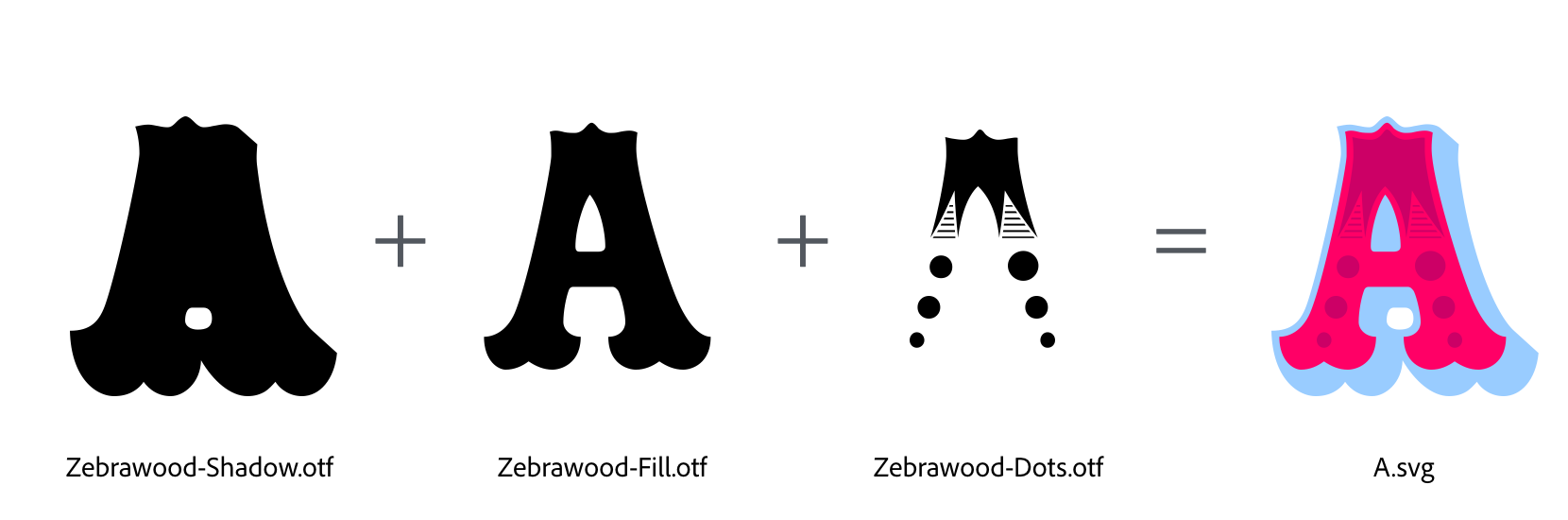
fonts2svg -c 99ccff,ff0066,cc0066 fonts/Zebrawood-Shadow.otf fonts/Zebrawood-Fill.otf fonts/Zebrawood-Dots.otf
Step 2
Add a set of SVG files to an existing OpenType (or TrueType) font.
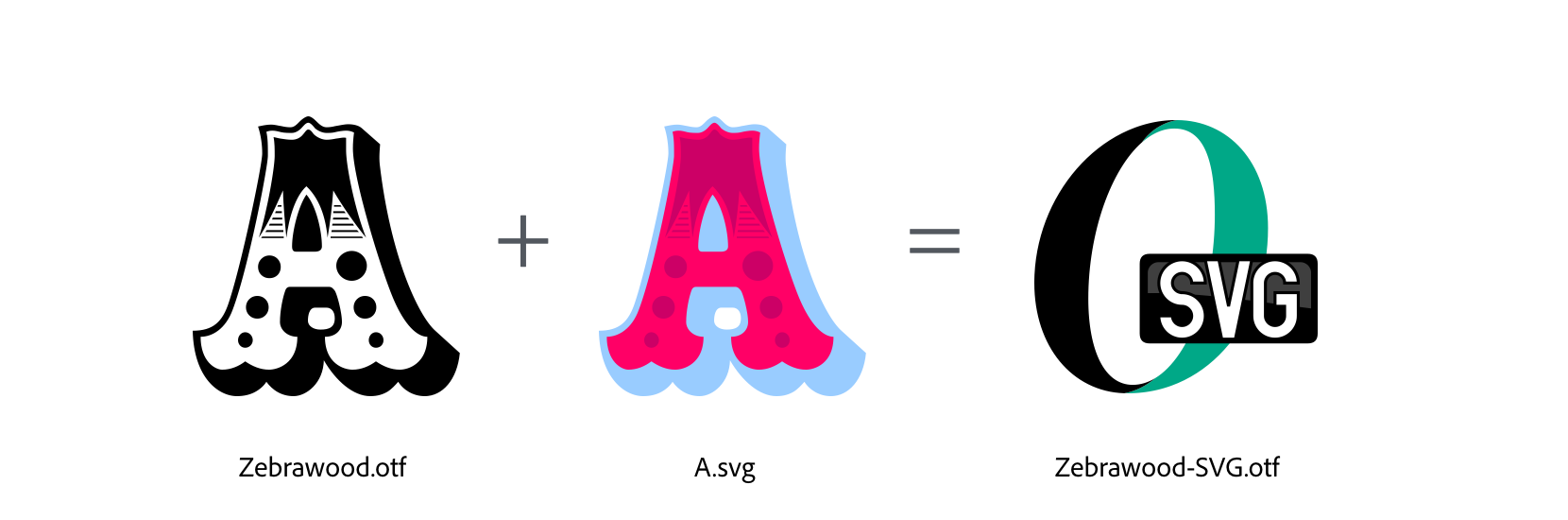
addsvg fonts/SVGs fonts/Zebrawood.otf
You can use Step 2 without doing Step 1, but there are a few things you need to be aware of when using the addsvg tool:
-
After the SVG files are saved with the authoring application (e.g. Adobe Illustrator, CorelDRAW!, Inkscape) they should be put thru a process that optimizes and cleans up the SVG code; this will slim down the file size while keeping the resulting artwork the same. For this step you can use one of these tools:
- SVG Cleaner (GUI version)
- SVG Cleaner (command line version)
- SVG Optimizer
- Scour
- picosvg
-
addsvg requires the SVG files to be named according to the glyphs which they are meant to be associated with. For example, if the glyph in the font is named ampersand, the SVG file must be named
ampersand.svg. -
addsvg expects the color artwork to have been designed at the same size as the glyphs in the font, usually 1000 or 2048 UPM. This means 1 point (pt) in the authoring app equals 1 unit in font coordinates. If the artwork's canvas size is not the same as the font's UPM value, use the
-koption to prevent the tool from removing the SVG'sviewBoxparameter. Retaining theviewBoxparameter will enable the artwork to be scaled to the full extent of the viewport (i.e. the font's UPM). -
If the artwork's
<svg>element containsheightand/orwidthparameters, remove them, otherwise the artwork will have a fixed size and won't be allowed to scale to the full extent of the viewport.
4 maintainers


Metadata
4 maintainers
Release files for opentypesvg 1.1.5
For a detailed explanation of source distributions (sdists) and built distributions (wheels), please see the package formats documentation.
Source distribution (sdist)
| File | Size | Uploaded | Provenance | Actions |
|---|---|---|---|---|
| opentypesvg-1.1.5.tar.gz | 155.9 kB | Without provenance | Details for opentypesvg-1.1.5.tar.gz |
Built distribution (wheel)
| File | Interpreter | ABI | Platform | Actions Reset |
|---|---|---|---|---|
| opentypesvg-1.1.5-py3-none-any.whl | Python 3 | none | any | Details for opentypesvg-1.1.5-py3-none-any.whl |
Total release size: 170.2 kB
Release files / opentypesvg-1.1.5.tar.gz
| Download URL | opentypesvg-1.1.5.tar.gz |
|---|---|
| Size | 155.9 kB |
| Tags | Source |
|
SHA-256 checksum How to use checksums |
21afa214d9a6c33743aa544f0a844779de99f9562f6990e4d3af8108adcd1b27
|
|
BLAKE2b-256 checksum How to use checksums |
a0c8063ff429ea83259ee3e915c516c8fe4bf23aace670d47f2be4321c43795b
|
| Upload date | |
|
Uploaded using Trusted Publishing? What is trusted publishing? |
No |
| Uploaded via |
twine/3.4.1 importlib_metadata/4.5.0 pkginfo/1.7.0 requests/2.25.1 requests-toolbelt/0.9.1 tqdm/4.61.0 CPython/3.9.5
|
Release files / opentypesvg-1.1.5-py3-none-any.whl
| Download URL | opentypesvg-1.1.5-py3-none-any.whl |
|---|---|
| Size | 14.3 kB |
| Tags | Python 3 |
|
SHA-256 checksum How to use checksums |
690f1fc622ee4b69b0230a78d2df5c394619fcf78092714df86c3dc5433c0ea7
|
|
BLAKE2b-256 checksum How to use checksums |
3b4ec2cfce85553778b51ff165526337b5136dfd5f68e6033e565a65850f5f3c
|
| Upload date | |
|
Uploaded using Trusted Publishing? What is trusted publishing? |
No |
| Uploaded via |
twine/3.4.1 importlib_metadata/4.5.0 pkginfo/1.7.0 requests/2.25.1 requests-toolbelt/0.9.1 tqdm/4.61.0 CPython/3.9.5
|
Security for opentypesvg 1.1.5
Provenance
Provenance describes where a file came from. On PyPI, provenance is shared via attestations, which provide a verifiable record of the build or publishing details. View details, limitations and caveats.
No provenance found
None of the files in this release were uploaded with provenance metadata.
A note on package security
PyPI is a repository for distributing packages, not a service for auditing them. While third-party security researchers and our staff do their best to detect and remove malicious packages, PyPI cannot guarantee the quality, security or suitability of any given package.
To learn more about protecting yourself from malicious actors, visit our package security documentation.














