
An Agent-native context database
Verified details
These details have been verified by PyPIProject links
GitHub Statistics
Maintainers


Project description

OpenViking: The Context Database for AI Agents
Website · GitHub · Issues · Docs






👋 Join our Community
📱 Lark Group · WeChat · Discord · X

Overview
Challenges in Agent Development
In the AI era, data is abundant, but high-quality context is hard to come by. When building AI Agents, developers often face these challenges:
- Fragmented Context: Memories are in code, resources are in vector databases, and skills are scattered, making them difficult to manage uniformly.
- Surging Context Demand: An Agent's long-running tasks produce context at every execution. Simple truncation or compression leads to information loss.
- Poor Retrieval Effectiveness: Traditional RAG uses flat storage, lacking a global view and making it difficult to understand the full context of information.
- Unobservable Context: The implicit retrieval chain of traditional RAG is like a black box, making it hard to debug when errors occur.
- Limited Memory Iteration: Current memory is just a record of user interactions, lacking Agent-related task memory.
The OpenViking Solution
OpenViking is an open-source Context Database designed specifically for AI Agents.
We aim to define a minimalist context interaction paradigm for Agents, allowing developers to completely say goodbye to the hassle of context management. OpenViking abandons the fragmented vector storage model of traditional RAG and innovatively adopts a "file system paradigm" to unify the structured organization of memories, resources, and skills needed by Agents.
With OpenViking, developers can build an Agent's brain just like managing local files:
- Filesystem Management Paradigm → Solves Fragmentation: Unified context management of memories, resources, and skills based on a filesystem paradigm.
- Tiered Context Loading → Reduces Token Consumption: L0/L1/L2 three-tier structure, loaded on demand, significantly saving costs.
- Directory Recursive Retrieval → Improves Retrieval Effect: Supports native filesystem retrieval methods, combining directory positioning with semantic search to achieve recursive and precise context acquisition.
- Visualized Retrieval Trajectory → Observable Context: Supports visualization of directory retrieval trajectories, allowing users to clearly observe the root cause of issues and guide retrieval logic optimization.
- Automatic Session Management → Context Self-Iteration: Automatically compresses content, resource references, tool calls, etc., in conversations, extracting long-term memory, making the Agent smarter with use.
Quick Start
Prerequisites
Before starting with OpenViking, please ensure your environment meets the following requirements:
- Python Version: 3.10 or higher
- Go Version: 1.22 or higher (Required for building AGFS components)
- C++ Compiler: GCC 9+ or Clang 11+ (Required for building core extensions)
- Operating System: Linux, macOS, Windows
- Network Connection: A stable network connection is required (for downloading dependencies and accessing model services)
1. Installation
Python Package
pip install openviking --upgrade --force-reinstall
Rust CLI (Optional)
curl -fsSL https://raw.githubusercontent.com/volcengine/OpenViking/main/crates/ov_cli/install.sh | bash
Or build from source:
cargo install --git https://github.com/volcengine/OpenViking ov_cli
2. Model Preparation
OpenViking requires the following model capabilities:
- VLM Model: For image and content understanding
- Embedding Model: For vectorization and semantic retrieval
Supported VLM Providers
OpenViking supports three VLM providers:
| Provider | Description | Get API Key |
|---|---|---|
volcengine |
Volcengine Doubao Models | Volcengine Console |
openai |
OpenAI Official API | OpenAI Platform |
litellm |
Unified access to various third-party models (Anthropic, DeepSeek, Gemini, vLLM, Ollama, etc.) | See LiteLLM Providers |
💡 Tip:
litellmsupports unified access to various models. Themodelfield must follow the LiteLLM format specification- The system auto-detects common models (e.g.,
claude-*,deepseek-*,gemini-*,hosted_vllm/*,ollama/*, etc.). For other models, use the full prefix according to LiteLLM format
Provider-Specific Notes
Volcengine (Doubao)
Volcengine supports both model names and endpoint IDs. Using model names is recommended for simplicity:
{
  "vlm": {
    "provider": "volcengine",
    "model": "doubao-seed-2-0-pro-260215",
    "api_key": "your-api-key",
    "api_base": "https://ark.cn-beijing.volces.com/api/v3"
  }
}
You can also use endpoint IDs (found in Volcengine ARK Console:
{
  "vlm": {
    "provider": "volcengine",
    "model": "ep-20241220174930-xxxxx",
    "api_key": "your-api-key",
    "api_base": "https://ark.cn-beijing.volces.com/api/v3"
  }
}
OpenAI
Use OpenAI's official API:
{
  "vlm": {
    "provider": "openai",
    "model": "gpt-4o",
    "api_key": "your-api-key",
    "api_base": "https://api.openai.com/v1"
  }
}
You can also use a custom OpenAI-compatible endpoint:
{
  "vlm": {
    "provider": "openai",
    "model": "gpt-4o",
    "api_key": "your-api-key",
    "api_base": "https://your-custom-endpoint.com/v1"
  }
}
LiteLLM (Anthropic, DeepSeek, Gemini, Qwen, vLLM, Ollama, etc.)
LiteLLM provides unified access to various models. The model field should follow LiteLLM's naming convention. Here we use Claude and Qwen as examples:
Anthropic:
{
  "vlm": {
    "provider": "litellm",
    "model": "claude-3-5-sonnet-20240620",
    "api_key": "your-anthropic-api-key"
  }
}
Qwen (DashScope):
{
  "vlm": {
    "provider": "litellm",
    "model": "dashscope/qwen-turbo", // see https://docs.litellm.ai/docs/providers/dashscope for more details
    "api_key": "your-dashscope-api-key",
    "api_base": "https://dashscope.aliyuncs.com/compatible-mode/v1"
  }
}
💡 Tip for Qwen:
- For China/Beijing region, use
api_base:https://dashscope.aliyuncs.com/compatible-mode/v1- For International region, use
api_base:https://dashscope-intl.aliyuncs.com/compatible-mode/v1
Common model formats:
| Provider | Model Example | Notes |
|---|---|---|
| Anthropic | claude-3-5-sonnet-20240620 |
Auto-detected, uses ANTHROPIC_API_KEY |
| DeepSeek | deepseek-chat |
Auto-detected, uses DEEPSEEK_API_KEY |
| Gemini | gemini-pro |
Auto-detected, uses GEMINI_API_KEY |
| Qwen | dashscope/qwen-turbo |
Set api_base based on region (see above) |
| OpenRouter | openrouter/openai/gpt-4o |
Full prefix required |
| vLLM | hosted_vllm/llama-3.1-8b |
Set api_base to vLLM server |
| Ollama | ollama/llama3.1 |
Set api_base to Ollama server |
Local Models (vLLM / Ollama):
# Start Ollama
ollama serve
// Ollama
{
  "vlm": {
    "provider": "litellm",
    "model": "ollama/llama3.1",
    "api_base": "http://localhost:11434"
  }
}
For complete model support, see LiteLLM Providers Documentation.
3. Environment Configuration
Server Configuration Template
Create a configuration file ~/.openviking/ov.conf, remove the comments before copy:
{
  "storage": {
    "workspace": "/home/your-name/openviking_workspace"
  },
  "log": {
    "level": "INFO",
    "output": "stdout"                 // Log output: "stdout" or "file"
  },
  "embedding": {
    "dense": {
      "api_base" : "<api-endpoint>",   // API endpoint address
      "api_key"  : "<your-api-key>",   // Model service API Key
      "provider" : "<provider-type>",  // Provider type: "volcengine" or "openai" (currently supported)
      "dimension": 1024,               // Vector dimension
      "model"    : "<model-name>"      // Embedding model name (e.g., doubao-embedding-vision-250615 or text-embedding-3-large)
    },
    "max_concurrent": 10               // Max concurrent embedding requests (default: 10)
  },
  "vlm": {
    "api_base" : "<api-endpoint>",     // API endpoint address
    "api_key"  : "<your-api-key>",     // Model service API Key
    "provider" : "<provider-type>",    // Provider type (volcengine, openai, deepseek, anthropic, etc.)
    "model"    : "<model-name>",       // VLM model name (e.g., doubao-seed-2-0-pro-260215 or gpt-4-vision-preview)
    "max_concurrent": 100              // Max concurrent LLM calls for semantic processing (default: 100)
  }
}
Note: For embedding models, supported providers are
volcengine(Doubao),openai,jina,voyage,minimax,vikingdb, andgemini(requirespip install "google-genai>=1.0.0"). For VLM models, we support three providers:volcengine,openai, andlitellm. Thelitellmprovider supports various models including Anthropic (Claude), DeepSeek, Gemini, Moonshot, Zhipu, DashScope, MiniMax, vLLM, Ollama, and more.
Server Configuration Examples
👇 Expand to see the configuration example for your model service:
Example 1: Using Volcengine (Doubao Models)
{
  "storage": {
    "workspace": "/home/your-name/openviking_workspace"
  },
  "log": {
    "level": "INFO",
    "output": "stdout"                 // Log output: "stdout" or "file"
  },
  "embedding": {
    "dense": {
      "api_base" : "https://ark.cn-beijing.volces.com/api/v3",
      "api_key"  : "your-volcengine-api-key",
      "provider" : "volcengine",
      "dimension": 1024,
      "model"    : "doubao-embedding-vision-250615"
    },
    "max_concurrent": 10
  },
  "vlm": {
    "api_base" : "https://ark.cn-beijing.volces.com/api/v3",
    "api_key"  : "your-volcengine-api-key",
    "provider" : "volcengine",
    "model"    : "doubao-seed-2-0-pro-260215",
    "max_concurrent": 100
  }
}
Example 2: Using OpenAI Models
{
  "storage": {
    "workspace": "/home/your-name/openviking_workspace"
  },
  "log": {
    "level": "INFO",
    "output": "stdout"                 // Log output: "stdout" or "file"
  },
  "embedding": {
    "dense": {
      "api_base" : "https://api.openai.com/v1",
      "api_key"  : "your-openai-api-key",
      "provider" : "openai",
      "dimension": 3072,
      "model"    : "text-embedding-3-large"
    },
    "max_concurrent": 10
  },
  "vlm": {
    "api_base" : "https://api.openai.com/v1",
    "api_key"  : "your-openai-api-key",
    "provider" : "openai",
    "model"    : "gpt-4-vision-preview",
    "max_concurrent": 100
  }
}
Example 3: Using Google Gemini Embedding
Install the required package first:
pip install "google-genai>=1.0.0"
{
  "storage": {
    "workspace": "/home/your-name/openviking_workspace"
  },
  "embedding": {
    "dense": {
      "provider": "gemini",
      "api_key": "your-google-api-key",
      "model": "gemini-embedding-2-preview",
      "dimension": 3072
    },
    "max_concurrent": 10
  },
  "vlm": {
    "api_base" : "https://api.openai.com/v1",
    "api_key"  : "your-openai-api-key",
    "provider" : "openai",
    "model"    : "gpt-4o",
    "max_concurrent": 100
  }
}
Get your Google API key at https://aistudio.google.com/apikey
Set Server Configuration Environment Variable
After creating the configuration file, set the environment variable to point to it (Linux/macOS):
export OPENVIKING_CONFIG_FILE=~/.openviking/ov.conf # by default
On Windows, use one of the following:
PowerShell:
$env:OPENVIKING_CONFIG_FILE = "$HOME/.openviking/ov.conf"
Command Prompt (cmd.exe):
set "OPENVIKING_CONFIG_FILE=%USERPROFILE%\.openviking\ov.conf"
💡 Tip: You can also place the configuration file in other locations, just specify the correct path in the environment variable.
CLI/Client Configuration Examples
👇 Expand to see the configuration example for your CLI/Client:
Example: ovcli.conf for visiting localhost server
{
  "url": "http://localhost:1933",
  "timeout": 60.0,
  "output": "table"
}
After creating the configuration file, set the environment variable to point to it (Linux/macOS):
export OPENVIKING_CLI_CONFIG_FILE=~/.openviking/ovcli.conf # by default
On Windows, use one of the following:
PowerShell:
$env:OPENVIKING_CLI_CONFIG_FILE = "$HOME/.openviking/ovcli.conf"
Command Prompt (cmd.exe):
set "OPENVIKING_CLI_CONFIG_FILE=%USERPROFILE%\.openviking\ovcli.conf"
4. Run Your First Example
📝 Prerequisite: Ensure you have completed the configuration (ov.conf and ovcli.conf) in the previous step.
Now let's run a complete example to experience the core features of OpenViking.
Launch Server
openviking-server
or you can run in background
nohup openviking-server > /data/log/openviking.log 2>&1 &
Run the CLI
ov status
ov add-resource https://github.com/volcengine/OpenViking # --wait
ov ls viking://resources/
ov tree viking://resources/volcengine -L 2
# wait some time for semantic processing if not --wait
ov find "what is openviking"
ov grep "openviking" --uri viking://resources/volcengine/OpenViking/docs/zh
Congratulations! You have successfully run OpenViking 🎉
VikingBot Quick Start
VikingBot is an AI agent framework built on top of OpenViking. Here's how to get started:
# Option 1: Install VikingBot from PyPI (recommended for most users)
pip install "openviking[bot]"

# Option 2: Install VikingBot from source (for development)
uv pip install -e ".[bot]"

# Start OpenViking server with Bot enabled
openviking-server --with-bot

# In another terminal, start interactive chat
ov chat
Server Deployment Details
For production environments, we recommend running OpenViking as a standalone HTTP service to provide persistent, high-performance context support for your AI Agents.
🚀 Deploy OpenViking on Cloud: To ensure optimal storage performance and data security, we recommend deploying on Volcengine Elastic Compute Service (ECS) using the veLinux operating system. We have prepared a detailed step-by-step guide to get you started quickly.
👉 View: Server Deployment & ECS Setup Guide
OpenClaw Context Plugin Details
- Test Dataset: Effect testing based on LoCoMo10 (https://github.com/snap-research/locomo) long-range dialogues (1,540 cases in total after removing category5 without ground truth)
- Experimental Groups: Since users may not disable OpenClaw's native memory when using OpenViking, we added experimental groups with native memory enabled or disabled
- OpenViking Version: 0.1.18
- Model: seed-2.0-code
- Evaluation Script: https://github.com/ZaynJarvis/openclaw-eval/tree/main
| Experimental Group | Task Completion Rate | Cost: Input Tokens (Total) |
|---|---|---|
| OpenClaw(memory-core) | 35.65% | 24,611,530 |
| OpenClaw + LanceDB (-memory-core) | 44.55% | 51,574,530 |
| OpenClaw + OpenViking Plugin (-memory-core) | 52.08% | 4,264,396 |
| OpenClaw + OpenViking Plugin (+memory-core) | 51.23% | 2,099,622 |
- Experimental Conclusions: After integrating OpenViking:
- With native memory enabled: 43% improvement over original OpenClaw with 91% reduction in input token cost; 15% improvement over LanceDB with 96% reduction in input token cost.
- With native memory disabled: 49% improvement over original OpenClaw with 83% reduction in input token cost; 17% improvement over LanceDB with 92% reduction in input token cost.
👉 View: OpenClaw Context Plugin
👉 View: OpenCode Memory Plugin Example
--
Core Concepts
After running the first example, let's dive into the design philosophy of OpenViking. These five core concepts correspond one-to-one with the solutions mentioned earlier, together building a complete context management system:
1. Filesystem Management Paradigm → Solves Fragmentation
We no longer view context as flat text slices but unify them into an abstract virtual filesystem. Whether it's memories, resources, or capabilities, they are mapped to virtual directories under the viking:// protocol, each with a unique URI.
This paradigm gives Agents unprecedented context manipulation capabilities, enabling them to locate, browse, and manipulate information precisely and deterministically through standard commands like ls and find, just like a developer. This transforms context management from vague semantic matching into intuitive, traceable "file operations". Learn more: Viking URI | Context Types
viking://
├── resources/              # Resources: project docs, repos, web pages, etc.
│   ├── my_project/
│   │   ├── docs/
│   │   │   ├── api/
│   │   │   └── tutorials/
│   │   └── src/
│   └── ...
├── user/                   # User: personal preferences, habits, etc.
│   └── memories/
│       ├── preferences/
│       │   ├── writing_style
│       │   └── coding_habits
│       └── ...
└── agent/                  # Agent: skills, instructions, task memories, etc.
    ├── skills/
    │   ├── search_code
    │   ├── analyze_data
    │   └── ...
    ├── memories/
    └── instructions/
2. Tiered Context Loading → Reduces Token Consumption
Stuffing massive amounts of context into a prompt all at once is not only expensive but also prone to exceeding model windows and introducing noise. OpenViking automatically processes context into three levels upon writing:
- L0 (Abstract): A one-sentence summary for quick retrieval and identification.
- L1 (Overview): Contains core information and usage scenarios for Agent decision-making during the planning phase.
- L2 (Details): The full original data, for deep reading by the Agent when absolutely necessary.
Learn more: Context Layers
viking://resources/my_project/
├── .abstract               # L0 Layer: Abstract (~100 tokens) - Quick relevance check
├── .overview               # L1 Layer: Overview (~2k tokens) - Understand structure and key points
├── docs/
│   ├── .abstract          # Each directory has corresponding L0/L1 layers
│   ├── .overview
│   ├── api/
│   │   ├── .abstract
│   │   ├── .overview
│   │   ├── auth.md        # L2 Layer: Full content - Load on demand
│   │   └── endpoints.md
│   └── ...
└── src/
    └── ...
3. Directory Recursive Retrieval → Improves Retrieval Effect
Single vector retrieval struggles with complex query intents. OpenViking has designed an innovative Directory Recursive Retrieval Strategy that deeply integrates multiple retrieval methods:
- Intent Analysis: Generate multiple retrieval conditions through intent analysis.
- Initial Positioning: Use vector retrieval to quickly locate the high-score directory where the initial slice is located.
- Refined Exploration: Perform a secondary retrieval within that directory and update high-score results to the candidate set.
- Recursive Drill-down: If subdirectories exist, recursively repeat the secondary retrieval steps layer by layer.
- Result Aggregation: Finally, obtain the most relevant context to return.
This "lock high-score directory first, then refine content exploration" strategy not only finds the semantically best-matching fragments but also understands the full context where the information resides, thereby improving the globality and accuracy of retrieval. Learn more: Retrieval Mechanism
4. Visualized Retrieval Trajectory → Observable Context
OpenViking's organization uses a hierarchical virtual filesystem structure. All context is integrated in a unified format, and each entry corresponds to a unique URI (like a viking:// path), breaking the traditional flat black-box management mode with a clear hierarchy that is easy to understand.
The retrieval process adopts a directory recursive strategy. The trajectory of directory browsing and file positioning for each retrieval is fully preserved, allowing users to clearly observe the root cause of problems and guide the optimization of retrieval logic. Learn more: Retrieval Mechanism
5. Automatic Session Management → Context Self-Iteration
OpenViking has a built-in memory self-iteration loop. At the end of each session, developers can actively trigger the memory extraction mechanism. The system will asynchronously analyze task execution results and user feedback, and automatically update them to the User and Agent memory directories.
- User Memory Update: Update memories related to user preferences, making Agent responses better fit user needs.
- Agent Experience Accumulation: Extract core content such as operational tips and tool usage experience from task execution experience, aiding efficient decision-making in subsequent tasks.
This allows the Agent to get "smarter with use" through interactions with the world, achieving self-evolution. Learn more: Session Management
Advanced Reading
Documentation
For more details, please visit our Full Documentation.
Community & Team
For more details, please see: About Us
Join the Community
OpenViking is still in its early stages, and there are many areas for improvement and exploration. We sincerely invite every developer passionate about AI Agent technology:
- Light up a precious Star for us to give us the motivation to move forward.
- Visit our Website to understand the philosophy we convey, and use it in your projects via the Documentation. Feel the change it brings and give us feedback on your truest experience.
- Join our community to share your insights, help answer others' questions, and jointly create an open and mutually helpful technical atmosphere:
- 📱 Lark Group: Scan the QR code to join → View QR Code
- 💬 WeChat Group: Scan the QR code to add assistant → View QR Code
- 🎮 Discord: Join Discord Server
- 🐦 X (Twitter):Follow us
- Become a Contributor, whether submitting a bug fix or contributing a new feature, every line of your code will be an important cornerstone of OpenViking's growth.
Let's work together to define and build the future of AI Agent context management. The journey has begun, looking forward to your participation!
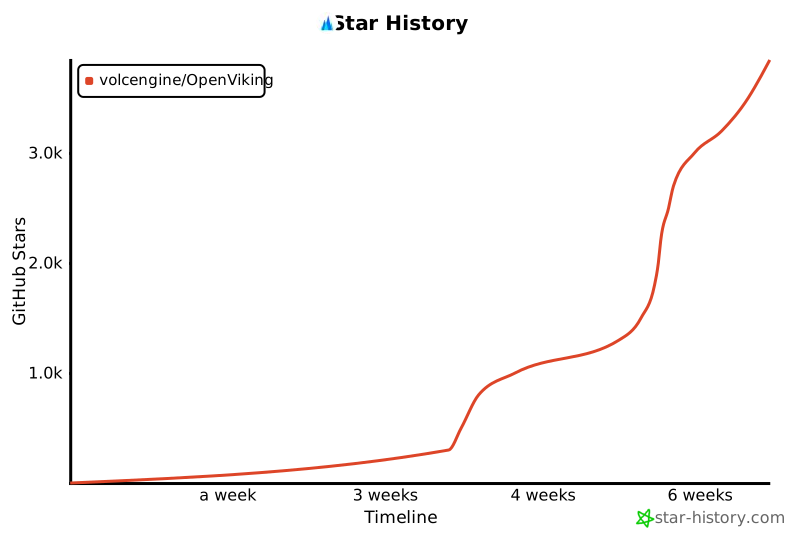
Star Trend
License
This project is licensed under the Apache License 2.0 - see the LICENSE file for details.
Project details
Verified details
These details have been verified by PyPIProject links
GitHub Statistics
Maintainers
Release history Release notifications | RSS feed


Download files
Download the file for your platform. If you're not sure which to choose, learn more about installing packages.
Source Distribution
Built Distributions
Filter files by name, interpreter, ABI, and platform.
If you're not sure about the file name format, learn more about wheel file names.
Copy a direct link to the current filters
File details
Details for the file openviking-0.2.11.tar.gz.
File metadata
- Download URL: openviking-0.2.11.tar.gz
- Upload date:
- Size: 9.9 MB
- Tags: Source
- Uploaded using Trusted Publishing? Yes
- Uploaded via: twine/6.1.0 CPython/3.13.7
File hashes
| Algorithm | Hash digest | |
|---|---|---|
| SHA256 |
6dd02cd95103c3d4ca5331ae89bbeb6e8ee6ccfb336438b37c061c880f36c504
|
|
| MD5 |
ea11e3b20dc39b2b1910c0bf7f9a1188
|
|
| BLAKE2b-256 |
1df63b28c52e2290db83d635ca1af691bc7fc34765c2addcc1307c0912cfff2a
|
Provenance
The following attestation bundles were made for openviking-0.2.11.tar.gz:
Publisher:
release.yml on volcengine/OpenViking
-
Statement:
-
Statement type:
https://in-toto.io/Statement/v1 -
Predicate type:
https://docs.pypi.org/attestations/publish/v1 -
Subject name:
openviking-0.2.11.tar.gz -
Subject digest:
6dd02cd95103c3d4ca5331ae89bbeb6e8ee6ccfb336438b37c061c880f36c504 - Sigstore transparency entry: 1180517806
- Sigstore integration time:
-
Permalink:
volcengine/OpenViking@32d782604a6c0ea388ac342e71c0c7e6d5483eb1 -
Branch / Tag:
refs/tags/v0.2.11 - Owner: https://github.com/volcengine
-
Access:
public
-
Token Issuer:
https://token.actions.githubusercontent.com -
Runner Environment:
github-hosted -
Publication workflow:
release.yml@32d782604a6c0ea388ac342e71c0c7e6d5483eb1 -
Trigger Event:
release
-
Statement type:
File details
Details for the file openviking-0.2.11-cp310-abi3-win_amd64.whl.
File metadata
- Download URL: openviking-0.2.11-cp310-abi3-win_amd64.whl
- Upload date:
- Size: 43.2 MB
- Tags: CPython 3.10+, Windows x86-64
- Uploaded using Trusted Publishing? Yes
- Uploaded via: twine/6.1.0 CPython/3.13.7
File hashes
| Algorithm | Hash digest | |
|---|---|---|
| SHA256 |
61e26c2edac7e78de65d365860d8b13f70e2e1b562cd53cf5ed37e97c31d8fdf
|
|
| MD5 |
cb0066fe42ac8d6d6cf599ace6fe49e3
|
|
| BLAKE2b-256 |
69b50b6269020feccd177dbc55a08d30e684952f6e9a075fe17aef4b606fbdb7
|
Provenance
The following attestation bundles were made for openviking-0.2.11-cp310-abi3-win_amd64.whl:
Publisher:
release.yml on volcengine/OpenViking
-
Statement:
-
Statement type:
https://in-toto.io/Statement/v1 -
Predicate type:
https://docs.pypi.org/attestations/publish/v1 -
Subject name:
openviking-0.2.11-cp310-abi3-win_amd64.whl -
Subject digest:
61e26c2edac7e78de65d365860d8b13f70e2e1b562cd53cf5ed37e97c31d8fdf - Sigstore transparency entry: 1180517843
- Sigstore integration time:
-
Permalink:
volcengine/OpenViking@32d782604a6c0ea388ac342e71c0c7e6d5483eb1 -
Branch / Tag:
refs/tags/v0.2.11 - Owner: https://github.com/volcengine
-
Access:
public
-
Token Issuer:
https://token.actions.githubusercontent.com -
Runner Environment:
github-hosted -
Publication workflow:
release.yml@32d782604a6c0ea388ac342e71c0c7e6d5483eb1 -
Trigger Event:
release
-
Statement type:
File details
Details for the file openviking-0.2.11-cp310-abi3-manylinux_2_31_x86_64.whl.
File metadata
- Download URL: openviking-0.2.11-cp310-abi3-manylinux_2_31_x86_64.whl
- Upload date:
- Size: 39.8 MB
- Tags: CPython 3.10+, manylinux: glibc 2.31+ x86-64
- Uploaded using Trusted Publishing? Yes
- Uploaded via: twine/6.1.0 CPython/3.13.7
File hashes
| Algorithm | Hash digest | |
|---|---|---|
| SHA256 |
819abc5bd8f9a22af9264fde0ef6ac78baf9378f9e4b3d8973f22d6dac06cdcf
|
|
| MD5 |
f4b0a96d77d15c75118d99f71b1901ed
|
|
| BLAKE2b-256 |
39706dac613446a001d11cf83f0532c6af9691d8ffcd66f1f2934b64f5fc774a
|
Provenance
The following attestation bundles were made for openviking-0.2.11-cp310-abi3-manylinux_2_31_x86_64.whl:
Publisher:
release.yml on volcengine/OpenViking
-
Statement:
-
Statement type:
https://in-toto.io/Statement/v1 -
Predicate type:
https://docs.pypi.org/attestations/publish/v1 -
Subject name:
openviking-0.2.11-cp310-abi3-manylinux_2_31_x86_64.whl -
Subject digest:
819abc5bd8f9a22af9264fde0ef6ac78baf9378f9e4b3d8973f22d6dac06cdcf - Sigstore transparency entry: 1180517832
- Sigstore integration time:
-
Permalink:
volcengine/OpenViking@32d782604a6c0ea388ac342e71c0c7e6d5483eb1 -
Branch / Tag:
refs/tags/v0.2.11 - Owner: https://github.com/volcengine
-
Access:
public
-
Token Issuer:
https://token.actions.githubusercontent.com -
Runner Environment:
github-hosted -
Publication workflow:
release.yml@32d782604a6c0ea388ac342e71c0c7e6d5483eb1 -
Trigger Event:
release
-
Statement type:
File details
Details for the file openviking-0.2.11-cp310-abi3-manylinux_2_31_aarch64.whl.
File metadata
- Download URL: openviking-0.2.11-cp310-abi3-manylinux_2_31_aarch64.whl
- Upload date:
- Size: 35.5 MB
- Tags: CPython 3.10+, manylinux: glibc 2.31+ ARM64
- Uploaded using Trusted Publishing? Yes
- Uploaded via: twine/6.1.0 CPython/3.13.7
File hashes
| Algorithm | Hash digest | |
|---|---|---|
| SHA256 |
0cad927aff90b73167027514012c9fa3864233412d8380f00d05549e8d2e4e9b
|
|
| MD5 |
78d407db9a62d824dca3ab680c39831d
|
|
| BLAKE2b-256 |
dba6cece7c42230a7e2fbc7654b5a91f5d56817feb2742820d655b7274d46770
|
Provenance
The following attestation bundles were made for openviking-0.2.11-cp310-abi3-manylinux_2_31_aarch64.whl:
Publisher:
release.yml on volcengine/OpenViking
-
Statement:
-
Statement type:
https://in-toto.io/Statement/v1 -
Predicate type:
https://docs.pypi.org/attestations/publish/v1 -
Subject name:
openviking-0.2.11-cp310-abi3-manylinux_2_31_aarch64.whl -
Subject digest:
0cad927aff90b73167027514012c9fa3864233412d8380f00d05549e8d2e4e9b - Sigstore transparency entry: 1180517822
- Sigstore integration time:
-
Permalink:
volcengine/OpenViking@32d782604a6c0ea388ac342e71c0c7e6d5483eb1 -
Branch / Tag:
refs/tags/v0.2.11 - Owner: https://github.com/volcengine
-
Access:
public
-
Token Issuer:
https://token.actions.githubusercontent.com -
Runner Environment:
github-hosted -
Publication workflow:
release.yml@32d782604a6c0ea388ac342e71c0c7e6d5483eb1 -
Trigger Event:
release
-
Statement type:
File details
Details for the file openviking-0.2.11-cp310-abi3-macosx_15_0_x86_64.whl.
File metadata
- Download URL: openviking-0.2.11-cp310-abi3-macosx_15_0_x86_64.whl
- Upload date:
- Size: 33.0 MB
- Tags: CPython 3.10+, macOS 15.0+ x86-64
- Uploaded using Trusted Publishing? Yes
- Uploaded via: twine/6.1.0 CPython/3.13.7
File hashes
| Algorithm | Hash digest | |
|---|---|---|
| SHA256 |
674cb553d777078697fa754acb03ec935cefa5dce754b055c137f718fe3187ad
|
|
| MD5 |
513c1eec52d5b1e02af0d628b74a7a7a
|
|
| BLAKE2b-256 |
3b4d1f8f726a5f6e6aa48ad90fedf704398ba690e8f4b7b8c2f0c82ac8d934dd
|
Provenance
The following attestation bundles were made for openviking-0.2.11-cp310-abi3-macosx_15_0_x86_64.whl:
Publisher:
release.yml on volcengine/OpenViking
-
Statement:
-
Statement type:
https://in-toto.io/Statement/v1 -
Predicate type:
https://docs.pypi.org/attestations/publish/v1 -
Subject name:
openviking-0.2.11-cp310-abi3-macosx_15_0_x86_64.whl -
Subject digest:
674cb553d777078697fa754acb03ec935cefa5dce754b055c137f718fe3187ad - Sigstore transparency entry: 1180517849
- Sigstore integration time:
-
Permalink:
volcengine/OpenViking@32d782604a6c0ea388ac342e71c0c7e6d5483eb1 -
Branch / Tag:
refs/tags/v0.2.11 - Owner: https://github.com/volcengine
-
Access:
public
-
Token Issuer:
https://token.actions.githubusercontent.com -
Runner Environment:
github-hosted -
Publication workflow:
release.yml@32d782604a6c0ea388ac342e71c0c7e6d5483eb1 -
Trigger Event:
release
-
Statement type:
File details
Details for the file openviking-0.2.11-cp310-abi3-macosx_14_0_arm64.whl.
File metadata
- Download URL: openviking-0.2.11-cp310-abi3-macosx_14_0_arm64.whl
- Upload date:
- Size: 29.2 MB
- Tags: CPython 3.10+, macOS 14.0+ ARM64
- Uploaded using Trusted Publishing? Yes
- Uploaded via: twine/6.1.0 CPython/3.13.7
File hashes
| Algorithm | Hash digest | |
|---|---|---|
| SHA256 |
61c0aaa72c0f90a5c756942d7672ba2511ae5de1e1f4081590477d791787d256
|
|
| MD5 |
8614630dac35c981124720c4cef49456
|
|
| BLAKE2b-256 |
55b3d5b77c4cbb7df0e43ca69c02f498c62f2320bbd60beee6ff7dd0a8e72168
|
Provenance
The following attestation bundles were made for openviking-0.2.11-cp310-abi3-macosx_14_0_arm64.whl:
Publisher:
release.yml on volcengine/OpenViking
-
Statement:
-
Statement type:
https://in-toto.io/Statement/v1 -
Predicate type:
https://docs.pypi.org/attestations/publish/v1 -
Subject name:
openviking-0.2.11-cp310-abi3-macosx_14_0_arm64.whl -
Subject digest:
61c0aaa72c0f90a5c756942d7672ba2511ae5de1e1f4081590477d791787d256 - Sigstore transparency entry: 1180517814
- Sigstore integration time:
-
Permalink:
volcengine/OpenViking@32d782604a6c0ea388ac342e71c0c7e6d5483eb1 -
Branch / Tag:
refs/tags/v0.2.11 - Owner: https://github.com/volcengine
-
Access:
public
-
Token Issuer:
https://token.actions.githubusercontent.com -
Runner Environment:
github-hosted -
Publication workflow:
release.yml@32d782604a6c0ea388ac342e71c0c7e6d5483eb1 -
Trigger Event:
release
-
Statement type:






