
openwebui-cli
A thin terminal client for Open WebUI, built directly on the openwebui-sdk library. It adds only the terminal surface (argparse and a formatter) and maps flags onto the SDK's orchestration, so you get tool-using chats from a shell, with no browser and no server.
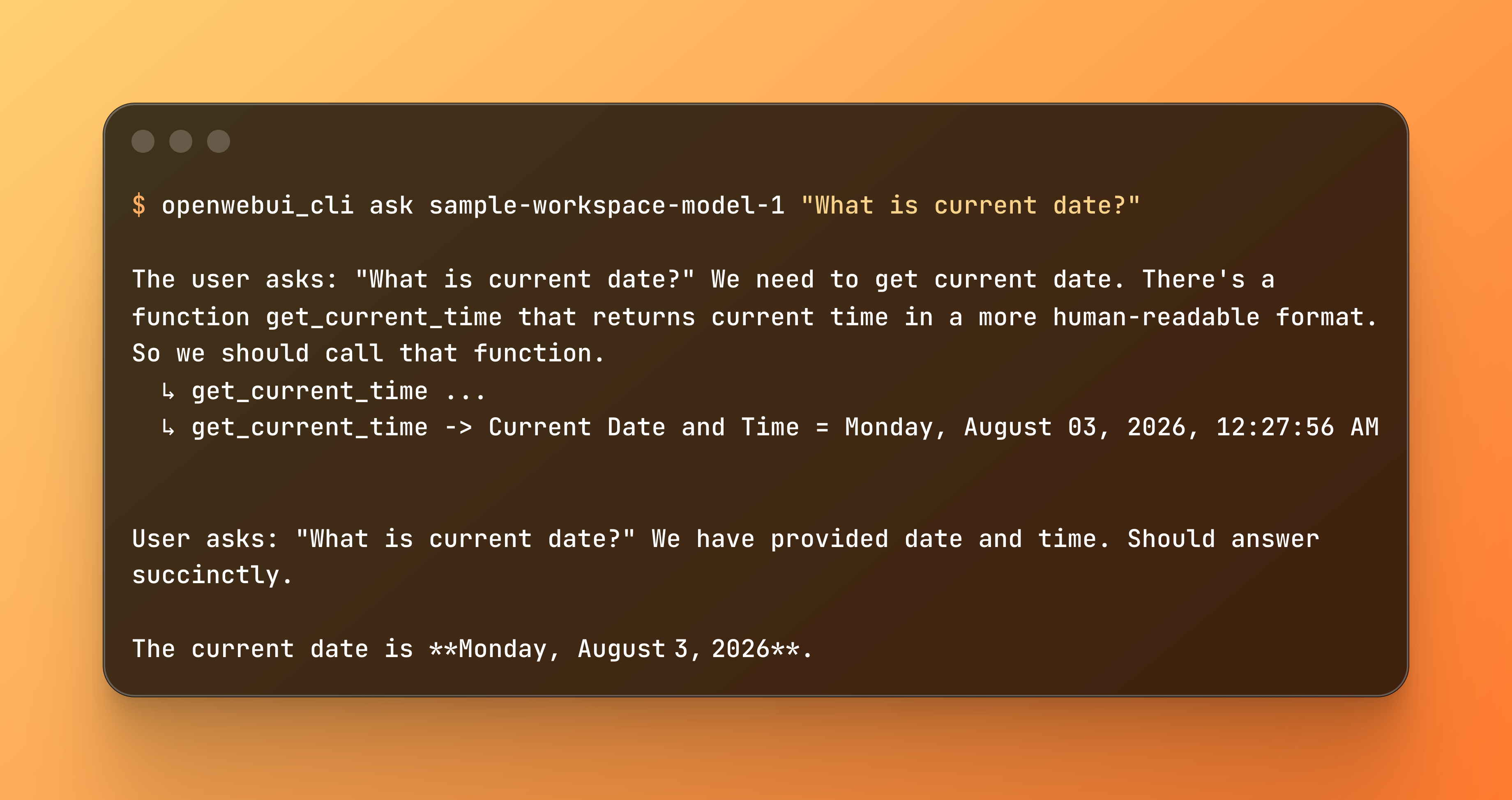
- Thin by design. All Open WebUI logic lives in the SDK; the CLI is a minimal flag→call wrapper you can study as an example of using the library.
- Tool execution from a terminal.
askruns the model's attached tools over Socket.IO (--tool,--no-tools), streaming reasoning and tool activity to stderr. - Clean machine output.
--plainfor raw text,--jsonfor a structured{answer, reasoning, tool_calls}blob, scripting-friendly. - Chat persistence.
--savewrites the chat (with a generated title) back to the web UI sidebar.
openwebui-cli auth login --url http://localhost:8080 --email me@example.com
openwebui-cli ask sample-workspace-model-1 "Use the tool to get current time." --json | jq -r .answer
# "The current time is 7:33 PM."
Agent skills
The CLI ships with a set of self-contained agent skills for working with it,
authored in the skills.sh format (SKILL.md +
optional references/) under skills/:
| skill | what it covers |
|---|---|
owui-auth |
log in, saved profiles, whoami, env-var credentials, resolution precedence |
owui-models |
create/edit/delete workspace models, attach tools & functions |
owui-tools |
create/update/inspect Python tools and valves, canonical template |
owui-functions |
admin filter/action functions and valves |
owui-ask |
chat with a model, tool execution, structured/plain output |
Install with the skills CLI:
npx skills add vedmaka/openwebui-sdk
Install
Install the CLI from the registry (PyPI-compatible; works with pip and
uv). It depends on openwebui-sdk, which is pulled in automatically:
pip install openwebui-cli
# or with uv
uv add openwebui-cli
Quick start without installing — run it straight from the registry with
uvx:
uvx openwebui-cli --help
Quick start
Sign in once. The token is saved to ~/.config/openwebui-cli/config.json (perms 0600):
openwebui-cli auth login --url http://localhost:8080 --email me@example.com
# password is prompted via getpass
Use an API key instead of a password:
openwebui-cli auth login --url http://localhost:8080 --api-key sk-...
See who you are:
openwebui-cli auth whoami
List models:
openwebui-cli models list
openwebui-cli models list --json
Ask a model (streams tokens to stdout by default):
openwebui-cli ask llama3.1 "What is the capital of France?"
openwebui-cli ask llama3.1 "Summarize this" --system "Be concise" --no-stream
cat notes.txt | openwebui-cli ask gpt-4o "Tidy this up" --stdin
The model is the first positional argument; the remaining arguments form
the prompt: ask <model> "<prompt>".
ask flags
| flag | default | meaning |
|---|---|---|
--system TEXT |
(none) | optional system prompt leading the messages |
--stdin |
off | read prompt text from stdin (appended to any positional prompt) |
--temperature N |
(model default) | sampling temperature |
--tool TOOL_ID |
(model attached) | add a tool (repeatable); Adds to the model's attached tools |
--no-tools |
off | ignore model-attached tools; force plain HTTP streaming |
--hide-tool-activity |
off | suppress the ↳ name lines on stderr (tools still run) |
--hide-reasoning |
off | suppress chain-of-thought on stderr |
--plain |
off | disable all formatting + suppress reasoning/tool/status; pipe-friendly |
--no-stream |
off | wait for the full answer instead of streaming |
--json |
off | emit a structured JSON result {answer, reasoning, tool_calls} on stdout (works with or without tools); suppresses streaming/formatted output |
--save |
off | persist the chat to Open WebUI so it appears in the sidebar (creates a chat row, saves messages, generates a title). Default: chats are ephemeral |
--url / --api-key / --token / --profile / --timeout |
(profile) | see Ad-hoc usage |
Tools in chat
By default, ask automatically enables any tools attached to the model
(its info.meta.toolIds, the same field the web UI reads when it picks a
model). So if your model has dummytools attached, this just works with no
flags. The tool is available and the model decides whether to call it:
openwebui-cli ask sample-workspace-model-1 "Use the tool to get current time."
When tools are in play, the CLI connects a Socket.IO session (the only path
Open WebUI runs the tool-call loop on), sends session_id + chat_id +
message_id + tool_ids, and streams the answer back. Tool activity prints to
stderr (↳ name … while running, ↳ name -> result when done); the model's
final answer streams to stdout.
--tool TOOL_ID (repeatable) adds to the model's attached tools (deduped):
openwebui-cli ask sample-workspace-model-1 "..." --tool extra_tool
--no-tools opts out. It ignores the model's attached tools and uses the plain
HTTP streaming path (no tool execution, no socket session):
openwebui-cli ask sample-workspace-model-1 "just answer" --no-tools
--hide-tool-activity suppresses the tool progress lines on stderr
(↳ name … / ↳ name -> result) for a clean output. The tools still
execute, only their display is hidden. Default: tool activity is shown.
openwebui-cli ask google/gemma-4-31b-it "..." --hide-tool-activity
Reasoning
Models that emit chain-of-thought (e.g. gpt-oss-120b) have their reasoning
streamed to stderr by default, so the model's final answer stays clean on
stdout. Use --hide-reasoning to suppress the reasoning for a clean output
(it still streams from the model; only the display is hidden):
openwebui-cli ask openai/gpt-oss-120b "Think step by step." --hide-reasoning
Output formatting
By default, ask renders reasoning and tool activity inline on stderr in
color (grey for reasoning, cyan for tool calls). No section headers, so the
natural stream-of-consciousness order (reason → tool → reason → tool → answer)
is preserved. The final answer goes to stdout, preceded by a blank line so
it visually separates from the diagnostic stream:
[stderr] We need to call get_current_time...
[stderr]   ↳ get_current_time ...
[stderr]   ↳ get_current_time -> Current Date and Time = ...
[stderr]
[stderr] Now we should respond with the result.
[stdout]
[stdout] The current time is 7:33 PM.
When stdout is piped (not a TTY) color is skipped automatically so | grep,
> file etc. keep working.
--plain disables all formatting and suppresses reasoning/tool/status
entirely. It emits only the model's answer text on stdout. Use it for
scripting:
openwebui-cli ask sample-workspace-model-1 "..." --plain | jq -r .
For finer control, --hide-reasoning and --hide-tool-activity suppress
individual channels while keeping the rest.
JSON output (--json)
--json emits one machine-readable JSON object on stdout (nothing on stderr)
and works the same whether or not the model has tools attached:
{
  "answer": "The current time is ...",
  "reasoning": "We need to call get_current_time ...",
  "tool_calls": [
    {"name": "get_current_time", "result": "Current Date and Time = ..."}
  ]
}
reasoning is null when the model didn't produce chain-of-thought;
tool_calls is [] when no tools ran. With tools it routes through the
Socket.IO path (so tools execute) and captures the structured result; without
tools it uses the plain HTTP path. It suppresses all streaming/formatting, ideal
for piping into jq or another tool:
openwebui-cli ask google/gemma-4-31b-it "Use the tool to get current time." --json | jq -r .answer
--json is mutually exclusive with --no-stream (you either stream or emit
one JSON blob).
Chat persistence (--save)
By default, ask runs are ephemeral. The answer streams to stdout but no
chat row is created in Open WebUI, so nothing appears in the sidebar. Add
--save to persist the conversation:
openwebui-cli ask openai/gpt-4.1-nano "What is the capital of France?" --save
# stderr: [chat: 3f2b...9ee]
# → appears in the OWUI sidebar with a generated title + both messages
This mirrors the web UI flow:
POST /api/v1/chats/new- create a chat row, get the server-minted id- run the completion (plain HTTP, or Socket.IO if tools are attached)
POST /api/v1/tasks/title/completions- generate a title from the conversationPOST /api/v1/chats/{id}- persist the user+assistant messages and title
Note that --save persists messages with the serialized reasoning/tool-call
<details> blocks intact, so the reasoning and tool calls render in the web UI
when you open the chat.
Function calling mode (native vs. prompt-based) is also read from the
model config (info.params.function_calling), just like the web UI, no flag
needed. A model with function_calling: "native" configured uses OpenAI-style
function calling automatically; one without uses Open WebUI's prompt-based
tool calling (works on any model). The CLI never overrides model config.
Sign out / remove a profile:
openwebui-cli auth list          # what's stored
openwebui-cli auth logout default
Docker
A prebuilt image is published to GitHub Container Registry as part of the CI
pipeline (docker job in .github/workflows/ci.yml, built from
cli/Dockerfile). It runs as the non-root user owui (uid 1000, home
/home/owui).
Tags: latest tracks the default branch; a v* tag push also publishes the
semver (e.g. 0.1.0) and a commit-sha tag. Pin an explicit version when
pulling reproducibly.
Run the CLI from a container
Pass credentials via env so no stored profile is needed:
docker run --rm \
  -e OPENWEBUI_URL=https://owui.example.com \
  -e OPENWEBUI_API_KEY=sk-... \
  ghcr.io/vedmaka/openwebui-cli:latest \
  ask sample-workspace-model-1 "What time is it?" --json
Or mount the profiles you saved on the host:
docker run --rm \
  -v ~/.config/openwebui-cli:/home/owui/.config/openwebui-cli \
  ghcr.io/vedmaka/openwebui-cli:latest auth whoami
Drop into a shell inside the container:
docker run --rm -it --entrypoint sh ghcr.io/vedmaka/openwebui-cli:latest
openwebui-cli --help
Add the CLI to your existing image
Use the published image as a build stage and copy the CLI into your own image
(a multi-stage FROM). The CLI's Python version must match your target base
(the published image is built on Python 3.13):
FROM ghcr.io/vedmaka/openwebui-cli:latest AS owui-cli

FROM python:3.13-slim
# your existing image setup ...

COPY --from=owui-cli /usr/local/bin/openwebui-cli /usr/local/bin/openwebui-cli
COPY --from=owui-cli /usr/local/lib/python3.13/site-packages \
                    /usr/local/lib/python3.13/site-packages
Both openwebui-sdk and openwebui-cli are on PyPI, so you can also install
the CLI directly in your image and skip the COPY layer:
RUN pip install openwebui-cli
Models
Create, edit and delete workspace models (Settings → Workspace Models), in
addition to models list.
# create from a JSON spec file
tee my-model.json <<'EOF'
{
  "name": "My Model",
  "base_model_id": "gpt-4o",
  "system": "You are a helpful assistant.",
  "tools": ["dummytools"],
  "capabilities": {"vision": true, "web_search": true},
  "function_calling": "native",
  "visibility": "private"
}
EOF
openwebui-cli models create my-model --spec-file my-model.json

# or provide the required values as flags (id + base model + name minimum)
openwebui-cli models create my-model --base-model gpt-4o --name "My Model" \
  --system "You are a helpful assistant." \
  --tool dummytools --function my_filter \
  --capabilities '{"vision": true}' \
  --function-calling native --visibility private

# edit an existing model (only the fields you pass change)
openwebui-cli models edit my-model --name "Better Name" \
  --system "New system prompt" --base-model gpt-4o \
  --tool dummytools --visibility public

# enable / disable tools for a model
openwebui-cli models tools add my-model dummytools web_search
openwebui-cli models tools remove my-model dummytools

# enable / disable functions (filters + actions) for a model
openwebui-cli models functions add my-model my_filter
openwebui-cli models functions remove my-model my_filter

# delete
openwebui-cli models delete my-model
The JSON spec file accepts the same fields as the flags: id, name,
base_model_id, system, description, tools, functions,
capabilities, function_calling and visibility. Flags given alongside
--spec-file override the file. visibility maps to public (no access
control) or private (owner only).
Tools
Create and manage workspace tools (Settings → Workspace Tools). The tool id
must be a valid Python identifier ([A-Za-z_][A-Za-z0-9_]*); the server
loads the source as a Tools class module and derives its function specs.
openwebui-cli tools list                       # all tools visible to you
openwebui-cli tools list --owned --json        # only your own / writable
openwebui-cli tools get my_tool                 # details + spec listing
openwebui-cli tools get my_tool --content       # raw source (for backup)

# create: source from an inline @file, --content-file, or --stdin
openwebui-cli tools create my_tool --name "My Tool" \
  --content @tools/my_tool.py --description "does X"
python -m openwebui_cli tools create my_tool --content-file my_tool.py

cat my_tool.py | openwebui-cli tools create my_tool --stdin

# update: omit --content to keep the current source (e.g. just rename)
openwebui-cli tools update my_tool --name "Better Name"
openwebui-cli tools update my_tool --description "new desc" --content @v2.py

# delete
openwebui-cli tools delete my_tool

# valves (admin config for a tool's Valves class)
openwebui-cli tools valves my_tool              # current values
openwebui-cli tools valves-spec my_tool         # JSON schema
openwebui-cli tools valves-set my_tool --data '{"api_key":"sk-..."}'
openwebui-cli tools valves-set my_tool --data-file valves.json
Functions
Create and manage workspace functions (Settings → Workspace Functions). Like
tools, the function id must be a valid Python identifier; the server loads the
source and derives its type (filter or action), which determines how a
model can attach it. Requires an admin account.
openwebui-cli functions list                       # all functions visible
openwebui-cli functions list --json
openwebui-cli functions get my_filter               # details + type
openwebui-cli functions get my_filter --content     # raw source (for backup)

# create: source from an inline @file, --content-file, or --stdin
openwebui-cli functions create my_filter --name "My Filter" \
  --content @filters/my_filter.py --description "does X"
cat my_filter.py | openwebui-cli functions create my_filter --stdin

# update: omit --content to keep the current source (e.g. just rename)
openwebui-cli functions update my_filter --name "Better Name"
openwebui-cli functions update my_filter --description "new desc" --content @v2.py

# delete
openwebui-cli functions delete my_filter

# valves (admin config for a function's Valves class)
openwebui-cli functions valves my_filter
openwebui-cli functions valves-spec my_filter
openwebui-cli functions valves-set my_filter --data '{"api_key":"sk-..."}'
openwebui-cli functions valves-set my_filter --data-file valves.json
Ad-hoc usage (no saved profile)
Every server flag has an env-var equivalent, so you can drive Open WebUI from a script without persisting anything:
OPENWEBUI_URL=http://localhost:8080 \
OPENWEBUI_API_KEY=sk-... \
  openwebui-cli models list
Or pass flags directly:
openwebui-cli models list --url http://localhost:8080 --api-key sk-...
openwebui-cli ask llama3.1 "hi" --url http://localhost:8080 --token eyJ...
| flag / env var | meaning |
|---|---|
--url / OPENWEBUI_URL |
base URL |
--api-key / OPENWEBUI_API_KEY |
sk-... API key (mutually exclusive with --token) |
--token / OPENWEBUI_TOKEN |
raw JWT bearer token |
--profile / OPENWEBUI_PROFILE |
name of a stored profile |
--timeout / OPENWEBUI_TIMEOUT |
per-request timeout (seconds, default 60) |
Self-signed TLS
urllib verifies certificates by default. For a self-signed deployment, point
Python at your CA rather than disabling verification:
SSL_CERT_FILE=/path/to/ca.pem openwebui-cli models list
# or, for a whole CA dir:
SSL_CERT_DIR=/etc/ssl/certs openwebui-cli models list
Exit codes
| code | meaning |
|---|---|
| 0 | success |
| 1 | app error (auth, network, …) |
| 2 | usage / argument error |
| 130 | interrupted (Ctrl-C) |
Layout
cli/
  pyproject.toml        # CLI distribution: openwebui-cli (depends on openwebui-sdk)
  src/openwebui_cli/
    __init__.py     # version
    __main__.py     # `python -m openwebui_cli`
    cli.py          # argparse subcommands: auth / models / tools / ask (thin wrapper over SDK)
    config.py       # profile persistence (~/.config/openwebui-cli/, perms 0600)
    formatting.py   # terminal output: inline color + answer separator, --plain mode
  tests/                  # <-- CLI tests (unittest)
The underlying Open WebUI library lives in the parent repo's
../README.md (openwebui-sdk).
1 maintainer

Metadata
1 maintainer
Release files for openwebui-cli 0.1.1
For a detailed explanation of source distributions (sdists) and built distributions (wheels), please see the package formats documentation.
Source distribution (sdist)
| File | Size | Uploaded | Provenance | |
|---|---|---|---|---|
| openwebui_cli-0.1.1.tar.gz | 35.9 kB | With provenance | Details |
Built distribution (wheel)
| File | Interpreter | ABI | Platform | Reset |
|---|---|---|---|---|
| openwebui_cli-0.1.1-py3-none-any.whl | Python 3 | none | any | Details |
Total release size: 65.2 kB
Release files / openwebui_cli-0.1.1.tar.gz
| Download URL | openwebui_cli-0.1.1.tar.gz |
|---|---|
| Size | 35.9 kB |
| Tags | Source |
|
SHA-256 checksum How to use checksums |
752a1a42ede90cb61b7b1b33258a1f3dc4e1476f47daf3675a830ae659b9b892
|
|
BLAKE2b-256 checksum How to use checksums |
1d0eb889add7259ff8e14dc810513d5c8af258f50b4bfd3488a00077fc18f4cd
|
| Upload date | |
|
Uploaded using Trusted Publishing? What is trusted publishing? |
Yes |
| Uploaded via |
twine/7.0.0 CPython/3.13.14
|
Provenance
Provenance describes where a file came from. On PyPI, provenance is shared via attestations, which provide a verifiable record of the build or publishing details. View details, limitations and caveats.


PyPI Publish Attestation
PyPI verified that this artifact, at this checksum, originated from the publisher listed below.
Signed by GitHub Actions, verified by PyPI on Aug 3, 2026.
Transparency logRelease files / openwebui_cli-0.1.1-py3-none-any.whl
| Download URL | openwebui_cli-0.1.1-py3-none-any.whl |
|---|---|
| Size | 29.4 kB |
| Tags | Python 3 |
|
SHA-256 checksum How to use checksums |
e0e17e8f1035ab956d6a1676b71cf656b558782a1d3c0af3c3e0e02a89512c20
|
|
BLAKE2b-256 checksum How to use checksums |
80e5e0eb78e0af52002d43db439c7b402a86640c93b967cfa37c3d0987f1140d
|
| Upload date | |
|
Uploaded using Trusted Publishing? What is trusted publishing? |
Yes |
| Uploaded via |
twine/7.0.0 CPython/3.13.14
|
Provenance
Provenance describes where a file came from. On PyPI, provenance is shared via attestations, which provide a verifiable record of the build or publishing details. View details, limitations and caveats.
PyPI Publish Attestation
PyPI verified that this artifact, at this checksum, originated from the publisher listed below.
Signed by GitHub Actions, verified by PyPI on Aug 3, 2026.
Transparency logSecurity for openwebui-cli 0.1.1
Provenance
Provenance describes where a file came from. On PyPI, provenance is shared via attestations, which provide a verifiable record of the build or publishing details. View details, limitations and caveats.
Full provenance
All 2 files in this release have been uploaded with provenance metadata.
Attestation for openwebui_cli-0.1.1.tar.gz
PyPI Publish Attestation
PyPI verified that this artifact, at this checksum, originated from the publisher listed below.
Signed by GitHub Actions, verified by PyPI on Aug 3, 2026.
Transparency logA note on package security
PyPI is a repository for distributing packages, not a service for auditing them. While third-party security researchers and our staff do their best to detect and remove malicious packages, PyPI cannot guarantee the quality, security or suitability of any given package.














