
Operator-Use



A personal assistant that operates your computer. Just like you.
Operator is an AI agent you message from anywhere Telegram, Discord, Slack, or Twitch and it works on your computer. It reads files, browses the web, runs commands, clicks through apps, and remembers who you are. It runs locally, connects to any LLM, and gets smarter over time.
Inspired by nanobot and OpenClaw. Thanks for these wonderful projects.
Key Features
🖥️ Desktop Control — Click, type, scroll, take screenshots, and open apps via native accessibility APIs (Windows UIA, macOS Accessibility (Beta), Linux (in progress)).
🌐 Web Browsing — Search, navigate, and extract content from the web.
💬 Multi-Channel — Message it through Telegram, Discord, Slack, Twitch, or MQTT.
🧠 Memory — Remembers you, your preferences, and past conversations across sessions.
📅 Scheduling — Cron-based recurring tasks and a heartbeat system for proactive work.
🎙️ Voice I/O — Full STT and TTS support across multiple providers.
🔌 Any LLM — Works with OpenAI, Anthropic, Google, Mistral, Groq, Ollama, and many more.
Table of Contents
- Install
- Quick Start
- Channels
- Supported LLMs
- Voice (STT / TTS)
- CLI Reference
- Docker
- Contributing
- Security
- Citation
- Star History
- License
📦 Install
Try it instantly (no install needed — runs setup on first launch):
uvx operator-use
Install permanently (then just type operator every time):
uv tool install operator-use
operator
With pip:
pip install operator-use
operator
First run automatically launches the setup wizard. After that,
operatorstarts your agent directly.
Update
uv tool upgrade operator-use
# or
pip install -U operator-use
uv tool upgrade operator-use
🚀 Quick Start
1. Run the setup wizard
operator onboard
This walks you through choosing an LLM provider, entering your API key, and connecting a messaging channel.
2. Start the agent
operator
That's it. Message your bot and it will start working.
💬 Channels
Connect Operator to the platform you already use:
| Channel | What you need |
|---|---|
| Telegram | Bot token from @BotFather |
| Discord | Bot token + Message Content intent |
| Slack | Bot token + App-Level token |
| Twitch | OAuth token + channel name |
| MQTT | Broker host + topic |
Telegram (Recommended)
1. Create a bot
- Open Telegram, search
@BotFather - Send
/newbot, follow the prompts - Copy the bot token
2. Configure via wizard
operator onboard
Select Telegram and paste your token when prompted.
Or edit your config directly:
{
  "channels": {
    "telegram": {
      "enabled": true,
      "token": "YOUR_BOT_TOKEN",
      "allow_from": ["YOUR_USER_ID"]
    }
  }
}
Find your user ID by messaging
@userinfoboton Telegram.
3. Run
operator run
Discord
1. Create a bot
- Go to the Discord Developer Portal
- Create an application → Bot → Add Bot
- Copy the bot token
2. Enable intents
In the Bot settings, enable MESSAGE CONTENT INTENT.
3. Get your User ID
- Discord Settings → Advanced → enable Developer Mode
- Right-click your username → Copy User ID
4. Configure
{
  "channels": {
    "discord": {
      "enabled": true,
      "token": "YOUR_BOT_TOKEN",
      "allow_from": ["YOUR_USER_ID"]
    }
  }
}
5. Invite the bot
- OAuth2 → URL Generator → Scopes:
bot - Bot Permissions:
Send Messages,Read Message History - Open the invite URL and add the bot to your server
6. Run
operator
Slack
1. Create a Slack app
- Go to api.slack.com/apps → Create New App → From scratch
- Under OAuth & Permissions, add bot token scopes:
chat:write,im:history,im:read - Install the app to your workspace and copy the Bot User OAuth Token
2. Enable Socket Mode
- Under Socket Mode, enable it and generate an App-Level Token with
connections:writescope
3. Configure
{
  "channels": {
    "slack": {
      "enabled": true,
      "bot_token": "xoxb-...",
      "app_token": "xapp-..."
    }
  }
}
4. Run
operator run
Twitch
1. Get an OAuth token
Generate a chat OAuth token at twitchapps.com/tmi.
2. Configure
{
  "channels": {
    "twitch": {
      "enabled": true,
      "token": "oauth:YOUR_TOKEN",
      "nick": "your_bot_username",
      "channel": "your_channel_name"
    }
  }
}
3. Run
operator run
🤖 Supported LLMs
Operator works with any of these providers:
| Provider | Notes |
|---|---|
| OpenAI | GPT-4o, o3, etc. |
| Anthropic | Claude 3.5/4 series |
| Gemini 2.0/2.5 series | |
| Mistral | All Mistral models |
| Groq | Ultra-fast inference |
| Ollama | Local models |
| Azure OpenAI | Enterprise Azure deployments |
| Cerebras | Fast inference |
| DeepSeek | DeepSeek-V3, R1 |
| NVIDIA | NVIDIA NIM |
| OpenRouter | 200+ models via one API |
| vLLM | Self-hosted inference |
| LiteLLM | Unified proxy |
| GitHub Copilot | Via Copilot API |
Configure your provider during operator onboard or in your config file.
🎙️ Voice (STT / TTS)
| Provider | STT | TTS |
|---|---|---|
| OpenAI | ✓ | ✓ |
| ✓ | ✓ | |
| Groq | ✓ | ✓ |
| ElevenLabs | ✓ | ✓ |
| Deepgram | ✓ | ✓ |
| Sarvam | ✓ | ✓ |
🖥️ CLI Reference
operator onboard     Interactive setup wizard
operator run         Start the agent
operator agent       Agent configuration
operator gateway     Manage channels
operator channels    List active channels
operator models      List available models
operator sessions    View conversation sessions
operator status      Show system status
operator logs        Stream logs
🐳 Docker
docker build -t operator .
docker run --env-file .env operator
Exposed ports:
| Port | Purpose |
|---|---|
| 8080 | Webhook server (Telegram / Discord / Slack) |
| 8765 | ACP server (Agent Communication Protocol) |
| 1883 | MQTT (plain) |
| 8883 | MQTT (TLS) |
| 9222 | Chrome DevTools Protocol |
Contributing
Contributions are welcome! Please read CONTRIBUTING.md for branch strategy, dev setup, code style, and PR guidelines.
Security
To report a vulnerability, please follow the steps in SECURITY.md. Do not open a public issue for security concerns.
Citation
If you use Operator-Use in your research or project, please cite it as:
@software{operator_use_2026,
  author    = {CursorTouch},
  title     = {Operator-Use: An AI Agent That Operates Your Computer},
  year      = {2026},
  url       = {https://github.com/CursorTouch/Operator-Use},
  license   = {MIT}
}
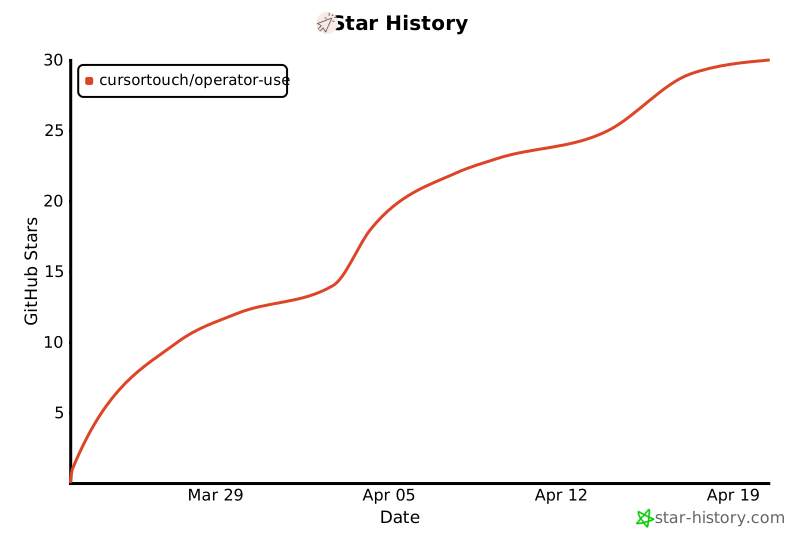
Star History
License
This project is licensed under the MIT License.
1 maintainer

Metadata
1 maintainer
Release files for operator-use 0.2.9
For a detailed explanation of source distributions (sdists) and built distributions (wheels), please see the package formats documentation.
Source distribution (sdist)
| File | Size | Uploaded | |
|---|---|---|---|
| operator_use-0.2.9.tar.gz | 563.7 kB | Details |
Built distribution (wheel)
| File | Interpreter | ABI | Platform | Reset |
|---|---|---|---|---|
| operator_use-0.2.9-py3-none-any.whl | Python 3 | none | any | Details |
Total release size: 1.4 MB
Release files / operator_use-0.2.9.tar.gz
| Download URL | operator_use-0.2.9.tar.gz |
|---|---|
| Size | 563.7 kB |
| Tags | Source |
|
SHA-256 checksum How to use checksums |
ebe53a56148d4efd14948dbddc08d6911ad3b6cd1c5794f709fd59e7b561dac4
|
|
BLAKE2b-256 checksum How to use checksums |
f40b5cda57ebb2071606a0f3d29f2ab282771ebb2681ebf811abe46aeae6c052
|
| Upload date | |
|
Uploaded using Trusted Publishing? What is trusted publishing? |
Yes |
| Uploaded via |
twine/6.1.0 CPython/3.13.7
|
Provenance
Provenance describes where a file came from. On PyPI, provenance is shared via attestations, which provide a verifiable record of the build or publishing details. View details, limitations and caveats.


PyPI Publish Attestation
PyPI verified that this artifact, at this checksum, originated from the publisher listed below.
Signed by GitHub Actions, verified by PyPI on Mar 23, 2026.
Transparency logRelease files / operator_use-0.2.9-py3-none-any.whl
| Download URL | operator_use-0.2.9-py3-none-any.whl |
|---|---|
| Size | 841.4 kB |
| Tags | Python 3 |
|
SHA-256 checksum How to use checksums |
8f571603a1b119ae8de474af57b6790d9a51c896a4b2abea5474f8df49676ed4
|
|
BLAKE2b-256 checksum How to use checksums |
1cfddab8b72c023fb3a779922a3e17a9914a7f2f1290166ee17d75fbef815065
|
| Upload date | |
|
Uploaded using Trusted Publishing? What is trusted publishing? |
Yes |
| Uploaded via |
twine/6.1.0 CPython/3.13.7
|
Provenance
Provenance describes where a file came from. On PyPI, provenance is shared via attestations, which provide a verifiable record of the build or publishing details. View details, limitations and caveats.
PyPI Publish Attestation
PyPI verified that this artifact, at this checksum, originated from the publisher listed below.
Signed by GitHub Actions, verified by PyPI on Mar 23, 2026.
Transparency log













