
Local-first operator console: fuses your AI agent sessions (Claude Code, Codex CLI, ChatGPT), git repos, and markdown notes into one dashboard that tells you what to do next.

Project description
⚡ opsroom




Your AI agents write code all day. opsroom shows you whether any of it pays — then closes the loop: agents propose, you approve, the ledger moves.

One console for every AI coding agent you run — Claude Code, OpenAI Codex CLI, ChatGPT, Claude web — plus your git repos and your markdown notes (Obsidian or plain folders), fused into one local dashboard that answers the only question that matters:
What should I do right now to make money?
No cloud. No accounts. No dependencies. One Python package, one SQLite file on your disk, one HTML file as your console.
pipx install opsroom-console   # or: pip install opsroom-console / uv tool install opsroom-console
opsroom demo             # a fully loaded LIVE console in 10 seconds (fictional data)
opsroom serve            # your console: live, writable, auto-refreshing
opsroom connect          # wire your agent CLI (claude/codex/gemini) — one confirm
A fresh install's console opens with an on-page SET UP YOUR ROOM card — name the goal and your ventures right there and start operating; no config files. (opsroom init is the terminal equivalent, and config.toml stays yours to refine.)
Wiring in your AI is one terminal command — opsroom connect finds your agent CLI, shows you exactly what it resolved, and writes the [agent] block only on your explicit yes (a second yes turns on the autonomous daily briefing). Deliberately terminal-only: the browser-facing console can never grant itself the power to launch a CLI. The equivalent by hand:
[agent]
enabled = true
command = ["claude", "-p"]   # any agent CLI — the brief is appended as ONE argument
advise  = "daily"            # autonomous briefings: "off" | "daily" | hours (2..168)
Something quiet? opsroom doctor checks the config, DB permissions, whether your agent command actually resolves (including under launchd's bare PATH), and prints the advisor's last error breadcrumb — read-only, exit 1 on any real failure.
What you get
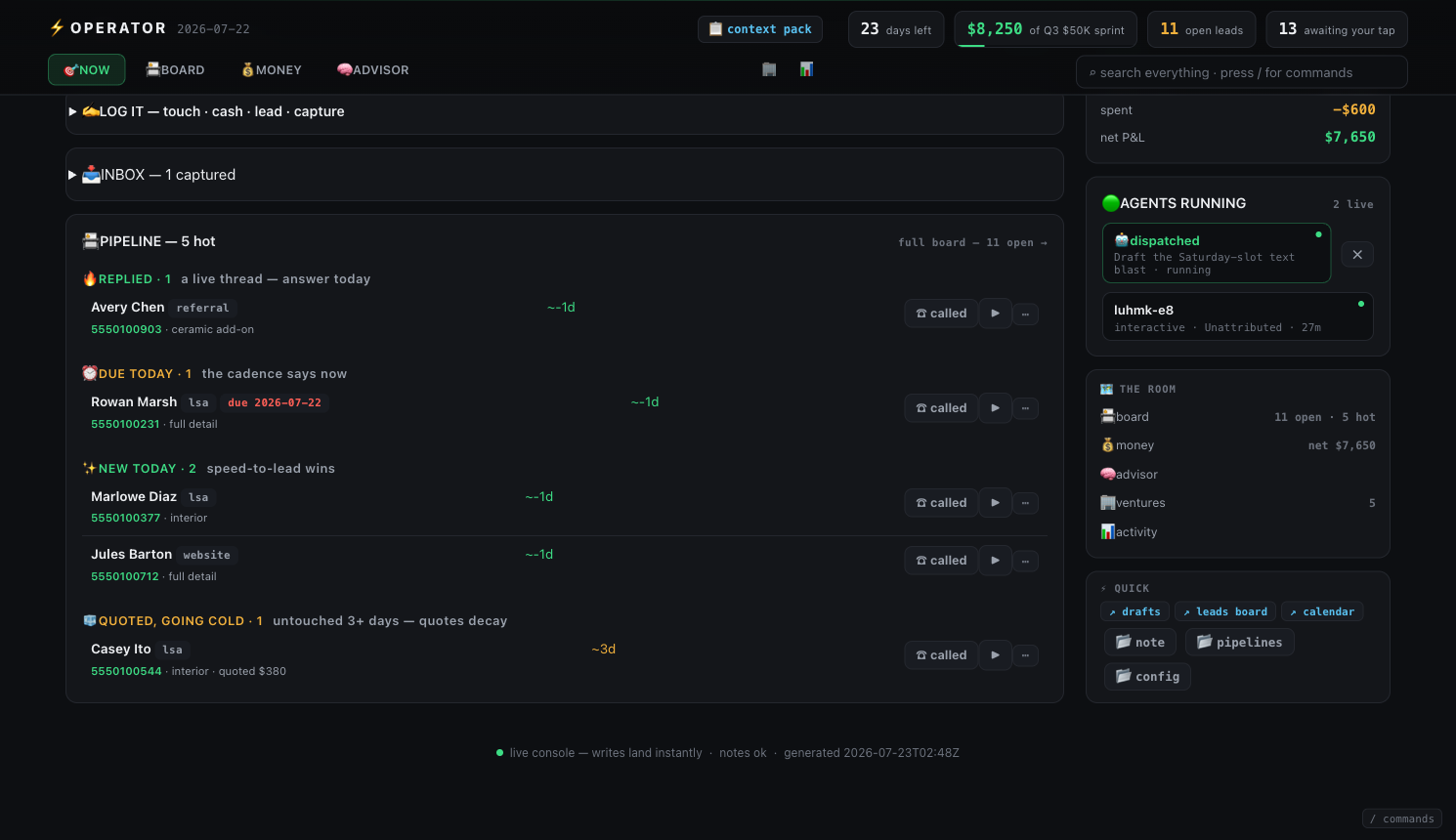
🎯 NOW — the whole operation on one surface. Everything worth doing — a live reply, a due follow-up, the top move, staged drafts, phone-first targets, an agent's staged promise — collapses into a single money-ranked list, and the pipeline's hot lanes (🔥 REPLIED · ⏰ DUE TODAY · ✨ NEW TODAY · 🧊 QUOTED-going-cold) render right below it, every row with its inline actions. The daily loop never leaves the page; the full BOARD stays one level down for deep sessions. Above it: today's pace and a live view of which AI agents are running right now.
⌨ COMMAND PALETTE — the whole board from the keyboard. Press / (or k) anywhere on the console: jump to any surface, open any hot lead, mark a follow-up done, apply an agent proposal, dispatch the top move. Plain stdlib JS; every action fires through the same CSRF-gated write path as the buttons.
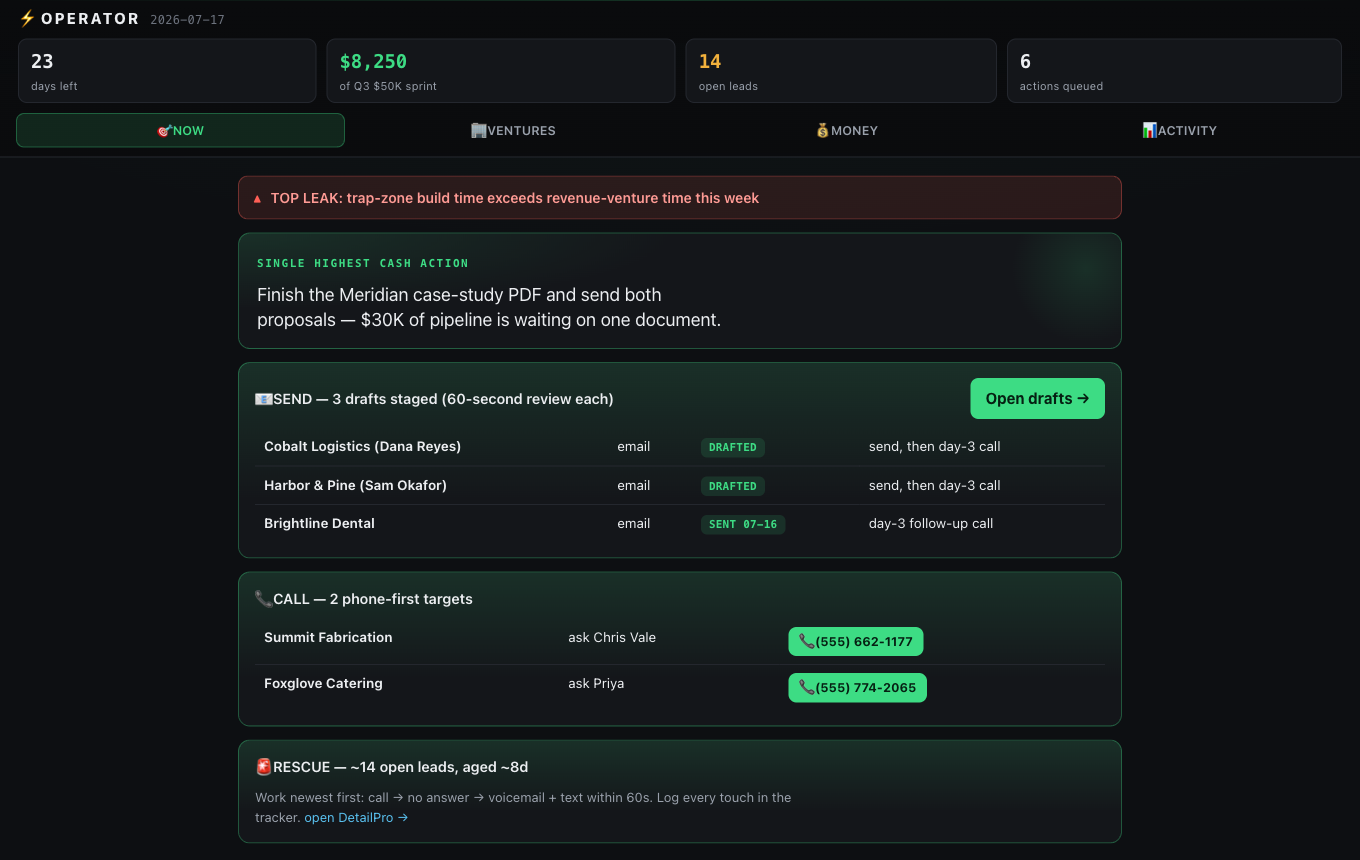
🏢 VENTURES — every project, with a brief. Click any venture: an ordered DO NEXT list generated from live pipeline state ("UNBLOCK FIRST: …" when your notes say something's blocking), a DONE timeline auto-pulled from your decisions log, live numbers, and every researched target as a searchable click-to-open card — pain hypothesis, decision-makers, phones linked.
💰 MONEY — a real P&L, not a vanity meter. Collected vs goal, days left, needed per day — plus a spend ledger (money out), net, and per-venture in/out/net so you see where the money actually comes from. A client-side path-to-goal simulator with knobs built from your own ventures answers "what combination of closes gets me there" without anything leaving the page. Cash counts only when collected, not quoted.
⌕ SEARCH — one box over everything. Type once in the live console and hit sessions, commits, decisions, leads, touches, and your inbox in the same result list. Full-text search over the activity ledger, literal match over the operator ledgers, all local.
✍ DRAFT — the reply, written for you, on your rails. Paste an inbound message and get a rails-correct draft built from the one-line offer you set per venture in config. Deterministic and local — no LLM call, and the drafter never quotes a number from the inbound message, only your canon prices. Edit, copy, log the send in one tap (which schedules the day-3 follow-up).
🟢 AGENTS RUNNING — see your live sessions, cowork and all. opsroom reads which Claude Code sessions are alive right now (interactive, cowork, background), attributes each to a venture, and flags the cowork/background ones — so you can see an agent working for you on a venture as it happens, not just after the fact in the rollup.
▶ DO IT — every action becomes a hand-off, and your agents close the loop. opsroom reads what your AI agents did all day; now it writes back. Every queued action — the top cash move, a DO NEXT step, a due follow-up, a staged promise — gets a ▶ button that opens the full work brief: the task, your config rails, and the live operator context (which now leads with LEDGER TRUTH — your real goal and collected/net, so an agent can never invent the numbers). Copy it into any AI chat, or opt in ([agent] enabled = true in config) and one tap launches your local agent CLI (e.g. claude -p) on the brief, detached, logged locally. The command comes only from your config, the brief is passed as a single argument (or piped with input = "stdin" for CLIs that don't take argv prompts), and it's off by default.
🧾 A RUNS LEDGER, NOT VIBES — every agent run ends in a recorded exit code. Each launch lands in the ledger with pid, exit code, duration, output size, and a scrubbed log tail; a run that dies silently (0 bytes) or fails turns the console red — task, accounting, log link, one-tap dismiss — instead of vanishing into a 0-byte log.
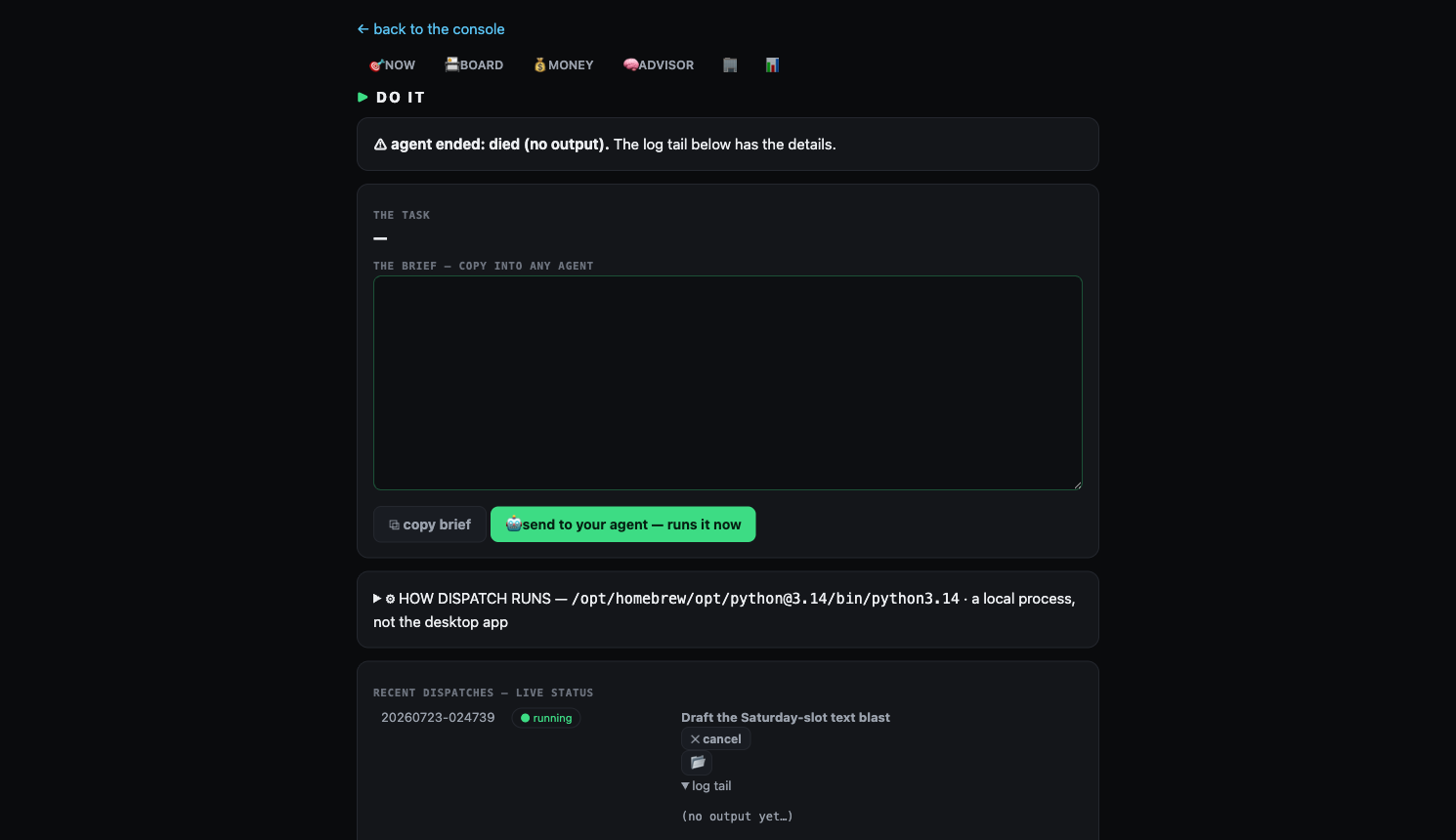
[agent] timeout_minutes) kills and records hung runs, the unattended advisor run auto-retries exactly once, a running dispatch gets a live growing log tail and a ✕ cancel, and opsroom doctor --fire proves the whole loop through your real configured command on demand: [PASS] fire: exit 0 · 41.2s · 1,824 bytes. If the always-on console is running older code than what's on disk, it says so and tells you the restart command.
🧠 ASK YOUR BOARD ANYTHING — and it thinks while you sleep. Type a question on the NOW tab ("what should I do about the aged quotes?") and it's dispatched to your agent CLI with your whole live board as context; the answer comes back as a rendered card with a ▶-dispatchable plan, not a log tail. Turn on the advisor ([agent] advise = "daily" or an hour interval — a second opt-in beyond enabled) and opsroom launches the agent on its own schedule to assess the board and surface plays beyond the derived queue: you open the console to a 🧠 TODAY'S BRIEFING it thought up while you were away. Agent prose is treated as untrusted input — escaped-first rendering, no links ever, 16KB caps, and answers are only read from runs opsroom itself registered.
🤖 AGENT PROPOSES — the operator loop. The return leg of dispatch: when an agent finishes a run, opsroom parses its output for fenced ```opsroom JSON blocks — "record $380 collected", "schedule the day-2 follow-up", "here's a new lead", "run this next" — and stages them as pending proposals on the console. Nothing applies automatically, ever: each proposal is one tap to apply (through the same write path as your own buttons) or dismiss, with a provenance link to the raw log. The verbs are a strict whitelist of things you could already do by hand; everything is scrubbed, size-capped, and double-tap-safe. Your agents work, propose, and wait for your tap — the ledger only moves when you say so.
⏳ WORK QUEUE — dispatches chain. Fire a second dispatch while an agent is running and it queues, auto-firing FIFO when the runner finishes. An agent can even propose its own next run; your tap chains it. Queued work shows as chips in AGENTS RUNNING with one-tap dismiss.
📇 BOARD — every lead in a real stage, not a blob. The BOARD is a stage-segmented view over every lead you've ever captured: new → contacted → talking → quoted → won/lost, with live counts, source pills (LSA/website/referral), age rendered as temperature, and a due-date that floats overdue work to the top. Every action is inline — call, quote, collect, move stage, draft — and lands you back on the board. Imports keep their provenance (source, first-seen date, reply flag) as structured fields, so a lead that replied arrives already in talking with the call due today. Agents can propose stage moves too (lead_stage — whitelisted, one-tap gated like everything else), and each lead's ▶ dispatches an agent with that lead's id, contact, quote and touch history baked into the brief.
🔥 REPLIED + LEADS — the hot list, fed by anything. Drop a small JSON file (from an AI agent session reading your mail, a CRM export, a webhook you pipe to disk) and opsroom merges it: new leads dedup by phone into the register, and a reply from someone you pitched hits the top of NOW as a call-these-first block with a one-tap drafted answer. Replies schedule the call for today, not the day-3 cadence — a live reply is the hottest thing on the board. The drop file is the boundary: opsroom itself never touches the network.
📊 ACTIVITY — where your time actually went, by agent. A BY AGENT table (Claude vs Codex vs ChatGPT: sessions, active hours, top venture), sessions per venture, commits, and the two features that hurt (in a good way):
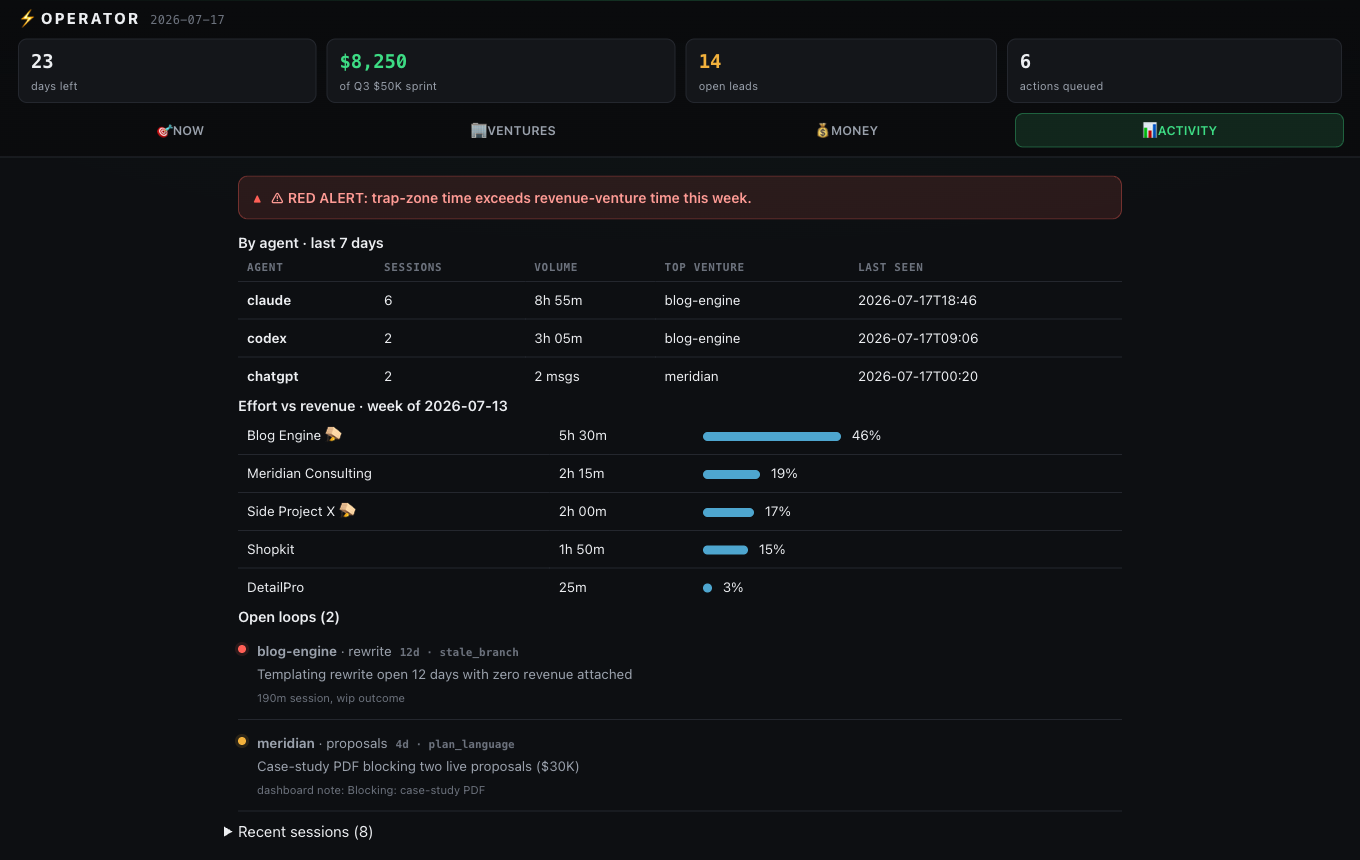
- Trap-zone drift: time spent in $0-revenue builds vs revenue ventures, with a red alert when building beats selling this week. The engineer's trap, made visible.
- Open loops: things you started and silently dropped — plan language in AI transcripts with no follow-up commit, stale branches, uncommitted work, in-progress notes going stale.
The sitrep
$ opsroom sitrep

SITREP · 2026-07-16

- DATE / DAYS TO GOAL: 2026-07-16 / 19d
- CASH COLLECTED vs Q3 $50K sprint: $8,250 collected
- OPEN LEADS: ~14 aged ~8d
- LIVE PIPELINE: Meridian: 2 proposals out ($12K + $18K) · 2 drafted, 1 sent, 2 call sheet
- TOP LEAK RIGHT NOW: ~14 open leads aged ~8d — paid-for money rotting uncalled
- SINGLE HIGHEST CASH ACTION TODAY: Finish the case-study PDF and send both proposals
Six lines, every morning, from live data. --write appends it to a daily note.
How it works
Read-only collectors, one local SQLite ledger, deterministic rendering:
| Source | What it reads |
|---|---|
cli |
Claude Code session logs (~/.claude/projects) — prompts, duration, outcomes |
codex |
OpenAI Codex CLI session logs (~/.codex/sessions) — same treatment, same attribution |
git |
every repo under your scan roots — commits, branches, uncommitted work |
fs |
mtime scan for non-git work |
notes |
your markdown roots — frontmatter, staleness, your dashboard note's ## Live state table |
chat |
manual drop of a chat export — both Claude (Anthropic) and ChatGPT (OpenAI) exports, sniffed by shape |
Attribution is by path: work done in ~/code/acme counts toward venture acme. Sessions are gap-capped active minutes, not wall clock.
Your notes are the API
opsroom doesn't make you adopt a system — it reads simple markdown conventions you can start using in five minutes:
- A dashboard note with a
## Live statetable (| Metric | Value | As of |) — rows are matched by key words (days to goal,cash, anything withlead), never by position, so reformatting won't break it. Ages keep ticking: "aged ~6 days" as-of last week reads correctly today. - A
## Today's one movesection → the console's hero action. - Pipeline trackers with
## Totalslines and## TOUCH LOGtables (Target | Channel | Status | Next) → your send/call queues. Any wide table in the same file → your searchable target list. - A
Decisions Log.mdwith- **YYYY-MM-DD** — …bullets → per-venture DONE timelines.
Security posture
This tool reads your terminal history and notes, so it's built paranoid:
- Fail-closed secret redaction — every event passes a redactor before touching the DB (API keys, AWS/GitHub/Slack/Stripe/Google tokens, JWTs, DB URIs, private keys, high-entropy
KEY=value). If redaction errors, the event is dropped, never written. - No network egress. Ever. Nothing phones home; the console HTML loads zero external resources. The only URLs are ones you configured as buttons.
- Local only — SQLite at
~/.local/share/opsroomwith600perms, refuses to live under a cloud-sync root (iCloud/Dropbox/OneDrive). - Read-only on all sources — your notes are never written; the only writes are the ledger and an optional append-only daily note.
- Agent output is untrusted input — proposals never auto-apply. They're parsed fail-closed (strict verb whitelist onto existing write actions, size caps, redaction, idempotent staging) and every one waits for your CSRF-gated tap. A hostile or prompt-injected agent log can at worst put a visible pending row on your board, with a link to the log that produced it.
opsroom purge --source=X/--before=DATEto shrink the blast radius any time.
Philosophy
Built during a 23-day cash sprint by an operator running eight ventures, out of one frustration: every productivity tool tracks activity; none of them track whether the activity pays. The rules encoded here are blunt:
- Cash counts when collected — not quoted, not booked, not "basically closed".
- Building instead of selling is a trap — visible on the board, hours counted.
- Everything you start and drop is a loop — it stays on the board until closed or dismissed.
- The console must answer "what do I do next" with names, numbers, and buttons — or it's just letters on a screen.
FAQ
Do I need Claude Code / Codex / Obsidian? No. Every source is optional and degrades gracefully. Git repos alone give you drift + loops + sessions; add notes when you want the money features.
Which AI agents are supported? Claude Code, OpenAI Codex CLI, Gemini CLI, Cursor, Aider, and OpenCode are read live from their local logs. ChatGPT and Claude web/desktop ingest via each vendor's data-export file dropped in a folder. Collectors are ~100-line files with one collect(con) entry point, PRs welcome for anything else.
macOS says the notes are unreadable. Grant your terminal Full Disk Access. If access drops mid-session, opsroom serves the last cached snapshot and says so.
Windows? WSL works. Native Windows path/permission handling has been hardened (sync-root detection, project-path derivation, and 600/700 perm enforcement all previously assumed /-separated POSIX paths and hard-failed on chmod), but it still hasn't been run end-to-end on a real Windows box — CI only covers ubuntu + macos. If you can, run the test gates and opsroom demo on native Windows and open an issue with what breaks.
Development
git clone https://github.com/malekadjeb-ai/opsroom && cd opsroom
for t in tests/test_*.py; do python3 "$t" || break; done   # every gate must exit 0
python3 -m opsroom.cli demo
Stdlib only — there is nothing to pip install for development. MIT license.
Want to add a collector for your agent (Gemini CLI, Cursor, Aider, ...)? It's a ~100-line file — see CONTRIBUTING.md for the recipe and the open good first issues.


Download files
Download the file for your platform. If you're not sure which to choose, learn more about installing packages.
Source Distribution
Built Distribution
Filter files by name, interpreter, ABI, and platform.
If you're not sure about the file name format, learn more about wheel file names.
Copy a direct link to the current filters
File details
Details for the file opsroom_console-0.16.1.tar.gz.
File metadata
- Download URL: opsroom_console-0.16.1.tar.gz
- Upload date:
- Size: 224.7 kB
- Tags: Source
- Uploaded using Trusted Publishing? No
- Uploaded via: twine/6.2.0 CPython/3.14.6
File hashes
| Algorithm | Hash digest | |
|---|---|---|
| SHA256 |
2b3adf9a3b69951b739348b0512204ae9ee1223cdfb03cabbdf81da801a966e5
|
|
| MD5 |
c93d78892e73bbf11e944aa3b8b3edef
|
|
| BLAKE2b-256 |
5fa193be4db3afce0f7c1618dcbd996af9b5a57b08db9f1d8a4080fdb073e8ac
|
File details
Details for the file opsroom_console-0.16.1-py3-none-any.whl.
File metadata
- Download URL: opsroom_console-0.16.1-py3-none-any.whl
- Upload date:
- Size: 181.8 kB
- Tags: Python 3
- Uploaded using Trusted Publishing? No
- Uploaded via: twine/6.2.0 CPython/3.14.6
File hashes
| Algorithm | Hash digest | |
|---|---|---|
| SHA256 |
9acd208fda8900c588df77624afcb3f93e8de3edabc6603654bb50ff1c1c026d
|
|
| MD5 |
10b6fe9b80f820d667373814ae1b587e
|
|
| BLAKE2b-256 |
bd627b0c4692d7a53531d5f6d430b514421a69b39d9177e5223be739da2f5747
|






