
OpsScript Gate
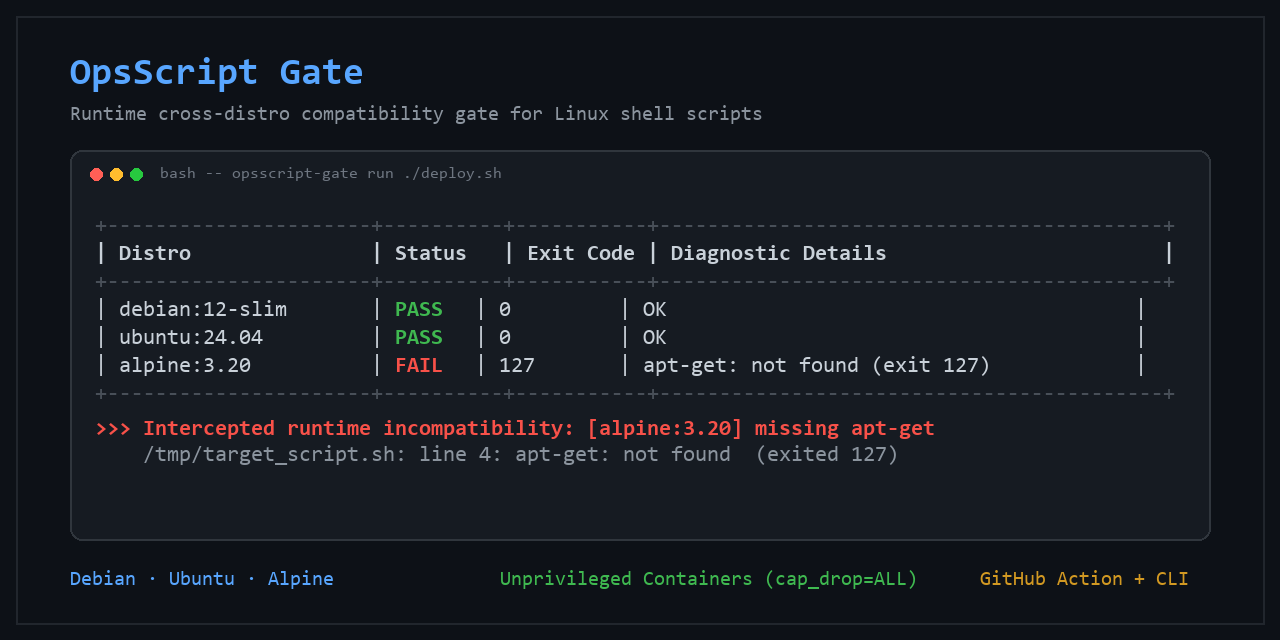
ShellCheck tells you if your script looks portable. OpsScript Gate checks if it actually runs there.








OpsScript Gate is a drop-in runtime compatibility gate for Linux shell scripts. It executes your shell scripts inside separate Debian, Ubuntu, and Alpine Docker containers before release, catching environment-specific runtime failures that static analysis cannot detect.
Quickstart
In GitHub Actions
Here is a complete minimal workflow to drop into .github/workflows/shell-compat.yml:
name: Shell compatibility
on: [pull_request]

jobs:
  shell-compat:
    runs-on: ubuntu-latest
    steps:
      - uses: actions/checkout@v7
      - uses: Mresyzz/opsscript-gate@v0.3.0
        with:
          script-path: scripts/setup.sh
          shell: auto
In Local Terminal (CLI)
Requires Python 3.10+ and a running local Docker engine:
# Install from PyPI
pip install opsscript-gate

# Run compatibility gate against your script
opsscript-gate run ./scripts/setup.sh
Example: What Static Analysis Misses
Consider this deployment script:
#!/bin/sh
set -e
echo "Fetching package information..."
apt-get --version
Running shellcheck reports 0 errors, 0 warnings because the syntax is valid POSIX shell.
However, when verified with OpsScript Gate:
+--------------------+----------+-----------+----------------------------------------------------+
| Distro             | Status   | Exit Code | Details                                            |
+--------------------+----------+-----------+----------------------------------------------------+
| debian:12-slim     | PASS     | 0         | OK                                                 |
| ubuntu:22.04       | PASS     | 0         | OK                                                 |
| ubuntu:24.04       | PASS     | 0         | OK                                                 |
| alpine:3.20        | FAIL     | 127       | Script failed with non-zero exit code: 127         |
+--------------------+----------+-----------+----------------------------------------------------+
Result: FAILED

============================================================
Failed Distributions - Output Snippets (last 15 lines):
============================================================

--- [alpine:3.20] (FAIL) ---
/tmp/target_script.sh: line 4: apt-get: not found
Example output; timing values omitted because they vary by host and image cache state.
Why it failed: Alpine Linux is musl/BusyBox-based and uses apk, not apt-get. OpsScript Gate catches the missing utility (exit code 127) during test execution, before the script is deployed.
Why OpsScript Gate?
OpsScript Gate vs ShellCheck vs Custom CI Matrix
| Capability | OpsScript Gate | ShellCheck | Handwritten CI Matrix |
|---|---|---|---|
| Runtime execution | Yes | No (Static AST only) | Yes |
| Real distro environments | Yes (Debian, Ubuntu, Alpine) | No | Yes |
| Preconfigured defaults | Yes | Yes | Requires custom workflow configuration |
| Safe container defaults | Built-in (ro, cap_drop, kill) |
N/A | User-defined |
| Anti-hang stdin protection | Built-in (</dev/null, noninteractive) |
No | User-defined |
| Unified summary & diagnostics | Built-in (ASCII + Step Summary) | Static warnings | User-defined |
- ShellCheck is indispensable for static analysis (syntax, quoting, SC warnings). OpsScript Gate complements it by testing actual execution behavior in real distributions.
- Handwritten CI Matrix requires maintaining complex Docker configurations, volume mounts, timeout guards, and log parsers across every project. OpsScript Gate packages this into a single check.
Security Boundaries
OpsScript Gate is not a security sandbox for untrusted code. Containers may run as the image's default user, and Docker/host-kernel security boundaries still apply.
OpsScript Gate applies conservative container defaults when running scripts:
- Restricted Container Defaults:
- Containers run with
privileged=False. - All Linux capabilities are dropped:
cap_drop=["ALL"]. - Privilege escalation is disabled:
security_opt=["no-new-privileges:true"].
- Containers run with
- Read-Only Target Mount:
- The tested script is mounted read-only (
:ro) at/tmp/target_script.sh. - OpsScript Gate does not mount additional host filesystem paths into the test container.
- The tested script is mounted read-only (
- Anti-Hang Deadlock Defense:
- Disables TTY and stdin (
stdin_open=False,tty=False). - Redirects execution with input disconnected:
/bin/sh -c "... /tmp/target_script.sh </dev/null". - Injects
DEBIAN_FRONTEND=noninteractiveandCI=true. - Any script prompting for user input (
read -p) fails immediately instead of blocking the CI runner.
- Disables TTY and stdin (
- Timeout & Container Cleanup:
- Enforces a configurable timeout (default: 60s). Timed-out containers are sent
SIGKILLand markedTIMED_OUT. - Container removal is attempted from a
finallyblock during normal Python execution paths, including failures and timeouts.
- Enforces a configurable timeout (default: 60s). Timed-out containers are sent
- Windows CRLF Defense:
- Automatically detects and normalizes carriage returns (
\r\n->\n) before container execution, preventing false\r: command not founderrors.
- Automatically detects and normalizes carriage returns (
- Minimal
/bin/shBaseline:- In default POSIX mode, containers invoke
/bin/shdirectly, catching undeclared Bashism syntax (e.g. bash arrays,[[ ... ]]) that break in lightweight Alpine environments.
- In default POSIX mode, containers invoke
Default Test Matrix
| Image | Distribution | Focus |
|---|---|---|
debian:12-slim |
Debian 12 (Bookworm) | Minimal glibc + APT base |
ubuntu:22.04 |
Ubuntu 22.04 LTS (Jammy) | Enterprise long-term support baseline |
ubuntu:24.04 |
Ubuntu 24.04 LTS (Noble) | Modern glibc, updated coreutils & defaults |
alpine:3.20 |
Alpine Linux 3.20 | Minimal musl libc + BusyBox /bin/sh environment |
You can customize the matrix at any time via --matrix or Action input matrix.
CLI Reference
usage: opsscript-gate run [-h] [--matrix MATRIX] [--timeout TIMEOUT]
                          [--format {table,markdown,json}]
                          [--shell {posix,shebang,auto}]
                          script_path
| Parameter | Type | Default | Description |
|---|---|---|---|
script_path |
Positional | Required | Path to target shell script |
--matrix |
String | debian:12-slim,ubuntu:22.04,ubuntu:24.04,alpine:3.20 |
Comma-separated list of Docker images |
--timeout |
Integer | 60 |
Hard timeout per container in seconds |
--format |
Choice | table |
Output format: table, markdown, or json |
--shell |
Choice | posix |
Execution mode: posix (default), shebang, or auto |
--version |
Flag | - | Show version number |
-h, --help |
Flag | - | Show argument help |
Shell Execution Modes (--shell)
posix(default): Strictly executes with/bin/sh, ignoring any script shebang. Useful for verifying that your script runs under minimal/bin/shenvironments, including Alpine BusyBox.shebang: Strictly honors the interpreter specified in the script's shebang (#!/bin/sh,#!/bin/bash,#!/usr/bin/sh,#!/usr/bin/bash,#!/usr/bin/env sh,#!/usr/bin/env bash). If the shebang is missing, malformed, or specifies an unsupported interpreter/flag, the check fails immediately with an error before running containers.auto: Honors recognized shebangs if present; falls back to/bin/shif no shebang is declared. Scripts with explicit unsupported or malformed shebangs fail immediately with an error (does not silently execute as POSIX).
Exit Code Convention
0: All distributions passed (PASS).1: At least one distribution failed (FAIL), timed out (TIMED_OUT), or errored (ERROR).
Examples
Check out the examples/ directory for self-contained, runnable scenarios:
examples/basic/: A clean POSIX script that passes across all distributions.examples/alpine-incompatibility/: Demonstrates catching implicit Debian/Ubuntu dependencies (e.g.apt-get).examples/interactive-hang/: Demonstrates how unhandledreadprompts fail immediately instead of hanging.examples/github-actions/: Ready-to-copy production pull request workflow.
Dogfooding
OpsScript Gate is used in Mresyzz/linux-dev-bootstrap to validate its install.sh script across the default Debian, Ubuntu, and Alpine matrix in GitHub Actions. That workflow pins Mresyzz/opsscript-gate@v0.2.1 with shell: auto.
See the downstream workflow: .github/workflows/test.yml.
Development & Testing
The test suite uses Docker SDK mocking to ensure fast unit tests without needing a local daemon:
# Clone and install with test dependencies
git clone https://github.com/Mresyzz/opsscript-gate.git
cd opsscript-gate
pip install -e .[test]

# Or install latest unreleased code directly from Git:
# pip install git+https://github.com/Mresyzz/opsscript-gate.git

# Run unit tests (mocked)
pytest -v -m "not integration"

# Run integration tests (Requires Docker daemon)
pytest -v
Current limitations
- Requires access to a Docker daemon.
- Scripts are executed with
/bin/shby default; use--shell shebangor--shell autofor shebang-aware execution. - Distribution runs are currently sequential.
- Containers use bridge networking by default.
- Failure reports currently include only a tail of captured output.
- OpsScript Gate checks runtime execution and exit status; it does not validate application-specific outcomes.
Roadmap
See ROADMAP.md for planned capabilities, including:
- Container resource limits (
--mem-limit,--pids-limit) - Configurable network isolation (
--network none|bridge) - Parallel matrix execution
Contributing & Security
- Contributing: Please review CONTRIBUTING.md for pull request guidelines and security boundaries.
- Security Policy: Read SECURITY.md to report vulnerabilities responsibly.
- Changelog: See CHANGELOG.md for release history.
License
OpsScript Gate is licensed under the MIT License.
1 maintainer

Release files for opsscript-gate 0.3.0
For a detailed explanation of source distributions (sdists) and built distributions (wheels), please see the package formats documentation.
Source distribution (sdist)
| File | Size | Uploaded | |
|---|---|---|---|
| opsscript_gate-0.3.0.tar.gz | 88.2 kB | Details |
Built distribution (wheel)
| File | Interpreter | ABI | Platform | Reset |
|---|---|---|---|---|
| opsscript_gate-0.3.0-py3-none-any.whl | Python 3 | none | any | Details |
Total release size: 106.4 kB
Release files / opsscript_gate-0.3.0.tar.gz
| Download URL | opsscript_gate-0.3.0.tar.gz |
|---|---|
| Size | 88.2 kB |
| Tags | Source |
|
SHA-256 checksum How to use checksums |
63f6a9d8653440f705e0dea95c79cd82a21a8206abedc7226ccaa3fb5d732f22
|
|
BLAKE2b-256 checksum How to use checksums |
9da0ad327d93ec73b656a4c4e527304d1c082b3a9334b58061d3771c2a45446f
|
| Upload date | |
|
Uploaded using Trusted Publishing? What is trusted publishing? |
Yes |
| Uploaded via |
twine/7.0.0 CPython/3.13.14
|
Provenance
Provenance describes where a file came from. On PyPI, provenance is shared via attestations, which provide a verifiable record of the build or publishing details. View details, limitations and caveats.


PyPI Publish Attestation
PyPI verified that this artifact, at this checksum, originated from the publisher listed below.
Signed by GitHub Actions, verified by PyPI on Sep 19, 2026.
Transparency logRelease files / opsscript_gate-0.3.0-py3-none-any.whl
| Download URL | opsscript_gate-0.3.0-py3-none-any.whl |
|---|---|
| Size | 18.2 kB |
| Tags | Python 3 |
|
SHA-256 checksum How to use checksums |
b20728b4597a5d271c55b710abf7124a07e8b5e21df2a98174796472a1a6a6fb
|
|
BLAKE2b-256 checksum How to use checksums |
6f375261f7215b1a2d6b6e1fcc457f2061a72b9cc13ea15cf3cae1dc80cf9d58
|
| Upload date | |
|
Uploaded using Trusted Publishing? What is trusted publishing? |
Yes |
| Uploaded via |
twine/7.0.0 CPython/3.13.14
|
Provenance
Provenance describes where a file came from. On PyPI, provenance is shared via attestations, which provide a verifiable record of the build or publishing details. View details, limitations and caveats.
PyPI Publish Attestation
PyPI verified that this artifact, at this checksum, originated from the publisher listed below.
Signed by GitHub Actions, verified by PyPI on Sep 19, 2026.
Transparency log













