

Optcom: Open Source Optical System Simulator




What is Optcom ?
Optcom is a Python library which aims to simulate optical systems. Optcom has been build for both advanced research and teaching purposes.
On one hand, Optcom can be used as an optical system simulation framework in which users can create their own optical / electric components and benefit from a wide range of helper functions. On the other hand, Optcom can be used with the in-build components for state-of-the art optical system simulation.
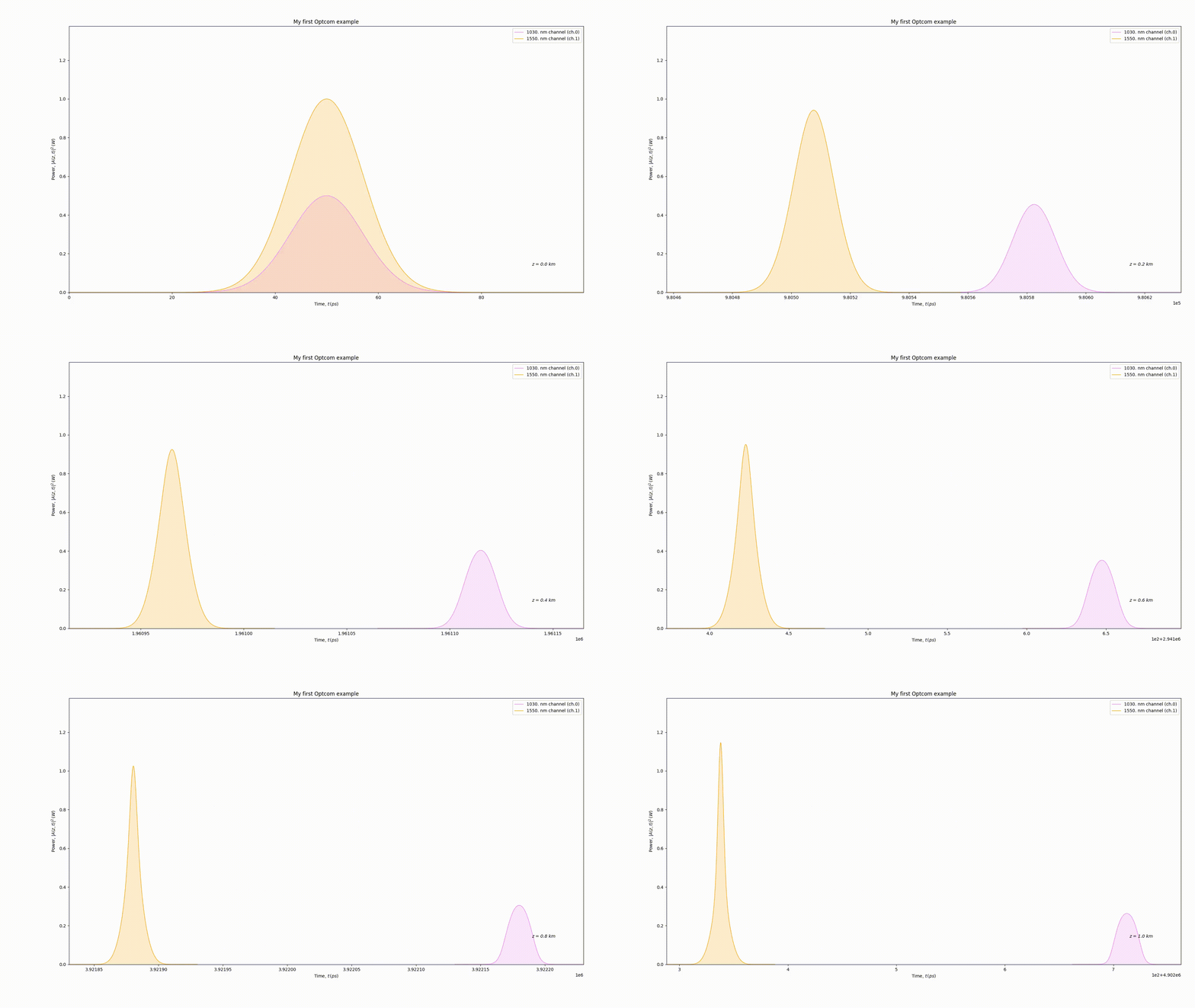
Moreover, user-friendly experience is at the heart of Optcom approach. In Optcom, an optical system is built by linking the ports of different components to each other. Here is a small example of what can be done:
import optcom as oc

# Create 2 Gaussian channels
pulse = oc.Gaussian(channels=2, center_lambda=[1030., 1550.], peak_power=[0.5, 1.0])
# Create fiber with a user-defined attenuation coefficient
fiber = oc.Fiber(length=1.0, alpha=[0.4], ATT=True, DISP=True, SPM=True, save_all=True)
# Create an optical layout and link the first port of 'pulse' to the first port of 'fiber'
layout = oc.Layout()
layout.add_link(pulse.get_port(0), fiber.get_port(0))
layout.run_all()
# Extract outputs and plot
time = fiber.storage.time
power = oc.temporal_power(fiber.storage.channels)
space = fiber.storage.space
oc.animation2d(time, power, space, x_label='t', y_label='P_t',
               plot_title='My first Optcom example',
               line_labels=['1030. nm channel', '1550. nm channel'])
Tutorials
See tutorials/ for basic and advanced tutorials.
Requirements
Installation should be OS independent. Python3.7 or later version is required. See https://www.python.org/downloads/ for more detail about python installation.
As an example, in Ubuntu, Debian or Mint, python 3 can be installed with:
sudo apt-get install python3 python3-pip
Install
Optcom can be installed using pip with:
python3 -m pip install optcom
Or in order to run the latest version of the code from the git repo:
python3 -m pip install git+git://github.com/optcom-org/optcom/
The required dependencies should have been installed along the pip installation, if any trouble is encountered, the dependencies can be manually install by chance of the requirements.txt file with:
python3 -m pip install -r requirements.txt
Issues and Questions
For bug report or suggestion, please use the Optcom issue tracker: https://github.com/optcom-org/optcom/issues
To ask questions about the usage of Optcom, use the Gitter repo: https://gitter.im/optcom-org/optcom
For any matter that does not concern the aforementioned ones, send an email to info@optcom.org
Contributing
Any contribution is welcome !
Optcom provides an optical system simulation framework and is as rich
as the number of components that can be used. You enjoy Optcom and
created your own component to fulfill your simulation need ? Share it
with the community! See tutorials/ to learn
how to create your own component.
Any help in testing, development or documentation is highly appreciated
and can be done from contributors of all experience levels. Please have
a look at the ROADMAP.md to see which tasks are available.
For contribution instructions and guidelines, please see
CONTRIBUTING.md.
Documentation
Find the built documentation at https://readthedocs.org/projects/optcom/
To manually build the documentation, go in docs/ and type:
make clean && make html
Release History
- 0.1.0 : The first Alpha version of Optcom
- 0.2.0 : Complete refactoring of v0.1.0 and new features
- 0.2.1 : Bug fix of v0.2.0
- 0.2.2 : Clear user interface
- 0.3.0 : Change of License + all OS support
- 0.3.1 : New parameters + additional doc
- 0.3.2 : New components + multi-processing for Taylor series
- 0.3.3 : New components + new parameters + 3D plot refactoring
- 0.3.4 : Optical filter update
- 0.3.5 : Noise management in ideal components
- 0.3.6 : New components
Hosting
The source code is hosted at https://github.com/optcom-org/optcom
Citation
If you use Optcom, please cite it as:
@misc{Optcom-org-optcom,
  title = {{Optcom}: A Python library for optical system simulation},
  author = "{Sacha Medaer}",
  howpublished = {\url{https://github.com/optcom-org/optcom}},
  url = "https://github.com/optcom-org/optcom",
  year = 2019
}
License
Optcom is licensed under the terms of the Apache 2.0 License, see
LICENSE.
Disclaimer
Optcom is a free open source Software developed and maintained by
volunteers. The authors take no responsibility, see
LICENSE.
2 maintainers


Metadata
2 maintainers
Release files for optcom 0.3.6
For a detailed explanation of source distributions (sdists) and built distributions (wheels), please see the package formats documentation.
Source distribution (sdist)
| File | Size | Uploaded | |
|---|---|---|---|
| optcom-0.3.6.tar.gz | 172.7 kB | Details |
Built distribution (wheel)
| File | Interpreter | ABI | Platform | Reset |
|---|---|---|---|---|
| optcom-0.3.6-py3-none-any.whl | Python 3 | none | any | Details |
Total release size: 508.7 kB
Release files / optcom-0.3.6.tar.gz
| Download URL | optcom-0.3.6.tar.gz |
|---|---|
| Size | 172.7 kB |
| Tags | Source |
|
SHA-256 checksum How to use checksums |
2d7086b6c503990bb15dcc126fe071d7e697c6fe283b78531578fa27bb71e871
|
|
BLAKE2b-256 checksum How to use checksums |
a37bb976219815688376a7031c9dda3f3ea158c15187cb00779d38aac5c71304
|
| Upload date | |
|
Uploaded using Trusted Publishing? What is trusted publishing? |
No |
| Uploaded via |
twine/2.0.0 pkginfo/1.5.0.1 requests/2.23.0 setuptools/47.1.1 requests-toolbelt/0.9.1 tqdm/4.36.1 CPython/3.7.5
|
Release files / optcom-0.3.6-py3-none-any.whl
| Download URL | optcom-0.3.6-py3-none-any.whl |
|---|---|
| Size | 336.0 kB |
| Tags | Python 3 |
|
SHA-256 checksum How to use checksums |
63c51f1c6e2470c0e8066fdf4ed4ab2bedf273f3b09cb717456d9b3f0c4ff838
|
|
BLAKE2b-256 checksum How to use checksums |
68036133ac62033d372fd3ac44080e61b22a1bd40050846955f9d775f97917e8
|
| Upload date | |
|
Uploaded using Trusted Publishing? What is trusted publishing? |
No |
| Uploaded via |
twine/2.0.0 pkginfo/1.5.0.1 requests/2.23.0 setuptools/47.1.1 requests-toolbelt/0.9.1 tqdm/4.36.1 CPython/3.7.5
|














