
optiland-zh
vibe coding
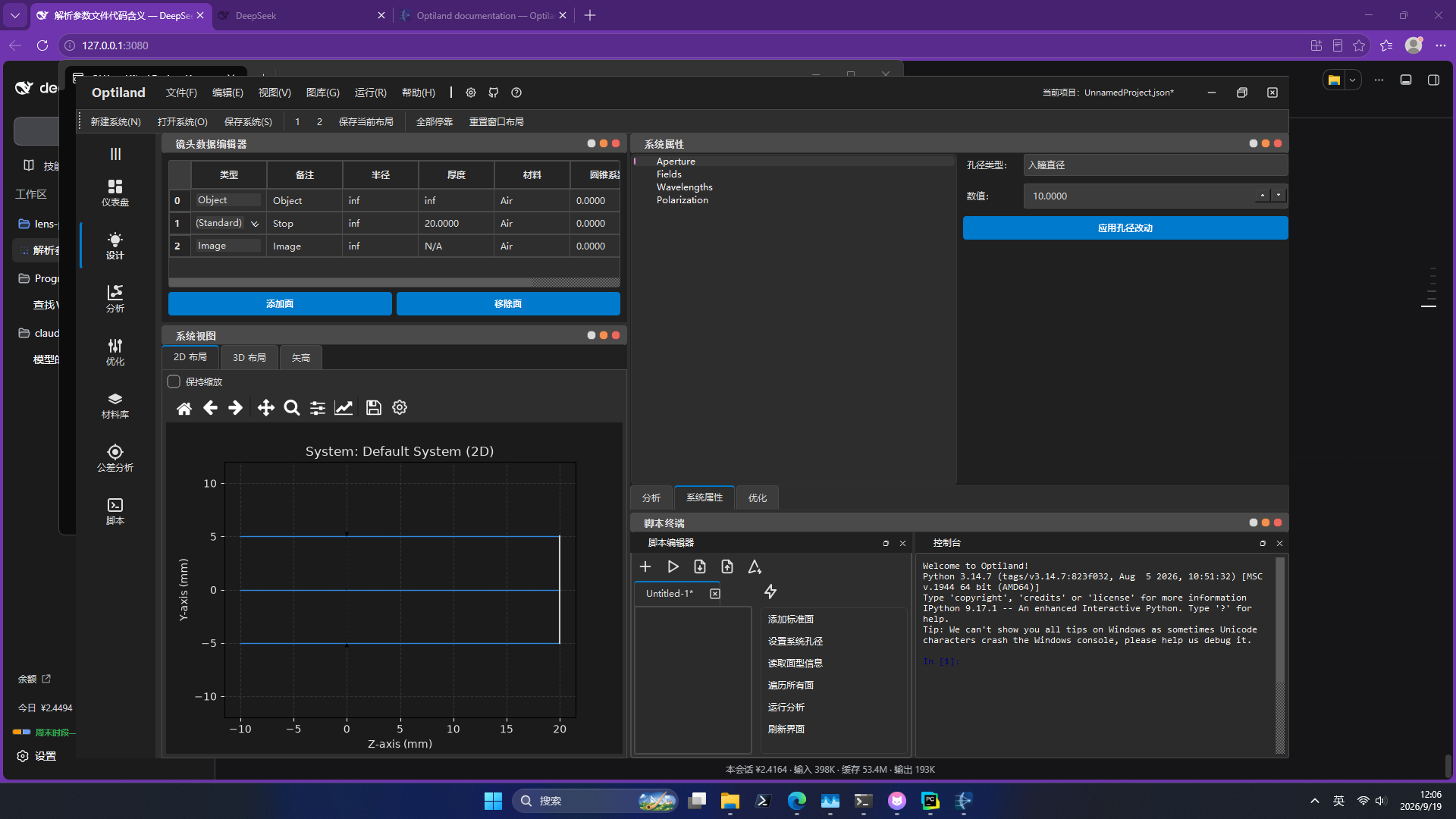
Optiland GUI 的简体中文汉化包。 运行期翻译层。 这是一个补丁,所以你仍然需要下载 Optiland 的本体
快速开始
pip install "optiland[gui]" optiland-gui-zh
optiland-zh
两条 pip 都要写。本包刻意不声明 optiland 依赖——那样会强制拉一份完整的
Qt 和 VTK,和你已经装好的版本打架,所以 pip 不会替你带上它。
使用
optiland-zh                    # 启动(终端用,能看到诊断信息)
optiland-zh-gui                # 启动(双击用,不弹控制台)
optiland-zh --list-languages   # 列出可用语言
optiland-zh --self-test        # 离屏自检,不开窗口
optiland-zh --coverage         # 词库覆盖率报告
也可以在自己的脚本里调用:
import optiland_zh

optiland_zh.install()                    # 必须早于 QApplication 创建
from optiland_gui.run_gui import main
main()
常见问题
提示找不到 PySide6 或 optiland_gui
只装了汉化包,没装本体。pip install "optiland[gui]" 即可。
想要桌面图标
optiland-zh --install-shortcut 创建;不想要了用 optiland-zh --uninstall-shortcut 删除。
想换语言,或者加一种语言
词库是 JSON,加语言不需要懂 Python。见 CONTRIBUTING.md。
它做了什么
Optiland 自带 Qt 图形界面,但只有英文,也没有语言开关。本包在运行期给
PySide6 的绑定打补丁,在文字进入 Qt 之前把它换掉——所以
pip install -U optiland 之后汉化依然有效。
有两件事值得说明:
界面是中文,程序内部读到的仍然是英文。 GUI 里有 18 处 currentText()
拿控件文字当逻辑键,比如用下拉框显示的分析名去查注册表。如果只做单向翻译,
这些功能会静默失效。
所以 currentText() 和 QLineEdit.text() 会把原文还给程序。
Qt 在 C++ 里创建的控件也覆盖到了。 比如 QFormLayout.addRow 的标签、
QDockWidget 的标题——这些控件的创建过程 Python 层看不到。Qt 自带的对话框按钮
(确定 / 取消 / 打开)则通过加载 qtbase_zh_CN.qm 解决。
详细的技术记录见 项目介绍。
已知限制
- 画在图表里的文字(matplotlib 绘图区标题)够不到
- 只覆盖 Optiland 自身的界面;第三方控件依赖它们各自的 i18n
贡献
三种贡献,按所需技能从低到高。前两种不需要懂 Python。
下面的命令都在仓库根目录运行(路径是相对的):
| 想做什么 | 怎么做 |
|---|---|
| 补词条 | python -m optiland_zh.extract --diff src/optiland_zh/catalogs/zh_CN.json 列出还缺什么,把译文加进 entries |
| 加一种语言 | 复制 catalogs/zh_CN.json,改 language 和 display_name,翻译 entries 的值以及 patterns 里的 replace(match 不能动) |
| 改引擎 | 界面上还有英文时,先用 python -m optiland_zh.audit 定位它属于哪类拦截点,再按 CONTRIBUTING.md 的「改引擎」一节动手 |
改完跑一遍:
pytest -q
optiland-zh --self-test
许可
1 maintainer

Release files for optiland-gui-zh 0.2.3
For a detailed explanation of source distributions (sdists) and built distributions (wheels), please see the package formats documentation.
Source distribution (sdist)
| File | Size | Uploaded | |
|---|---|---|---|
| optiland_gui_zh-0.2.3.tar.gz | 73.7 kB | Details |
Built distribution (wheel)
| File | Interpreter | ABI | Platform | Reset |
|---|---|---|---|---|
| optiland_gui_zh-0.2.3-py3-none-any.whl | Python 3 | none | any | Details |
Total release size: 122.9 kB
Release files / optiland_gui_zh-0.2.3.tar.gz
| Download URL | optiland_gui_zh-0.2.3.tar.gz |
|---|---|
| Size | 73.7 kB |
| Tags | Source |
|
SHA-256 checksum How to use checksums |
c3cddee2bd4ab9d62d891fabab4a942c3fd2723d1642344f6d2d24db0f929798
|
|
BLAKE2b-256 checksum How to use checksums |
ad8a8da6e49e6e225be2a6ba1a96f743302b57a42147c2d1f005155d765fbd17
|
| Upload date | |
|
Uploaded using Trusted Publishing? What is trusted publishing? |
Yes |
| Uploaded via |
twine/7.0.0 CPython/3.13.14
|
Provenance
Provenance describes where a file came from. On PyPI, provenance is shared via attestations, which provide a verifiable record of the build or publishing details. View details, limitations and caveats.


PyPI Publish Attestation
PyPI verified that this artifact, at this checksum, originated from the publisher listed below.
Signed by GitHub Actions, verified by PyPI on Sep 25, 2026.
Transparency logRelease files / optiland_gui_zh-0.2.3-py3-none-any.whl
| Download URL | optiland_gui_zh-0.2.3-py3-none-any.whl |
|---|---|
| Size | 49.2 kB |
| Tags | Python 3 |
|
SHA-256 checksum How to use checksums |
f8651b7da31e4ac7ed2688ab34ed456c9ce1e5ff401c0c04d4beadcc035d1b11
|
|
BLAKE2b-256 checksum How to use checksums |
eba4ff7f3ee256aa24a7ee9080ee9d4e3d0d172d684e142d202b8832179c91ba
|
| Upload date | |
|
Uploaded using Trusted Publishing? What is trusted publishing? |
Yes |
| Uploaded via |
twine/7.0.0 CPython/3.13.14
|
Provenance
Provenance describes where a file came from. On PyPI, provenance is shared via attestations, which provide a verifiable record of the build or publishing details. View details, limitations and caveats.
PyPI Publish Attestation
PyPI verified that this artifact, at this checksum, originated from the publisher listed below.
Signed by GitHub Actions, verified by PyPI on Sep 25, 2026.
Transparency log













