
Lightweight humanoid robot task planner and simulator

Project description
____ __ _ _
/ __ ____ / /()() ___
/ / / / __ / __/ / _/ / __ ` \
#/ // / // / // (__ ) / / / / / / #_/ ./_///// // /_/
/_/
Humanoid task planning and lightweight simulation in pure Python.



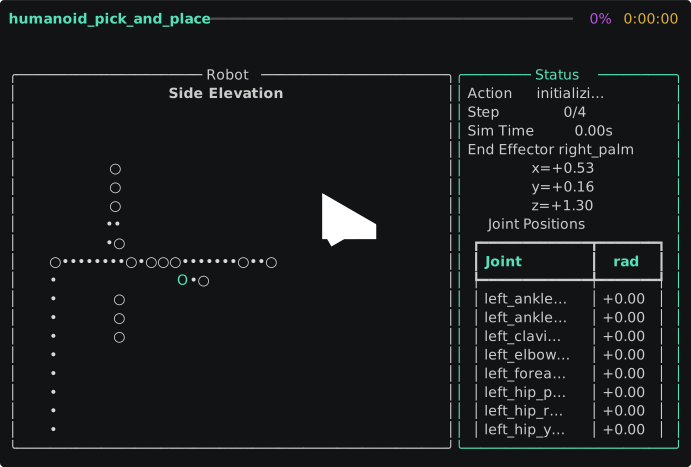
optisim is a lightweight humanoid robot task planner and simulator for teams that want to move faster than a full robotics stack allows. It sits in the practical middle ground between task specs and heavyweight sim/control infrastructure, giving you a 31-DOF humanoid, inverse kinematics, deterministic execution, motion planning, behavior trees, grasp analysis, safety monitoring, sensor simulation, and terminal-first visualization in a small pure-Python package shaped for the current wave of general-purpose humanoid robotics, including Tesla Optimus-style manipulation workflows. The package currently ships with 12 built-in task templates and a broad pytest-backed CI suite.
Features
- ✅
optisim.core: task authoring withActionPrimitive,TaskComposer,TaskDefinition, and validation utilities - ✅
optisim.robot: built-in 31-DOF humanoid model, URDF loading, and Jacobian IK - ✅
optisim.sim: deterministic step-based execution engine, world state management, and recording/replay - ✅
optisim.viz: terminal-first visualization plus optional matplotlib inspection - ✅
optisim.planning: RRT and RRT-Connect motion planning with path smoothing - ✅
optisim.trajopt: trajectory optimization with cubic splines, timing optimization, and motion-profile outputs - ✅
optisim.behavior: behavior tree execution with YAML loading for structured task logic - ✅
optisim.dynamics: rigid-body dynamics, energy analysis, and joint/payload/workspace constraints - ✅
optisim.grasp: contact-based grasp planning, force-closure checks, friction-cone checks, and gripper presets - ✅
optisim.language: deterministic natural-language instruction parsing, scene-aware symbol grounding, and primitive-sequence generation - ✅
optisim.wbc: whole-body control with hierarchical null-space task stacking and damped least-squares solves - ✅
optisim.reactive: reactive manipulation control with contact-phase FSMs and sensor-driven velocity scaling - ✅
optisim.mpc: linear inverted-pendulum MPC for CoM balance, ZMP regulation, and simple humanoid footstep planning - ✅
optisim.footstep: bipedal footstep planning, gait scheduling, swing-trajectory generation, and walking-plan analysis - ✅
optisim.retarget: pure-numpy human-to-humanoid motion retargeting from reference skeleton poses into 31-DOF robot joint trajectories - ✅
optisim.multi: shared-world multi-robot fleet coordination with dependency-aware task scheduling - ✅
optisim.library: 12 built-in humanoid task templates for rapid scenario bootstrapping - ✅
optisim.analytics: trajectory metrics, run comparison, and profiling helpers - ✅
optisim.benchmark: standardized humanoid manipulation benchmark suites, evaluators, and report export helpers - ✅
optisim.curriculum: curriculum learning utilities for progressive task-difficulty scheduling, callback hooks, and benchmark-driven training loops - ✅
optisim.export: trajectory, scene, and benchmark export utilities for JSON, CSV, ROS2-style, mocap, and task-annotation workflows - ✅
optisim.policy: pure-numpy behavioral cloning — train neural policies from demonstrations, MLP network with Adam optimizer, stateless and stateful (history-window) executors - ✅
optisim.rl: pure-numpy PPO reinforcement learning — train agents in OptisimEnv, Actor-Critic network, GAE rollout buffer, clipped surrogate loss, callbacks, and evaluation utilities - ✅
optisim.gym_env: OpenAI Gymnasium environment wrapper for RL-style experimentation - ✅
optisim.scene: semantic scene graphs for household and warehouse task planning, querying, and TAMP predicate conversion - ✅
optisim.primitives: parameterized motion primitive library bridging semantic scene-graph planning with executable robot motions - ✅
optisim.worldmodel: lightweight learned world model for scene-transition prediction, transition collection, and model-predictive primitive planning - ✅
optisim.contact: pure-numpy contact geometry, spring-damper normal forces, Coulomb friction, and lightweight contact-world stepping - ✅
optisim.dexterous: dexterous multi-finger hand kinematics, tactile fingertip sensing, and simple hand-level grasp control - ✅
optisim.safety: safety zones, joint limits, emergency stop handling, andSafetyConfighumanoid presets - ✅
optisim.sensors: force/torque, proximity, encoder, IMU, and depth-camera simulation with configurable noise models - ✅ Typed pure-Python API with PEP 561 marker support and a broad pytest-backed CI suite
Quick Start
python -m venv .venv
source .venv/bin/activate && pip install -e .
python -m optisim run examples/stack_blocks.yaml --visualize
python -m optisim multi examples/multi_robot_warehouse.yaml
python -m optisim sim examples/pick_and_place.yaml --web
python examples/mpc_balance.py
3D web visualizer demo: run optisim sim examples/pick_and_place.yaml --web
Whole-body control example:
from optisim.robot import build_humanoid_model
from optisim.wbc import BalanceTask, JointLimitTask, PostureTask, build_wbc_controller

robot = build_humanoid_model()
controller = build_wbc_controller(
    [
        BalanceTask(priority=0),
        PostureTask({"torso_yaw": 0.1, "left_shoulder_pitch": -0.25}, priority=1),
        JointLimitTask(priority=2),
    ]
)

result = controller.solve(robot, dt=0.05, max_iterations=40, tolerance=1e-3)

print(result.converged, result.iterations)
print(result.task_errors)
MPC balance example:
from optisim.mpc import FootstepPlanner, build_humanoid_mpc

controller = build_humanoid_mpc()
planner = FootstepPlanner()
plan = planner.plan_walk(direction=[1.0, 0.0, 0.0], steps=4)

state = [0.0, 0.0, 0.0, 0.0, controller.config.com_height_z]
solution = controller.step(state, target_position=[0.05, 0.0], footstep_plan=plan)

print(solution.optimal_states[:3])
print(solution.optimal_inputs[:3])
RL PPO example:
from optisim.rl import PPOConfig, PPOTrainer
from optisim.gym_env import OptisimEnv, register_optisim_env

register_optisim_env()
env = OptisimEnv(max_steps=100)
trainer = PPOTrainer(PPOConfig(total_timesteps=10_000, n_steps=64))
result = trainer.train(env)
print(result.mean_reward)
Architecture
 task.yaml / behavior.yaml / Python API
                 |
                 v
        +----------------------+
        | optisim.core         |
        | authoring / validate |
        +----+-----------+-----+
             |           |
     +-------+           +-------------------+
     |                                       |
     v                                       v
 +----------------------+         +----------------------+
 | optisim.library      |         | optisim.behavior     |
 | built-in templates   |         | BT exec / YAML load  |
 +----------+-----------+         +----------+-----------+
            |                                |
            +----------------+---------------+
                             |
                             v
                    +----------------------+
                    | task graph / intents |
                    +----------+-----------+
                               |
      +------------------------+-------------------------+
      |                        |                         |
      v                        v                         v
 +------------------+  +----------------------+  +----------------------+  +----------------------+
 | optisim.robot    |  | optisim.planning     |  | optisim.trajopt      |  | optisim.grasp        |
 | humanoid / URDF  |  | RRT / RRT-Connect    |  | cubic splines /      |  | contacts / closure   |
 | Jacobian IK      |  | smoothing            |  | timing / profiles    |  | friction / grippers  |
 +---------+--------+  +----------+-----------+  +----------+-----------+  +----------+-----------+
           |                      |                         |                         |
           +-----------+----------+-------------------------+-------------------------+
                       |
                       v
               +----------------------+
               | optisim.wbc          |
               | task stacking /      |
               | null-space / DLS     |
               +---+------------------+
                   |
                   v
               +----------------------+
               | optisim.sim          |
               | engine / world / log |
               | recording / replay   |
               +---+---------+--------+
                   |         |        |
          +--------+         |        +--------------------+
          |                  |                             |
          v                  v                             v
 +------------------+ +----------------------+   +----------------------+
 | optisim.dynamics | | optisim.safety       |   | optisim.sensors      |
 | rigid body /     | | zones / limits /     |   | FT / proximity /     |
 | energy /         | | estop / presets      |   | encoders / IMU /     |
 | constraints      | |                      |   | depth / noise / suite|
 +--------+---------+ +----------+-----------+   +----------+-----------+
          |                      |                          |
          +----------------------+--------------------------+
                                 |
                                 v
                        +----------------------+
                        | optisim.reactive     |
                        | contact FSM /        |
                        | sensor scaling       |
                        +---+-------------+-------------+------+
                            |             |             |
             +--------------+             |             +------------------+
             |                            |                                |
             v                            v                                v
 +----------------------+                         +----------------------+
 | optisim.multi        |                         | optisim.gym_env      |
 | fleet / shared world |                         | Gymnasium wrapper    |
 | dependency schedule  |                         | RL-style interface   |
 +----------+-----------+                         +----------------------+
            |
            v
 +----------------------+   +----------------------+
 | optisim.analytics    |   | optisim.viz          |
 | metrics / compare /  |   | terminal / matplotlib|
 | profiling            |   |                      |
 +----------------------+   +----------------------+
Why optisim?
Most robotics tools force a bad tradeoff. Low-level kinematics libraries are too bare to express manipulation tasks, while full simulation stacks are expensive to learn, slow to modify, and often overkill when the real question is, "Can this humanoid plausibly do this task sequence?" optisim fills that gap with a small, inspectable, typed codebase for validating humanoid task logic before you commit to middleware, planners, perception pipelines, or robot-specific control code.
That matters because humanoid robotics is now moving from research demos toward iterative product engineering. In that phase, teams need something lighter than a full digital twin but more concrete than slides, spreadsheets, or unvalidated YAML. optisim is built for that middle layer.
Examples
See examples/README.md for a full list of bundled scenarios.
pick_and_place: reach, grasp, move, and place an object on a support surfacepour_water: manipulate a pitcher and perform a tilt-style pouring sequenceopen_door: reach, rotate, and pull a door interaction targetstack_blocks: chain multiple object transfers into a simple assembly taskmulti_robot_warehouse: two humanoids sort warehouse parcels with dependency-aware fleet coordinationurdf_demo.py: load a bundled RRBot-style URDF arm, solve a reach target with IK, and animate it in the terminal
Task Library
optisim now includes a built-in task library so you can start from realistic humanoid manipulation templates instead of authoring YAML from scratch.
python -m optisim library list
python -m optisim library run pick_and_place --param object=mug --param surface=shelf --visualize
python -m optisim library export multi_room_delivery --output task.yaml
| Template | Difficulty |
|---|---|
pick_and_place |
beginner |
table_clearing |
beginner |
dish_loading |
beginner |
laundry_folding |
intermediate |
shelf_stocking |
intermediate |
drawer_open_close |
intermediate |
assembly_line_pick |
beginner |
pallet_stacking |
intermediate |
bin_sorting |
beginner |
tool_handover |
intermediate |
walk_and_pickup |
intermediate |
multi_room_delivery |
advanced |
Safety
optisim.safety adds zone monitoring, joint-limit enforcement, emergency stop handling, and reusable humanoid defaults.
import numpy as np

from optisim.safety import EmergencyStop, SafetyConfig, SafetyMonitor, SafetyZone, ZoneType

config = SafetyConfig.default_humanoid()
monitor = SafetyMonitor(zones=config.zones, joint_limits=config.joint_limits)
estop = EmergencyStop()

monitor.add_zone(
    SafetyZone(
        name="operator_cell",
        center=np.array([0.8, 0.0, 1.0]),
        half_extents=np.array([0.3, 0.4, 0.8]),
        zone_type=ZoneType.FORBIDDEN,
    )
)

link_positions = {
    "left_hand": np.array([0.82, 0.0, 1.05]),
    "torso": np.array([0.0, 0.0, 1.2]),
}

violations = monitor.check_positions("optimus_alpha", link_positions)

if violations:
    print(monitor.summarize_violations(violations))
    estop.check_and_raise(violations)
Sensor Simulation
optisim.sensors provides configurable sensor models for contact, proprioception, inertial sensing, and depth perception.
import numpy as np

from optisim.sensors import ForceTorqueSensor, IMUSensor, SensorSuite

suite = SensorSuite.default_humanoid_suite()

ft = suite.get_sensor("left_wrist_ft")
imu = suite.get_sensor("torso_imu")

assert isinstance(ft, ForceTorqueSensor)
assert isinstance(imu, IMUSensor)

wrist_wrench = ft.read([12.0, -3.5, 48.0, 0.2, 0.0, -0.1])
imu_reading = imu.read(
    linear_accel_sensor_frame=np.array([0.15, 0.0, 0.05]),
    angular_velocity_sensor_frame=np.array([0.0, 0.1, -0.02]),
)

print("force/torque:", wrist_wrench)
print("imu accel:", imu_reading["accel"])
print("imu gyro:", imu_reading["gyro"])
Development
pip install -e .[dev]
pytest -q
GitHub Actions runs the same test suite on pushes and pull requests to main.
Contributing
Contributions are expected to keep the project lightweight, deterministic, typed, and easy to inspect. Start with CONTRIBUTING.md, open an issue or draft PR for behavioral changes, and include tests for simulator, IK, task, or robot-model work.
License
optisim is released under the MIT License. See LICENSE.
Release history Release notifications | RSS feed

Download files
Download the file for your platform. If you're not sure which to choose, learn more about installing packages.
Source Distribution
Built Distribution
Filter files by name, interpreter, ABI, and platform.
If you're not sure about the file name format, learn more about wheel file names.
Copy a direct link to the current filters
File details
Details for the file optisim-0.19.0.tar.gz.
File metadata
- Download URL: optisim-0.19.0.tar.gz
- Upload date:
- Size: 292.4 kB
- Tags: Source
- Uploaded using Trusted Publishing? No
- Uploaded via: twine/6.2.0 CPython/3.12.3
File hashes
| Algorithm | Hash digest | |
|---|---|---|
| SHA256 |
3d978805f54918ef1bbc25734f26454fbe9774ec85960bc3eaa0d416e62f6c01
|
|
| MD5 |
2b84e682fa2312c888d53d3ffe57818e
|
|
| BLAKE2b-256 |
64569f20da5f22aa1b468e48aa7d2b8e46d7422222bc527617dd963dffa25100
|
File details
Details for the file optisim-0.19.0-py3-none-any.whl.
File metadata
- Download URL: optisim-0.19.0-py3-none-any.whl
- Upload date:
- Size: 262.2 kB
- Tags: Python 3
- Uploaded using Trusted Publishing? No
- Uploaded via: twine/6.2.0 CPython/3.12.3
File hashes
| Algorithm | Hash digest | |
|---|---|---|
| SHA256 |
80169d4ae6b4ba37ba352164ebeb77c3910bacd448a6d9126cb63177e15e7fe4
|
|
| MD5 |
897cb7f322b02015dd142b9efb6fd140
|
|
| BLAKE2b-256 |
cfc7cb99e5c16c6eb8bf4aa21546f9fcfed3d83557a0d00fa8ea0b56733af675
|






