
optitrader is an opne-source Python package for portfolio optimization.

Project description










optitrader
Description
optitrader is an open-source Python package for portfolio optimization and quantitative finance applications. It is meant to provide a comprehensive suite of tools to easily build a custom portfolio, analyze the optimization results and it also supports the trade execution by leveraging Alpaca's Trading API.
Using
Python package: to add and install this package as a dependency of your project, run poetry add optitrader.
Python CLI: to view this app's CLI commands once it's installed, run optitrader --help.
Rest API: to serve this application as a REST API, run docker compose up app and open localhost:8080 in your browser to see the documentation. Within the Dev Container, this is equivalent to running poe api.
Streamlit Dashboard: to use this application from a Streamlit dashboard, run optitrader dashboard. This is equivalent to running poe app and open localhost:8000 in your browser.
Example
Once the package has been installed you can use it as follows:
from optitrader import optitrader
from optitrader.optimization.objectives import CVaRObjectiveFunction
from optitrader.enums import UniverseName

optimal_ptf = Optitrader(
        objectives=[CVaRObjectiveFunction()],
        universe_name=UniverseName.POPULAR_STOCKS,
    ).solve()

# Optimal Portfolio:
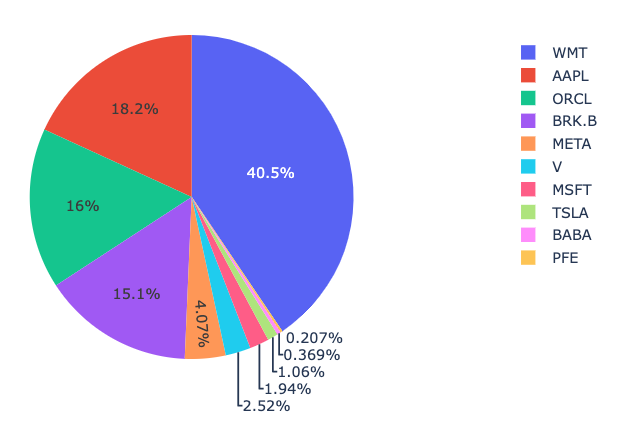
Portfolio(
    weights={
        'AAPL': 0.18168,
        'BABA': 0.00369,
        'BRK.B': 0.15119,
        'META': 0.04067,
        'MSFT': 0.01936,
        'ORCL': 0.16028,
        'PFE': 0.00207,
        'TSLA': 0.01057,
        'V': 0.02516,
        'WMT': 0.40532
        },
    objective_values={
        'Conditional Value at Risk': 0.007560866163075728
        }
)
and you can use the available methods of the Portfolio class, such as pie_plot:
optimal_ptf.pie_plot()
Contributing
This project has been boostrapped using this cookiecutter template.
Prerequisites
1. Set up Git to use SSH
- Generate an SSH key and add the SSH key to your GitHub account.
- Configure SSH to automatically load your SSH keys:
cat << EOF >> ~/.ssh/config
Host *
  AddKeysToAgent yes
  IgnoreUnknown UseKeychain
  UseKeychain yes
EOF
2. Install Docker
- Install Docker Desktop.
- Enable Use Docker Compose V2 in Docker Desktop's preferences window.
- Linux only:
- Configure Docker to use the BuildKit build system. On macOS and Windows, BuildKit is enabled by default in Docker Desktop.
- Export your user's user id and group id so that files created in the Dev Container are owned by your user:
cat << EOF >> ~/.bashrc
export UID=$(id --user)
export GID=$(id --group)
EOF
3. Install VS Code or PyCharm
- Install VS Code and VS Code's Dev Containers extension. Alternatively, install PyCharm.
- Optional: install a Nerd Font such as FiraCode Nerd Font and configure VS Code or configure PyCharm to use it.
Development environments
The following development environments are supported:
- ⭐️ GitHub Codespaces: click on Code and select Create codespace to start a Dev Container with GitHub Codespaces.
- ⭐️ Dev Container (with container volume): click on Open in Dev Containers to clone this repository in a container volume and create a Dev Container with VS Code.
- Dev Container: clone this repository, open it with VS Code, and run Ctrl/⌘ + ⇧ + P → Dev Containers: Reopen in Container.
- PyCharm: clone this repository, open it with PyCharm, and configure Docker Compose as a remote interpreter with the
devservice. - Terminal: clone this repository, open it with your terminal, and run
docker compose up --detach devto start a Dev Container in the background, and then rundocker compose exec dev zshto open a shell prompt in the Dev Container.
Developing
- This project follows the Conventional Commits standard to automate Semantic Versioning and Keep A Changelog with Commitizen.
- Run
poefrom within the development environment to print a list of Poe the Poet tasks available to run on this project. - Run
poetry add {package}from within the development environment to install a run time dependency and add it topyproject.tomlandpoetry.lock. Add--group testor--group devto install a CI or development dependency, respectively. - Run
poetry updatefrom within the development environment to upgrade all dependencies to the latest versions allowed bypyproject.toml. - Run
cz bumpto bump the package's version, update theCHANGELOG.md, and create a git tag.
Similar projects
optitrader is built by keeping in mind the availability of other great open-source repositories, such as:
Release history Release notifications | RSS feed


Download files
Download the file for your platform. If you're not sure which to choose, learn more about installing packages.
Source Distribution
Built Distribution
Filter files by name, interpreter, ABI, and platform.
If you're not sure about the file name format, learn more about wheel file names.
Copy a direct link to the current filters
File details
Details for the file optitrader-0.0.1.tar.gz.
File metadata
- Download URL: optitrader-0.0.1.tar.gz
- Upload date:
- Size: 46.1 kB
- Tags: Source
- Uploaded using Trusted Publishing? No
- Uploaded via: poetry/1.4.2 CPython/3.10.12 Linux/5.15.49-linuxkit
File hashes
| Algorithm | Hash digest | |
|---|---|---|
| SHA256 |
0b405922e99e4535b8569a2ce311330ab783139cd0ac67d591b0d2392db8c4b3
|
|
| MD5 |
b9daae56a5ce02d17430300da07180c5
|
|
| BLAKE2b-256 |
6d1d806cbfa6222e2437ab057aad5a54028d1d4607c6c7100c5b018f6606afb9
|
File details
Details for the file optitrader-0.0.1-py3-none-any.whl.
File metadata
- Download URL: optitrader-0.0.1-py3-none-any.whl
- Upload date:
- Size: 70.3 kB
- Tags: Python 3
- Uploaded using Trusted Publishing? No
- Uploaded via: poetry/1.4.2 CPython/3.10.12 Linux/5.15.49-linuxkit
File hashes
| Algorithm | Hash digest | |
|---|---|---|
| SHA256 |
b8665d3e16686627a4b71c0f01f6cfd2cef5ce64136f2f22256db3cdd3a5ead3
|
|
| MD5 |
bfc12cf61b4cd4df28a31114799cbb0f
|
|
| BLAKE2b-256 |
1bdb3d67aa02869ef1f0bd7a6c11d51a300936eb9221993d91af66f51ed69e64
|






