

Optuna: A hyperparameter optimization framework





:link: Website | :page_with_curl: Docs | :gear: Install Guide | :pencil: Tutorial | :bulb: Examples | Twitter | LinkedIn | Medium
Optuna is an automatic hyperparameter optimization software framework, particularly designed for machine learning. It features an imperative, define-by-run style user API. Thanks to our define-by-run API, the code written with Optuna enjoys high modularity, and the user of Optuna can dynamically construct the search spaces for the hyperparameters.
:loudspeaker: News
- Aug 3, 2026: Release candidate of Optuna v5 is available! Check out the release note for details.
- Jun 1, 2026: Optuna 4.9.0 is out! Check out the release note for details.
- Mar 16, 2026: Optuna 4.8.0 is out! Check out the release note for details.
- Jan 19, 2026: Optuna 4.7.0 is out! Check out the release note for details.
- Nov 10, 2025: A new article Announcing Optuna 4.6 has been published.
- Oct 28, 2025: A new article AutoSampler: Full Support for Multi-Objective & Constrained Optimization has been published.
:fire: Key Features
Optuna has modern functionalities as follows:
- Lightweight, versatile, and platform agnostic architecture
- Handle a wide variety of tasks with a simple installation that has few requirements.
- Pythonic search spaces
- Define search spaces using familiar Python syntax including conditionals and loops.
- Efficient optimization algorithms
- Adopt state-of-the-art algorithms for sampling hyperparameters and efficiently pruning unpromising trials.
- Easy parallelization
- Scale studies to tens or hundreds of workers with little or no changes to the code.
- Quick visualization
- Inspect optimization histories from a variety of plotting functions.
Basic Concepts
We use the terms study and trial as follows:
- Study: optimization based on an objective function
- Trial: a single execution of the objective function
Please refer to the sample code below. The goal of a study is to find out the optimal set of
hyperparameter values (e.g., regressor and svr_c) through multiple trials (e.g.,
n_trials=100). Optuna is a framework designed for automation and acceleration of
optimization studies.
Sample code with scikit-learn

import optuna
import sklearn


# Define an objective function to be minimized.
def objective(trial):

    # Invoke suggest methods of a Trial object to generate hyperparameters.
    regressor_name = trial.suggest_categorical("regressor", ["SVR", "RandomForest"])
    if regressor_name == "SVR":
        svr_c = trial.suggest_float("svr_c", 1e-10, 1e10, log=True)
        regressor_obj = sklearn.svm.SVR(C=svr_c)
    else:
        rf_max_depth = trial.suggest_int("rf_max_depth", 2, 32)
        regressor_obj = sklearn.ensemble.RandomForestRegressor(max_depth=rf_max_depth)

    X, y = sklearn.datasets.fetch_california_housing(return_X_y=True)
    X_train, X_val, y_train, y_val = sklearn.model_selection.train_test_split(X, y, random_state=0)

    regressor_obj.fit(X_train, y_train)
    y_pred = regressor_obj.predict(X_val)

    error = sklearn.metrics.mean_squared_error(y_val, y_pred)

    return error  # An objective value linked with the Trial object.


study = optuna.create_study()  # Create a new study.
study.optimize(objective, n_trials=100)  # Invoke optimization of the objective function.
[!NOTE] More examples can be found in optuna/optuna-examples.
The examples cover diverse problem setups such as multi-objective optimization, constrained optimization, pruning, and distributed optimization.
Installation
Optuna is available at the Python Package Index and on Anaconda Cloud.
# PyPI
$ pip install optuna
# Anaconda Cloud
$ conda install -c conda-forge optuna
[!IMPORTANT] Optuna supports Python 3.9 or newer.
Rustuna
Rustuna is a faster implementation of Optuna written in Rust. It keeps the API you already know, and rewrites the parts that start to hurt at scale: sampling speed and memory efficiency.
- Faster sampler implementations: Rustuna supports TPE, MOTPE, NSGA-II, and CMA-ES, and finishes the same study several times to several hundred times faster for cheap objective functions.
- Memory-efficient storage: Several design choices to make Rustuna's storage memory-efficient. Furthermore, discarding unnecessary trial history prevents memory usage and runtime from increasing as the number of trials grows.
- Zero Python runtime dependencies: No Python runtime dependencies by default ー dramatically faster imports, and far less exposure to supply chain attacks.
[!NOTE] Rustuna is currently experimental. Compared with Optuna, it still lacks some features and APIs, and it has not yet been optimized enough to deliver better performance for every use case. Since the project has not had the same level of maturity as Optuna, bugs and rough edges likely remain. We appreciate your understanding when using it.
Web Dashboard
Optuna Dashboard is a real-time web dashboard for Optuna. You can check the optimization history, hyperparameter importance, etc. in graphs and tables. You don't need to create a Python script to call Optuna's visualization functions. Feature requests and bug reports are welcome!
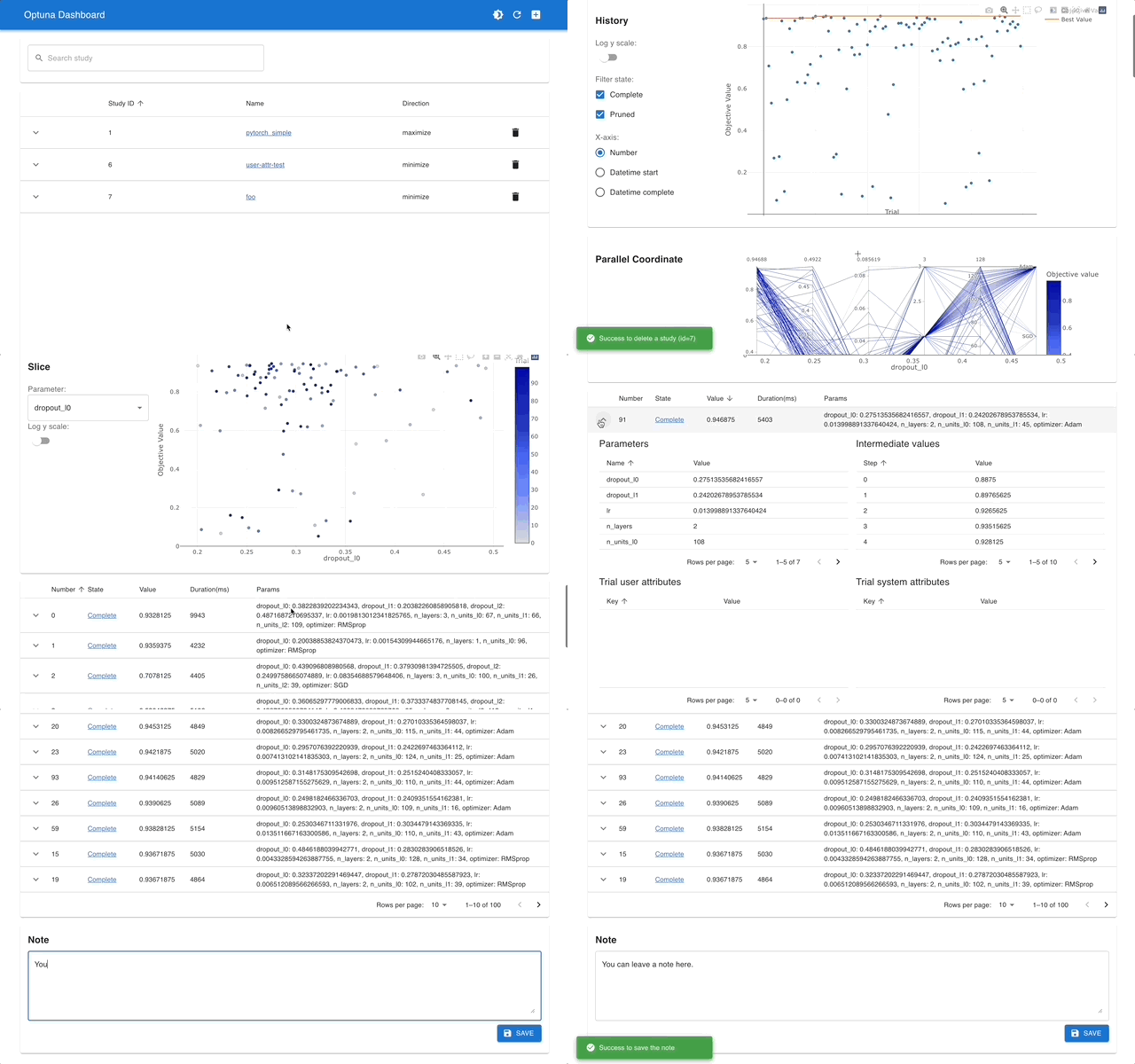
optuna-dashboard can be installed via pip:
$ pip install optuna-dashboard
[!TIP] Please check out the convenience of Optuna Dashboard using the sample code below.
Sample code to launch Optuna Dashboard
Save the following code as optimize_toy.py.
import optuna


def objective(trial):
    x1 = trial.suggest_float("x1", -100, 100)
    x2 = trial.suggest_float("x2", -100, 100)
    return x1**2 + 0.01 * x2**2


study = optuna.create_study(storage="sqlite:///db.sqlite3")  # Create a new study with database.
study.optimize(objective, n_trials=100)
Then try the commands below:
# Run the study specified above
$ python optimize_toy.py

# Launch the dashboard based on the storage `sqlite:///db.sqlite3`
$ optuna-dashboard sqlite:///db.sqlite3
...
Listening on http://localhost:8080/
Hit Ctrl-C to quit.
OptunaHub
OptunaHub is a feature-sharing platform for Optuna. You can use the registered features and publish your packages.
Use registered features
optunahub can be installed via pip:
$ pip install optunahub
# Install AutoSampler dependencies (CPU only is sufficient for PyTorch)
$ pip install cmaes scipy torch --extra-index-url https://download.pytorch.org/whl/cpu
You can load registered module with optunahub.load_module.
import optuna
import optunahub


def objective(trial: optuna.Trial) -> float:
    x = trial.suggest_float("x", -5, 5)
    y = trial.suggest_float("y", -5, 5)
    return x**2 + y**2


module = optunahub.load_module(package="samplers/auto_sampler")
# See https://hub.optuna.org/samplers/auto_sampler/ to know the ``AutoSampler`` API.
study = optuna.create_study(sampler=module.AutoSampler())
study.optimize(objective, n_trials=10)

print(study.best_trial.value, study.best_trial.params)
For more details, please refer to the optunahub documentation.
Publish your packages
You can publish your package via optunahub-registry. See the Tutorials for Contributors in OptunaHub.
Communication
- GitHub Discussions for questions.
- GitHub Issues for bug reports and feature requests.
Contribution
Any contributions to Optuna are more than welcome!
If you are new to Optuna, please check the good first issues. They are relatively simple, well-defined, and often good starting points for you to get familiar with the contribution workflow and other developers.
If you already have contributed to Optuna, we recommend the other contribution-welcome issues.
For general guidelines on how to contribute to the project, take a look at CONTRIBUTING.md.
Reference
If you use Optuna in one of your research projects, please cite our KDD paper "Optuna: A Next-generation Hyperparameter Optimization Framework":
BibTeX
@inproceedings{akiba2019optuna,
  title={{O}ptuna: A Next-Generation Hyperparameter Optimization Framework},
  author={Akiba, Takuya and Sano, Shotaro and Yanase, Toshihiko and Ohta, Takeru and Koyama, Masanori},
  booktitle={The 25th ACM SIGKDD International Conference on Knowledge Discovery \& Data Mining},
  pages={2623--2631},
  year={2019}
}
License
MIT License (see LICENSE).
Optuna uses the codes from SciPy and fdlibm projects (see LICENSE_THIRD_PARTY).


Download files
Download the file for your platform. If you're not sure which to choose, learn more about installing packages.
Source Distribution
Built Distribution
Filter files by name, interpreter, ABI, and platform.
If you're not sure about the file name format, learn more about wheel file names.
Copy a direct link to the current filters
File details
Details for the file optuna-5.0.0.tar.gz.
File metadata
- Download URL: optuna-5.0.0.tar.gz
- Upload date:
- Size: 508.7 kB
- Tags: Source
- Uploaded using Trusted Publishing? Yes
- Uploaded via:
twine/6.1.0 CPython/3.13.13
File hashes
| Algorithm | Hash digest | |
|---|---|---|
| SHA256 |
358bb878b7b1e20e90dc944ac4261796dd3d5c2b7860aa960a08fc10e0b5beff
|
|
| MD5 |
171222c4b03baf2189165bbfe3b205d1
|
|
| BLAKE2b-256 |
276d7bd33b5ed3a83f1c1517fb20c54c7dbf59e6c76430d9b26d3205074ff6b0
|
File details
Details for the file optuna-5.0.0-py3-none-any.whl.
File metadata
- Download URL: optuna-5.0.0-py3-none-any.whl
- Upload date:
- Size: 442.4 kB
- Tags: Python 3
- Uploaded using Trusted Publishing? Yes
- Uploaded via:
twine/6.1.0 CPython/3.13.13
File hashes
| Algorithm | Hash digest | |
|---|---|---|
| SHA256 |
5fff892ae6baf4948c810c5b8635ec67e08efb0709b41cb73b14e30391d44720
|
|
| MD5 |
8ed0b9eeb085786ea9dd630b6a6c5ed0
|
|
| BLAKE2b-256 |
90e57c5e8cdda8c9f0cd8aca0a376dee9cff6b8c30692cf614960d9e80f59689
|














