
No project description provided

Project description


🪐 ✨ Earthdata MCP Server


Earthdata MCP Server is a Model Context Protocol (MCP) server implementation that provides tools to interact with NASA Earth Data. It enables efficient dataset discovery and retrieval for Geospatial analysis.
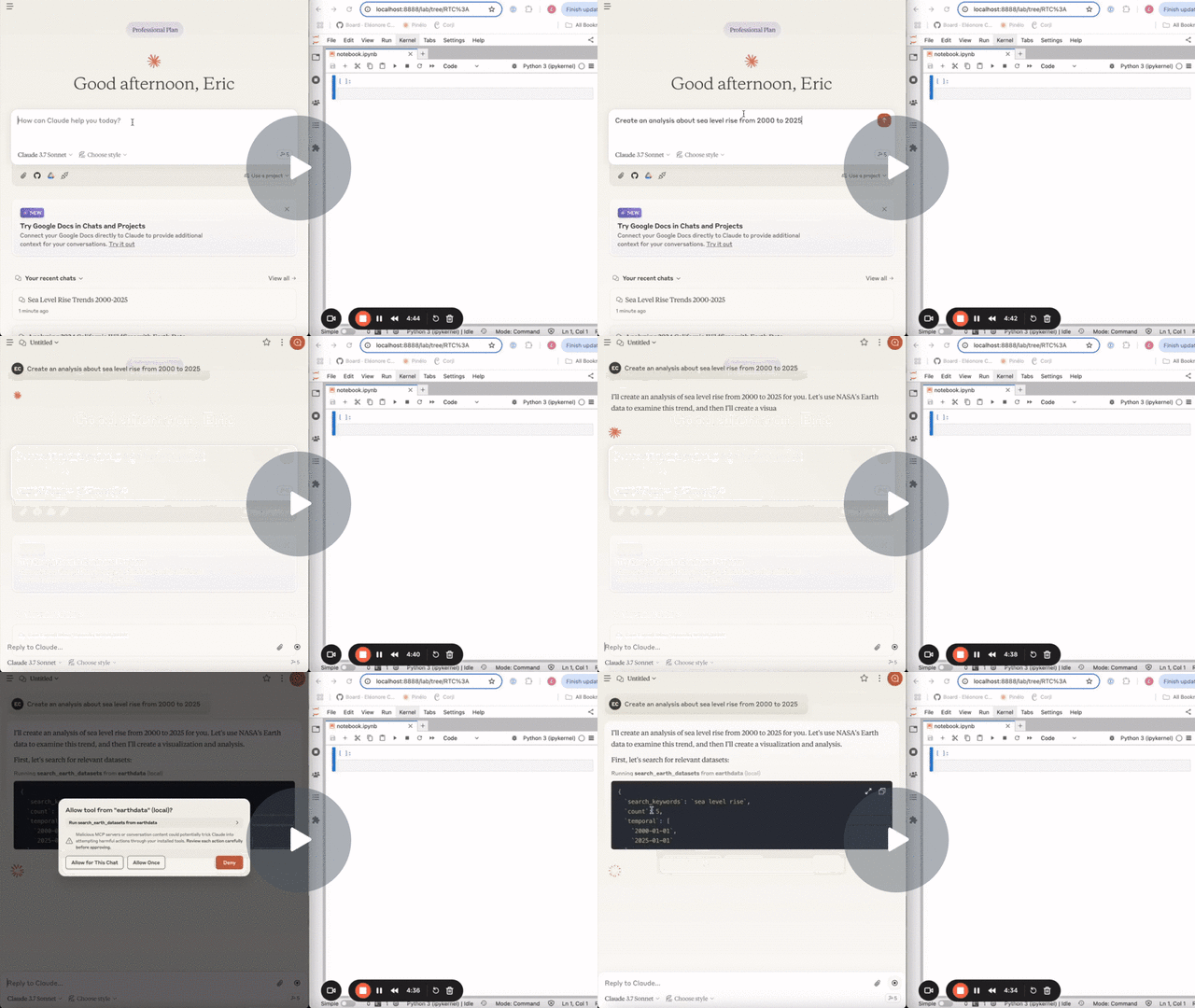
The following demo uses this MCP server to search for datasets and data granules on NASA Earthdata, the jupyter-earth-mcp-server to download the data in Jupyter and the jupyter-mcp-server to run further analysis.
Use with Claude Desktop
To use this with Claude Desktop, add the following to your claude_desktop_config.json.
{
  "mcpServers": {
    "earthdata": {
      "command": "docker",
      "args": [
        "run",
        "-i",
        "--rm",
        "datalayer/earthdata-mcp-server:latest"
      ]
    }
  }
}
If you are using Linux, start Claude with the following command.
make claude-linux
Tools
The server offers 2 tools.
search_earth_datasets
- Search for datasets on NASA Earthdata.
- Input:
- search_keywords (str): Keywords to search for in the dataset titles.
- count (int): Number of datasets to return.
- temporal (tuple): (Optional) Temporal range in the format (date_from, date_to).
- bounding_box (tuple): (Optional) Bounding box in the format (lower_left_lon, lower_left_lat, upper_right_lon, upper_right_lat).
- Returns: List of dataset abstracts.
search_earth_datagranules
- Search for data granules on NASA Earthdata.
- Input:
- short_name (str): Short name of the dataset.
- count (int): Number of data granules to return.
- temporal (tuple): (Optional) Temporal range in the format (date_from, date_to).
- bounding_box (tuple): (Optional) Bounding box in the format (lower_left_lon, lower_left_lat, upper_right_lon, upper_right_lat).
- Returns: List of data granules.
Building
# or run `docker build -t datalayer/earthdata-mcp-server .`
make build-docker
If you prefer, you can pull the prebuilt images.
make pull-docker
Release history Release notifications | RSS feed

Download files
Download the file for your platform. If you're not sure which to choose, learn more about installing packages.
Source Distribution
Built Distribution
Filter files by name, interpreter, ABI, and platform.
If you're not sure about the file name format, learn more about wheel file names.
Copy a direct link to the current filters
File details
Details for the file orange_earthdata_mcp_server-0.1.1.tar.gz.
File metadata
- Download URL: orange_earthdata_mcp_server-0.1.1.tar.gz
- Upload date:
- Size: 8.0 kB
- Tags: Source
- Uploaded using Trusted Publishing? No
- Uploaded via: twine/6.1.0 CPython/3.11.12
File hashes
| Algorithm | Hash digest | |
|---|---|---|
| SHA256 |
dbaa460590f8b041349d9d8af6826003f81926820c2579bf6cc802f891d53a3a
|
|
| MD5 |
fbe954638b259836c5e4d18fe1774601
|
|
| BLAKE2b-256 |
b7d424643bae41c8b236474409651df65821b25983a661f2cc1e3681f8e08216
|
File details
Details for the file orange_earthdata_mcp_server-0.1.1-py3-none-any.whl.
File metadata
- Download URL: orange_earthdata_mcp_server-0.1.1-py3-none-any.whl
- Upload date:
- Size: 6.3 kB
- Tags: Python 3
- Uploaded using Trusted Publishing? No
- Uploaded via: twine/6.1.0 CPython/3.11.12
File hashes
| Algorithm | Hash digest | |
|---|---|---|
| SHA256 |
10507709de917389b94075cf2f2ecfea1384f5e9e2749cab3cd7998ea38f741f
|
|
| MD5 |
e0fe5b3e8dae54d21d454707fdae13b1
|
|
| BLAKE2b-256 |
66b85c51d85893b6f60f931ced9f2a723a3cc627a2dec27558e10cefa111b6f8
|






