
Zendesk MCP Server


A Model Context Protocol server for Zendesk.
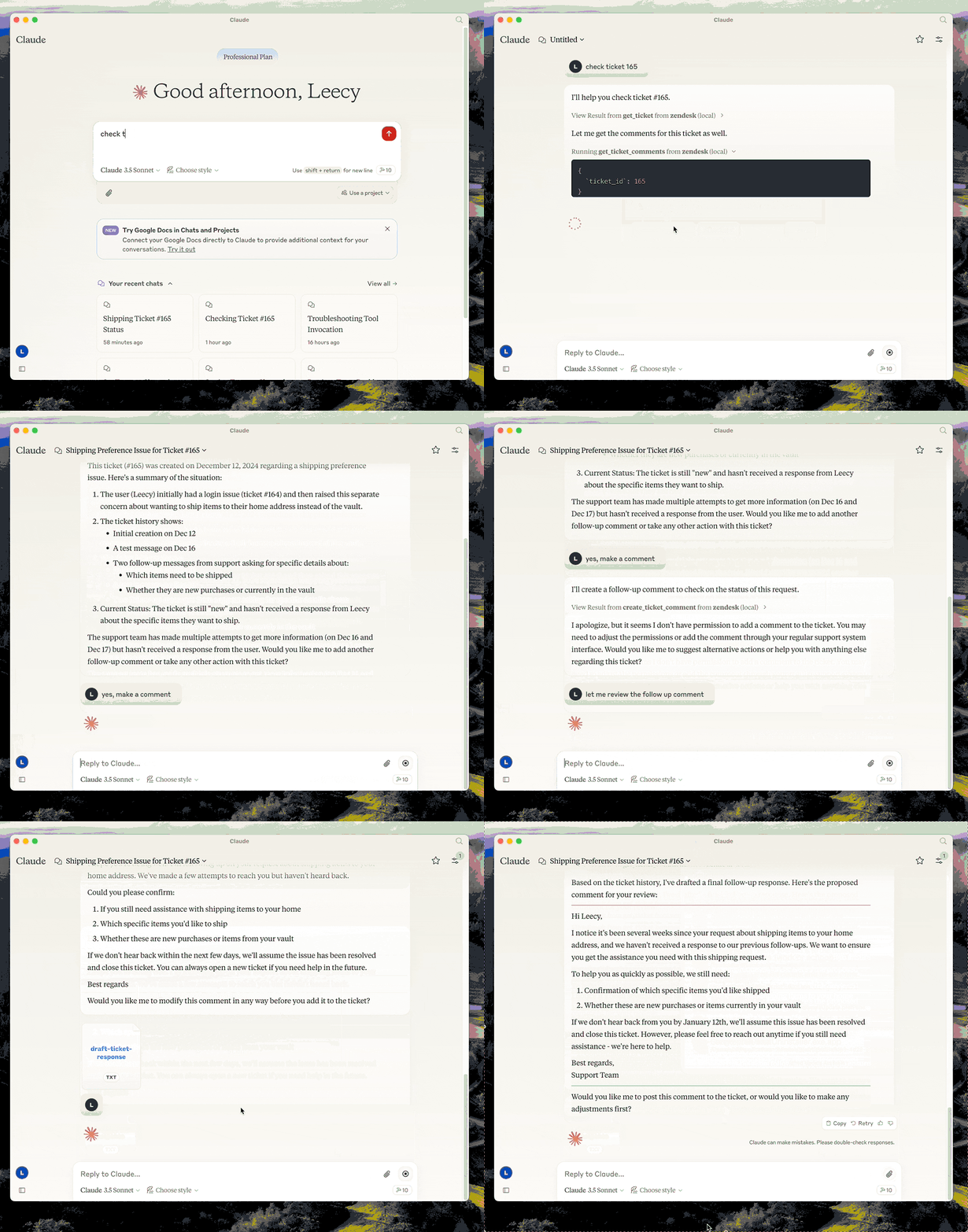
This server provides a comprehensive integration with Zendesk. It offers:
- Tools for retrieving and managing Zendesk tickets and comments
- Specialized prompts for ticket analysis and response drafting
- Full access to the Zendesk Help Center articles as knowledge base
Setup
- build:
uv venv && uv pip install -e .oruv buildin short. - setup zendesk credentials in
.envfile, refer to .env.example. - configure in Claude desktop:
{
  "mcpServers": {
      "zendesk": {
          "command": "uv",
          "args": [
              "--directory",
              "/path/to/zendesk-mcp-server",
              "run",
              "zendesk"
          ]
      }
  }
}
Resources
- zendesk://knowledge-base, get access to the whole help center articles.
Prompts
analyze-ticket
Analyze a Zendesk ticket and provide a detailed analysis of the ticket.
draft-ticket-respons
Draft a response to a Zendesk ticket.
Tools
get_ticket
Retrieve a Zendesk ticket by its ID
- Input:
ticket_id(integer): The ID of the ticket to retrieve
get_ticket_comments
Retrieve all comments for a Zendesk ticket by its ID
- Input:
ticket_id(integer): The ID of the ticket to get comments for
create_ticket_comment
Create a new comment on an existing Zendesk ticket
- Input:
ticket_id(integer): The ID of the ticket to comment oncomment(string): The comment text/content to addpublic(boolean, optional): Whether the comment should be public (defaults to true)
1 maintainer

Metadata
1 maintainer
Release files for orange-zendesk-mcp-server 0.1.0
For a detailed explanation of source distributions (sdists) and built distributions (wheels), please see the package formats documentation.
Source distribution (sdist)
| File | Size | Uploaded | |
|---|---|---|---|
| orange_zendesk_mcp_server-0.1.0.tar.gz | 21.2 kB | Details |
Built distribution (wheel)
| File | Interpreter | ABI | Platform | Reset |
|---|---|---|---|---|
| orange_zendesk_mcp_server-0.1.0-py3-none-any.whl | Python 3 | none | any | Details |
Total release size: 31.2 kB
Release files / orange_zendesk_mcp_server-0.1.0.tar.gz
| Download URL | orange_zendesk_mcp_server-0.1.0.tar.gz |
|---|---|
| Size | 21.2 kB |
| Tags | Source |
|
SHA-256 checksum How to use checksums |
863c6af48b76e1909bb6ccb02fb601dd33bfe67fbc1e32ea2c8ad27533015f46
|
|
BLAKE2b-256 checksum How to use checksums |
6c74d0795f05924775d558a9f78bfe477f6e676e30de62afd5ae80e7ef98cb1b
|
| Upload date | |
|
Uploaded using Trusted Publishing? What is trusted publishing? |
No |
| Uploaded via |
twine/6.1.0 CPython/3.11.12
|
Release files / orange_zendesk_mcp_server-0.1.0-py3-none-any.whl
| Download URL | orange_zendesk_mcp_server-0.1.0-py3-none-any.whl |
|---|---|
| Size | 10.0 kB |
| Tags | Python 3 |
|
SHA-256 checksum How to use checksums |
e3cc9491c0b728f9e82f2be09b061e89bdd7d666b21a625cd506f3ef2342e27c
|
|
BLAKE2b-256 checksum How to use checksums |
585bd702f89925a3b9a7c25860c3d317d5647e7bd8c0a07aaebb739a96306c2a
|
| Upload date | |
|
Uploaded using Trusted Publishing? What is trusted publishing? |
No |
| Uploaded via |
twine/6.1.0 CPython/3.11.12
|













