
Orange3 Il Post Widget
An Orange3 add-on widget for fetching articles, podcasts, and newsletters from the Italian online newspaper Il Post. The widget queries the Il Post search API and outputs a Corpus ready for text mining workflows.
User Interface
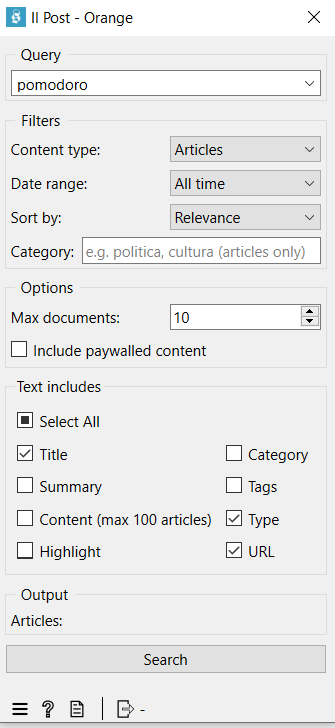
Installation
pip install orange3-ilpost
The package requires Orange3 and orange3-text to be installed. The Il Post API wrapper (ilpost-api-wrapper) is installed automatically as a dependency.
Usage
After installation, the Il Post category will appear in the Orange Canvas widget toolbox.
- Drag the Il Post widget onto the canvas.
- Type a search query in the Query field and press Enter or click Search.
- Adjust the filters as needed (see below).
- Connect the widget output to any text mining widget (e.g. Corpus Viewer, Word Cloud, Topic Modelling).
Controls
| Control | Description |
|---|---|
| Query | Search term. Keeps a history of recent queries. |
| Content type | Filter by All, Articles, Podcasts, or Newsletters. |
| Date range | Filter by All time, Past year, or Past 30 days. |
| Sort by | Sort results by Relevance, Newest, or Oldest. |
| Category | Optional editorial category filter (e.g. politica, cultura). Applies to articles only. |
| Max documents | Maximum number of results to retrieve (1–1000, capped at 100 when Content is selected). |
| Include paywalled content | When unchecked, subscriber-only results are excluded. |
| Text includes | Choose which fields are included in the output corpus and used as text features for analysis. Use Select All to check or uncheck all fields at once. Selecting Content (max 100 articles) also downloads the full article body (capped at 100 documents). |
Output
The widget outputs a Corpus with the following metadata columns:
| Field | Type | Description |
|---|---|---|
| Title | String | Article/episode title |
| Summary | String | Short description |
| Content | String | Full article body (only when Content is selected in Text includes) |
| Highlight | String | Search snippet with matched terms |
| Category | String | Editorial category |
| Tags | String | Comma-separated topic tags |
| Type | String | Content type (post, episodes, newsletter) |
| Publication Date | Time | Publication timestamp (Italian local time) |
| URL | String | Link to the full content |
| Relevance Score | Continuous | Search relevance score (0.0 when sorted by date) |
Only the columns selected in Text includes appear in the output corpus (Publication Date and Relevance Score are always included).
Example workflow
[Il Post] → [Corpus Viewer]
[Il Post] → [Word Cloud]
[Il Post] → [Topic Modelling]
[Il Post] → [Sentiment Analysis]
Requirements
- Python 3.9+
- Orange3
- orange3-text
- ilpost-api-wrapper
License
MIT
1 maintainer

Metadata
1 maintainer
Release files for orange3-ilpost 0.2.1
For a detailed explanation of source distributions (sdists) and built distributions (wheels), please see the package formats documentation.
Source distribution (sdist)
| File | Size | Uploaded | |
|---|---|---|---|
| orange3_ilpost-0.2.1.tar.gz | 8.3 kB | Details |
Built distribution (wheel)
| File | Interpreter | ABI | Platform | Reset |
|---|---|---|---|---|
| orange3_ilpost-0.2.1-py3-none-any.whl | Python 3 | none | any | Details |
Total release size: 17.5 kB
Release files / orange3_ilpost-0.2.1.tar.gz
| Download URL | orange3_ilpost-0.2.1.tar.gz |
|---|---|
| Size | 8.3 kB |
| Tags | Source |
|
SHA-256 checksum How to use checksums |
1611851ba08dfd154781b73af26ce15943cc612d09cb065eef3e6b34dc462a56
|
|
BLAKE2b-256 checksum How to use checksums |
eb101ca3ca6d7d95ad7bc998c6c6765a3a1116f9529ed3105549222c5c8e85b3
|
| Upload date | |
|
Uploaded using Trusted Publishing? What is trusted publishing? |
No |
| Uploaded via |
twine/6.2.0 CPython/3.13.5
|
Release files / orange3_ilpost-0.2.1-py3-none-any.whl
| Download URL | orange3_ilpost-0.2.1-py3-none-any.whl |
|---|---|
| Size | 9.2 kB |
| Tags | Python 3 |
|
SHA-256 checksum How to use checksums |
419226982d40d427000c32376dca2aebcba0de6c0727d25f23135cf57821df48
|
|
BLAKE2b-256 checksum How to use checksums |
fdf267de99e3698f0e223ae8776602c6b409437b3b6adcc8e32ffa4a6982270d
|
| Upload date | |
|
Uploaded using Trusted Publishing? What is trusted publishing? |
No |
| Uploaded via |
twine/6.2.0 CPython/3.13.5
|














