
OrbitalViz
Visualise molecules and molecular orbitals (MOs) interactively in Python.
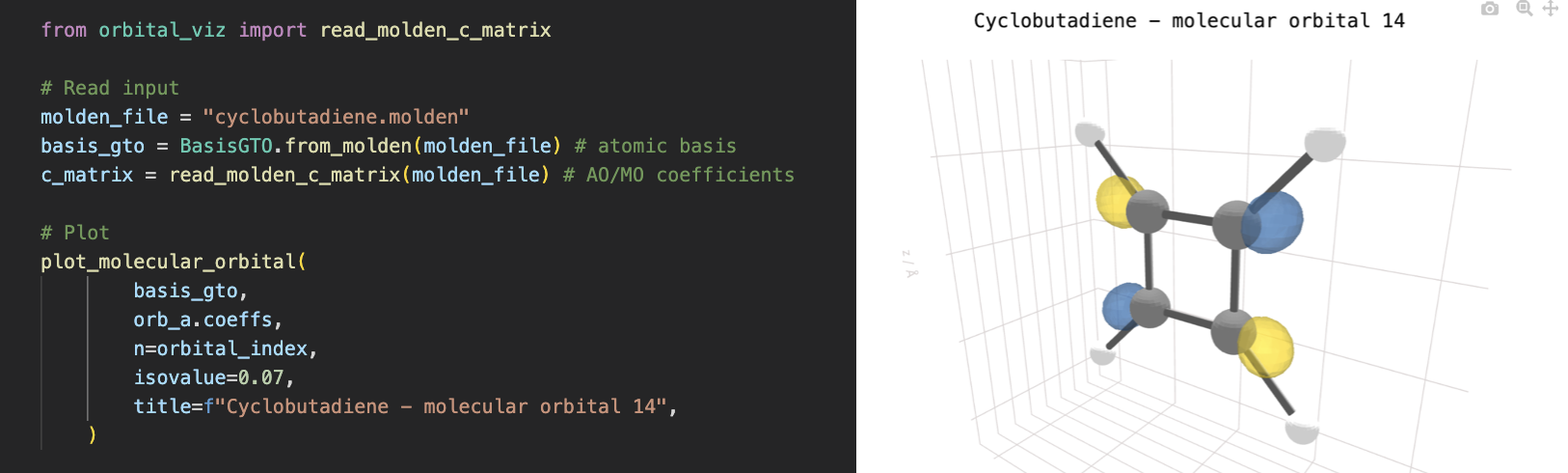
Installation
pip install orbital_viz
Requires Python ≥ 3.11.
Quick start
From a Molden file
from orbital_viz import parse_molden_to_dict, BasisGTO, read_molden_c_matrix, plot_molecular_orbital

# Parse geometry and basis set
data = parse_molden_to_dict("molecule.molden")
basis = BasisGTO(**data)

# Read MO coefficients
C = read_molden_c_matrix("molecule.molden", basis.n_basis)

# Plot MO index 5 (zero-based)
fig = plot_molecular_orbital(basis, C, n=5)
fig.show()
From a custom basis (e.g. PyBEST output)
from orbital_viz import BasisGTO, plot_molecular_orbital
import numpy as np

basis = BasisGTO(
    atoms=[6, 6],                         # Carbon, Carbon
    coordinates=[[-0.67, 0, 0], [0.67, 0, 0]],  # Å
    number_of_primitives=[3, 3],
    contraction=[0.154, 0.535, 0.444, 0.154, 0.535, 0.444],
    Alpha=[71.6, 13.0, 3.53, 71.6, 13.0, 3.53],
    shell_types=[0, 0],
    shell_to_atom=[0, 1],
)

C = np.load("mo_coefficients.npy")   # shape (n_basis, n_mo)
fig = plot_molecular_orbital(basis, C, n=0, isovalue=0.04, dark_bg=True)
fig.show()
API reference
parse_molden_to_dict(filepath)
Parses a standard Molden file and returns a dictionary ready to pass directly into BasisGTO.
data = parse_molden_to_dict("molecule.molden")
# keys: atoms, coordinates, number_of_primitives,
#       contraction, Alpha, shell_types, shell_to_atom
read_molden_c_matrix(filepath, n_basis)
Reads the MO coefficient matrix from a Molden file.
Returns an np.ndarray of shape (n_basis, n_mo).
BasisGTO
Contracted GTO basis set for a molecule. Handles Cartesian and spherical (solid-harmonic) AOs up to arbitrary angular momentum.
BasisGTO(
    atoms,                  # list[int]  – atomic numbers
    coordinates,            # list[list[float]]  – XYZ positions in Å
    number_of_primitives,   # list[int]  – primitives per shell
    contraction,            # list[float]  – contraction coefficients (flat)
    Alpha,                  # list[float]  – exponents (flat)
    shell_types,            # list[int]  – angular momentum per shell (0=s,1=p,…)
    shell_to_atom,          # list[int]  – atom index per shell
)
Key attributes: atoms, coordinates, n_atoms, n_basis.
plot_molecular_orbital(Basis, mo_coeffs, n, **kwargs)
Renders MO n as an interactive Plotly 3-D figure.
| Parameter | Default | Description |
|---|---|---|
grid_points |
50 |
Grid resolution per axis — increase for smoother surfaces |
isovalue |
0.05 |
ψ value at which isosurfaces are drawn |
padding |
2.0 |
Extra space (Å) around the molecule bounding box |
opacity |
0.45 |
Isosurface opacity (0–1) |
atom_scale |
0.25 |
Scale factor on VDW radii for atom spheres |
bond_radius |
0.08 |
Bond cylinder radius (Å) |
title |
None |
Figure title; defaults to "MO #n" |
dark_bg |
False |
Dark background (great for glowing orbital renders) |
show_labels |
True |
Show atom labels |
Returns a plotly.graph_objects.Figure. Call .show() to render in Jupyter or .write_html("out.html") to save.
Examples
See the examples/ directory for Jupyter notebooks:
ethylene_from_pybest.ipynb— ethylene MOs from PyBEST outputcyclobutadiene_from_molden.ipynb— cyclobutadiene MOs from a Molden file
Dependencies
License
MIT
1 maintainer

Metadata
1 maintainer
Release files for orbital-viz 0.1.1
For a detailed explanation of source distributions (sdists) and built distributions (wheels), please see the package formats documentation.
Source distribution (sdist)
| File | Size | Uploaded | Provenance | Actions |
|---|---|---|---|---|
| orbital_viz-0.1.1.tar.gz | 18.0 kB | Without provenance | Details for orbital_viz-0.1.1.tar.gz |
Built distribution (wheel)
| File | Interpreter | ABI | Platform | Actions Reset |
|---|---|---|---|---|
| orbital_viz-0.1.1-py3-none-any.whl | Python 3 | none | any | Details for orbital_viz-0.1.1-py3-none-any.whl |
Total release size: 36.6 kB
Release files / orbital_viz-0.1.1.tar.gz
| Download URL | orbital_viz-0.1.1.tar.gz |
|---|---|
| Size | 18.0 kB |
| Tags | Source |
|
SHA-256 checksum How to use checksums |
e553dc1b6888f597df97695a53bf110f0784682a3bb0d2f271e3ac9a8c055bbd
|
|
BLAKE2b-256 checksum How to use checksums |
6b24ff299d218a09a2cabe97bffcaee79e205f7ecc28bc94aec5337af1125e9e
|
| Upload date | |
|
Uploaded using Trusted Publishing? What is trusted publishing? |
No |
| Uploaded via |
twine/6.2.0 CPython/3.12.12
|
Release files / orbital_viz-0.1.1-py3-none-any.whl
| Download URL | orbital_viz-0.1.1-py3-none-any.whl |
|---|---|
| Size | 18.6 kB |
| Tags | Python 3 |
|
SHA-256 checksum How to use checksums |
216fdbd3a6b2175bd60eea49d6b556d555bec924ce38b2d4b319a8f4e3b4e523
|
|
BLAKE2b-256 checksum How to use checksums |
648b1aead470310336b1af1a88b75afe9ef4cb1cd27f9ec81b07ba90aefcadd0
|
| Upload date | |
|
Uploaded using Trusted Publishing? What is trusted publishing? |
No |
| Uploaded via |
twine/6.2.0 CPython/3.12.12
|
Security for orbital-viz 0.1.1
Provenance
Provenance describes where a file came from. On PyPI, provenance is shared via attestations, which provide a verifiable record of the build or publishing details. View details, limitations and caveats.
No provenance found
None of the files in this release were uploaded with provenance metadata.
A note on package security
PyPI is a repository for distributing packages, not a service for auditing them. While third-party security researchers and our staff do their best to detect and remove malicious packages, PyPI cannot guarantee the quality, security or suitability of any given package.
To learn more about protecting yourself from malicious actors, visit our package security documentation.














