
ORCA — Open RF Integrated Circuit Automation
An open-source EDA tool for AI-assisted RFIC design: a surrogate modelling pipeline for RF integrated circuit components — from parametric GDS layout to full-wave EM simulation to a trained ONNX model for COBRA.






©2026
Gianluca Simone*, David Lurz*, Martin Grund*, Fabian Schneider°, Michael Loose*, Sascha Breun*, Manuel Koch*, Robert Weigel*, Norman Franchi*
* Institute for Intelligent Electronics and Systems (LITES), Friedrich-Alexander-Universität (FAU), Erlangen-Nürnberg, Germany
° Chair of Integrated Electronic Systems, Otto-von-Guericke-University Magdeburg, Germany
Paper (Coming Soon) | Documentation | BibTeX
ORCA builds neural-network surrogate models of RF integrated circuit components, such as on-chip inductors and transformers. Instead of running a slow electromagnetic (EM) simulation for every candidate geometry during circuit design, ORCA runs the simulations once and learns how the geometry parameters map to S-parameters. It hands the result to circuit optimizers like COBRA as a portable ONNX model.
Given a parametric geometry class, ORCA:
- generates thousands of GDS layout variants with gdsfactory and drops those that fail the design rules, checked with KLayout,
- meshes them with gds2palace and gmsh, then runs full-wave EM simulations with Palace,
- trains a PyTorch model to predict S-parameters from the geometry and frequency, with hyperparameters tuned by Optuna,
- exports it to ONNX and tests it against held-out simulations.
The whole flow is built on open-source tools, from layout to trained model.
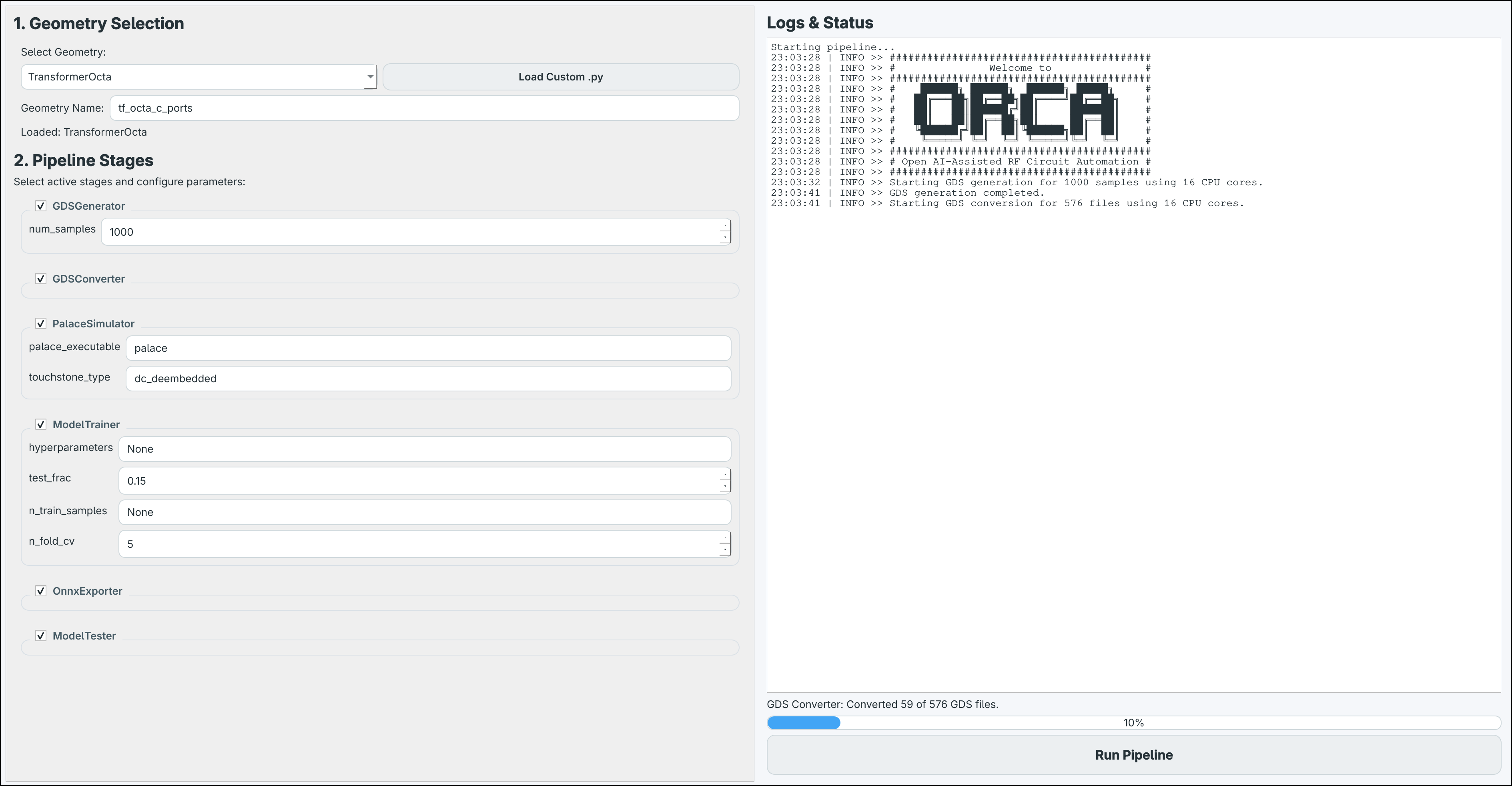
Key Features
- Parametric layout generation: sample thousands of buildable GDS variants from a small Python geometry class.
- Open-source full-wave EM simulation: S-parameters from Palace on a laptop, a workstation or a Slurm HPC cluster.
- Surrogate models: PyTorch models with automatic normalization and Optuna hyperparameter tuning.
- Portable ONNX export: the model runs with
onnxruntimealone; COBRA loads it directly. - Built-in validation: error statistics of the exported model on held-out geometries.
- GUI and scripting: click through the pipeline or drive it from Python.
- Model sharing: publish surrogates on the Hugging Face Hub for others to reuse.
- Technology-agnostic: bring your own layer stackup XML.
ORCA builds the model; COBRA uses it to optimize circuits without running EM simulations, and can call back into ORCA's geometry classes to verify a design with EM.
Installation
ORCA needs Python 3.11–3.13 and, for the EM simulations, Palace. It is published on PyPI as orca-rfic; the import package and the GUI command are called orca.
From PyPI, with pip or uv in a virtual environment:
pip install "orca-rfic[train]"      # full pipeline
pip install orca-rfic               # layout generation and simulation only, no PyTorch

uv pip install "orca-rfic[train]"   # the same with uv
From source with uv (recommended for development):
git clone https://github.com/DI-PASSIONATE/ORCA
cd ORCA
uv sync --extra train --extra cpu     # CPU-only PyTorch
uv sync --extra train --extra cu130   # or CUDA 13.0 (driver >= 580); cu126 for older drivers
uv sync                               # or simulation only, no PyTorch
Run ORCA with uv run orca or after source .venv/bin/activate. The installation guide also covers installing from source with pip; HPC_INSTALL.md shows an install on a Slurm cluster.
Quickstart
Start the GUI with:
orca
Or run the pipeline from a Python script:
import orca
from orca.geometry.presets import TransformerOcta

pipeline = orca.ORCA(
    [
        orca.GDSGenerator(num_samples=1000),
        orca.DRCChecker(),
        orca.GDSConverter(),
        orca.PalaceSimulator(palace_executable="palace"),
        orca.ModelTrainer(),
        orca.OnnxExporter(),
        orca.ModelTester(),
    ]
)

if __name__ == "__main__":  # required: worker processes re-import this script
    pipeline.run(geometry=TransformerOcta(), num_processes=16, seed=40)
Each stage can be left out, e.g. to retrain on existing simulation results. An interrupted run picks up where it stopped when started again. See the quickstart for every stage option.
Pipeline Stages
| Stage | Class | What it does |
|---|---|---|
| GDS generation | GDSGenerator |
Samples the geometry's parameters and draws a GDS layout for each |
| Design-rule check | DRCChecker |
Snaps layouts to the manufacturing grid and drops those that violate the IHP SG13G2 rules |
| GDS conversion | GDSConverter |
Meshes the layouts for Palace with gds2palace |
| EM simulation | PalaceSimulator |
Runs Palace and stores the S-parameters as Touchstone files |
| Model training | ModelTrainer |
Trains (and by default tunes) a PyTorch model from geometry and frequency to S-parameters |
| ONNX export | OnnxExporter |
Exports the model to a self-contained ONNX file for COBRA |
| Model testing | ModelTester |
Reports the model's error on held-out geometries |
The pipeline documentation describes each stage in detail.
Custom Geometries
To build a surrogate of your own component, write a BaseGeometry subclass that defines its parameters and draws its layout, and pair it with a layer stackup XML and a Palace simulation config (.simcfg). The custom classes guide walks through it; the bundled presets (InductorOcta, TransformerOcta) are reference implementations.
Sharing Models
Trained models can be published on the Hugging Face Hub with the orca-rfic tag, where COBRA and other users can find them. See Sharing Models on Hugging Face.
Documentation
The full documentation is at di-passionate.github.io/ORCA, including troubleshooting.
Cite This Work
If you use ORCA in your research, please cite our upcoming SBCCI 2026 paper (or use GitHub's Cite this repository button, backed by CITATION.cff):
@INPROCEEDINGS{2026_COBRA,
  author={Simone, Gianluca and Lurz, David and Grund, Martin and Schneider, Fabian and Loose, Michael and Breun, Sascha and Koch, Manuel and Weigel, Robert and Franchi, Norman},
  booktitle={2026 39th SBC/SBMicro/IEEE Symposium on Integrated Circuits and Systems Design (SBCCI)},
  title={{COBRA: An AI-Assisted Circuit-Level Optimizer for Open Source Based RFIC Design}},
  year={2026},
  organization={IEEE},
  keywords={artificial intelligence, design automation, EDA, neural network, open-source, optimization, Palace, radio frequency integrated circuit, surrogate model}
}
Acknowledgements
This work was supported by the Bundesministerium für Forschung, Technologie und Raumfahrt (BMFTR) under the DI-PASSIONATE project. We thank our colleagues in the LITES institute for their feedback and support during development. Special thanks to the open-source community for providing the tools and libraries that made this project possible, including but not limited to:
The authors gratefully acknowledge the scientific support and HPC resources provided by the Erlangen National High Performance Computing Center (NHR@FAU) of the Friedrich-Alexander-Universität Erlangen-Nürnberg (FAU). The hardware is partially funded by the German Research Foundation (DFG).

|
|
1 maintainer

Metadata
1 maintainer
Release files for orca-rfic 2.0.0
For a detailed explanation of source distributions (sdists) and built distributions (wheels), please see the package formats documentation.
Source distribution (sdist)
| File | Size | Uploaded | |
|---|---|---|---|
| orca_rfic-2.0.0.tar.gz | 160.2 kB | Details |
Built distribution (wheel)
| File | Interpreter | ABI | Platform | Reset |
|---|---|---|---|---|
| orca_rfic-2.0.0-py3-none-any.whl | Python 3 | none | any | Details |
Total release size: 332.6 kB
Release files / orca_rfic-2.0.0.tar.gz
| Download URL | orca_rfic-2.0.0.tar.gz |
|---|---|
| Size | 160.2 kB |
| Tags | Source |
|
SHA-256 checksum How to use checksums |
ca27cacc091d6f28c93f2ef90f39876197f3498d897ba1997b87673ead5ebde2
|
|
BLAKE2b-256 checksum How to use checksums |
f2f2b81889322615c732776ff922f0fa0e7ca0285a20b2052482a6fd14ad7ab8
|
| Upload date | |
|
Uploaded using Trusted Publishing? What is trusted publishing? |
Yes |
| Uploaded via |
uv/0.12.22 {"installer":{"name":"uv","version":"0.12.22","subcommand":["publish"]},"python":null,"implementation":{"name":null,"version":null},"distro":{"name":"Ubuntu","version":"24.04","id":"noble","libc":null},"system":{"name":null,"release":null},"cpu":null,"openssl_version":null,"setuptools_version":null,"rustc_version":null,"ci":true}
|
Release files / orca_rfic-2.0.0-py3-none-any.whl
| Download URL | orca_rfic-2.0.0-py3-none-any.whl |
|---|---|
| Size | 172.4 kB |
| Tags | Python 3 |
|
SHA-256 checksum How to use checksums |
2f18afae93c37a1170e2253da394a3c4595f19a350eba09802288fb5f28b4ba7
|
|
BLAKE2b-256 checksum How to use checksums |
3c89eed1518ac4a40262ca766bdd4480aad13bd7b9c1dc21273a7f1da72bd6fe
|
| Upload date | |
|
Uploaded using Trusted Publishing? What is trusted publishing? |
Yes |
| Uploaded via |
uv/0.12.22 {"installer":{"name":"uv","version":"0.12.22","subcommand":["publish"]},"python":null,"implementation":{"name":null,"version":null},"distro":{"name":"Ubuntu","version":"24.04","id":"noble","libc":null},"system":{"name":null,"release":null},"cpu":null,"openssl_version":null,"setuptools_version":null,"rustc_version":null,"ci":true}
|














