
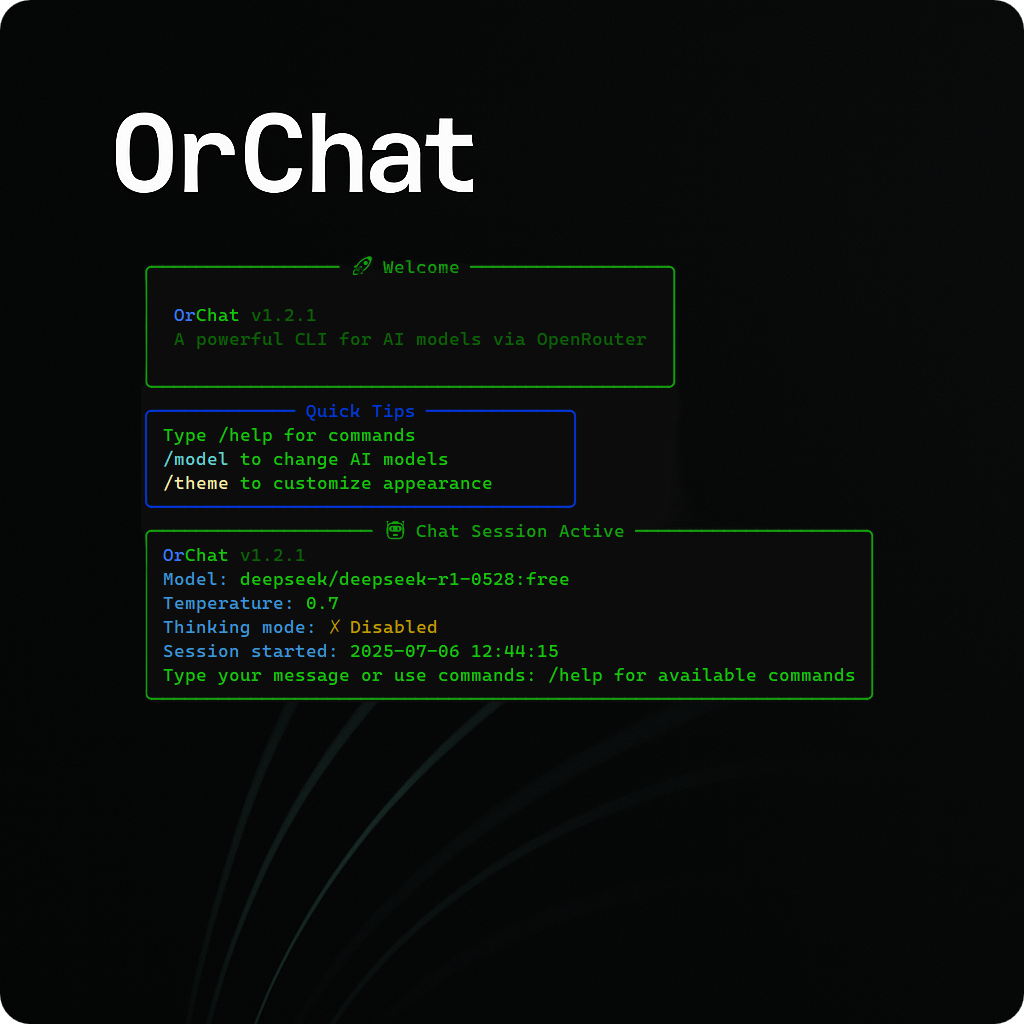
A powerful CLI for chatting with AI models through OpenRouter.

Project description
🤖 OrChat





🚀 Installation • ✨ Features • 💬 Chat Commands • 📁 File Attachment • 🧠 Thinking Mode • ⚙️ Configuration • 🔍 Troubleshooting • 🤝 Contributing
A powerful CLI for chatting with AI models through OpenRouter with streaming responses, token tracking, and extensive customization options.
✨ Features
🔗 Core Features
- Universal Model Access: Connect to any AI model available on OpenRouter with dynamic model retrieval
- Interactive Chat: Enjoy a smooth conversation experience with real-time streaming responses
- Rich Markdown Rendering: View formatted text, code blocks, tables and more directly in your terminal
- Performance Analytics: Track token usage, response times, and total cost for efficiency monitoring
- Command Auto-completion: Enhanced user experience with intelligent command suggestions and prompt history navigation
- Prompt History Navigation: Use ↑/↓ arrow keys to navigate through previous prompts and Ctrl+R for history search
- Pricing Display: Real-time pricing information displayed during active chat sessions
📎 File & Media Support
- Multimodal Support: Share images and various file types with compatible AI models
- Enhanced File Processing: Improved file attachment with better error handling and path support
- File Attachment Support: Share files of various types with the AI for analysis
🧠 Advanced Features
- Smart Thinking Mode: See the AI's reasoning process with compatible models
- Multiple Export Formats: Save conversations as Markdown, HTML, JSON, TXT, or PDF
- Smart Context Management: Automatically manages conversation history to stay within token limits
- Customizable Themes: Choose from different visual themes for your terminal
⌨️ Interactive Input Features
- Command History Navigation: Press ↑/↓ arrow keys to cycle through previous prompts and commands
- History Search: Use Ctrl+R to search through your prompt history with keywords
- Automatic Command Completion: Start typing "/" and command suggestions appear instantly - no Tab key needed!
- Auto-Suggest from History: Previous commands and prompts appear as grey suggestions as you type
- Intelligent Command Detection: Commands work anywhere in your message with
/attachand/upload
💡 How Auto-Completion Works:
- Type
/→ All available commands appear automatically - Type
/c→ Filters to commands starting with 'c' (clear, cls, clear-screen, etc.) - Type
/temp→ Shows/temperaturecommand - Type
/think→ Shows/thinkingand/thinking-modecommands - No Tab key required - completions appear as you type!
🚀 Installation
From PyPI (Recommended)
pip install orchat
# Run the application
orchat
From Source
git clone https://github.com/oop7/OrChat.git
pip install -r requirements.txt
python main.py
📋 Prerequisites
- Python 3.7 or higher
- An OpenRouter API key (get one at OpenRouter.ai)
- Required packages: in
requirements.txt
🏁 Getting Started
- Install OrChat using one of the methods above
- Run the setup wizard
- if you follow from source PyPI:
orchat --setup - if you follow from source method:
python main.py --setup
- if you follow from source PyPI:
- Enter your OpenRouter API key when prompted
- Select your preferred AI model and configure settings
- Start chatting!
🪛 Add-Ons
FZF fuzzy search (Enhanced Model Selection)
-
Install fzf and pyfzf
- Install pyfzf
pip install pyfzf
- Fzf can be downloaded from https://github.com/junegunn/fzf?tab=readme-ov-file#installation
- Install pyfzf
-
Ensure fzf is in your path
-
From now on, the model selection will use fzf for powerful fuzzy search and filtering capabilities!
Note: If fzf is not installed, OrChat will automatically fall back to standard model selection.
⚙️ Configuration
🔧 Configuration Methods
OrChat can be configured in multiple ways:
- Setup Wizard: Run
python main.py --setupfor interactive configuration - Config File: Edit the
config.inifile in the application directory - Environment Variables: Create a
.envfile with your configuration - System Environment Variables: Set environment variables directly in your system (recommended for security)
Enhanced Environment Support: OrChat now supports system/user environment variables, removing the strict requirement for .env files.
📄 Configuration Examples
Example .env file:
OPENROUTER_API_KEY=your_api_key_here
Example config.ini structure:
[API]
OPENROUTER_API_KEY = your_api_key_here

[SETTINGS]
MODEL = anthropic/claude-3-opus
TEMPERATURE = 0.7
SYSTEM_INSTRUCTIONS = You are a helpful AI assistant.
THEME = default
MAX_TOKENS = 8000
AUTOSAVE_INTERVAL = 300
STREAMING = True
THINKING_MODE = False
🖥️ Command-Line Options
--setup: Run the setup wizard--model MODEL: Specify the model to use (e.g.,--model "anthropic/claude-3-opus")--task {creative,coding,analysis,chat}: Optimize for a specific task type--image PATH: Analyze an image file
💬 Chat Commands
| Command | Description |
|---|---|
/help |
Show available commands |
/exit |
Exit the chat |
/quit |
Exit the chat |
/new |
Start a new conversation |
/clear |
Clear conversation history |
/cls or /clear-screen |
Clear the terminal screen |
/save [format] |
Save conversation (formats: md, html, json, txt, pdf) |
/model |
Change the AI model |
/temperature <0.0-2.0> |
Adjust temperature setting |
/system |
View or change system instructions |
/tokens |
Show token usage statistics |
/speed |
Show response time statistics |
/theme <theme> |
Change the color theme (default, dark, light, hacker) |
/thinking |
Show last AI thinking process |
/thinking-mode |
Toggle thinking mode on/off |
/attach or /upload |
Share a file with the AI (can be used anywhere in your message) |
/about |
Show information about OrChat |
/update |
Check for updates |
/settings |
View current settings |
📁 File Attachment
📎 Basic Usage
Share files with the AI for analysis using the enhanced attachment system:
/attach path/to/your/file.ext
/upload path/to/your/file.ext
✨ Enhanced Features
- Flexible Command Usage:
/uploadand/attachcan be used anywhere in your message, not just at the beginning - Quoted Path Support: Handles file paths with spaces using quotes (
/attach "C:\path with spaces\file.txt") - Better Error Handling: Improved error messages and usage examples
- File Preview: Shows file metadata and preview before processing
- Security Validation: Built-in file size and type validation (10MB limit)
📋 Supported File Types
- Images: JPG, PNG, GIF, WEBP, BMP (displayed visually with multimodal models)
- Code Files: Python, JavaScript, Java, C++, TypeScript, Swift, etc. (with syntax highlighting)
- Text Documents: TXT, MD, CSV (full content displayed)
- Data Files: JSON, XML (displayed with formatting)
- Web Files: HTML, CSS (formatted display)
- Archives: ZIP, TAR, GZ, RAR (basic metadata support)
🧠 Thinking Mode
🎯 Basic Usage
OrChat can display the AI's reasoning process with enhanced thinking mode:
/thinking-mode       # Toggle thinking mode on/off
/thinking            # Show the most recent thinking process
This feature allows you to see how the AI approached your question before giving its final answer. Auto Thinking Mode automatically enables this feature when you select models with reasoning support.
✨ Enhanced Features
- Improved Detection: Better extraction of thinking content from model responses
- Model Compatibility: Automatic handling of models that don't support thinking mode
- Visual Indicators: Clear status indicators showing if thinking mode is enabled
- Flexible Setup: Option to enable/disable during model selection
🎨 Themes
🎨 Available Themes
Change the visual appearance with the /theme command:
- default: Blue user, green assistant
- dark: Cyan user, magenta assistant
- light: Blue user, green assistant with lighter colors
- hacker: Matrix-inspired green text on black
📊 Token Management
📊 Smart Context Management
OrChat intelligently manages conversation context to keep within token limits:
- Automatically trims old messages when approaching limits
- Displays comprehensive token usage statistics including total tokens and cost tracking
- Shows real-time pricing information during active sessions
- Displays total cost tracking across conversations
- Allows manual clearing of context with
/clear
🔄 Updates
🔄 Version Management
Check for updates with the /update command to see if a newer version is available.
🔍 Troubleshooting
🔍 Common Issues & Solutions
- API Key Issues: Ensure your OpenRouter API key is correctly set in config.ini, .env file, or system environment variables. OrChat will prompt for re-entry if an incorrect key is detected
- Insufficient Account Credit: If you receive a 402 error, check your OpenRouter account balance and add funds as needed
- File Path Problems: When using
/attachor/upload, use quotes for paths with spaces and ensure correct path format for your OS - Model Compatibility: Some features like thinking mode only work with specific models
- Command Usage: Remember that
/uploadand/attachcan be used anywhere in your message for flexibility
📝 License
This project is licensed under the MIT License - see the LICENSE file for details.
🤝 Contributing
Contributions are welcome! Feel free to open issues or submit pull requests.
🙏 Acknowledgments
🙏 Special Thanks
- OpenRouter for providing unified API access to AI models
- Rich for the beautiful terminal interface
- All contributors and users who provide feedback and help improve OrChat
Release history Release notifications | RSS feed


Download files
Download the file for your platform. If you're not sure which to choose, learn more about installing packages.
Source Distribution
Built Distribution
Filter files by name, interpreter, ABI, and platform.
If you're not sure about the file name format, learn more about wheel file names.
Copy a direct link to the current filters
File details
Details for the file orchat-1.2.9.tar.gz.
File metadata
- Download URL: orchat-1.2.9.tar.gz
- Upload date:
- Size: 38.0 kB
- Tags: Source
- Uploaded using Trusted Publishing? No
- Uploaded via: twine/6.1.0 CPython/3.13.3
File hashes
| Algorithm | Hash digest | |
|---|---|---|
| SHA256 |
43986a8540e3e00b448a8bb5d0cc07160fa0e9c4aa19c8a04352a52f701cf50e
|
|
| MD5 |
b737f9410704b53361747f2fc6f65300
|
|
| BLAKE2b-256 |
8ed8cfd5207f3fdaef5ca311db41ee5b5d3627f8be95ead5a5b06c79d0eeb889
|
File details
Details for the file orchat-1.2.9-py3-none-any.whl.
File metadata
- Download URL: orchat-1.2.9-py3-none-any.whl
- Upload date:
- Size: 33.2 kB
- Tags: Python 3
- Uploaded using Trusted Publishing? No
- Uploaded via: twine/6.1.0 CPython/3.13.3
File hashes
| Algorithm | Hash digest | |
|---|---|---|
| SHA256 |
4176458526f517d4b8d0fd17ac1e66d527d77e630e54a4d6fe0d9dd44430a28d
|
|
| MD5 |
3a17924ae7fba9482e028900ff518e53
|
|
| BLAKE2b-256 |
8cb9f22fb09cdf94db337b0a25e3045a410b0b3676c72ccc9f80c4e773145f5e
|






