
🎻 Agent Orchestra
像 Kubernetes 管理 Pod 一样管理 AI Agent。
声明式 YAML 定义流水线 → Temporal 驱动执行 → MCP 通信 Agent → Prometheus/OTel 可观测。







一句话说清楚
| 你要做的事 | 用什么 |
|---|---|
| 搭一个聊天机器人 / RAG 问答 | Dify |
| 编排 LLM 调用链(prompt → tool → prompt) | LangChain / LangGraph |
| 管理一支 AI Agent 团队完成工程任务 | Orchestra 🎻 |
Orchestra 不是 chatbot builder,是 AI Agent 团队的 CI/CD 引擎。
一分钟看懂
# game-dev.pipeline.yaml
apiVersion: orchestra.io/v1
kind: Pipeline
metadata:
  name: game-dev
spec:
  agents:
    walnut:  {role: developer,  capabilities: [godot, gdscript]}
    chestnut:{role: tester,     capabilities: [pytest, coverage]}
    coconut: {role: ci_engineer, capabilities: [docker, deploy]}

  pipeline:
    stages:
      - name: code
        agent: walnut
        input: "$.params.task"
        output: "$.code.patch"

      - name: test
        dependsOn: [code]
        agent: chestnut
        input: "$.code.patch"
        output: "$.test.result"

      - name: deploy
        dependsOn: [test]
        agent: coconut
        input: "$.code.patch"
        output: "$.deploy.url"
orchestra submit game-dev.pipeline.yaml -p task="修复 BUG-041:字体丢失"
orchestra status --watch
核桃写代码 → 栗子跑测试 → 椰子部署,一条命令,自动串起来。
流水线执行流程
flowchart LR
    A["📋 design-review<br/>blueberry"] --> B["💻 code<br/>walnut"]
    A --> C["🎨 art<br/>cherry"]
    B --> D["🧪 test<br/>almond"]
    C --> D
    D --> |"pass"| E["🖥️ ui-verify<br/>strawberry+grape"]
    D --> |"fail"| F["🔍 diagnose<br/>blueberry"]
    F --> G["🔧 fix-each<br/>dynamic × N"]
    G --> D
    E --> H["✋ deploy-approval<br/>人工审批"]
    H --> I["🚀 deploy<br/>coconut"]
condition 分支 · parallel fan-out · dynamic for_each · 人工审批 · 失败补偿
终端演示
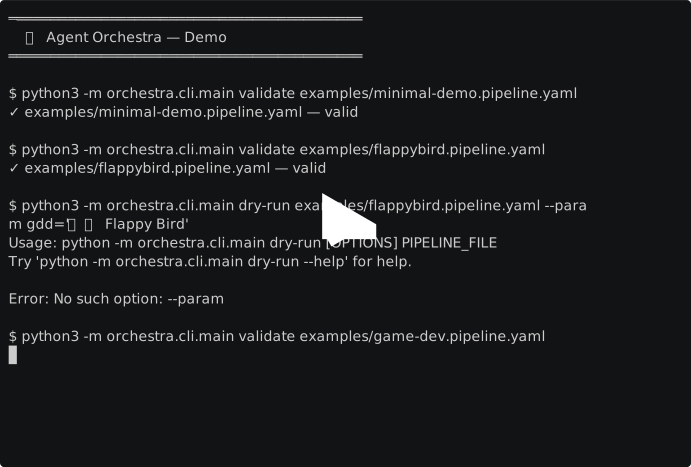
$ orchestra validate examples/flappybird.pipeline.yaml
✓ 校验通过 (0 errors, 0 warnings)

$ orchestra dry-run examples/flappybird.pipeline.yaml --param gdd="复刻 Flappy Bird"
  Topo: [design-review, code, art, test, diagnose, fix-each, ui-verify, deploy-approval, deploy]
  Wave 1: [design-review]
  Wave 2: [code, art]
  Wave 3: [test]
  Wave 4: [diagnose, ui-verify]
  Wave 5: [deploy-approval]
  Wave 6: [deploy]

$ orchestra submit examples/flappybird.pipeline.yaml --param gdd="..."
✓ submitted
  workflow_id : flappybird-dev-3f7a2b1c
  run_id      : 3f7a2b1c
  task_queue  : agent-blueberry

$ orchestra status --watch
  phase=Succeeded  stage=deploy  progress=100%  eta=—
解决什么痛点
| 手工编排的痛 | Orchestra 怎么解决 |
|---|---|
| 依赖手工排序、容易出错 | 声明式 YAML DAG,自动解析拓扑 |
| Agent 宕机不知道 | 15s 心跳 + 三层探针,自动故障转移 |
| 失败靠人手动重试 | 指数退避自动重试 + Saga 补偿 |
| 没有执行历史 | Temporal Event History 全量审计 |
| 多人并发抢占一个 Agent | Task Queue 隔离 + maxConcurrency 限流 |
| 流程没法版本化 | Pipeline YAML 纳入 Git 版本控制 |
与 Dify / LangGraph / CrewAI 的差异
| 维度 | Dify | LangGraph | CrewAI | Orchestra |
|---|---|---|---|---|
| 定位 | LLM 应用平台 | LLM 图状态机 | Agent 角色协作 | Agent 流水线引擎 |
| 编排粒度 | LLM 调用 | LLM 调用 + 状态 | Agent + Task | Agent + Stage + DAG |
| 执行引擎 | 自研轻量 | 单进程 | 单进程 | Temporal(工业级) |
| 断点续传 | ❌ | 有限 | ❌ | ✅ Event History Replay |
| Saga 补偿 | ❌ | ❌ | ❌ | ✅ 部署失败自动回滚 |
| 多 Agent 并行 | ❌ | ❌ | 有限 | ✅ DAG 扇出 + 投票聚合 |
| 人工审批节点 | ❌ | ❌ | ❌ | ✅ any/all/quorum |
| Serverless 友好 | ❌ | ✅ | ✅ | ✅ Worker 按需扩缩 |
| 代码量 | 40万+ 行 | ~3 万行 | ~2 万行 | ~1 万行 |
架构
flowchart TB
    subgraph Config["配置层"]
        YAML["pipeline.yaml<br/>声明式 DAG 定义"]
    end

    subgraph Orchestration["编排层 — Temporal Server"]
        WF["PipelineWorkflow<br/>DAG 调度 · Signal · Update"]
        ACT["Activities<br/>心跳 · 重试 · 幂等"]
        SAGA["Saga 补偿"]
    end

    subgraph Execution["执行层 — Agent Workers"]
        W1["🥜 walnut<br/>developer"]
        W2["🧪 almond<br/>tester"]
        W3["🌰 chestnut<br/>developer"]
        W4["🥥 coconut<br/>ci_engineer"]
        W5["🍒 cherry<br/>designer"]
        W6["🥭 mango<br/>developer"]
        W7["🍓 strawberry<br/>tester"]
        W8["🫐 blueberry<br/>chat"]
        W9["🍇 grape<br/>standby"]
    end

    subgraph Observability["可观测层"]
        PROM["Prometheus<br/>指标"]
        GRAF["Grafana<br/>看板"]
        OTEL["OpenTelemetry<br/>追踪"]
        AUDIT["审计日志<br/>SQLite"]
    end

    YAML --> WF
    WF --> ACT
    ACT --> W1 & W2 & W3 & W4 & W5 & W6 & W7 & W8 & W9
    ACT --> SAGA
    ACT -.-> PROM & OTEL & AUDIT
    PROM --> GRAF
四层架构对标 Kubernetes 控制面/数据面分离。编排层用 Temporal 做持久化执行内核,Agent 通过 MCP 协议零侵入接入。
技术选型
| 层 | 选型 | 原因 |
|---|---|---|
| 编排内核 | Temporal | 持久化 Workflow、Replay、Signal、Saga |
| Agent 通信 | MCP(Model Context Protocol) | 标准协议,与 Agent 实现解耦 |
| 流水线定义 | 自研 YAML DSL | 参考 K8s CRD + LangGraph 节点/边模型 |
| 可观测性 | Prometheus + Grafana + OTel | 工业标准,无需自建 |
| 持久化 | SQLite(起步)/ PostgreSQL(生产) | Temporal 自带,零配置 |
K8s 启发的设计
| K8s 概念 | Orchestra 对应 |
|---|---|
| Pod 声明式定义 | agents: YAML |
| Liveness/Readiness Probe | Agent 心跳监控 + 健康检查 |
| Service 发现 | Agent 能力路由(agentSelector) |
| Job | Pipeline 提交执行 |
| CronJob | Schedule 定时触发 |
| ResourceQuota | Agent maxConcurrency |
| Operator + CRD | Pipeline / PipelineRun / AgentProfileSet |
快速开始
方式 A:Demo 模式(推荐首次体验,1 分钟跑通)
无需任何外部 Agent。 仓库自带 demo agent,docker compose up 即可体验完整流水线。
# 1. 启动 Demo 环境(Temporal + 内置 Demo Agent + Worker)
docker compose -f deploy/docker-compose.demo.yml up -d

# 2. 安装 CLI
pip install -e .

# 3. 提交 Demo 流水线
orchestra submit examples/minimal-demo.pipeline.yaml --param task="hello world"

# 4. 查看结果
orchestra status --watch
open http://localhost:8080   # Temporal UI
方式 B:生成你自己的流水线
# 交互式生成配置(询问项目名称、Agent、Stage)
orchestra init

# 验证并运行
orchestra validate my-pipeline.pipeline.yaml
orchestra dry-run  my-pipeline.pipeline.yaml
orchestra submit   my-pipeline.pipeline.yaml --values values.yaml
方式 C:连接真实 Agent(生产部署)
# 1. 编辑 config/profiles.yaml,填入你的 Agent MCP endpoint
# 2. 启动全套服务栈
docker compose -f deploy/docker-compose.yml up -d

# 3. 提交
orchestra submit examples/game-dev.pipeline.yaml --param gdd="..."
面板地址
| 面板 | Demo | 生产 |
|---|---|---|
| Temporal UI | http://localhost:8080 | 同 |
| Grafana | — | http://localhost:3000 |
| Prometheus | — | http://localhost:9090 |
Pipeline YAML 速览
基础 DAG
stages:
  - name: design
    agent: mango
    output: "$.gdd"
  - name: code
    agent: walnut
    dependsOn: [design]
    input: "$.gdd.task"
    output: "$.code.patch"
  - name: test
    agent: chestnut
    dependsOn: [code]
    input: "$.code.patch"
并行 + 投票聚合
- name: ui-verify
  agents: [strawberry, grape]
  aggregateStrategy: vote       # all | any | first | merge | vote | quorum
条件分支
- name: fix
  agent: walnut
  dependsOn: [test]
  condition: 'test.result == "fail"'    # false → SKIPPED,不阻塞后续
人工审批
- name: deploy-approval
  dependsOn: [ci-gate]
  approval:
    approvers: [ou_alice]
    policy: any
    timeout: 1h
    onTimeout: reject
动态展开(for_each)
- name: fix-each
  dependsOn: [diagnose]
  dynamic:
    generator: for_each
    input: "$.diagnose.bugs"    # 按 Bug 列表动态生成子 Stage
    maxParallel: 3
    template:
      name: "fix-bug-{{ item.id }}"
      agent: walnut
项目结构
docs/          需求 / 设计 / 架构 / 使用文档(共 4 份,3 万+ 字)
schema/        JSON Schema(pipeline / pipeline-run / agent-profile)
config/        Agent profiles + capabilities 词表
examples/      示例流水线(minimal-demo / game-dev / flappybird / parameterized)
deploy/        Docker Compose(demo / 生产)+ Prometheus + Grafana + OTel
scripts/       demo_agent.py(内置 mock Agent,开箱即用)
src/
  domain/      领域模型(Agent / Pipeline / Stage / State / Errors)
  schema/      YAML 解析 / JSONPath / DAG 拓扑 / CEL 表达式 / 模板
  workflows/   PipelineWorkflow(Temporal Workflow 实现)
  activities/  Agent Task / Artifact / Compensation / Notification
  adapters/    Agent 通信适配器(MCP / Mock;Protocol 可扩展)
  state/       幂等键 / Artifact 存储
  observability/ 日志 / 指标 / 追踪 / 审计
  worker/      Worker 进程 + 生命周期 + 注册
  cli/         CLI 命令(validate / submit / status / approve / schedule)
tests/         单元 / 集成 / Replay / Chaos / Load
runbook/       故障处置 SOP
Agent 管理
内置 9 个 Agent Profile,按能力路由:
| Agent | 角色 | 能力 | 模型 |
|---|---|---|---|
| 🥜 核桃 walnut | developer | godot, gdscript, git | deepseek-v4-pro |
| 🧪 杏仁 almond | tester | pytest, coverage, playwright | deepseek-v4-pro |
| 🌰 栗子 chestnut | developer | python, web, fastapi | deepseek-v4-pro |
| 🥥 椰子 coconut | ci_engineer | docker, deploy, k8s | deepseek-v4-pro |
| 🍒 樱桃 cherry | designer | ui-design, figma, asset-export | deepseek-v4-pro |
| 🥭 芒果 mango | developer | godot, shader, gameplay | deepseek-v4-pro |
| 🍓 草莓 strawberry | tester | playwright, ui-test, e2e | deepseek-v4-pro |
| 🫐 蓝莓 blueberry | chat | summarize, translate, analyze | deepseek-v4-pro |
| 🍇 葡萄 grape | standby | generic, fallback | deepseek-v4-pro |
实现进度
| Phase | 内容 | 状态 |
|---|---|---|
| P0 | domain 类型契约 | ✅ |
| P1 | schema 解析 + DAG 校验 | ✅ |
| P2 | state / adapters / observability | ✅ |
| P3 | activities(agent_task / artifact / compensation) | ✅ |
| P4 | workflows(signal / query / update / condition / parallel / dynamic / loop) | ✅ |
| P5 | worker(lifecycle / registry / main) | ✅ |
| P6 | CLI(19 个子命令) | ✅ |
| P7 | 部署联调 + Replay fixture | ✅ |
108 个测试,~10,500 行 Python。详细变更见
CHANGELOG.md。
社区
- 安全漏洞报告
- 行为准则
- 贡献指南
- 讨论区:GitHub Issues
开发
阅读 CLAUDE.md 了解项目宪法(确定性铁律 / 幂等铁律 / 测试策略)。
# 安装开发依赖
pip install -e ".[dev]"

# 运行测试
pytest
pytest -m "not integration"  # 仅单元测试

# 代码检查
ruff check src/ tests/
mypy src/
License
Apache 2.0 © Agent Orchestra Contributors
1 maintainer

Metadata
1 maintainer
Release files for orchestra-agent 0.1.0
For a detailed explanation of source distributions (sdists) and built distributions (wheels), please see the package formats documentation.
Source distribution (sdist)
| File | Size | Uploaded | Provenance | Actions |
|---|---|---|---|---|
| orchestra_agent-0.1.0.tar.gz | 200.9 kB | Without provenance | Details for orchestra_agent-0.1.0.tar.gz |
Built distribution (wheel)
| File | Interpreter | ABI | Platform | Actions Reset |
|---|---|---|---|---|
| orchestra_agent-0.1.0-py3-none-any.whl | Python 3 | none | any | Details for orchestra_agent-0.1.0-py3-none-any.whl |
Total release size: 327.6 kB
Release files / orchestra_agent-0.1.0.tar.gz
| Download URL | orchestra_agent-0.1.0.tar.gz |
|---|---|
| Size | 200.9 kB |
| Tags | Source |
|
SHA-256 checksum How to use checksums |
ab41b12985c725bbb87511e273d943d8db84bd072ace6ea16f74f227dd1aea4b
|
|
BLAKE2b-256 checksum How to use checksums |
536d66eb5f9166e17443bf0b82e66c4bb96a6068ce950faddc30aba358495350
|
| Upload date | |
|
Uploaded using Trusted Publishing? What is trusted publishing? |
No |
| Uploaded via |
twine/6.2.0 CPython/3.10.12
|
Release files / orchestra_agent-0.1.0-py3-none-any.whl
| Download URL | orchestra_agent-0.1.0-py3-none-any.whl |
|---|---|
| Size | 126.6 kB |
| Tags | Python 3 |
|
SHA-256 checksum How to use checksums |
bb01b1c7701ec752cdc0a65ee4c3f635f10d6baeb11634a629d7ba153108ae67
|
|
BLAKE2b-256 checksum How to use checksums |
7941095e02145ea5e21d2c750ee96b1f800ff56fc5164823e90aec7a1f1ad701
|
| Upload date | |
|
Uploaded using Trusted Publishing? What is trusted publishing? |
No |
| Uploaded via |
twine/6.2.0 CPython/3.10.12
|
Security for orchestra-agent 0.1.0
Provenance
Provenance describes where a file came from. On PyPI, provenance is shared via attestations, which provide a verifiable record of the build or publishing details. View details, limitations and caveats.
No provenance found
None of the files in this release were uploaded with provenance metadata.
A note on package security
PyPI is a repository for distributing packages, not a service for auditing them. While third-party security researchers and our staff do their best to detect and remove malicious packages, PyPI cannot guarantee the quality, security or suitability of any given package.
To learn more about protecting yourself from malicious actors, visit our package security documentation.













