
Orcho — Production Harness for Agentic Software Delivery








Orcho is a production harness and control plane for agentic software delivery.
Run one task. Watch Orcho plan, implement, reject false-ready work, repair it, and prove what is ready to deliver.
📖 Documentation: docs.orcho.dev

Three commands to the first result: install, bootstrap, run. The recorded pipeline is deterministic mock mode using the real CLI and lifecycle; output is trimmed for pace. Interactive version with pause and scrub: docs.orcho.dev.
Use the coding agents you already trust. They remain the workers; Orcho owns the delivery protocol around them: plan → implementation → review → repair → final acceptance.
It is built for work that needs more structure than a single interactive agent session:
- one task or one coordinated change across several repositories;
- explicit phase topology through profiles;
- human/agent review gates with resume and retry;
- durable run state: plans, diffs, findings, metrics, evidence;
- CLI, SDK, and MCP control surfaces.
Which model runs which phase is fully configurable.
Default: Claude (PLAN / BUILD / FIX) + Codex (REVIEW / QA).
Assign registered runtimes such as Claude, a Claude-compatible GLM wrapper,
Codex, or Gemini to any phase via env vars, profiles, or config.local.json.
No engine fork is required for project-specific context. Orcho starts with a
safe generic fallback. In an interactive terminal, workspace init offers a
default-no choice to create starter project plugin-configs for the projects it
registers. Those candidates give Orcho explicit architecture context, file
hints, and a starting verification policy; review them against repository
evidence before relying on them. Non-interactive and dry-run init stay
template-only and never write project plugins.
Quick start — your existing repository
With Python 3.12+, pipx, and one supported coding-agent CLI on PATH,
install Orcho once and initialise it from inside the repository you already
have:
pipx install orcho

cd ~/www/my-project
orcho workspace init
orcho run --mock --task "Describe and implement one small change"
orcho status
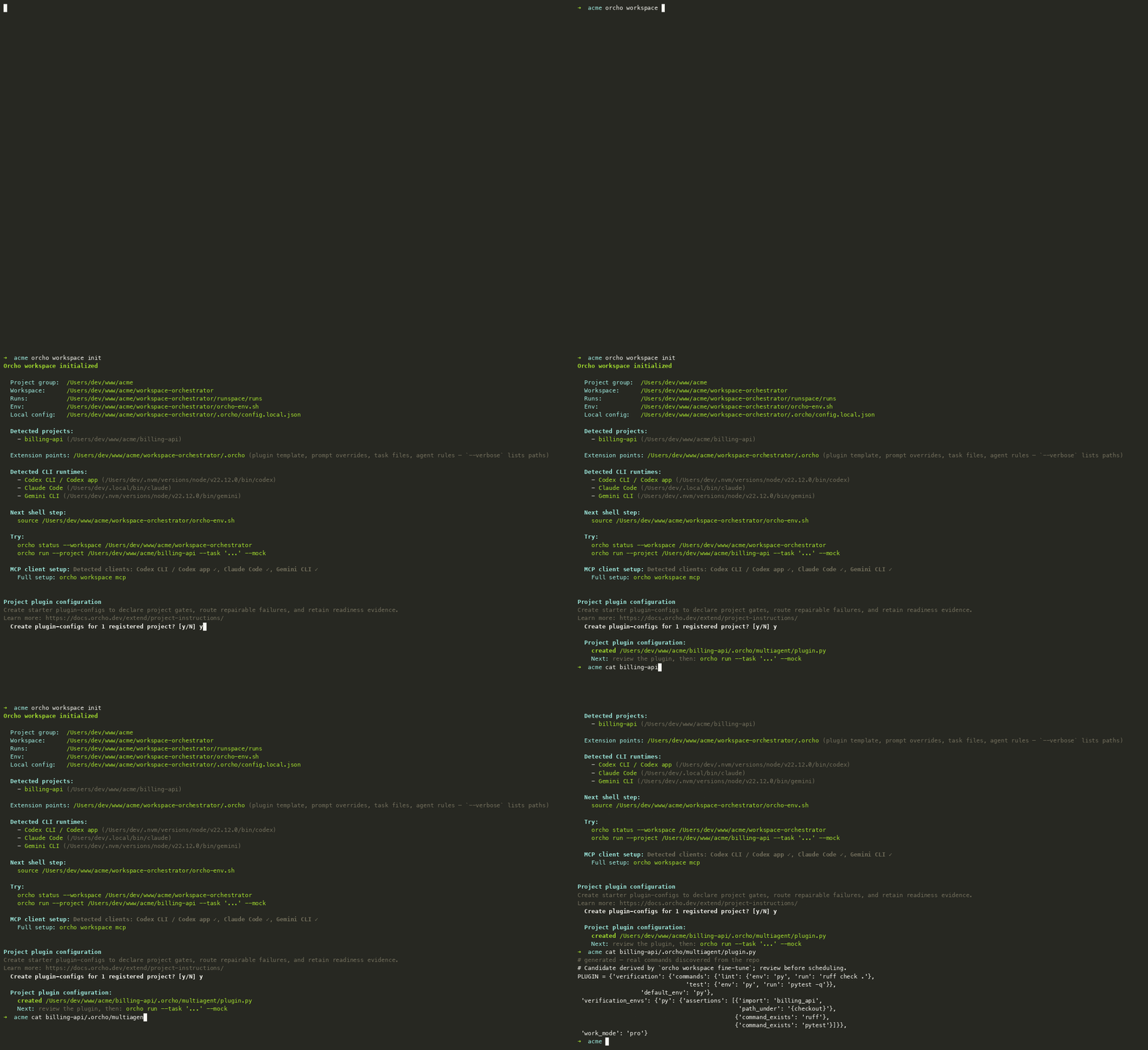
workspace init does not move or copy the repository. It registers the
canonical project path and stores Orcho's control state in an external managed
workspace. An eligible interactive terminal may separately offer an explicit
project-plugin write; non-interactive and dry-run init do not write project
plugins. Later CLI commands resolve the workspace from the current project
directory; no --project flag, environment script, or dedicated parent folder
is required.
To print the complete, read-only MCP client setup for that workspace, run:
orcho workspace mcp
The mock run exercises the delivery pipeline without calling a model. For a
real run, remove --mock and make sure at least one supported coding-agent CLI
is available on PATH.
Detailed walkthrough: Getting started
Next step — a shared product workspace
The in-place flow above is the fastest way to start. For a long-lived product, especially one split across repositories such as a backend and frontend, the recommended second step is to keep the related repositories under one intentional root and place the Orcho workspace there too:
~/work/my-product/
├── backend/
├── frontend/
└── workspace-orchestrator/  # created by Orcho
If the repositories already share a parent, use it. If they do not, reorganise them when that is practical; Orcho still accepts absolute paths, so this layout is a best practice rather than a requirement.
Initialise the product root:
orcho workspace init ~/work/my-product
Then either run commands from ~/work/my-product, where Orcho discovers the
workspace automatically, or activate it once in a Unix shell and run from any
directory:
source ~/work/my-product/workspace-orchestrator/orcho-env.sh
This gives mono-project and cross-project runs one place for aliases, policy, history, evidence, and MCP configuration. Cross-project work can then name the registered repositories explicitly:
orcho cross \
  --task "Change the API contract and update the frontend" \
  --projects backend frontend
workspace init registers the directory names as aliases, so repeating their
absolute paths is unnecessary. --projects remains explicit because one
workspace may contain more repositories than a particular change should touch.
See Connecting your project for the complete shared-workspace setup and configuration precedence.
Install
orcho is the native CLI distribution — it installs the core CLI and the
MCP server (orcho-mcp). The recommended path is pipx, which keeps the CLI
isolated from any project environment. Pick your OS below, or jump to the
OS-agnostic Docker / direct engine
paths.
Prerequisites on every OS: Python 3.12+, and for real (non---mock) runs at
least one code-agent CLI (claude, codex, or gemini) available to Orcho.
claude-glm is an Orcho runtime identity that launches the installed plain
claude CLI with its GLM-compatible environment; it is not another executable
to install. See the Claude-compatible GLM guide.
pipx ensurepathupdatesPATHfor future shells, not the one you run it in. So afterensurepathyou must open a new terminal beforepipx(and the installedorcho) are onPATH— this trips up first-time Windows setups in particular. Each block below marks exactly where to reopen the shell.
macOS
brew install pipx        # skip if pipx is already installed
pipx ensurepath
# ↻ reopen your terminal so the installed `orcho` is on PATH:
pipx install orcho
orcho --help
Linux
python3 -m pip install --user pipx   # or: sudo apt install pipx / sudo dnf install pipx
python3 -m pipx ensurepath
# ↻ reopen your terminal so `pipx` (and later `orcho`) are on PATH:
pipx install orcho
orcho --help
Windows
Native Windows is supported and exercised in CI. Install Python 3.12+ and Git for Windows first, then, in PowerShell:
py -m pip install --user pipx
py -m pipx ensurepath
# ↻ IMPORTANT: close this window and open a NEW PowerShell now — `ensurepath`
#   only updates PATH for new shells, so `pipx` is not found until you reopen.
pipx install orcho
orcho --help
Prefer a Unix shell? Install into WSL2 using the Linux steps above. Full Windows notes — agent-CLI paths, WSL2 layout, and pipe-based output streaming — are in docs/expert/05_windows.md.
Docker
OS-agnostic. Use Docker to try Orcho without installing its Python package or agent CLIs on the host:
docker pull ghcr.io/symphos-ai/orcho
alias orcho='docker run --rm -it \
  -v "$PWD":/workspace \
  -v ~/.orcho-auth:/agent-auth:ro \
  ghcr.io/symphos-ai/orcho orcho'

orcho run --project /workspace --task "Add input validation to the login endpoint."
The image includes the core CLI and MCP server. See
orcho Docker docs
for credential bootstrap, MCP stdio setup, and custom project toolchains.
Direct engine dependency
OS-agnostic. Use pip when you intentionally want orcho-core in the active
virtualenv, CI image, devcontainer, or custom image:
python -m pip install orcho-core
The orcho distribution depends on orcho-core; most CLI users should start
with orcho, while integrators can depend on orcho-core directly. The
orcho[mcp]/orcho[all] extras remain as no-op back-compat aliases.
Upgrading
orcho update detects the installer that owns the current environment — pipx,
uv tool, pip in a virtualenv, or plain pip — and upgrades through it:
orcho update            # upgrade via the detected install manager
orcho update --dry-run  # report the install and command, change nothing
Editable installs and source checkouts are reported rather than upgraded: the
checkout is the upgrade unit there, so update it with git pull.
For source-checkout setup, tests, and contribution workflow, see CONTRIBUTING.md.
Try the golden mock demo
The fastest zero-API proof is the single-project CLI demo. It creates a disposable git-backed fixture, runs the full mock pipeline, rejects one false-ready implementation, repairs it, and writes the final evidence.
For an installed CLI, use the packaged demo bootstrap:
orcho demos bootstrap golden-api
orcho demos install golden-api is accepted as the same operation.
From an existing source checkout, run the shell bootstrap script directly:
examples/scripts/bootstrap_demo_1a.sh
Do not clone this repository next to a pipx install orcho only to obtain the
demo assets; that creates two Orcho copies on the machine and makes it too easy
to confuse the installed CLI with source-checkout code.
Then paste the printed orcho run ... --mock command and inspect:
orcho evidence --workspace /tmp/orcho_demo_1a/workspace-orchestrator
orcho status --workspace /tmp/orcho_demo_1a/workspace-orchestrator
orcho diff <run-id> --stat --workspace /tmp/orcho_demo_1a/workspace-orchestrator
Full walkthrough: docs/demos/demo-1a-single-project-cli.md. For QA, release smokes, SDK checks, and repeatable recordings, see the deterministic mock harness guide.
Go deeper
The getting-started guide covers platform prerequisites, MCP client setup, real provider runs, evidence inspection, and the optional shared-root layout for intentional cross-project work.
How it works
Task
  → Claude  [PLAN]              writes the implementation plan
  → Codex   [validate_plan]     audits the plan
  → Claude  [BUILD]             implements the code
  → Codex   [REVIEW]            reviews the diff
  → Claude  [FIX]               fixes the findings
  → Codex   [final_acceptance]  final verdict
Core commands
# One project
cd ~/my-project
orcho run --task "Add input validation to /api/login"

# Several projects at once
orcho cross --task "Add rate limiting: API + client" \
            --projects api:~/api client:~/client

# No API calls (test)
orcho run --mock --task "..." --project ~/my-project

# Plan only (no code)
orcho run --profile planning --task "..." --project ~/my-project

# Resume an interrupted run
orcho run --resume 20260503_104135

# Status, history, metrics
orcho status | orcho history | orcho metrics

# Upgrade via the manager that installed Orcho
orcho update
Choose generic mode or a starter project plugin
After registering one or more projects, an eligible interactive workspace init explains the benefits and asks one default-no question before creating
starter plugin-configs. The candidates are derived from repository markers, but
they are not a finished project contract. Declining, end-of-input, or an
interrupted prompt keeps generic mode and leaves every project tree unchanged.
--no-interactive, non-TTY input, and --dry-run do not ask or create project
plugins.
Generic mode is sufficient for the first smoke run. If you opt in, init writes
the candidate to your-project/.orcho/multiagent/plugin.py; an existing file,
directory, or symlink is reported as skipped and is never replaced. You can
also author that file yourself. In either case, merge the generated agent rules
into the project's root instructions and complete the configuration from facts
found in the repository:
If the project already has tests, linting, build checks, and CI, do not invent another quality system. Reuse those project-native commands in the plugin. CI remains the independent repository gate; the plugin lets Orcho select and run the relevant proof inside the task lifecycle, route a fixable failure back to repair, and attach durable receipts to readiness before delivery. It also keeps broad checks out of task prose, where planning and implementation agents can otherwise run them redundantly.
PLUGIN = {
    "name": "My Project",
    "language": "Python 3.12",
    "architecture": "REST API. Routes: app/routes/, services: app/services/.",
    "file_hints": ["app/routes/", "app/services/", "tests/"],
    "verification_envs": {"project": {"python": "python"}},
    "verification": {
        "default_env": "project",
        "commands": {"lint": {"run": ["python", "-m", "ruff", "check", "."], "cost": "fast"}},
        "gate_sets": {"hygiene": {"commands": ["lint"], "default_policy": "require"}},
        "selection": [{"always": ["hygiene"]}],
        "schedule": [{"after_phase": "implement", "gate_sets": ["hygiene"], "action": "repair_loop"}],
    },
}
This declares a command, selects it, gives it a scheduled identity, lets Orcho
execute it, records an immutable receipt, and uses that receipt for readiness.
Cost is evidence metadata: fast is bounded deterministic local feedback,
moderate needs more setup or time, slow is broad or expensive, and
unknown has no reliable predictable cost evidence. It never shortcuts
selection, execution, policy, or action. See the practical scheduled
verification guide. For worked
Python, PHP/Docker, and TypeScript/browser portfolios, see the public
quality gate strategy.
Without a configured project plugin, Orcho still runs, but it falls back to
generic context and has no project-owned scheduled verification contract.
For the full workflow—including read-only fine-tune suggestions,
agent-assisted repository discovery, and the engineer approval boundary—see
Project plugin configuration.
Package layout
orcho-core/
├── cli/                            ← CLI facade (orcho run / cross / status…)
├── sdk/                            ← typed headless API for tools and embedders
├── pipeline/
│   ├── project_orchestrator.py     ← single-project pipeline
│   ├── cross_project/              ← cross-project planning, dispatch, gates
│   ├── runtime/                    ← profiles, steps, state, runner
│   ├── prompts/                    ← composable prompt parts and contracts
│   ├── control/                    ← handoff, resume, operator decisions
│   ├── engine/                     ← sessions, logging, worktrees, run diff
│   ├── evidence/                   ← evidence bundle and renderers
│   ├── profiles/                   ← profile loading and validation
│   ├── sandbox/                    ← command isolation backends
│   ├── skills/                     ← skill discovery and injection
│   ├── plugins.py                  ← PluginConfig + load_plugin()
│   └── checkpoint.py               ← SQLite store (--resume)
├── core/
│   ├── _prompts/                   ← core prompt templates
│   ├── _config/                    ← packaged defaults
│   ├── contracts/                  ← plan/review/release schemas
│   ├── infra/                      ← config, platform, binary discovery
│   ├── observability/              ← logging, metrics, trace
│   ├── io/                         ← retry, git helpers, prompt loader
│   └── context/                    ← codemap builder (optional)
├── agents/                         ← runtimes, registry, stream parsers
└── tests/                          ← unit, integration, acceptance, SDK contract tests
Documentation
The user-facing portal is docs.orcho.dev — start there.
The in-repo docs below are the contributor & deep reference: the canonical engineering contracts the portal links into. Ordered from general to specific.
| Level | For whom | Link |
|---|---|---|
| User | You want to use the system | docs/user/ |
| Expert | You tune prompts, plugins, and models | docs/expert/ |
| Integrator | You author profiles, gates, and adapters | docs/guides/ |
| Reference | Exact schemas and registries | docs/reference/ |
| Creator | You develop the engine itself | docs/creator/ |
Full index: docs/README.md.
Testing
pytest tests/ -q
pytest tests/unit/ -v
pytest tests/integration/ -v
Tests must not call real models. Use MockAgentProvider for
pipeline-flow scenarios.
Key principles
- Zero hardcoding — all project context comes through
plugin.py - DRY engine —
pipeline/engine/is shared by both orchestrators - 3-level prompts — project → workspace → core (always overridable)
- Discoverable extension points —
workspace initcreates safe.orcho/guides and templates without overwriting local edits - Resumable —
--resumecontinues from the last checkpoint - Cross-platform — macOS, Linux, Windows (native + WSL2)
1 maintainer

Metadata
1 maintainer
Release files for orcho-core 0.11.1
For a detailed explanation of source distributions (sdists) and built distributions (wheels), please see the package formats documentation.
Source distribution (sdist)
| File | Size | Uploaded | |
|---|---|---|---|
| orcho_core-0.11.1.tar.gz | 1.9 MB | Details |
Built distribution (wheel)
| File | Interpreter | ABI | Platform | Reset |
|---|---|---|---|---|
| orcho_core-0.11.1-py3-none-any.whl | Python 3 | none | any | Details |
Total release size: 4.1 MB
Release files / orcho_core-0.11.1.tar.gz
| Download URL | orcho_core-0.11.1.tar.gz |
|---|---|
| Size | 1.9 MB |
| Tags | Source |
|
SHA-256 checksum How to use checksums |
112dcaf7a946ff50e409ba62ec818f57bee1a82c644a5f583672fdfe34ada280
|
|
BLAKE2b-256 checksum How to use checksums |
381abcdbfb6654888952f9d7db5c4e90df3120ddab13837e890d540ec1058d83
|
| Upload date | |
|
Uploaded using Trusted Publishing? What is trusted publishing? |
Yes |
| Uploaded via |
twine/6.1.0 CPython/3.13.14
|
Provenance
Provenance describes where a file came from. On PyPI, provenance is shared via attestations, which provide a verifiable record of the build or publishing details. View details, limitations and caveats.


PyPI Publish Attestation
PyPI verified that this artifact, at this checksum, originated from the publisher listed below.
Signed by GitHub Actions, verified by PyPI on Sep 29, 2026.
Transparency logRelease files / orcho_core-0.11.1-py3-none-any.whl
| Download URL | orcho_core-0.11.1-py3-none-any.whl |
|---|---|
| Size | 2.2 MB |
| Tags | Python 3 |
|
SHA-256 checksum How to use checksums |
b849736b5705100b1a322879e94f571a8fed465e89e318b55d04040e3cec0e1d
|
|
BLAKE2b-256 checksum How to use checksums |
965f99dcd6115bd9c7e7dab7d7f2ecde7d1f60252e022586550bea1de00dd645
|
| Upload date | |
|
Uploaded using Trusted Publishing? What is trusted publishing? |
Yes |
| Uploaded via |
twine/6.1.0 CPython/3.13.14
|
Provenance
Provenance describes where a file came from. On PyPI, provenance is shared via attestations, which provide a verifiable record of the build or publishing details. View details, limitations and caveats.
PyPI Publish Attestation
PyPI verified that this artifact, at this checksum, originated from the publisher listed below.
Signed by GitHub Actions, verified by PyPI on Sep 29, 2026.
Transparency log













