
orcho-mcp








Model Context Protocol server for Orcho.
Exposes orcho's runtime to MCP-aware clients (Claude Code, Cursor, Zed, and other MCP-speaking tools) over stdio. It lets clients drive Orcho as a production harness and control plane for agentic software delivery: act, observe, decide, inspect, and resume without raw log scraping.
📖 Documentation: docs.orcho.dev
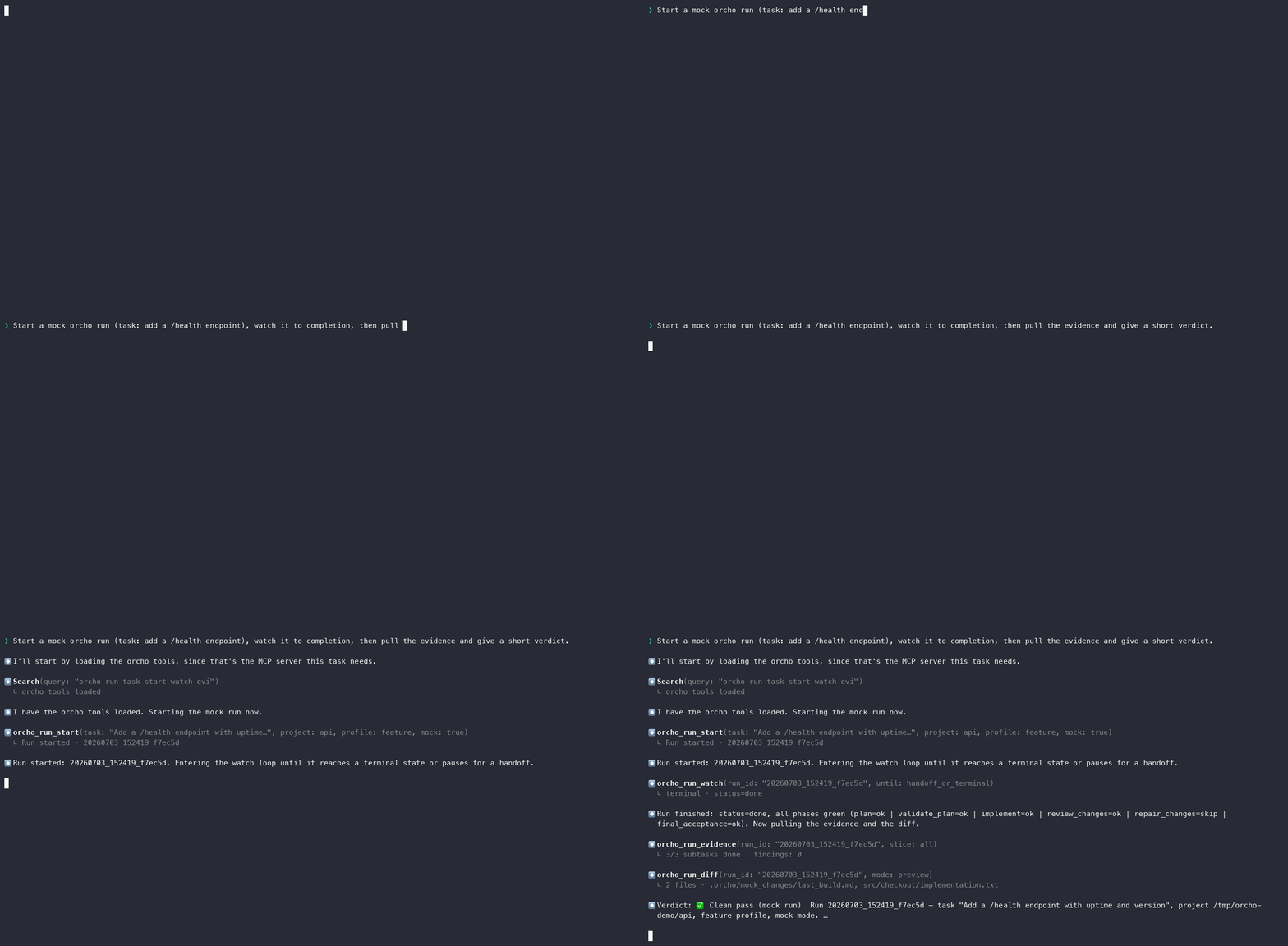
An AI client (here Claude Code) driving a run through this server —
orcho_run_start → orcho_run_watch → orcho_run_evidence → verdict, all
typed, no log scraping. Real session; the run is mock=True. Interactive
version: docs.orcho.dev.
Status: public alpha. Core control-loop surfaces are available:
- Act:
orcho_run_start/orcho_run_resume/orcho_run_cancelwith L4-test-pinned semantics (process-group signal handling, supervisor-owned restart-recovery, race-aware cancel).- Observe:
orcho_run_statusanswers "What is happening / what should I do next?";orcho_run_historyandorcho_run_events_tailare read-only, polling-friendly context.- Route:
orcho_run_diagnoseandorcho_workspace_pending_decisionsclassify the continuation subject and visible decision work.- Decision support:
orcho_handoff_advice/orcho_delivery_gateexplain sanctioned choices without applying them.- Decide:
orcho_phase_handoff_decideresolves runtime-published phase-handoff actions;orcho_delivery_gate/orcho_delivery_decideexpose and resolve post-release delivery or correction;orcho_criterion_deciderecords an operator's accept/reject on a human acceptance criterion. Decision tools never invent actions, never infer a verdict from conversation, and never spawn a pipeline process.- Inspect:
orcho_run_evidenceanswers "What happened / what proves it?";orcho_run_diffanswers "What changed?"- Measure:
orcho_run_metricsanswers "How much did it consume?" with tokens, duration, phase breakdown, and cost-reference fields when available.- Reclaim:
orcho_workspace_cleanup_reportpreviews what retained checkouts could be freed and what is protected;orcho_workspace_cleanup_reclaimacts only on a selection the operator confirmed.Live progress:
orcho_run_watchemits orderednotifications/progresswhen the MCP request carries aprogressToken. Clients that don't carry one pollorcho_run_status/orcho_run_events_tailagainst the same run state.
Install
Choose an install path:
| Path | Use when | Command |
|---|---|---|
Native CLI with pipx |
You want orcho and orcho-mcp available from the shell. |
pipx install orcho |
| Docker | You want the MCP server and agent CLIs isolated inside a container. | docker pull ghcr.io/symphos-ai/orcho |
| Direct MCP dependency | You intentionally want only this package in a virtualenv, CI image, devcontainer, or custom image. | python -m pip install orcho-mcp |
If pipx is missing, install it first. On macOS with Homebrew:
brew install pipx
pipx ensurepath
exec zsh -l
For Linux or Windows, use the official pipx installation guide.
Recommended CLI install
Use the orcho distribution when you want both the Orcho commands and the MCP
server available from your shell. Since orcho 0.1.1 the server ships by
default — no extra needed. pipx keeps the command set isolated from the
current project or Python environment.
pipx install orcho
orcho-mcp --help
Since orcho 0.1.1 this includes the MCP server by default. The [mcp] and
[all] extras remain as no-op aliases.
Containerized MCP server
Use Docker when an MCP client should start an isolated server over stdio:
docker run --rm -i \
  -v /path/to/my-workspace:/workspace \
  -v ~/.orcho-auth:/agent-auth:ro \
  -e ORCHO_WORKSPACE=/workspace/workspace-orchestrator \
  ghcr.io/symphos-ai/orcho \
  orcho-mcp
Inside that server, projects live under /workspace/<project-name>. The
orcho Docker docs
cover one-time credential bootstrap and custom project toolchains.
Direct MCP package install
Use pip when you intentionally want orcho-mcp in the active virtual
environment, CI image, devcontainer, or Docker image.
python -m pip install orcho-mcp
This pulls orcho-core (the engine), the official mcp Python SDK, and the runtime pieces orcho-mcp depends on.
Create a workspace
Orcho writes run state into an Orcho workspace. Start by pointing it at the folder that groups your project repos:
orcho workspace init ~/www/my-workspace
The command creates ~/www/my-workspace/workspace-orchestrator/,
including .orcho/ settings and extension-point guides, and prints the
MCP config snippet for that workspace. To write the snippet directly
into a project-local MCP config:
ORCHO_MCP_COMMAND="$(command -v orcho-mcp)"

orcho workspace init ~/www/my-workspace \
  --mcp-config ~/www/my-workspace/.mcp.json \
  --mcp-server-name orcho-my-workspace \
  --orcho-mcp-command "$ORCHO_MCP_COMMAND"
ORCHO_MCP_COMMAND must point to the command your MCP client can run.
For packaged installs this is normally orcho-mcp. For source installs,
use the absolute path inside the Orcho environment, for example
/Users/me/orcho-preview/orcho-core/.venv/bin/orcho-mcp.
Each MCP server process owns one workspace through ORCHO_WORKSPACE.
For multiple workspaces, add multiple MCP server entries.
Register with an MCP-aware client
Each client has its own MCP registry/config format. Use
docs/mcp_client_setup.md for copy-paste
instructions for Codex CLI/app, Claude Code, Gemini CLI, the Claude app,
and Antigravity.
What's inside
npx @modelcontextprotocol/inspector orcho-mcp
Opens a web UI on localhost showing every registered tool, resource, and prompt with full JSON schemas — Anthropic's official Inspector ≈ Swagger UI for MCP.
A static catalogue is also committed at docs/mcp_schema.json — the same shape, snapshotted in CI.
Control loop
The full contract — starting, observing, resuming, cancelling, deciding, and inspecting runs through the MCP wire — lives in docs/run_lifecycle.md. The complete multi-axis decision graph is documented in docs/architecture/control_state_machine.md. Tool docstrings stay terse; those files are the long-form references.
Tool naming is consistent: every run-lifecycle tool is orcho_run_<verb>. State-transition and inspection tools sit beside that group with their own names:
| Group | Tools |
|---|---|
| Act | orcho_run_start, orcho_run_resume, orcho_run_cancel |
| Observe | orcho_run_status, orcho_run_live_status, orcho_run_watch, orcho_run_events_summary, orcho_run_events_tail, orcho_run_history |
| Route | orcho_run_diagnose, orcho_workspace_pending_decisions |
| Decision support | orcho_handoff_advice, orcho_delivery_gate |
| Decide | orcho_phase_handoff_decide, orcho_delivery_decide, orcho_criterion_decide |
| Inspect | orcho_run_evidence, orcho_run_diff |
| Measure | orcho_run_metrics |
| Reclaim | orcho_workspace_cleanup_report, orcho_workspace_cleanup_reclaim |
When choosing a read tool, start from the question:
| Question | MCP tool |
|---|---|
| What is happening / what should I do next? | orcho_run_status |
| What happened / what proves it? | orcho_run_evidence |
| How much did it consume? | orcho_run_metrics |
| What changed? | orcho_run_diff |
| What disk can I get back, and what is still at risk? | orcho_workspace_cleanup_report |
Reclaiming space is deliberately two calls. orcho_workspace_cleanup_report
is read-only and mints a confirm_token for the exact selection it just
showed; orcho_workspace_cleanup_reclaim refuses any token that does not
match the live workspace. A model cannot tidy up on its own initiative, and a
selection that changed after the operator reviewed it is refused rather than
swept. Separate tool names also mean a client that allowlists the preview has
not thereby allowlisted the removal.
For an end-to-end walkthrough of the full control loop with code, see docs/control_loop_walkthrough.md.
Current public-alpha boundaries
orcho_run_live_statusis a bounded mono-run card. Cross runs use the broader status, event, evidence, and sub-run projections. Its closedstate_classdistinguishes healthy phase-emptystartingfrom core-ownedstalled; stalled runs are diagnosed/inspected and cancelled only when MCP owns control, never resumed or watched as active.orcho_workspace_pending_decisionscurrently aggregates phase handoffs; it is not a universal inbox for every delivery and cross-gate decision.- a CLI-started or otherwise foreign run can be fully inspected, but mutation
is refused as
inspect_onlywhen this MCP server does not own its supervisor record. - core owns the lifecycle and allowed actions. The MCP layer projects that state; it does not create a second state machine.
Architecture
orcho-mcp is one of the public Orcho runtime packages:
orcho-core— pipeline runtime + CLI (Apache-2.0).orcho-mcp— MCP server, this repo (Apache-2.0).
The post-v1 cross-MCP consumer roadmap (orcho-as-MCP-client — pipeline agents calling external GitHub / Linear / Slack MCP servers) is documented in orcho-core/docs/plans/2026-05-06-cross-mcp-orchestration.md.
For contributor-facing architecture and test guidance:
docs/architecture/control_state_machine.mdmaps core lifecycle state, MCP projections, pending decisions, delivery, continuation lineage, and the typed tool edge for each supported transition.docs/architecture/mcp_boundaries.mddescribes the package boundaries enforced by the architecture tests.docs/architecture/observation_delivery.mddefines the durable replay contract for MCP observation and notification use.docs/architecture/workspace_cleanup_confirmation.mdexplains the report/reclaim split and the confirmation token that keeps a destructive sweep tied to a selection an operator actually reviewed.docs/testing.mdexplains the test philosophy, layer model, fixture style, and verification commands.
License
Apache-2.0. See LICENSE.
1 maintainer

Metadata
1 maintainer
Release files for orcho-mcp 0.11.1
For a detailed explanation of source distributions (sdists) and built distributions (wheels), please see the package formats documentation.
Source distribution (sdist)
| File | Size | Uploaded | |
|---|---|---|---|
| orcho_mcp-0.11.1.tar.gz | 315.5 kB | Details |
Built distribution (wheel)
| File | Interpreter | ABI | Platform | Reset |
|---|---|---|---|---|
| orcho_mcp-0.11.1-py3-none-any.whl | Python 3 | none | any | Details |
Total release size: 675.2 kB
Release files / orcho_mcp-0.11.1.tar.gz
| Download URL | orcho_mcp-0.11.1.tar.gz |
|---|---|
| Size | 315.5 kB |
| Tags | Source |
|
SHA-256 checksum How to use checksums |
5edab7d5e5d712fd7fa1be88e1f0e2139cdc725151a77b03972e8ac9edae86d2
|
|
BLAKE2b-256 checksum How to use checksums |
081ebe954279819aa08462acd7c60d505413fd803aae83b08d582ac5f4e2b831
|
| Upload date | |
|
Uploaded using Trusted Publishing? What is trusted publishing? |
Yes |
| Uploaded via |
twine/6.1.0 CPython/3.13.14
|
Provenance
Provenance describes where a file came from. On PyPI, provenance is shared via attestations, which provide a verifiable record of the build or publishing details. View details, limitations and caveats.


PyPI Publish Attestation
PyPI verified that this artifact, at this checksum, originated from the publisher listed below.
Signed by GitHub Actions, verified by PyPI on Sep 29, 2026.
Transparency logRelease files / orcho_mcp-0.11.1-py3-none-any.whl
| Download URL | orcho_mcp-0.11.1-py3-none-any.whl |
|---|---|
| Size | 359.7 kB |
| Tags | Python 3 |
|
SHA-256 checksum How to use checksums |
a8ba08ceb113d85ea4b6f28e0dae7cba10cfbfe779d5167e33b7b177bae4f7e7
|
|
BLAKE2b-256 checksum How to use checksums |
802b8195a72c9727fe057f286aef8c57d8b3f10bef367d664ca0b89db177a5f4
|
| Upload date | |
|
Uploaded using Trusted Publishing? What is trusted publishing? |
Yes |
| Uploaded via |
twine/6.1.0 CPython/3.13.14
|
Provenance
Provenance describes where a file came from. On PyPI, provenance is shared via attestations, which provide a verifiable record of the build or publishing details. View details, limitations and caveats.
PyPI Publish Attestation
PyPI verified that this artifact, at this checksum, originated from the publisher listed below.
Signed by GitHub Actions, verified by PyPI on Sep 29, 2026.
Transparency log













