
Orcho








Orcho is a production harness and local-first control plane around AI coding workers.
Run one task. Watch Orcho plan, implement, reject false-ready work, repair it, and prove what is ready to deliver.
📖 Documentation: docs.orcho.dev
This package is the recommended installer for the public Orcho command set. It
installs the full set by default — the core CLI (orcho-core) and the
MCP server (orcho-mcp). For a minimal engine-only install, depend on
orcho-core directly.
Those are the two ways to drive Orcho, and both come with this package.
Drive it yourself — the CLI

orcho run end to end (mock pipeline, sped up): plan → validation →
implement → review → final acceptance → delivery, with a live phase stream and
an evidence rollup.
Let your agent drive — MCP
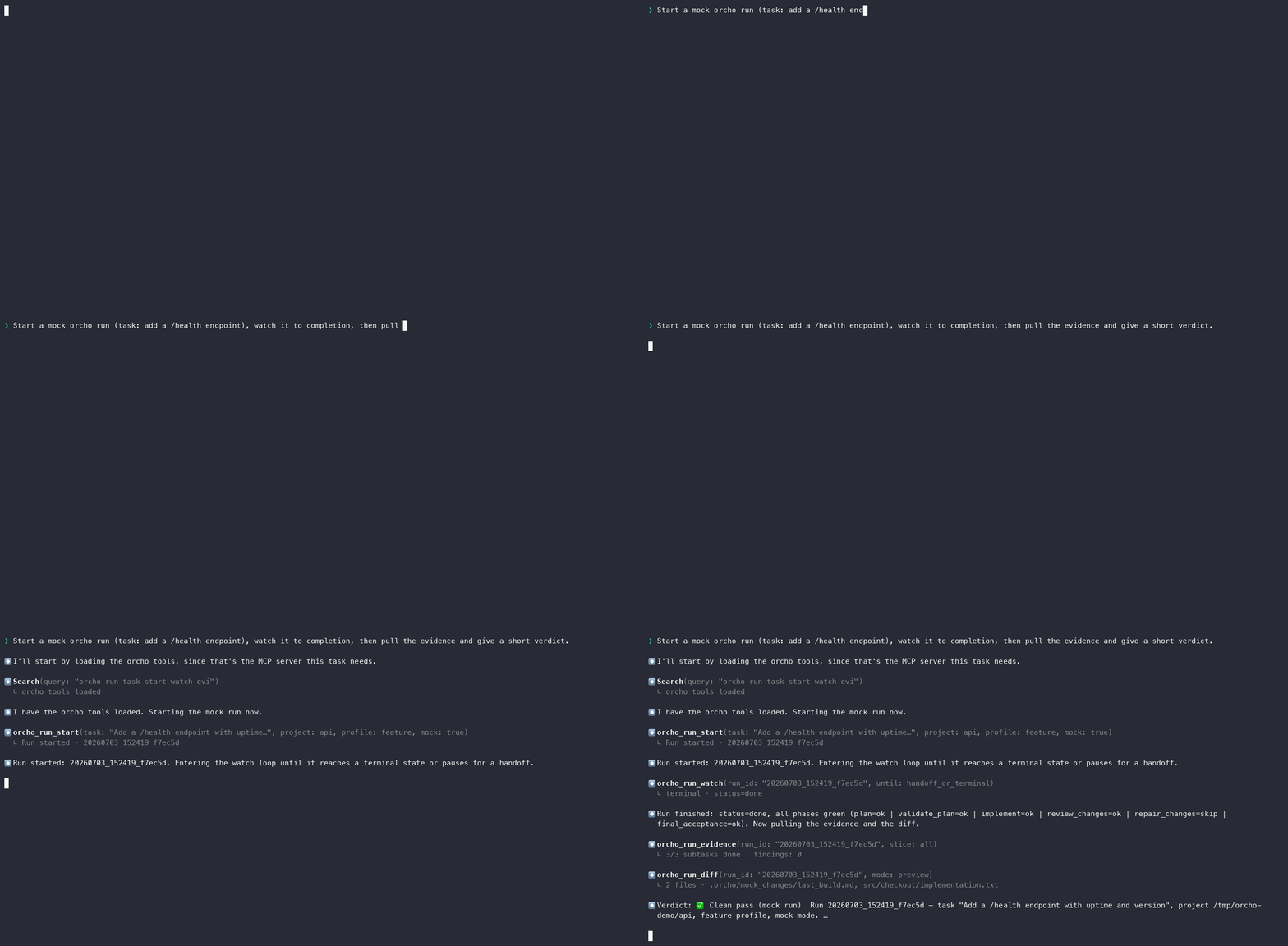
The same run, driven by an AI client (here Claude Code) through the MCP
server — orcho_run_start → orcho_run_watch → orcho_run_evidence → verdict,
all typed, no log scraping.
Both runs above are mock=True. Interactive, pausable versions:
docs.orcho.dev.
Install
Pick the install path by how isolated you want the run to be:
| Path | Use when | Command |
|---|---|---|
Native CLI with pipx |
You trust the machine and want orcho on your shell PATH. |
pipx install orcho |
| Docker | You want to try Orcho in a container, or keep agent CLIs and project tools isolated. | docker pull ghcr.io/symphos-ai/orcho |
Project-managed pip |
You intentionally want Orcho inside a virtualenv, CI image, devcontainer, or custom Docker image. | python -m pip install orcho |
If pipx is missing, install it first. On macOS with Homebrew:
brew install pipx
pipx ensurepath
exec zsh -l
For Linux or Windows, use the official pipx installation guide.
Recommended: isolated CLI install
Use pipx when you want Orcho commands available from your shell without
installing Orcho into the current project or Python environment.
pipx install orcho
This installs the core commands plus the MCP server:
orcho --help
orcho-run --help
orcho-cross --help
orcho-mcp --help
Engine and core CLI only, without the MCP server:
python -m pip install orcho-core
orcho[mcp] and orcho[all] remain as back-compat aliases; since 0.1.1 they
install the same set as plain orcho.
Upgrading
orcho update resolves the installer that owns the environment Orcho is
running from and upgrades through it:
orcho update
Add --dry-run to see the detected install and the upgrade command without
running it. Orcho delegates to the detected manager rather than reimplementing
one, so you can always run the equivalent command yourself:
| Install | Upgrade command |
|---|---|
pipx |
pipx upgrade orcho |
uv tool |
uv tool upgrade orcho |
pip in a virtualenv or image |
python -m pip install --upgrade orcho |
Editable installs and source checkouts are reported, not upgraded: there the
checkout is the upgrade unit, so update it with git pull instead.
Try without installing: Docker
Use Docker when you want to run Orcho in an isolated container while mounting only the current project and an explicit credential directory.
docker pull ghcr.io/symphos-ai/orcho
alias orcho='docker run --rm -it \
  -v "$PWD":/workspace \
  -v ~/.orcho-auth:/agent-auth:ro \
  ghcr.io/symphos-ai/orcho orcho'

orcho run --project /workspace --task "Add input validation to the login endpoint."
orcho status
See docker/README.md for the one-time credential bootstrap, MCP stdio setup, and project-toolchain extension pattern.
Alternative: project-managed environment
Use pip when you intentionally want Orcho inside the active virtual
environment, CI image, devcontainer, or Docker image.
python -m pip install orcho
Commands
orcho --help
orcho-run --help
orcho-cross --help
orcho-mcp --help
Package Layout
orcho-coreprovides the core engine and CLI.orcho-mcpprovides the MCP server.
This package only coordinates installation and command dispatch.
1 maintainer

Metadata
1 maintainer
Release files for orcho 0.11.1
For a detailed explanation of source distributions (sdists) and built distributions (wheels), please see the package formats documentation.
Source distribution (sdist)
| File | Size | Uploaded | |
|---|---|---|---|
| orcho-0.11.1.tar.gz | 10.3 kB | Details |
Built distribution (wheel)
| File | Interpreter | ABI | Platform | Reset |
|---|---|---|---|---|
| orcho-0.11.1-py3-none-any.whl | Python 3 | none | any | Details |
Total release size: 19.5 kB
Release files / orcho-0.11.1.tar.gz
| Download URL | orcho-0.11.1.tar.gz |
|---|---|
| Size | 10.3 kB |
| Tags | Source |
|
SHA-256 checksum How to use checksums |
dc0f4c922aa915fc03d228cadb3c5c1a942f9ad3ffdc58e4979b3cf878bc1c6d
|
|
BLAKE2b-256 checksum How to use checksums |
8fc9e71b1293cb82ab872ecca5e54d663c0ba8e15cc0ade42bac853d0e3161eb
|
| Upload date | |
|
Uploaded using Trusted Publishing? What is trusted publishing? |
Yes |
| Uploaded via |
twine/6.1.0 CPython/3.13.14
|
Provenance
Provenance describes where a file came from. On PyPI, provenance is shared via attestations, which provide a verifiable record of the build or publishing details. View details, limitations and caveats.


PyPI Publish Attestation
PyPI verified that this artifact, at this checksum, originated from the publisher listed below.
Signed by GitHub Actions, verified by PyPI on Sep 29, 2026.
Transparency logRelease files / orcho-0.11.1-py3-none-any.whl
| Download URL | orcho-0.11.1-py3-none-any.whl |
|---|---|
| Size | 9.2 kB |
| Tags | Python 3 |
|
SHA-256 checksum How to use checksums |
48fa6066824ceac37e191e4e917c546120f2556cb9954c719811098beb042c7f
|
|
BLAKE2b-256 checksum How to use checksums |
eb36f58bb676e49967c92bd3b780bb2b608692827a18cba875af774d4bf33aaa
|
| Upload date | |
|
Uploaded using Trusted Publishing? What is trusted publishing? |
Yes |
| Uploaded via |
twine/6.1.0 CPython/3.13.14
|
Provenance
Provenance describes where a file came from. On PyPI, provenance is shared via attestations, which provide a verifiable record of the build or publishing details. View details, limitations and caveats.
PyPI Publish Attestation
PyPI verified that this artifact, at this checksum, originated from the publisher listed below.
Signed by GitHub Actions, verified by PyPI on Sep 29, 2026.
Transparency log













