
oscan - a manual, authorized self-assessment scanner for web apps and sites (vulnerabilities + GDPR), with secure-by-default guidance.
Verified details
These details have been verified by PyPIProject links
GitHub Statistics
Maintainers

Project description
oscan - orel-cybersecurity-check
Find the security holes AI-built apps ship with, in one command. Both a scanner and a Claude Code skill: audit any site, web app, or repo for vulnerabilities, leaked secrets, and GDPR gaps, or build new apps secure by default.


uvx --from orel-cybersecurity-check oscan https://your-site.example
A manual, authorized self-assessment scanner for the sites, web apps, and repos
people increasingly build with AI. It catches the holes those builds ship with: SQL
injection, secrets in git history, weak cookies/tokens, an exposed .git/.env,
missing security headers, no rate-limiting, and it checks GDPR/privacy basics too.
Highlights
- One command, whole surface - TLS, security headers, cookies & tokens, secrets in git history, exposed
.git/.env, injection, auth hardening, DoS-resilience, and GDPR. - Scanner + Claude Code skill - audit an existing app, or build a new one secure by default.
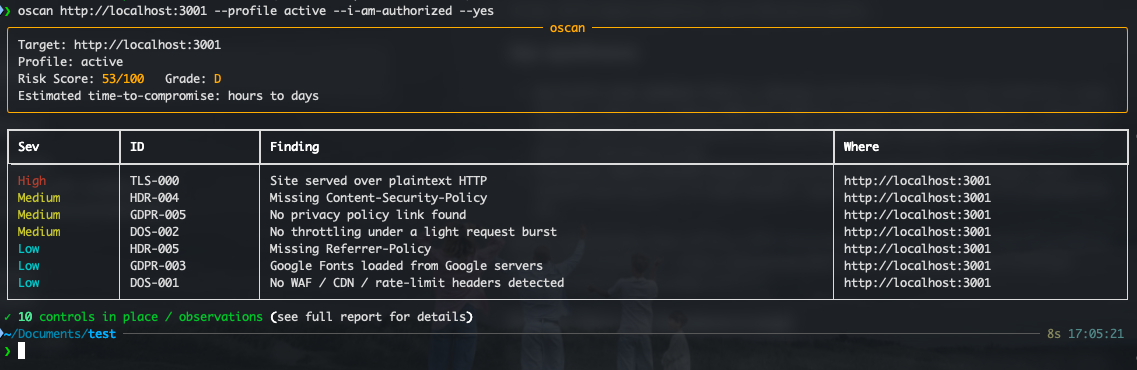
- Actionable output - a 0-100 risk score, a letter grade, and plain-language fixes, plus JSON and Markdown reports.
- Safe by default - passive is observe-only; intrusive checks are gated behind
--i-am-authorized. - Local or remote - scan a live URL, a local repo, or a remote repo by its git URL.
Detection is deterministic (in code); an optional Claude layer only rewrites findings into plain language. The tool works fully offline without it.
This repo ships both pieces:
oscan- the scanner (this README).orel_cybersecurity_check- a Claude Code skill (inskill/) that drivesoscanand adds secure-by-default build guidance. See Claude Code skill below.
⚠️ Authorization & ethics
Use this only on assets you own or are explicitly authorized to test. It is for self-assessment, authorized pentesting, and learning.
- The default
passiveprofile only observes (safe GET requests, no payloads). - The intrusive
activeprofile (injection markers, auth-lockout, a capped rate-limit burst) requires the--i-am-authorizedflag, an interactive confirmation, and writes an audit log entry. - There is no DDoS flooder and no password cracker. "DoS resilience" verifies rate-limiting/WAF exists (a hard-capped burst); "auth hardening" verifies account lockout exists (a few failed logins on your own account). The goal is to confirm defenses work, not to attack.
- All payloads are non-destructive detection markers - never
DROP, never data exfiltration.
Install
Run it once, with no permanent install (needs uv):
uvx --from orel-cybersecurity-check oscan https://your-site.example
Install the oscan command for repeated use:
pipx install orel-cybersecurity-check     # isolated (recommended)
pip install orel-cybersecurity-check      # or plain pip
For the optional Claude enrichment layer, add the ai extra:
pipx install "orel-cybersecurity-check[ai]".
From source, for development:
git clone https://github.com/orelsv/orel-cybersecurity-check.git
cd orel-cybersecurity-check
python3 -m venv .venv && source .venv/bin/activate
pip install -e .            # add ".[ai]" for the optional Claude layer
Optional external tools (auto-detected, graceful fallback if missing):
gitleaks for stronger secret scanning.
Usage
# Passive scan of a live site (safe default)
oscan https://your-site.example

# Scan a local repo for secrets in the working tree AND git history
oscan --repo /path/to/your-repo

# Scan a remote repo by URL (cloned to a temp dir, then removed)
oscan --repo https://github.com/org/project

# Write machine + human reports
oscan https://your-site.example --json report.json --md report.md

# GDPR / privacy focus
oscan https://your-site.example --gdpr

# Active (intrusive, non-destructive) scan of YOUR OWN target
oscan https://your-site.example --profile active --i-am-authorized

# Verify login lockout exists (your own test account)
oscan https://your-site.example --profile active --i-am-authorized \
  --login-url https://your-site.example/login --login-user you@example.com
Profiles
| Profile | What it does | Gate |
|---|---|---|
passive (default) |
TLS, headers, cookies/tokens, exposed .git/.env, secrets, GDPR |
none |
standard |
+ path enumeration, JWT analysis, WAF/rate-limit header check | none |
active |
+ SQLi/XSS/traversal/open-redirect markers, admin-endpoint probe, login-lockout, DoS-resilience burst | --i-am-authorized + confirm |
What it checks
- Transport & TLS - HTTPS, TLS version, cert validity, HTTP→HTTPS redirect, HSTS
- Security headers - CSP, X-Content-Type-Options, clickjacking protection, Referrer-Policy, version disclosure
- Cookies & tokens - Secure / HttpOnly / SameSite flags, JWT in cookies, tokens in URLs
- Secrets & git - working tree and full git history (committed-then-deleted secrets),
.gitignorecoverage. Allowlist a known/fake secret with an inline# gitleaks:allow(or# pragma: allowlist secret) marker, or a repo.gitleaksignore. - Exposed files -
/.git,/.env, config/backup files, source maps - CORS (standard) - arbitrary-origin reflection, wildcard-with-credentials
- API security (standard) - exposed OpenAPI/Swagger docs, GraphQL introspection, excessive data exposure (sensitive fields in JSON), verbose error/stack-trace disclosure
- Injection (active) - SQLi (error-based + time-based blind), NoSQL injection, reflected XSS, path traversal, open redirect, SSRF (cloud-metadata)
- Auth hardening (active) - JWT hygiene (
alg=none, HMAC alg-confusion risk, empty signature, no-exp, sensitive claims), unauthenticated admin/debug endpoints, login rate-limiting/lockout - DoS resilience - WAF/CDN/rate-limit presence + a capped burst to confirm throttling
- GDPR / privacy - consent before tracking, third-party trackers, Google Fonts, privacy policy, PII over HTTP
Output
Console summary with a Risk Score (0-100), a letter grade, and an estimated time-to-compromise, plus optional JSON (SIEM-friendly) and Markdown reports.
Optional Claude enrichment
If the anthropic package is installed and ANTHROPIC_API_KEY is set, each
finding gets a one-sentence plain-language explanation. Detection is unchanged -
Claude is only a presentation layer. Disable with --no-enrich; pick a model
with OSCAN_ENRICH_MODEL (default claude-haiku-4-5).
Claude Code skill
The orel_cybersecurity_check skill lets Claude Code
build apps securely by default and drive oscan to audit existing ones. Install
it globally (one line):
mkdir -p ~/.claude/skills && curl -sL https://github.com/orelsv/orel-cybersecurity-check/archive/main.tar.gz | tar -xz --strip-components=2 -C ~/.claude/skills orel-cybersecurity-check-main/skill/orel_cybersecurity_check
Then restart your Claude Code session. The skill is at
skill/orel_cybersecurity_check/SKILL.md.
For a project-local install instead of global, replace ~/.claude/skills with
.claude/skills in your project root.
Development
pip install -e ".[dev]"
ruff check . && ruff format --check .   # lint + formatting (CI gate)
pytest                                  # 51 tests, no network required
The test suite includes an end-to-end run against a deliberately vulnerable local server and a git repo with a committed-then-deleted secret. CI runs the same checks on Python 3.11-3.13. See CONTRIBUTING.md.
License
MIT
Project details
Verified details
These details have been verified by PyPIProject links
GitHub Statistics
Maintainers


Download files
Download the file for your platform. If you're not sure which to choose, learn more about installing packages.
Source Distribution
Built Distribution
Filter files by name, interpreter, ABI, and platform.
If you're not sure about the file name format, learn more about wheel file names.
Copy a direct link to the current filters
File details
Details for the file orel_cybersecurity_check-0.1.3.tar.gz.
File metadata
- Download URL: orel_cybersecurity_check-0.1.3.tar.gz
- Upload date:
- Size: 47.1 kB
- Tags: Source
- Uploaded using Trusted Publishing? Yes
- Uploaded via: twine/6.1.0 CPython/3.13.12
File hashes
| Algorithm | Hash digest | |
|---|---|---|
| SHA256 |
a67ab86857a9910f0e854b515dd5d0ae0550c5ebc5358af91fb9969cdd286ba7
|
|
| MD5 |
cf149c2a02b4ac2b31d4673e64460c24
|
|
| BLAKE2b-256 |
12ecd7bd2060648bb25218fe044016c88d2021558e9c33a5fa808d3a01a94c42
|
Provenance
The following attestation bundles were made for orel_cybersecurity_check-0.1.3.tar.gz:
Publisher:
release.yml on orelsv/orel-cybersecurity-check
-
Statement:
-
Statement type:
https://in-toto.io/Statement/v1 -
Predicate type:
https://docs.pypi.org/attestations/publish/v1 -
Subject name:
orel_cybersecurity_check-0.1.3.tar.gz -
Subject digest:
a67ab86857a9910f0e854b515dd5d0ae0550c5ebc5358af91fb9969cdd286ba7 - Sigstore transparency entry: 1826051220
- Sigstore integration time:
-
Permalink:
orelsv/orel-cybersecurity-check@4e54dc4be805911ed22902c6693707c0ce73a270 -
Branch / Tag:
refs/tags/v0.1.3 - Owner: https://github.com/orelsv
-
Access:
public
-
Token Issuer:
https://token.actions.githubusercontent.com -
Runner Environment:
github-hosted -
Publication workflow:
release.yml@4e54dc4be805911ed22902c6693707c0ce73a270 -
Trigger Event:
push
-
Statement type:
File details
Details for the file orel_cybersecurity_check-0.1.3-py3-none-any.whl.
File metadata
- Download URL: orel_cybersecurity_check-0.1.3-py3-none-any.whl
- Upload date:
- Size: 51.3 kB
- Tags: Python 3
- Uploaded using Trusted Publishing? Yes
- Uploaded via: twine/6.1.0 CPython/3.13.12
File hashes
| Algorithm | Hash digest | |
|---|---|---|
| SHA256 |
6608884d9e4b826d0bd765870aba789025ac986e3daf45731c1dc4174b58577d
|
|
| MD5 |
d932275d9cf71be3b3abeadaa120a46c
|
|
| BLAKE2b-256 |
75c5ab696a81d0f16734564ff6048fdc47f71e670beef24b2bc16c42f5240e1f
|
Provenance
The following attestation bundles were made for orel_cybersecurity_check-0.1.3-py3-none-any.whl:
Publisher:
release.yml on orelsv/orel-cybersecurity-check
-
Statement:
-
Statement type:
https://in-toto.io/Statement/v1 -
Predicate type:
https://docs.pypi.org/attestations/publish/v1 -
Subject name:
orel_cybersecurity_check-0.1.3-py3-none-any.whl -
Subject digest:
6608884d9e4b826d0bd765870aba789025ac986e3daf45731c1dc4174b58577d - Sigstore transparency entry: 1826051514
- Sigstore integration time:
-
Permalink:
orelsv/orel-cybersecurity-check@4e54dc4be805911ed22902c6693707c0ce73a270 -
Branch / Tag:
refs/tags/v0.1.3 - Owner: https://github.com/orelsv
-
Access:
public
-
Token Issuer:
https://token.actions.githubusercontent.com -
Runner Environment:
github-hosted -
Publication workflow:
release.yml@4e54dc4be805911ed22902c6693707c0ce73a270 -
Trigger Event:
push
-
Statement type:






