
Org Social TUI
A terminal client for Org Social, a decentralized social network based on plain-text social.org files served over HTTP.
🚀 Quick Start
New to Org Social?
Follow this quick tutorial to get started without needing to know all the technical details:
Quick Tutorial to Get Started on Org Social
Install and run
You need Python 3.12+. Install the client from PyPI; the engine comes inside the package for macOS 14+ (Apple Silicon and Intel) and Linux (x86_64 and ARM64, any distribution).
With uv (recommended, installs it in its own environment):
uv tool install org-social-tui
With pip:
pip install org-social-tui
Then run it:
org-social
Or try it without installing anything:
uvx --from org-social-tui org-social
To update later: uv tool upgrade org-social-tui or pip install --upgrade org-social-tui.
On other platforms the package installs without the engine. Build it with a Swift 6 toolchain and put it on your $PATH:
git clone https://git.andros.dev/org-social/client-core.git
swift build -c release --package-path client-core --product orgsocial-engine
cp client-core/.build/release/orgsocial-engine ~/.local/bin/
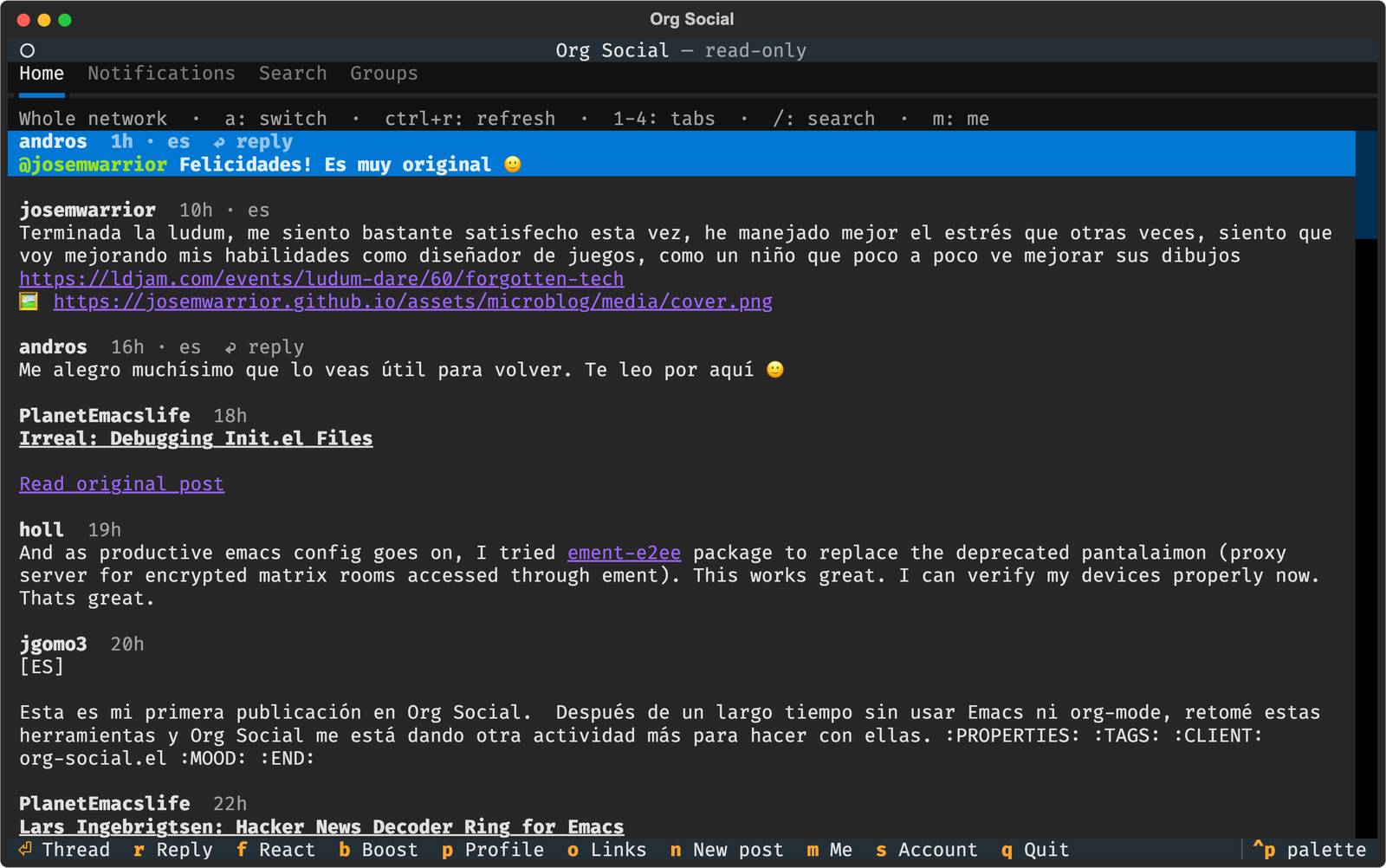
The first time it opens read-only, showing the whole network. Press s to set up your account, or write the configuration file by hand (see Configuration below).
✨ Features
- Timeline: the people you follow, or the whole network (
ato switch), with infinite scroll. - Threads with nested replies, reply and boost counts, reactions and poll results.
- Notifications: mentions, replies, reactions and boosts, with an unread counter on the tab.
- Search by text or
#tag. - Profiles: follow or unfollow (
F), and edit your own (E). - Groups: browse them, join or leave (
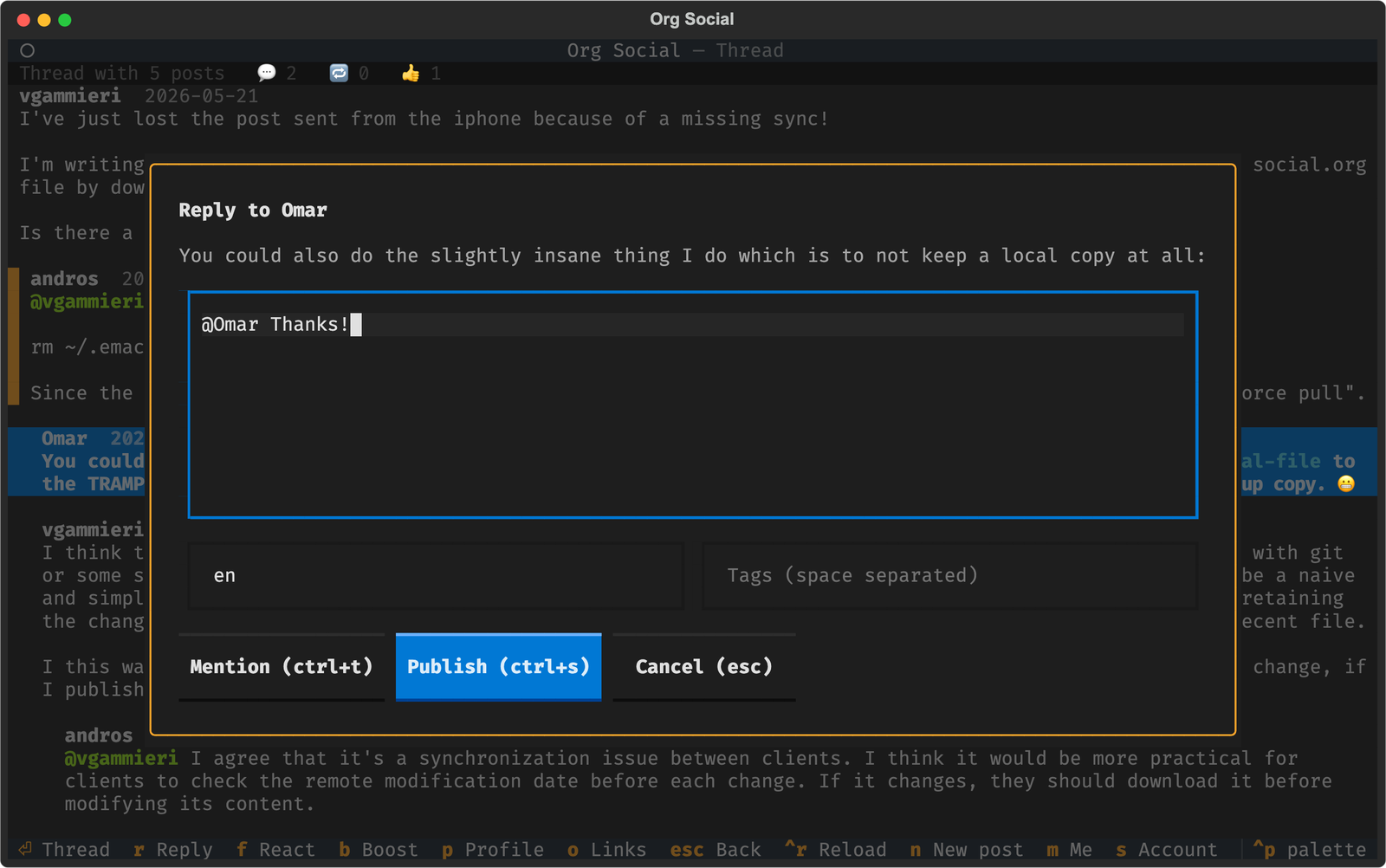
J) and post to a group (n). - Write: new posts, polls, replies (they start with a mention of the author), reactions, boosts and votes. Your posts can be edited (
e), pinned (P) or deleted (d). Reacting, boosting or voting again on a post undoes it. - Mentions:
ctrl+tin the composer lists the people you follow and inserts@nickat the cursor. - Moderation: block an author (
x) or mute words. Hidden posts disappear from every list. - Org rendering: bold, italic, code, strikethrough, headings, links (clickable in terminals that support them), source and quote blocks, images and tags.
- Read-only mode without an account.
⚙️ Configuration
The configuration lives in ~/.config/org-social-tui/config.toml ($XDG_CONFIG_HOME/org-social-tui/config.toml if that variable is set). Use another file with --config:
org-social --config ~/work/org-social.toml
You don't need to write it by hand: press s inside the app, fill in the form and save with ctrl+s. The file is created with 0600 permissions because it contains your upload credentials.
Complete example
mirror = "https://mirror.org-social.org/api"
feed = "https://host.org-social.org/alice/social.org"
lang = "en"
blocked = ["https://spam.example.com/social.org"]
muted_words = ["crypto", "giveaway"]

[upload]
method = "vfile"
url = "https://host.org-social.org/vfile?token=...&ts=...&sig=..."
| Key | Description |
|---|---|
feed |
Public URL of your social.org. Leave it empty to browse read-only. |
mirror |
Org Social mirror API used for every read. The default works for everyone. |
lang |
Default language of new posts (ISO 639-1 code). |
blocked |
Feed URLs whose posts are hidden. x on a post adds its author. |
muted_words |
Words or phrases; posts containing any of them (body or tags, case-insensitive) are hidden. |
[upload] |
How the client uploads your social.org after every change. See below. |
Upload methods
Every action that changes your feed (posting, reacting, following, editing your profile...) downloads your social.org, modifies it and uploads it again. Choose how it is uploaded:
vfile: your feed is hosted on an Org Social host. This is the easiest option: sign up at host.org-social.org/signup and you will get a public URL (for feed) and a vfile URL (for upload.url).
feed = "https://host.org-social.org/alice/social.org"

[upload]
method = "vfile"
url = "https://host.org-social.org/vfile?token=...&ts=...&sig=..."
GitHub: your social.org lives in a GitHub repository. The token needs write access to the repository contents.
feed = "https://raw.githubusercontent.com/alice/social/main/social.org"

[upload]
method = "github"
token = "github_pat_..."
owner = "alice"
repo = "social"
path = "social.org"   # optional, default social.org
branch = "main"       # optional, default main
Codeberg (or any Forgejo/Gitea instance):
feed = "https://codeberg.org/alice/social/raw/branch/main/social.org"

[upload]
method = "codeberg"
token = "..."
owner = "alice"
repo = "social"
path = "social.org"                     # optional, default social.org
branch = "main"                         # optional, default main
instance = "https://codeberg.org"       # optional, for other Forgejo/Gitea hosts
WebDAV: any server accepting PUT uploads (Nextcloud, Apache mod_dav, nginx...).
feed = "https://example.com/social.org"

[upload]
method = "webdav"
url = "https://dav.example.com/files/alice/social.org"
username = "alice"    # optional
password = "..."      # optional
State
Notifications you have already seen are remembered in state.json, next to config.toml. Delete it to mark everything as unread again.
⌨️ Keys
| Key | Action |
|---|---|
1 2 3 4 |
Home, Notifications, Search, Groups |
/ |
Search (esc leaves the search field, so digits switch tabs again) |
a |
Following / whole network |
ctrl+r |
Refresh |
n |
New post (inside a group: post to the group) |
m |
Your profile |
s |
Account settings |
esc |
Back |
q |
Quit |
On a post:
| Key | Action |
|---|---|
enter |
Open the thread |
r |
Reply |
f |
React (again: remove the reaction) |
b |
Boost (again: undo the boost) |
v |
Vote on a poll (again: remove the vote) |
p |
Author's profile |
o |
Open a link |
x |
Block the author |
e |
Edit (your posts) |
P |
Pin or unpin (your posts) |
d |
Delete (your posts) |
On a profile: F follows or unfollows, E edits your own profile. In the Groups tab and on a group: J joins or leaves.
In the composer: ctrl+t inserts a mention, ctrl+s publishes, esc cancels. To create a poll, write the question as the text and fill in the options separated by | (Emacs | Vim | Nano) and how many days it stays open.
🧩 How it works
The interface is written in Python with Textual. All the logic (parsing, writing posts, rendering Org, the mirror API, uploads, the write queue) comes from orgsocial-engine, the engine of the shared Swift client core, the same code the iOS app uses.
┌──────────────────────────┐    JSON-RPC 2.0     ┌─────────────────────────────┐
│ Python + Textual (UI)    │ ◄─────────────────► │ orgsocial-engine (Swift)    │
│ src/org_social_tui/      │    stdin/stdout     │ ../client-core              │
└──────────────────────────┘                     └─────────────────────────────┘
The app looks for the engine in ../client-core/.build/release, then ../client-core/.build/debug, then the binary bundled in the package, then $PATH. Set ORG_SOCIAL_ENGINE to use another binary. The protocol is documented in the client core's ENGINE.md; any program able to spawn a process and read JSON can use it.
🛠️ Development
Clone both repositories side by side; the app finds the engine in ../client-core without installing it:
git clone https://git.andros.dev/org-social/client-core.git
git clone https://git.andros.dev/org-social/tui-app.git
swift build -c release --package-path client-core --product orgsocial-engine
cd tui-app
uv sync
uv run org-social
uv run pytest                       # all tests (integration ones need the engine built)
uv run pytest -m "not integration"  # without the engine
uv run ruff check && uv run ruff format --check
The integration tests run the real engine against a local HTTP server that acts as feed host and mirror, so nothing is published.
Releasing
scripts/release.sh builds every distribution into dist/: the sdist, a pure wheel that uses the engine from $PATH, and wheels with the engine bundled for macOS (universal2) and Linux (x86_64 and aarch64). The Linux engines are fully static, cross-compiled in Docker with the Swift static Linux SDK. It needs macOS with Xcode, Docker and ../client-core (or CLIENT_CORE=/path). Then publish with uv publish.
Contributing
Contributions are welcome! Please see the contribution guidelines for instructions on how to submit issues or pull requests.
License
GPL-3.0
1 maintainer

Metadata
1 maintainer
Release files for org-social-tui 1.1.0
For a detailed explanation of source distributions (sdists) and built distributions (wheels), please see the package formats documentation.
Source distribution (sdist)
| File | Size | Uploaded | |
|---|---|---|---|
| org_social_tui-1.1.0.tar.gz | 49.7 kB | Details |
Built distributions (wheels)
| File | Reset | |||
|---|---|---|---|---|
| org_social_tui-1.1.0-py3-none-manylinux_2_17_x86_64.manylinux2014_x86_64.musllinux_1_1_x86_64.whl | Python 3 | none | Linux glibc 2.17+ x86-64, Linux musl 1.1+ x86-64 | Details |
| org_social_tui-1.1.0-py3-none-manylinux_2_17_aarch64.manylinux2014_aarch64.musllinux_1_1_aarch64.whl | Python 3 | none | Linux glibc 2.17+ ARM64, Linux musl 1.1+ ARM64 | Details |
| org_social_tui-1.1.0-py3-none-macosx_14_0_universal2.whl | Python 3 | none | macOS 14.0+ universal2 (ARM64, x86-64) | Details |
| org_social_tui-1.1.0-py3-none-any.whl | Python 3 | none | any | Details |
Total release size: 48.4 MB














