
 orgwarrior-web

A porcelain for Org's agenda, in your browser, phone first. A small web page over orgwarrior's engine: Org stays the source of truth, and your running Emacs does all the Org work.
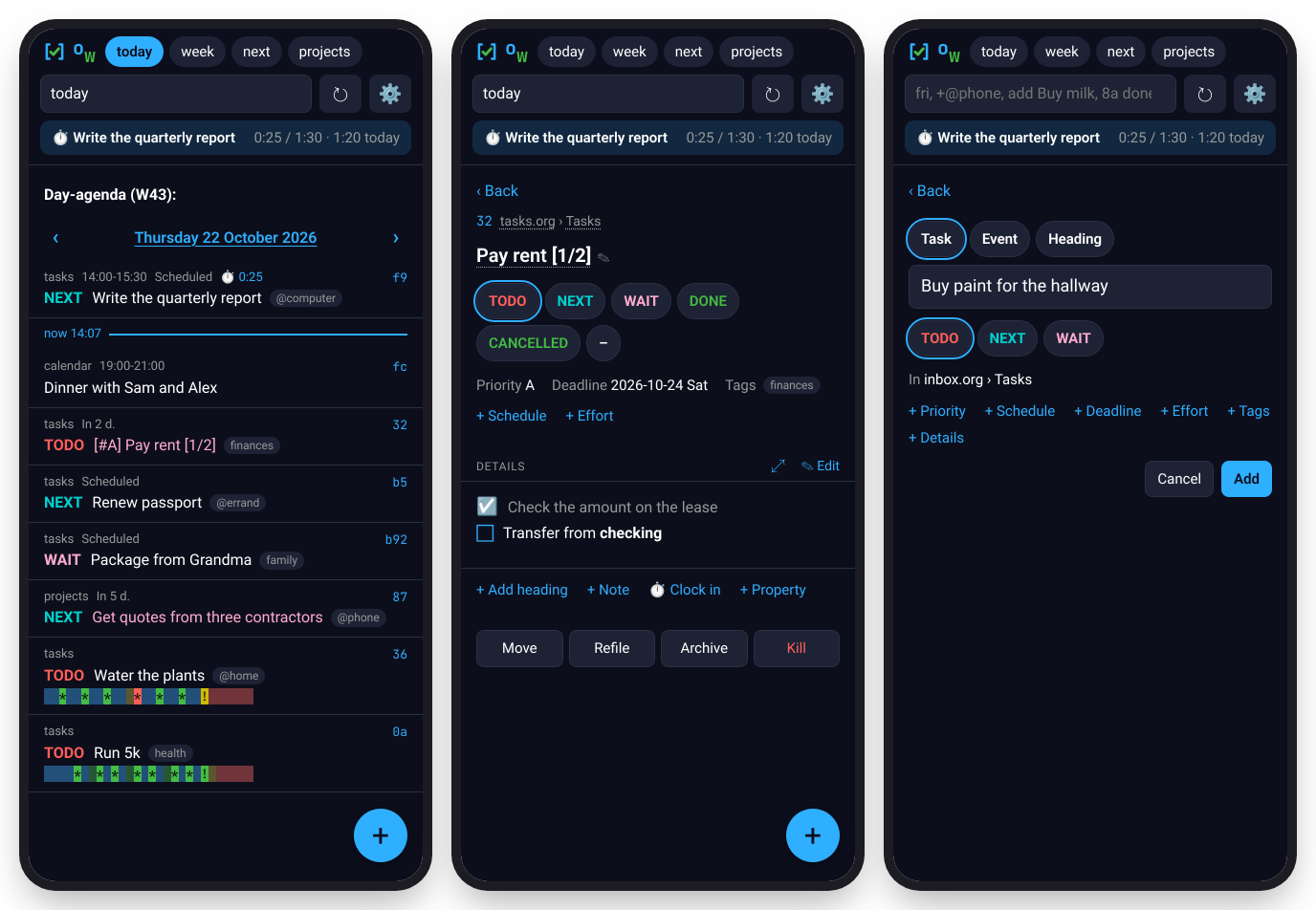
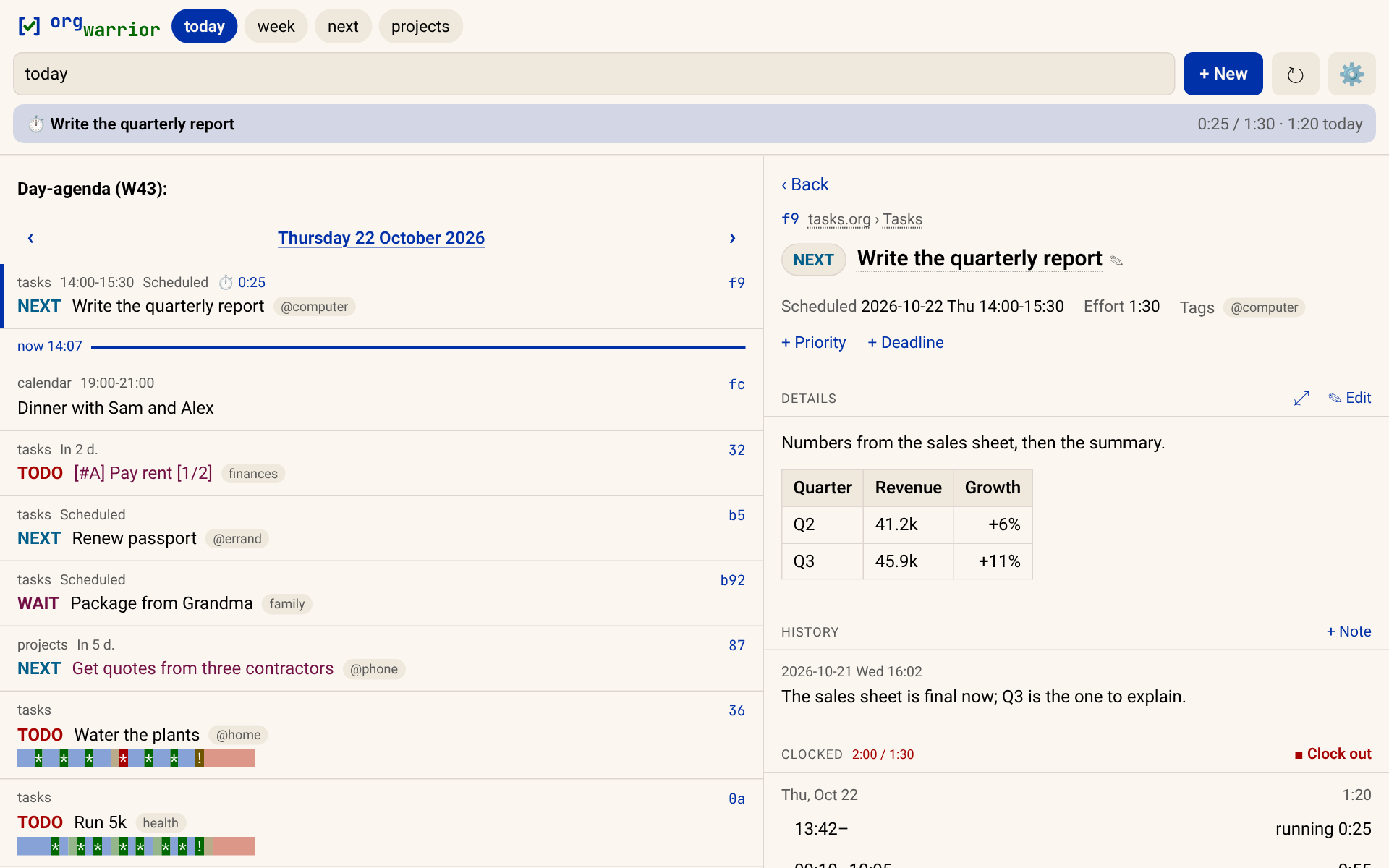
- Your agenda, as Org builds it: your views, TODO keywords, tags,
habits (with their consistency graphs) and time grid; tabs for the views
you use, and a box that takes anything the
orgwarriorcommand does. - Act on any task: states, dates (repeaters in words), tags, priority, notes, effort, properties, refile, archive, moving it around its outline. Details render as Org exports them: tables, code, checkboxes you can tick.
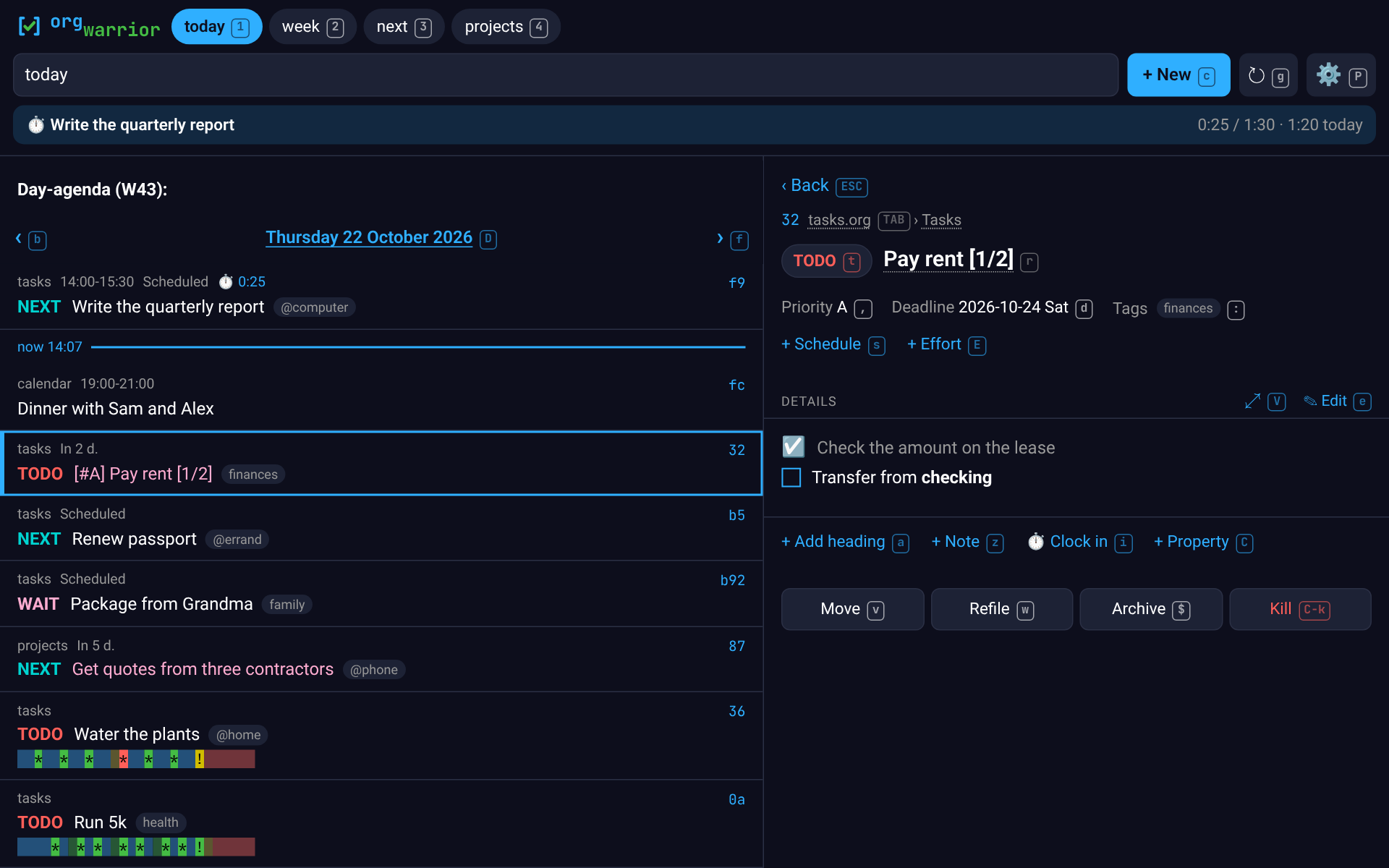
- Phone first, desktop too: one tap per change on a phone; side by side from 1000 px, with the keyboard working as Org's agenda does (rebindable, or evil-collection's keys in one line).
- Clocking in the header, clock reports, and a calendar feed for your phone's calendar app.
- Signed in per device, installable as an app, and shareable: someone else can add to your list from their phone without seeing it.
How it fits
Not a task manager: Org is. In Git's terms Org is the plumbing, and orgwarrior-web a porcelain over it, beside orgwarrior's command line and orgwarrior-mcp, for Claude:
  porcelain    orgwarrior       orgwarrior-web       orgwarrior-mcp
               a terminal       a browser            Claude, any MCP client
                       \             |              /
  engine          orgwarrior.el, loaded into your running Emacs
                                 |
  plumbing        Org mode  ──▶  your .org files
The page asks the engine for views and acts through it; nothing on the server reads or writes your Org files itself.
Quick start
You need Emacs 29 or later running as a daemon (emacs --daemon, or
your system's Emacs service). Then one of these, each giving both the page
and the orgwarrior command:
brew install aleksozolins/tap/orgwarrior   # macOS or Linux, with Homebrew
yay -S orgwarrior-web                      # Arch, from the AUR (any AUR helper)
pipx install orgwarrior-web                # anywhere with Python 3.11+ (or: uv tool install orgwarrior-web)
orgwarrior-web # http://127.0.0.1:22546/
Open http://127.0.0.1:22546/: on your own machine it's open without signing in until you make the first token.
From zero to your phone, each step a line here and a section below
(10.0.0.5 standing for the server's address on your network):
- Emacs running as a daemon, its
org-agenda-filesset, and the install above:orgwarriorin a terminal shows today's agenda. - A certificate for
10.0.0.5, since a phone installs the page as an app only over HTTPS: a few lines of openssl in docs/phone.md, then itsca.crtinstalled on the phone. - A token for the phone:
orgwarrior-web token add phone --url https://10.0.0.5:22546prints its link (signing in). - The server where the phone reaches it:
orgwarrior-web --host 10.0.0.5 --cert … --key …, as a service to keep it running. - On the phone, the link opened once, then the page installed as an app (docs/phone.md).
Update as you installed it (brew upgrade, your AUR helper, pipx upgrade orgwarrior-web); both commands come along. With pipx or uv, if you
installed orgwarrior on its own first, uninstall it before: this carries
it, one copy of the engine. With
orgwarrior-mcp, install
that instead: it carries both.
A tour
- Views: tabs for the views you use, and any
orgwarriorquery in the box:wait,+@phone,fri,next +@phone, a file's outline (projects.org), a word to search,--archiveand a word to search the archives too,closed weekfor what you got done. On a day's agenda, ‹ › step through the days and a tap on the date picks any; on the week, through the weeks. - A task's page shows it as fields: tap the title to rename it, a state to set it (with a note where Org would ask), what's set (Scheduled, Deadline, Priority, Effort, Tags) to change it in a sheet, or its + to add it. Then its details as Org renders them, its outline, its history of notes and state changes, its clocks and properties, each tapped to change. Move, refile, archive and kill come last.
- On any row, a long press (or right-click) offers what you can decide without opening it; select several to act on them at once.
- Adding: the + adds a task, an event or a plain heading, with dates, tags, effort and details, to your inbox or anywhere you refile to. On Android, Share a link or some text to the installed app and the add page opens with it filled in.
- Editing: a task's text as it is in the file, with buttons that write Org for you (bold, a link, a checklist, a code block); saving checks nothing changed underneath.
- Structure: a file's view is a tree you fold and unfold;
h(or a task's parent, tapped) zooms into one heading, as Org's narrowing does, a breadcrumb back out. Move puts a task above or below its neighbours, into the heading above or out of its parent, with its subtasks, as Org'sM-↑M-↓M-S-→M-S-←do. - Clocking: clock in on a task and the header shows it running against
its effort; clock out there, now or at a time.
clocked weekis a report, a tree of files and headings;Radds what was clocked under a day's agenda. - The keyboard, from 1000 px:
j/kthrough the list, each task shown beside it, and a key for everything (tstate,s/ddates,:tags,wrefile,cadd by keys…). Each control shows its key while you use them;?lists them all. Keys of your own covers changing them. - Preferences (⚙), per device: Modus Operandi/Vivendi Tinted by default, following the device's light or dark, plus Gruvbox, Solarized, Dracula and Nord; key hints when typing, always or never.
Configuration
orgwarrior-web reads orgwarrior's config (~/.config/orgwarrior/config.toml,
orgwarrior's keys)
at startup, so your views and colors are the page's too, plus a [web]
table of its own. Restart it after changing the file; a mistake in [web]
stops it with a message saying where.
| key | what it does |
|---|---|
[web] name |
whose list this is: the tab title and the installed app's name (ow · Sam), and what a sharer's page says |
[web.tabs] |
the tab row, in order: label = "query" (anything the box takes). Default: today, week, all, then your [views] |
[web.keys] |
a preset ("evil") and keys of your own: Keys of your own |
[web.calendar] |
the calendar feed's options: Calendar feed |
[web]
name = "Sam"

[web.tabs]
today = "today"
next  = "next"            # a TODO keyword
home  = "+@home"          # a tag search
inbox = "inbox"           # a [views] entry
projects = "projects.org" # a file's outline
Tabs can also be saved from the page (+ at the end of the row), kept on the server for all your devices.
| option | |
|---|---|
--host ADDRESS |
where to listen (default 127.0.0.1); off it, a token is needed first |
--port N |
default 22546 |
-s, --socket NAME |
the Emacs daemon's socket, if not orgwarrior's |
--cert FILE, --key FILE |
serve HTTPS (On a phone) |
token add NAME [--add | --calendar | --mcp] [--url BASE] |
a device's sign-in link (Signing in); --mcp, Claude's for orgwarrior-mcp |
token list, token revoke NAME |
the tokens, and cutting one off |
GET /healthz needs no token, for a monitor: ok when Emacs answers within
3 s, else a 503 with the reason in the server's log.
Signing in
Each device signs in with its own token. Make one per device, on the server, then serve where your devices reach:
orgwarrior-web token add phone --url https://10.0.0.5:22546   # http:// without --cert
orgwarrior-web --host 10.0.0.5
It prints a link with the token in it (…/?key=…): open that once on the
phone and it stays signed in (a cookie, renewed each time you open the
page). The token isn't shown again and isn't stored, only its hash, in
~/.local/state/orgwarrior-web/tokens.json. token list shows them,
token revoke phone cuts that device off at once; no restart either way.
Other clients send Authorization: Bearer TOKEN.
A home-screen app on an iPhone doesn't share Safari's sign-in: open it
and paste the key (the part after key=, or the whole link) into the
field it shows.
Off 127.0.0.1 it won't start until there's a token. On 127.0.0.1 it's open until the first one is made, for trying it out; behind a proxy that does its own login, never making one keeps it that way.
The token crosses the network with every request, so over plain HTTP anyone who can watch the traffic can take it: use HTTPS (below), and still listen only where your own devices reach (a LAN, a VPN).
Sharing your list
For someone else who should only add to your list (a partner, an
assistant), --add:
orgwarrior-web token add robin --add --url https://10.0.0.5:22546
Their page is one form: a task or an event, its dates and some context.
The server files whatever they send in your inbox ([add], events too),
with your default keyword, no tags, and :FROM: robin in its drawer.
Under the form they see what they've sent, newest first: whether you've
scheduled it, when it's due, whether it's done (until you archive it).
Nothing else of your list: not your keywords, notes or tags, and none of
your own tasks. [web] name makes their page say whose list it is.
On a phone
Open the address in the phone's browser, signed in with its link. To install it as an app (its own icon, no address bar, Android's Share menu adding to it), browsers want HTTPS: a Chrome flag for a plain-HTTP address, a certificate of your own for the server's IP address (a small CA you trust on each device, made with openssl in a few lines), or a reverse proxy you already run. All three, step by step, and installing on Android and iPhone: docs/phone.md.
Calendar feed
/calendar.ics is your agenda as a calendar to subscribe to, read-only:
scheduled dates, deadlines (their warnings as alarms), events, repeats and
diary sexps like birthdays, each event a link to its task. It takes a
token of its own, one that opens the feed and nothing else:
orgwarrior-web token add calendar --calendar --url https://10.0.0.5:22546
Subscribing from Android, iPhone and desktop apps, and its options
([web.calendar]): docs/calendar.md.
A second instance
Someone in the household who doesn't use Emacs can have a list of their
own, from the web page alone: an instance of their own on the same
server. Their own user (lingering, so their services run without a
login), their own Emacs daemon and init (org files, keywords, agenda
commands), their own orgwarrior config with [web] name, and
orgwarrior-web on another port. A certificate for the IP covers every
port, so devices that trust the CA need nothing new. Each instance's
sign-in cookie is named for its port (browsers keep cookies by host, not
port), so a browser signed in to both keeps both.
Add tokens both ways (token add NAME --add on each) let each of you add
to the other's list, and a tab like from-robin = '+FROM="robin"' lists
what came from the other. For their own Claude, an
orgwarrior-mcp of their
own the same way: their user, another port, their tokens.
Keys of your own
The keys are org agenda's where they fit, and where the page's use matters
more they differ on purpose (s/d dates, w refile, j/k…). Change
any of them, or take evil-collection's
agenda keys, in the config:
[web.keys]
preset = "evil"            # evil-collection's agenda keys
kill = "C-d"               # keys as Emacs writes them; sequences too: "d d"
archive = []               # none
? on the page lists every key in effect. Every action, the syntax, the
evil preset and where org's keys differ: docs/keys.md.
Running it as a service
On Linux, a systemd user unit keeps it running (~/.config/systemd/user/orgwarrior-web.service):
[Unit]
Description=orgwarrior-web
After=emacs.service
Wants=emacs.service

[Service]
ExecStart=/usr/bin/orgwarrior-web --host 10.0.0.5 --cert %h/.local/share/orgwarrior-web/tls/server.crt --key %h/.local/share/orgwarrior-web/tls/server.key
Restart=on-failure

[Install]
WantedBy=default.target
systemctl --user enable --now orgwarrior-web
loginctl enable-linger "$USER"   # keep it (and Emacs) running when you're logged out
ExecStart takes the command's full path: command -v orgwarrior-web
prints it (~/.local/bin/ for pipx and uv, written %h/.local/bin/ here).
emacs.service is the user unit Emacs ships; with a daemon started some
other way, drop those two lines. On macOS, a launch agent does the same
(launchctl), Homebrew's emacsclient on its PATH.
Contributing
I read every issue and fix what I can, bugs first. Pull requests are
welcome; for anything big, open an issue first so we can talk it through.
uv run pytest runs every test, the browser ones included (Development).
Development
git clone https://github.com/aleksozolins/orgwarrior
git clone https://github.com/aleksozolins/orgwarrior-web
cd orgwarrior-web
uv tool install --editable .   # orgwarrior-web runs this checkout, orgwarrior ../orgwarrior's
uv run pytest            # the routes and feed, and the page in a headless browser
scripts/get-browser      # once: the browser those tests use
scripts/dev-web          # the page on 127.0.0.1:22599, against orgwarrior's dev daemon
scripts/screenshots      # every README screenshot, from docs/demo's made-up org files
The two checkouts sit side by side: orgwarrior-web takes orgwarrior from
../orgwarrior for development ([tool.uv.sources]), from PyPI when
installed.
scripts/dev-web starts orgwarrior's sandbox daemon if it isn't running
(../orgwarrior/scripts/dev-daemon, or ORGWARRIOR_REPO) and serves the
page against it with the sandbox's config and a tokens file of its own,
so it's open without signing in. Your real daemon, config, tokens and
Org files are never touched: the dev daemon writes Org files only in its
copy. Any orgwarrior-web option goes after it (--port 22600). Linux
and macOS; the screenshots and browser tests, Linux.
Claude (Anthropic's AI) was used in developing orgwarrior-web. All code is reviewed by me, and every behavior is covered by real tests.
License
GPL-3.0-or-later, as Emacs and Org are.
1 maintainer

Metadata
1 maintainer
Release files for orgwarrior-web 0.1.0
For a detailed explanation of source distributions (sdists) and built distributions (wheels), please see the package formats documentation.
Source distribution (sdist)
| File | Size | Uploaded | Provenance | |
|---|---|---|---|---|
| orgwarrior_web-0.1.0.tar.gz | 1.2 MB | With provenance | Details |
Built distribution (wheel)
| File | Interpreter | ABI | Platform | Reset |
|---|---|---|---|---|
| orgwarrior_web-0.1.0-py3-none-any.whl | Python 3 | none | any | Details |
Total release size: 1.4 MB
Release files / orgwarrior_web-0.1.0.tar.gz
| Download URL | orgwarrior_web-0.1.0.tar.gz |
|---|---|
| Size | 1.2 MB |
| Tags | Source |
|
SHA-256 checksum How to use checksums |
4b7eeb7f4466ad6e4b9d63b6ed8aebac26ba391339e5c1949ef1bb7ade09c0a2
|
|
BLAKE2b-256 checksum How to use checksums |
a399bba108e7b365923ed856261360a6fe53dbdbcd41f714e6ab2f6a82d6f14c
|
| Upload date | |
|
Uploaded using Trusted Publishing? What is trusted publishing? |
Yes |
| Uploaded via |
twine/7.0.0 CPython/3.13.16
|
Provenance
Provenance describes where a file came from. On PyPI, provenance is shared via attestations, which provide a verifiable record of the build or publishing details. View details, limitations and caveats.


PyPI Publish Attestation
PyPI verified that this artifact, at this checksum, originated from the publisher listed below.
Signed by GitHub Actions, verified by PyPI on Oct 22, 2026.
Transparency logRelease files / orgwarrior_web-0.1.0-py3-none-any.whl
| Download URL | orgwarrior_web-0.1.0-py3-none-any.whl |
|---|---|
| Size | 169.2 kB |
| Tags | Python 3 |
|
SHA-256 checksum How to use checksums |
245ad3b352d001e03ac31603561806d08fcf3693b6861fb3427314890f4719f8
|
|
BLAKE2b-256 checksum How to use checksums |
6acdb4eeb1cc799d4668eb238a141c53095ed1df81a0007f2940765c7f804248
|
| Upload date | |
|
Uploaded using Trusted Publishing? What is trusted publishing? |
Yes |
| Uploaded via |
twine/7.0.0 CPython/3.13.16
|
Provenance
Provenance describes where a file came from. On PyPI, provenance is shared via attestations, which provide a verifiable record of the build or publishing details. View details, limitations and caveats.
PyPI Publish Attestation
PyPI verified that this artifact, at this checksum, originated from the publisher listed below.
Signed by GitHub Actions, verified by PyPI on Oct 22, 2026.
Transparency logSecurity for orgwarrior-web 0.1.0
Provenance
Provenance describes where a file came from. On PyPI, provenance is shared via attestations, which provide a verifiable record of the build or publishing details. View details, limitations and caveats.
Full provenance
All 2 files in this release have been uploaded with provenance metadata.
Attestation for orgwarrior_web-0.1.0.tar.gz
PyPI Publish Attestation
PyPI verified that this artifact, at this checksum, originated from the publisher listed below.
Signed by GitHub Actions, verified by PyPI on Oct 22, 2026.
Transparency logA note on package security
PyPI is a repository for distributing packages, not a service for auditing them. While third-party security researchers and our staff do their best to detect and remove malicious packages, PyPI cannot guarantee the quality, security or suitability of any given package.














