
 orgwarrior

Your org agenda from the command line, taskwarrior-style. Every task
gets a short ID, and orgwarrior ID VERB acts on it.
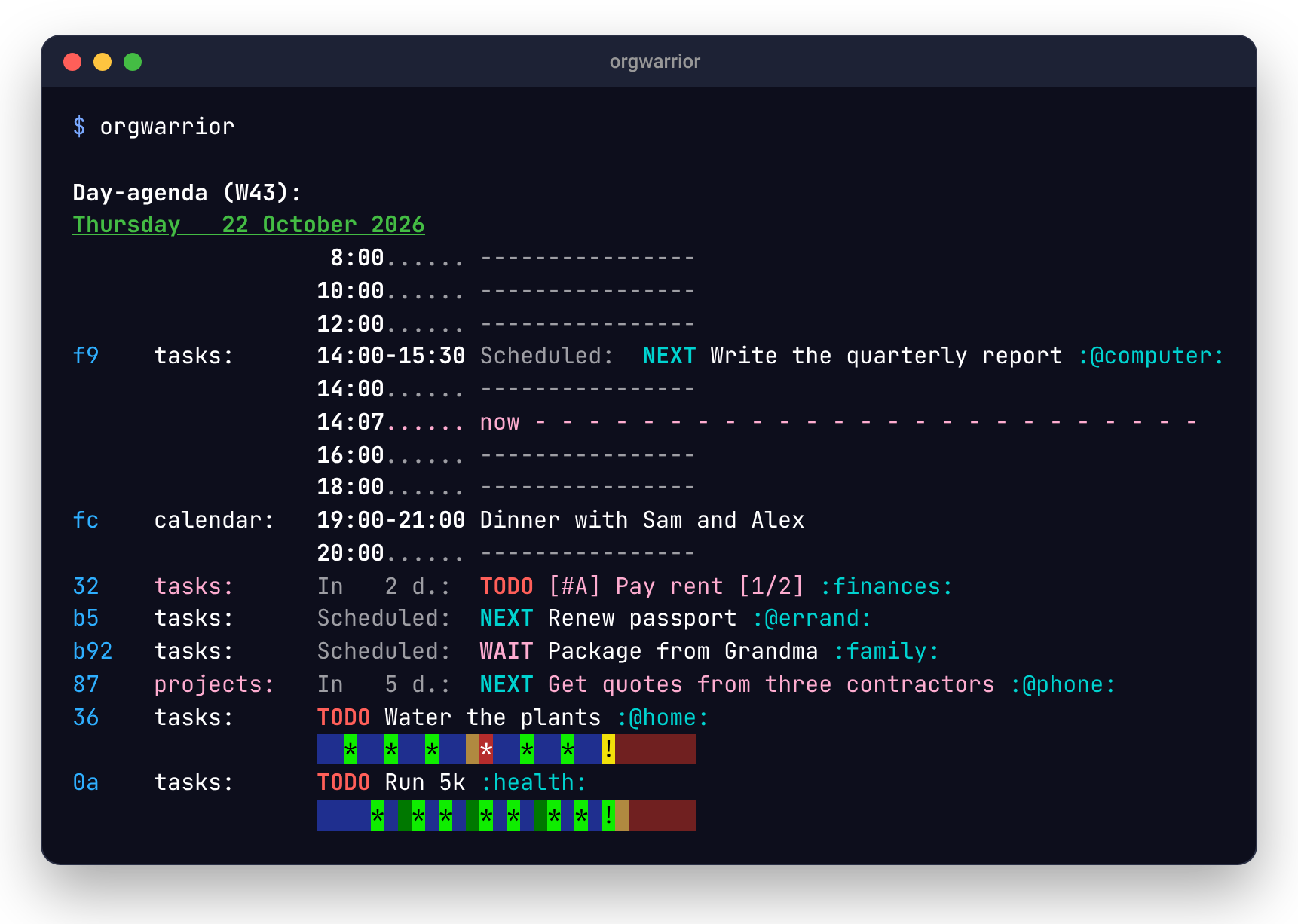
orgwarrior doesn't read your org files itself. It asks your running Emacs to do the work, so your agenda files, TODO keywords, custom agenda commands, logging, habits and refile targets behave exactly as they do in Emacs.
- You don't need to change your Emacs config. orgwarrior loads its own code into Emacs when it needs to.
- IDs don't change. A task's ID comes from its file and title, so it's the same in every view and from one day to the next.
orgwarrior-web puts the same agenda on a web page for your phone. orgwarrior-mcp gives it to Claude.
Quick start
You'll need Emacs 29 or later with its server running, and your org settings loaded in it. Any of these works:
emacs --daemon, or your system's Emacs service (systemctl --user enable --now emacson most Linux systems).- On a Mac with Homebrew,
brew services start emacs(orbrew services start emacs-plus@30for emacs-plus). - If you keep Emacs open as an app, add
(server-start)to your init file. orgwarrior then works while Emacs is open.
Then install orgwarrior one of these ways:
brew install aleksozolins/tap/orgwarrior   # macOS or Linux
yay -S orgwarrior                          # Arch, with any AUR helper
pipx install orgwarrior                    # Python 3.11+; uv tool install works too
Installing orgwarrior-web or orgwarrior-mcp also installs this command, so you only need one of them.
orgwarrior --check      # checks Emacs, your agenda files and the rest
orgwarrior              # today's agenda
orgwarrior help         # all the commands on one screen
--check says what's missing and how to fix it. Once it's happy, you'll
see what your Emacs agenda shows.
To act on a task, use the ID shown beside it:
orgwarrior c1 done -m "booked for the 20th"
orgwarrior 32 sched fri
orgwarrior add NEXT call the dentist :@phone: s:fri
To update, use the tool you installed with: brew upgrade, your AUR
helper, or pipx upgrade orgwarrior. alias ow=orgwarrior saves typing.
Homebrew and the AUR install the man page. With pipx or uv, copy it to
where man looks, and do it again after each upgrade:
mkdir -p ~/.local/share/man/man1
orgwarrior help --man > ~/.local/share/man/man1/orgwarrior.1
Everyday use
| command | what it does |
|---|---|
orgwarrior |
shows the default view (today) |
orgwarrior week, orgwarrior fri, orgwarrior all |
this week, one day, or every open TODO |
orgwarrior +@phone, orgwarrior next +@phone |
tasks with a tag, or in a TODO state with a tag |
orgwarrior flu shot |
searches text; add --archive to search archived tasks too |
orgwarrior projects.org |
shows a file's outline |
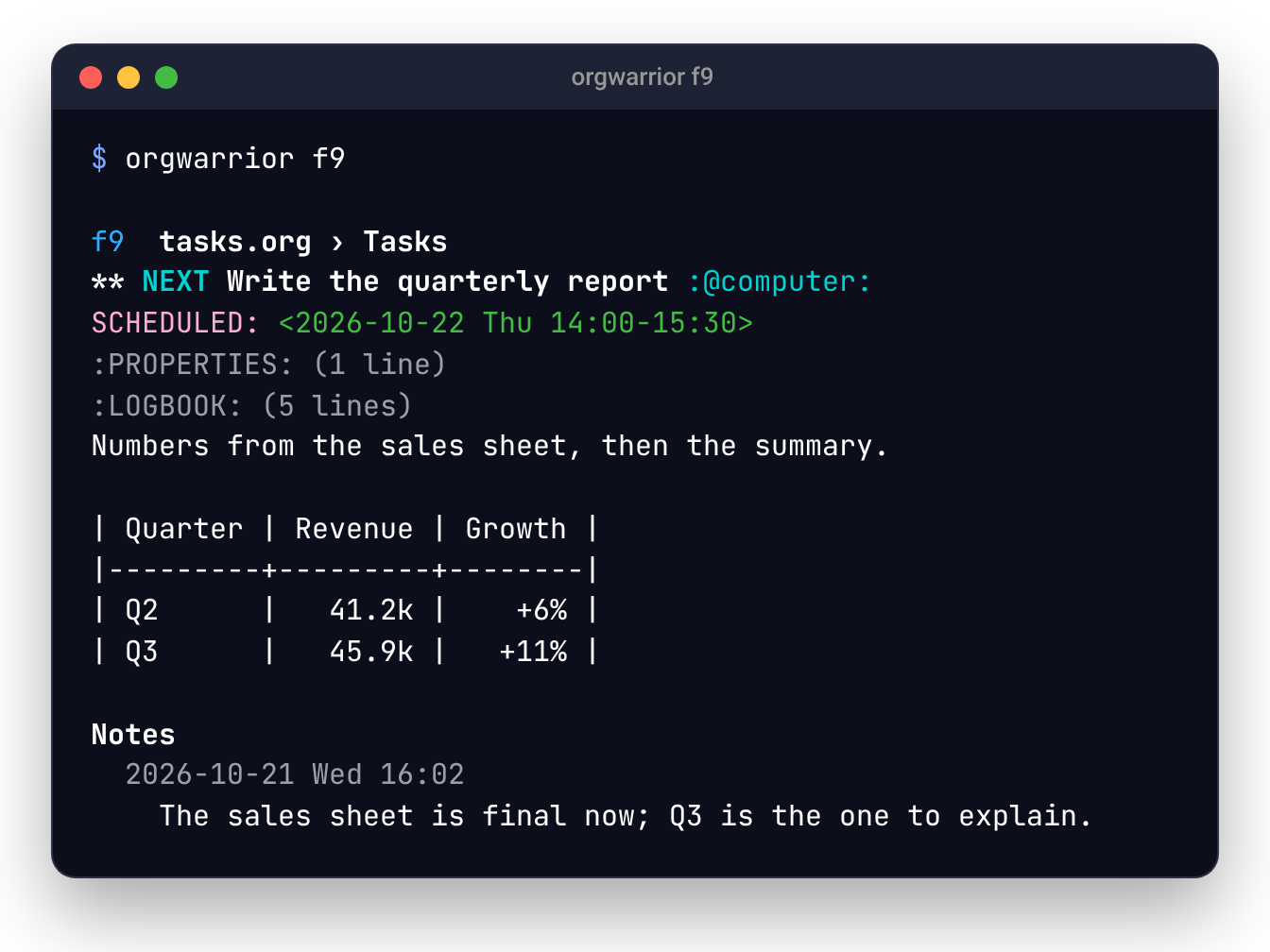
orgwarrior c1 |
shows a task: where it lives, its text, notes and child headings |
orgwarrior c1 done, orgwarrior c1 wait |
sets any of your TODO keywords, asking for a note where org would |
orgwarrior c1 sched fri 14:00, orgwarrior c1 due +2w |
sets dates, written the way org reads them |
orgwarrior c1 +@home -someday, orgwarrior c1 pri A |
changes tags and priority |
orgwarrior c1 refile projects |
refiles under a heading; with no target, lists them |
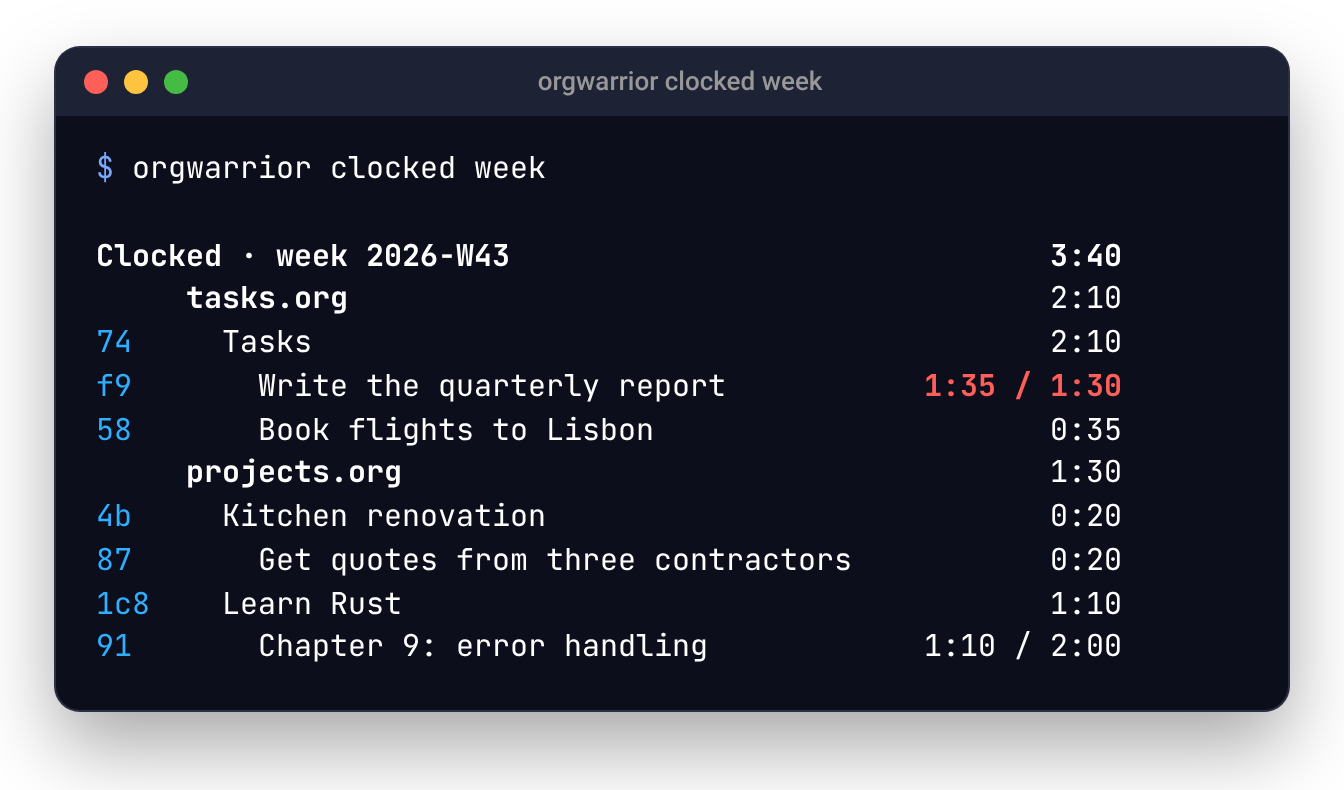
orgwarrior c1 clock in, orgwarrior clock out |
clocks in and out; orgwarrior clocked week totals the time |
orgwarrior c1 clocks add yesterday 14:00-15:30 |
logs time already spent, without touching a running clock |
orgwarrior closed week |
lists what you finished, day by day, archived tasks included |
orgwarrior c1 edit |
opens the task in Emacs, in this terminal |
orgwarrior add event Dentist @fri 10:30 |
adds an event (a plain timestamp, no keyword) |
orgwarrior c1 when sat 10:30 |
moves an event to another date |
Most commands take several IDs at once: orgwarrior c1 32 done.
orgwarrior help TOPIC explains each part with examples (help dates,
help refile, help clock…), and --help works after any command.
How it works
Org is the task manager. orgwarrior is a friendlier set of commands on top of it, the way Git's everyday commands sit on top of its internals.
  orgwarrior          orgwarrior-web         orgwarrior-mcp
  (a terminal)        (a browser)            (Claude, any MCP client)
          \                 |                 /
       orgwarrior.el, loaded into your running Emacs
                            |
             Org mode  ──▶  your .org files
Each command goes to your Emacs daemon through emacsclient.
orgwarrior's elisp then has Org do the work: build the agenda, change a
heading, read a date. Org writes the file just as it would from the
agenda buffer, so logging, repeaters, [1/3] cookies and hooks all work
as usual.
- IDs are short hashes of the file and the heading's title, like Git's
commit IDs. Changing a task's keyword, tags or dates keeps its ID.
Renaming or refiling it gives it a new one, and orgwarrior prints the
change (
6a → 91). An old ID stops matching instead of pointing at a different task. For a day afterwards, while Emacs runs, a new task that would get the same ID gets a longer one. - Notes: where Emacs would ask for a note (
@inorg-todo-keywords, or aLOGGINGproperty), orgwarrior asks in the terminal.-mgives it up front. - Safety: if a file has unsaved changes in Emacs, orgwarrior refuses to
touch it rather than save someone's half-finished edit.
killasks before deleting. - Read-only files: a file that isn't writable (
chmod a-w) is shown but never changed. This is meant for a calendar that a script exports to org, from vdirsyncer or Google for example. Every change to it is refused, it's never offered as a place to refile or add to, and orgwarrior-web's calendar feed leaves it out, since your calendar app already has the original.
Configuration
Everything is optional. The config file is
~/.config/orgwarrior/config.toml (or under $XDG_CONFIG_HOME, or
wherever ORGWARRIOR_CONFIG points).
config.toml.example
lists every key with comments.
| key | what it does |
|---|---|
default_view |
the view plain orgwarrior shows (default today) |
socket |
the Emacs server socket, if it isn't the default (also -s or ORGWARRIOR_SOCKET) |
prefix_format |
an org-agenda-prefix-format used only by orgwarrior |
tags |
inline puts tags after the title (the default), right aligns them right |
time_grid |
true keeps Org's time grid |
color |
auto (color on a terminal, unless NO_COLOR is set), always or never |
[views] |
name = "key" makes an org-agenda-custom-commands entry a view; a week here replaces the built-in one |
[add] |
where add writes: a file (otherwise Emacs's org-default-notes-file), a heading to file under, and captured = true to stamp a :CAPTURED: time |
[add.event] |
the same, for add event |
[refile] |
new_in and new_suffix for refile --new; usual, the target a front end offers first |
[colors] |
colors for a role or TODO keyword: bold cyan, #ff8f88, on-green… (see orgwarrior help colors) |
[web] |
settings for orgwarrior-web; orgwarrior ignores them |
Troubleshooting
Start with orgwarrior --check. It checks Emacs, your init file, your
agenda files, where add writes and your config, and says what to fix.
- "no Emacs daemon is running": start Emacs as a daemon
(
emacs --daemon), or add(server-start)to your init file if you keep Emacs open as an app. If your daemon runs under another name (emacs --daemon=work), setsocket = "work"in the config. - Every view is empty: Emacs has no
org-agenda-files. Set them in your init file ((setq org-agenda-files '("~/org")); a directory works), or add a file withC-c [, as you would for Org's agenda. - "There's no file to add to":
addwrites toorg-default-notes-fileunless[add] filenames another file. Point it at your inbox. - "… is encrypted and not open in Emacs": an agenda file is
.gpg, and orgwarrior can't type its passphrase. Open it in Emacs once (it stays decrypted while Emacs runs), or take it out oforg-agenda-files. - "Emacs tried to ask a question": something in your Emacs, such as a hook, wanted to ask something. orgwarrior can't answer, so it stops. Do the same thing in Emacs itself to see what it asks.
- Colors look wrong:
color = "never"orNO_COLOR=1turns them off, and[colors]changes any of them.
From Python
Other programs can use the same code through orgwarrior.api;
orgwarrior-web is built on it. Views, tasks and actions come back as
plain data.
from orgwarrior.api import Orgwarrior

ow = Orgwarrior()             # uses your config.toml and daemon
ow.view("wait +@phone")       # [{"text", "id", "spans"}, ...]
ow.show("c1")                 # {"id", "file", "path", "lines", "children"}
ow.show("c1", html=True)      # ... plus "html": its text as org exports it
ow.act(["c1"], "done", note="booked")
With Claude
Claude Code, or any AI agent with a shell on the machine running your Emacs, can use orgwarrior for you. A skill file teaches it how: reading views and IDs, the verbs, adding tasks, and asking before it deletes anything.
mkdir -p ~/.claude/skills/orgwarrior
orgwarrior help --skill > ~/.claude/skills/orgwarrior/SKILL.md
Then ask things like "what's due this week?" or "what did I get done
yesterday?". Run the command again after an upgrade to pick up new
features. Put your own preferences (your inbox's tags, keywords it should
leave alone) in ~/.claude/CLAUDE.md, which the command never
overwrites.
Where Claude can't run commands on that machine (claude.ai, the phone apps), orgwarrior-mcp gives it the same agenda as MCP tools.
Development
git clone https://github.com/aleksozolins/orgwarrior
cd orgwarrior
uv tool install --editable .   # the orgwarrior command runs this checkout
uv run pytest                  # all tests, including the ERT suite
scripts/dev-daemon             # a throwaway emacs -Q daemon on test files
scripts/dev-orgwarrior today   # orgwarrior against that daemon
scripts/dev-daemon stop
The dev daemon never touches your real Emacs, config or org files. It only writes to its own copy of the test files. The scripts run on Linux and macOS. Tested on Emacs 29.4 (Org 9.6) and 31.1 (Org 9.8).
Claude (Anthropic's AI) was used in developing orgwarrior. I review all the code, and every behavior is covered by tests.
Contributing
I read every issue and fix what I can, bugs first. Pull requests are
welcome. For anything big, open an issue first so we can talk it through.
uv run pytest runs every test (Development).
License
GPL-3.0-or-later, the same as Emacs and Org.
1 maintainer

Metadata
1 maintainer
Release files for orgwarrior 0.4.0
For a detailed explanation of source distributions (sdists) and built distributions (wheels), please see the package formats documentation.
Source distribution (sdist)
| File | Size | Uploaded | Provenance | |
|---|---|---|---|---|
| orgwarrior-0.4.0.tar.gz | 783.8 kB | With provenance | Details |
Built distribution (wheel)
| File | Interpreter | ABI | Platform | Reset |
|---|---|---|---|---|
| orgwarrior-0.4.0-py3-none-any.whl | Python 3 | none | any | Details |
Total release size: 891.0 kB
Release files / orgwarrior-0.4.0.tar.gz
| Download URL | orgwarrior-0.4.0.tar.gz |
|---|---|
| Size | 783.8 kB |
| Tags | Source |
|
SHA-256 checksum How to use checksums |
bd479d0aeedcd6cfdc4274961f2914b53785caa191e6dadcc9ddbc5f27700683
|
|
BLAKE2b-256 checksum How to use checksums |
283028ab5756de502e424236c2f4678251e6b14e849b42ead67dc06977b089f8
|
| Upload date | |
|
Uploaded using Trusted Publishing? What is trusted publishing? |
Yes |
| Uploaded via |
twine/7.0.0 CPython/3.13.16
|
Provenance
Provenance describes where a file came from. On PyPI, provenance is shared via attestations, which provide a verifiable record of the build or publishing details. View details, limitations and caveats.


PyPI Publish Attestation
PyPI verified that this artifact, at this checksum, originated from the publisher listed below.
Signed by GitHub Actions, verified by PyPI on Oct 24, 2026.
Transparency logRelease files / orgwarrior-0.4.0-py3-none-any.whl
| Download URL | orgwarrior-0.4.0-py3-none-any.whl |
|---|---|
| Size | 107.2 kB |
| Tags | Python 3 |
|
SHA-256 checksum How to use checksums |
a5b1b9e6b2c4e20ce5c23053d06b1aa147cea7a051be5a896529175a758c52a6
|
|
BLAKE2b-256 checksum How to use checksums |
db899cb6dd16f8401433c018b71595e2bcc16b98d09bcd4296ba08540ed5541a
|
| Upload date | |
|
Uploaded using Trusted Publishing? What is trusted publishing? |
Yes |
| Uploaded via |
twine/7.0.0 CPython/3.13.16
|
Provenance
Provenance describes where a file came from. On PyPI, provenance is shared via attestations, which provide a verifiable record of the build or publishing details. View details, limitations and caveats.
PyPI Publish Attestation
PyPI verified that this artifact, at this checksum, originated from the publisher listed below.
Signed by GitHub Actions, verified by PyPI on Oct 24, 2026.
Transparency logSecurity for orgwarrior 0.4.0
Provenance
Provenance describes where a file came from. On PyPI, provenance is shared via attestations, which provide a verifiable record of the build or publishing details. View details, limitations and caveats.
Full provenance
All 2 files in this release have been uploaded with provenance metadata.
Attestation for orgwarrior-0.4.0.tar.gz
PyPI Publish Attestation
PyPI verified that this artifact, at this checksum, originated from the publisher listed below.
Signed by GitHub Actions, verified by PyPI on Oct 24, 2026.
Transparency logA note on package security
PyPI is a repository for distributing packages, not a service for auditing them. While third-party security researchers and our staff do their best to detect and remove malicious packages, PyPI cannot guarantee the quality, security or suitability of any given package.
To learn more about protecting yourself from malicious actors, visit our package security documentation.














