
orhelper




Script and automate OpenRocket from Python.
Load a .ork file, tweak the rocket or launch conditions, run simulations, and
get the results back as NumPy arrays: for parameter sweeps, optimisation, Monte
Carlo landing-zone studies, or your own plots.
Documentation: openrocket.info/orhelper: installation, a user guide, the API reference, and a reference of every flight data variable with its unit.
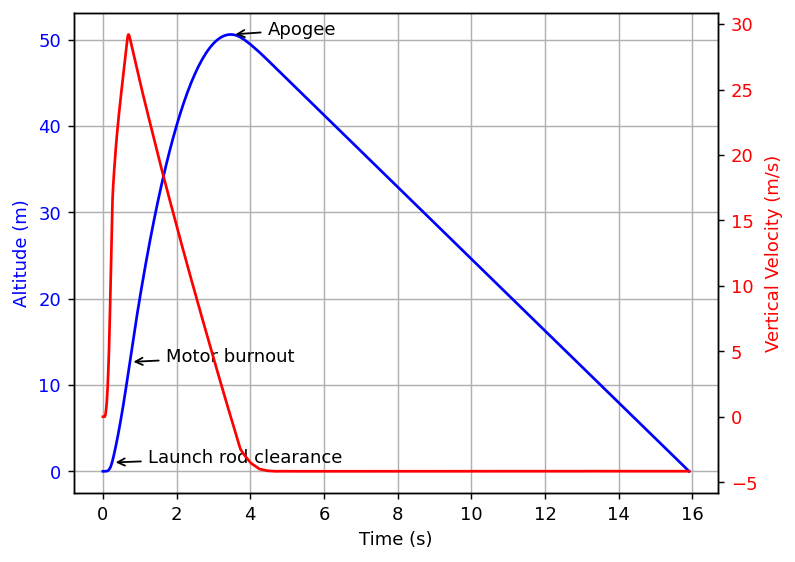
Output of examples/simple_plot.py
Quickstart
-
Install OpenRocket from openrocket.info/downloads (22.02 or newer). The installer bundles the Java runtime that orhelper uses.
-
Install orhelper:
pip install orhelper
-
Run a simulation (this uses the sample rocket that ships with orhelper):
import numpy as np

import orhelper
from orhelper import FlightDataType

with orhelper.OpenRocketInstance(log_level="ERROR") as instance:
    orh = orhelper.Helper(instance)

    doc = orh.load_doc(orhelper.sample_ork_path())  # or "/path/to/your.ork"
    sim = doc.getSimulation(0)
    orh.run_simulation(sim)

    data = orh.get_timeseries(sim, [FlightDataType.TYPE_TIME,
                                    FlightDataType.TYPE_ALTITUDE,
                                    FlightDataType.TYPE_VELOCITY_TOTAL])

    print(f"Apogee:       {np.max(data[FlightDataType.TYPE_ALTITUDE]):.0f} m")
    print(f"Max velocity: {np.nanmax(data[FlightDataType.TYPE_VELOCITY_TOTAL]):.0f} m/s")
    print(f"Flight time:  {data[FlightDataType.TYPE_TIME][-1]:.1f} s")
Apogee:       51 m
Max velocity: 29 m/s
Flight time:  15.9 s
(Exact numbers vary slightly from run to run, because
run_simulationrandomizes the simulation's random seed.)The complete script is
examples/quickstart.py. If OpenRocket isn't in its default location, or it can't be found, pass the jar explicitly:OpenRocketInstance(jar="/path/to/OpenRocket.jar").
How it works
orhelper starts OpenRocket's Java code inside your Python process using JPype. It adds a small layer of helpers on top, and everything else is OpenRocket's own Java API.
OpenRocketInstancestarts (and on exit shuts down) the JVM and initialises OpenRocket. Use it as a context manager; everything that touches OpenRocket must happen inside thewithblock.Helperhas the Python-friendly operations:load_doc,save_doc,run_simulation,get_timeseries,get_final_values,get_events,get_component_named.FlightDataTypeandFlightEventare Python enums for the variables and events OpenRocket records. Pass members (or their names as strings) to the helpers above.AbstractSimulationListenerlets you hook into a simulation from Python (seeexamples/monte_carlo.py).- Everything else is a raw Java object.
load_docreturns anOpenRocketDocument,doc.getSimulation(0)aSimulation,sim.getOptions()aSimulationOptions, and so on. Call their Java methods directly (getFoo(),setFoo(value)). To find out what's available, browse the OpenRocket source (theinfo.openrocket.corepackage; in 22.02 and 23.09 it isnet.sf.openrocketinstead) or usedir(obj)in a Python session. Java methods take SI units, and angles are in radians.
Common tasks
All snippets assume the with orhelper.OpenRocketInstance() as instance: block and
orh = orhelper.Helper(instance) from the quickstart, and doc/sim loaded as there.
Change launch conditions (angles in radians, speeds in m/s):
opts = sim.getOptions()
opts.setLaunchRodAngle(math.radians(5))
opts.setLaunchRodDirection(math.radians(90))
opts.setWindSpeedAverage(4.0)
Modify a component, for example override a mass:
body = orh.get_component_named(sim.getRocket(), "Body tube")
body.setMassOverridden(True)
body.setOverrideMass(0.120)  # kg
Get just the final value of a variable:
orh.get_final_values(sim, [FlightDataType.TYPE_POSITION_X])
Save your changes: orh.save_doc("modified.ork", doc).
Multistage rockets: get_timeseries, get_final_values and get_events
take branch_number (0 is the sustainer; 1, 2, ... are booster branches).
Run Python code during a simulation by subclassing
orhelper.AbstractSimulationListener and passing instances via
run_simulation(sim, listeners=[...]). Override only the hooks you need
(postStep, endSimulation, ...); see examples/monte_carlo.py.
Examples
Examples live in examples/. Start with the notebook
tour.ipynb (needs pip install jupyter matplotlib), or run
any script, for example python examples/quickstart.py. Some need extra packages:
pip install matplotlib scipy (or pip install "orhelper[examples]").
| Example | What it shows | Extra packages |
|---|---|---|
tour.ipynb |
Guided notebook: run, plot, change launch conditions and components, pandas, listeners | jupyter, matplotlib |
quickstart.py |
Run a simulation, print apogee, max velocity and events | none |
events_and_stats.py |
Event table with altitudes, OpenRocket's summary statistics, landing distance | none |
edit_and_save.py |
Change a component and the launch conditions, compare, save a new .ork |
none |
parameter_sweep.py |
Sweep wind speed and launch angle and write a CSV file | none |
multistage.py |
Read the data and events of each branch of a multistage rocket | none |
custom_listener.py |
Run Python code at every simulation step with a listener | none |
parallel_runs.py |
Run simulations in parallel, one JVM per worker process | none |
custom_setup.py |
Explicit jar, jvm_args and log settings; handling startup errors |
none |
simple_plot.py |
Plot altitude and velocity with annotated events | matplotlib |
lazy.py |
Find the launch angle that minimises drift with scipy.optimize |
matplotlib, scipy |
monte_carlo.py |
Randomise launch angle, wind and masses; custom listeners; landing-zone statistics | none |
More background is on the OpenRocket wiki.
Troubleshooting
OpenRocketNotFoundError/JVMNotFoundErrorwhen starting. orhelper couldn't find OpenRocket or its Java runtime. The message says what was missing. Passjar="…/OpenRocket.jar"(andjvm="…/libjvm.*"if no Java runtime is found), ororhome="…"for an installation in a non-default place. The default install locations it looks in are~/OpenRocket(Linux),/Applications/OpenRocket.app(macOS) and%PROGRAMFILES%\OpenRocket(Windows). Both are subclasses oforhelper.OrHelperError(aRuntimeError).JVMAlreadyStartedError. JPype starts the JVM once per Python process, so a secondOpenRocketInstance(even after the first one closed) fails. Do all OpenRocket work in a singlewithblock, and use a new process to switch OpenRocket versions (for example withmultiprocessingusing thespawnstart method).- Wrong Java version. OpenRocket 23.09 and newer need Java 17; 22.02 also works with Java 11. The OpenRocket installers bundle a suitable runtime.
- JVM fails to load on Apple Silicon or with a mixed 32/64-bit setup. The Python interpreter and the Java runtime must have the same CPU architecture.
- A result contains
nan. Some series arenanat the first time step (for example velocities at t=0). Usenp.nanmax/np.nanmin, or drop the first sample. - Lots of log output. Pass
log_level="ERROR"to silence OpenRocket's Java logging. orhelper's own Python messages go through theorhelperlogger and are only shown if you configure logging (for examplelogging.basicConfig(level=logging.INFO)). - Need more memory, or a headless JVM? Pass JVM options with
OpenRocketInstance(jvm_args=["-Xmx4g", "-Djava.awt.headless=true"]). TypeError: … unexpected keyword argument. Onlyorhome,jar,jvm,jvm_argsandloglevel(plus the positionaljar_pathandlog_level) are accepted; a misspelt option is an error rather than being ignored.AttributeError: … not available in this OpenRocket version. You asked for aFlightDataTypeintroduced after the OpenRocket version you're running.- Showing plots. Leave the
with OpenRocketInstance()block before callingplt.show(), so the JVM is shut down first, assimple_plot.pydoes.
OpenRocket compatibility
The helpers and Python simulation listeners support OpenRocket 22.02, 23.09, 24.12, and the 26.xx development code. orhelper detects the Java package layout used by the loaded version. Startup loads the local motor and component databases; interactive motor-database updates belong in the OpenRocket application.
The compatibility tests passed on macOS with Python 3.10, JPype 1.5, and Java 17
for all four versions, and with Java 11 for 22.02. The 26.xx run used snapshot
1f317c066; the relevant APIs were also compared with upstream 259ba462a.
To select a specific version, pass its JAR explicitly:
import orhelper

with orhelper.OpenRocketInstance(jar="/path/to/OpenRocket.jar") as instance:
    helper = orhelper.Helper(instance)
    document = helper.load_doc(orhelper.sample_ork_path())
    simulation = document.getSimulation(0)
    helper.run_simulation(simulation)
    data = helper.get_timeseries(simulation, [orhelper.FlightDataType.TYPE_ALTITUDE])
Both jar=... and the legacy positional JAR argument take precedence over
the automatically discovered installation. jvm=... selects a different JVM
when needed. JPype can start the JVM only once per Python process; use a new
process to switch OpenRocket versions or start another instance after shutdown.
FlightDataType includes the variables introduced in 24.12 and 26.xx.
Requesting a variable unavailable in an older OpenRocket version raises
AttributeError. Both enum members and their names as strings are accepted.
TYPE_PROPELLANT_MASS remains supported as a legacy name for TYPE_MOTOR_MASS,
which measures total motor mass, including the casing. Existing enum numeric
values are preserved.
get_events() handles simulation warnings (SIM_WARN) and aborts (SIM_ABORT).
For multistage rockets, get_events(simulation, branch_number=1) selects a booster
branch, matching the branch selection in get_timeseries() and get_final_values().
Development and testing
git clone https://github.com/openrocket/orhelper.git
cd orhelper
pip install -e ".[examples]"
Run the Python regression tests with:
python -m unittest discover -s tests -v
The Java integration tests are skipped unless OPENROCKET_JAR is set. They require
a JDK with javac on PATH, run without a display, and isolate Java preferences
and the motor database from your normal OpenRocket settings. Run each version in
a separate Python process:
OPENROCKET_JAR=/path/to/OpenRocket.jar python -m unittest discover -s tests -v
These tests check every built-in flight-data type and event, actual simulation
results, saving and reloading, listener cloning, and multistage branches. A second
test module runs every script in examples/ against the jar, so the examples can't
silently break. CI runs both against the released OpenRocket 22.02, 23.09 and 24.12 jars.
See CONTRIBUTING.md for more, and CHANGELOG.md
for release notes.
License
orhelper is released under the GNU General Public License v2.
Credits
3 maintainers


Metadata
3 maintainers
Release files for orhelper 0.2.1
For a detailed explanation of source distributions (sdists) and built distributions (wheels), please see the package formats documentation.
Source distribution (sdist)
| File | Size | Uploaded | Provenance | Actions |
|---|---|---|---|---|
| orhelper-0.2.1.tar.gz | 240.7 kB | Without provenance | Details for orhelper-0.2.1.tar.gz |
Built distribution (wheel)
| File | Interpreter | ABI | Platform | Actions Reset |
|---|---|---|---|---|
| orhelper-0.2.1-py3-none-any.whl | Python 3 | none | any | Details for orhelper-0.2.1-py3-none-any.whl |
Total release size: 469.4 kB
Release files / orhelper-0.2.1.tar.gz
| Download URL | orhelper-0.2.1.tar.gz |
|---|---|
| Size | 240.7 kB |
| Tags | Source |
|
SHA-256 checksum How to use checksums |
cb5eec020124bd77de08ab31c9d6e05d2908fe55b7382ca707a509f795db39b4
|
|
BLAKE2b-256 checksum How to use checksums |
e49cabb91ded4b09f4c86335d37329f1c59fe16e959812746e70792458830c76
|
| Upload date | |
|
Uploaded using Trusted Publishing? What is trusted publishing? |
No |
| Uploaded via |
twine/7.0.0 CPython/3.10.10
|
Release files / orhelper-0.2.1-py3-none-any.whl
| Download URL | orhelper-0.2.1-py3-none-any.whl |
|---|---|
| Size | 228.7 kB |
| Tags | Python 3 |
|
SHA-256 checksum How to use checksums |
6b7e1da9a3c1f96f4ce1c5d934fb8310a5e14c8fc7aaa1229c5ab1d3cf6cb930
|
|
BLAKE2b-256 checksum How to use checksums |
06c90ee644ef8bcbbee35402db90ef9184587ee11f7e3afb9a4cbf549aaec65b
|
| Upload date | |
|
Uploaded using Trusted Publishing? What is trusted publishing? |
No |
| Uploaded via |
twine/7.0.0 CPython/3.10.10
|
Security for orhelper 0.2.1
Provenance
Provenance describes where a file came from. On PyPI, provenance is shared via attestations, which provide a verifiable record of the build or publishing details. View details, limitations and caveats.
No provenance found
None of the files in this release were uploaded with provenance metadata.
A note on package security
PyPI is a repository for distributing packages, not a service for auditing them. While third-party security researchers and our staff do their best to detect and remove malicious packages, PyPI cannot guarantee the quality, security or suitability of any given package.
To learn more about protecting yourself from malicious actors, visit our package security documentation.














