
OrionBelt Analytics - the Ontology-based MCP server for your Text-2-SQL convenience

Project description

OrionBelt Analytics
The Ontology-based MCP server for your Text-2-SQL convenience.







OrionBelt Analytics is an MCP server that analyzes relational database schemas and generates RDF/OWL ontologies with embedded SQL mappings. It provides relationship-aware Text-to-SQL with automatic fan-trap prevention, GraphRAG for intelligent schema discovery, and interactive charting -- all accessible through any MCP-compatible AI client.
The OrionBelt Ecosystem
| Project | Purpose |
|---|---|
| OrionBelt Analytics (this) | Schema analysis, ontology generation, GraphRAG, Text-to-SQL |
| OrionBelt Semantic Layer | Declarative YAML models compiled into dialect-specific, fan-trap-free SQL |
| OrionBelt Ontology Builder | Visual OWL ontology editor with reasoning and graph visualization (live demo) |
| OrionBelt Chat | AI chat UI for Analytics + Semantic Layer (Chainlit, multiple LLM providers) |
Run Analytics and Semantic Layer side-by-side in Claude Desktop for schema-aware ontology generation and guaranteed-correct SQL compilation.
Architecture
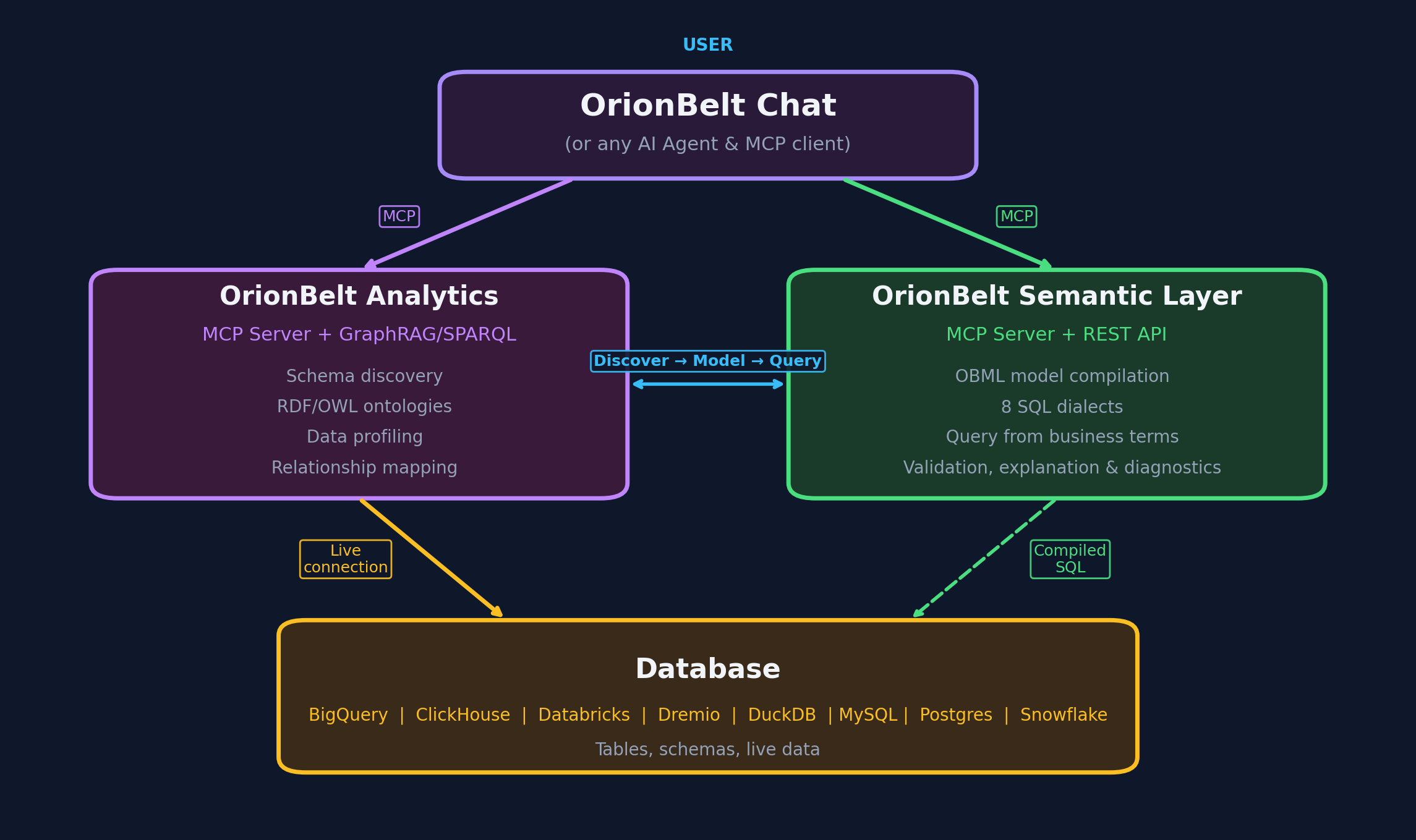
- 8 database connectors -- PostgreSQL, MySQL, Snowflake, ClickHouse, Dremio, BigQuery, DuckDB/MotherDuck, Databricks SQL
- RDF/OWL ontology generation with
oba:namespace SQL annotations and W3C R2RML mappings - GraphRAG -- graph traversal (up to 12 hops) + ChromaDB vector embeddings for semantic schema discovery
- SPARQL 1.1 query interface via persistent Oxigraph RDF store
- Fan-trap prevention -- automatic detection and safe query pattern suggestions
- Interactive charting -- Plotly charts with MCP-UI rendering in Claude Desktop
- Workspace persistence -- reconnect to the same database and restore your previous session
Quick Start
1. Install
git clone https://github.com/ralfbecher/orionbelt-analytics
cd orionbelt-analytics
uv sync
Requires Python 3.13+ and uv.
2. Configure
cp .env.template .env
Edit .env with your database credentials. At minimum, set the variables for one database (e.g. POSTGRES_HOST, POSTGRES_PORT, POSTGRES_DATABASE, POSTGRES_USERNAME, POSTGRES_PASSWORD).
See docs/configuration.md for all environment variables, transport options, and troubleshooting.
3. Run
uv run server.py
The server starts on http://localhost:9000 (HTTP transport, configurable via MCP_SERVER_PORT).
Connect Your AI Client
Claude Desktop
Start the server, then add to your claude_desktop_config.json:
{
  "mcpServers": {
    "OrionBelt-Analytics": {
      "command": "npx",
      "args": [
        "mcp-remote",
        "http://localhost:9000/mcp",
        "--transport",
        "http-only"
      ]
    }
  }
}
Claude Code
claude mcp add orionbelt-analytics http://localhost:9000/mcp
LibreChat
Set MCP_TRANSPORT=sse in .env, restart the server, then add to librechat.yaml:
mcpServers:
  OrionBelt-Analytics:
    url: "http://host.docker.internal:9000/sse"
    timeout: 60000
    startup: true
Other Frameworks
OrionBelt works with LangChain, OpenAI Agents SDK, CrewAI, Google ADK, Vercel AI SDK, n8n, and ChatGPT Custom GPTs. See docs/integrations.md for setup examples.
Tools
OrionBelt exposes 32 MCP tools. Here is a summary by category:
Connection & Schema
| Tool | Description |
|---|---|
connect_database |
Connect to any supported database using .env credentials |
list_schemas |
List available schemas in the connected database |
reset_cache |
Clear cached schema and ontology data for the current session |
analyze_schema |
Analyze schema structure with automatic GraphRAG + ontology generation |
get_table_details |
Get detailed column, key, and constraint info for a specific table |
restore_workspace |
Restore a previous session's schema cache, ontology, GraphRAG, and RDF store |
Ontology & Semantic
| Tool | Description |
|---|---|
generate_ontology |
Generate RDF/OWL ontology from schema with SQL mapping annotations |
suggest_semantic_names |
Detect abbreviations and cryptic names for business-friendly renaming |
apply_semantic_names |
Apply LLM-suggested semantic names and descriptions to ontology |
load_my_ontology |
Load a custom .ttl ontology file from an import folder |
download_ontology |
Download the current ontology as a Turtle file |
download_r2rml |
Download the R2RML mapping as a Turtle file |
Query & Visualization
| Tool | Description |
|---|---|
sample_table_data |
Preview table data with row limit and injection protection |
validate_sql_syntax |
Validate SQL with dialect detection, security analysis, fan-trap checks |
execute_sql_query |
Execute SQL with fan-trap detection and result validation |
generate_chart |
Generate Plotly charts (bar, line, scatter, heatmap) with MCP-UI rendering |
GraphRAG
| Tool | Description |
|---|---|
initialize_graphrag |
Initialize graph + vector index for schema intelligence |
graphrag_search |
Semantic search across schema elements |
graphrag_query_context |
Get optimized context for SQL generation (85-95% token reduction) |
graphrag_find_join_path |
Discover join paths between tables via graph traversal |
graphrag_overview |
Schema statistics and community clustering overview |
SPARQL & RDF
| Tool | Description |
|---|---|
store_ontology_in_rdf |
Persist ontology in Oxigraph for SPARQL access |
query_sparql |
Execute SPARQL SELECT queries |
query_sparql_ask |
Execute SPARQL ASK queries (true/false) |
list_tables_sparql |
List tables via SPARQL |
find_columns_by_type_sparql |
Find columns by data type via SPARQL |
add_rdf_knowledge |
Add custom metadata triples to the RDF store |
get_rdf_store_stats |
Get RDF store statistics |
Semantic Models
| Tool | Description |
|---|---|
save_semantic_model |
Save a semantic model (e.g., OBML YAML) to the workspace |
get_semantic_model |
Retrieve a stored semantic model by name |
list_semantic_models |
List all stored semantic models for the current connection |
System
| Tool | Description |
|---|---|
get_server_info |
Server version, features, and configuration |
For full parameter details, return values, and examples, see docs/tools-reference.md.
Typical Workflows
Full analysis session:
connect_database("postgresql") -> analyze_schema("public") -> generate_ontology() -> execute_sql_query(...)
Quick data exploration:
connect_database("duckdb") -> list_schemas() -> sample_table_data("events")
Query with visualization:
validate_sql_syntax(query) -> execute_sql_query(query) -> generate_chart(data, "bar", ...)
Resume a previous session:
connect_database("postgresql") -> restore_workspace("public")
Documentation
| Document | Contents |
|---|---|
| Tools Reference | Full parameter docs, return values, and usage examples |
| Configuration | Environment variables, transport setup, troubleshooting |
| GraphRAG | Graph-based schema intelligence and OBML workflow |
| Fan-Trap Prevention | The fan-trap problem, detection, and safe SQL patterns |
| Integrations | LangChain, OpenAI, CrewAI, Google ADK, Vercel, n8n, ChatGPT |
| Development | Project structure, testing, contributing |
License
Copyright 2025-2026 RALFORION d.o.o.
Licensed under the Business Source License 1.1. See LICENSE for details.
Change Date: 2030-03-16 | Change License: Apache License, Version 2.0
For commercial licensing inquiries, contact: licensing@ralforion.com

Release history Release notifications | RSS feed


Download files
Download the file for your platform. If you're not sure which to choose, learn more about installing packages.
Source Distribution
Built Distribution
Filter files by name, interpreter, ABI, and platform.
If you're not sure about the file name format, learn more about wheel file names.
Copy a direct link to the current filters
File details
Details for the file orionbelt_analytics-1.3.0.tar.gz.
File metadata
- Download URL: orionbelt_analytics-1.3.0.tar.gz
- Upload date:
- Size: 697.3 kB
- Tags: Source
- Uploaded using Trusted Publishing? No
- Uploaded via: uv/0.8.15
File hashes
| Algorithm | Hash digest | |
|---|---|---|
| SHA256 |
0566a61c24ae0485c641e9769a843a95bf4f03828f7d0b3562846c0bb63965ac
|
|
| MD5 |
790f91e2f63326374c84a8b1029d5ac8
|
|
| BLAKE2b-256 |
b0d6a37705e413b8ebc6e99baf81c8f83b9ac7f6a6f1d62b620d30d18bbd1018
|
File details
Details for the file orionbelt_analytics-1.3.0-py3-none-any.whl.
File metadata
- Download URL: orionbelt_analytics-1.3.0-py3-none-any.whl
- Upload date:
- Size: 188.3 kB
- Tags: Python 3
- Uploaded using Trusted Publishing? No
- Uploaded via: uv/0.8.15
File hashes
| Algorithm | Hash digest | |
|---|---|---|
| SHA256 |
3760af3b3f646c9b5f2c2f43b7953b0af2a18b1b9272a75df111bf069de68a8d
|
|
| MD5 |
3f7a4a57e3888562565d58c358a3124c
|
|
| BLAKE2b-256 |
24feb7faf40c63af19cbb2521f6c7afc15fd5a3476d1749748874d48e1e92778
|






