
OrionBelt Chat - Chainlit + Pydantic AI chat client for OrionBelt Analytics

Project description

OrionBelt Chat
AI-powered chat interface for OrionBelt Analytics & Semantic Layer








A production-ready chat application that connects to OrionBelt Analytics and OrionBelt Semantic Layer MCP servers, providing a conversational interface for database analysis, semantic modeling, and interactive data visualization. Built with Chainlit and Pydantic AI, supporting multiple LLM providers (cloud and local).
Better Together: Works seamlessly with OrionBelt Analytics and OrionBelt Semantic Layer. Connect to both MCP servers simultaneously for schema-aware ontology generation, semantic modeling, guaranteed-correct SQL compilation, and interactive chart rendering.
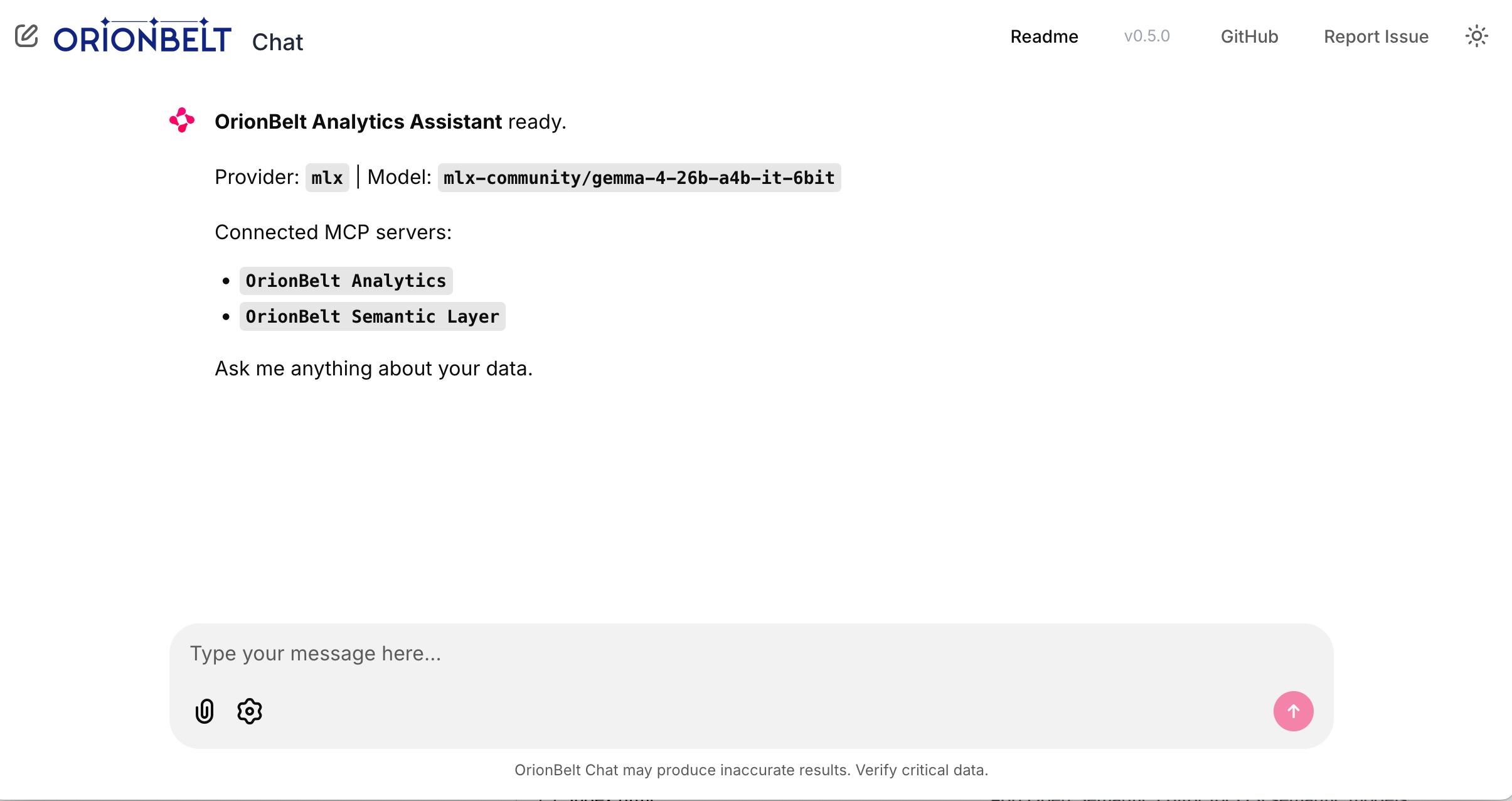
Startup — connected MCP servers, provider & model selection
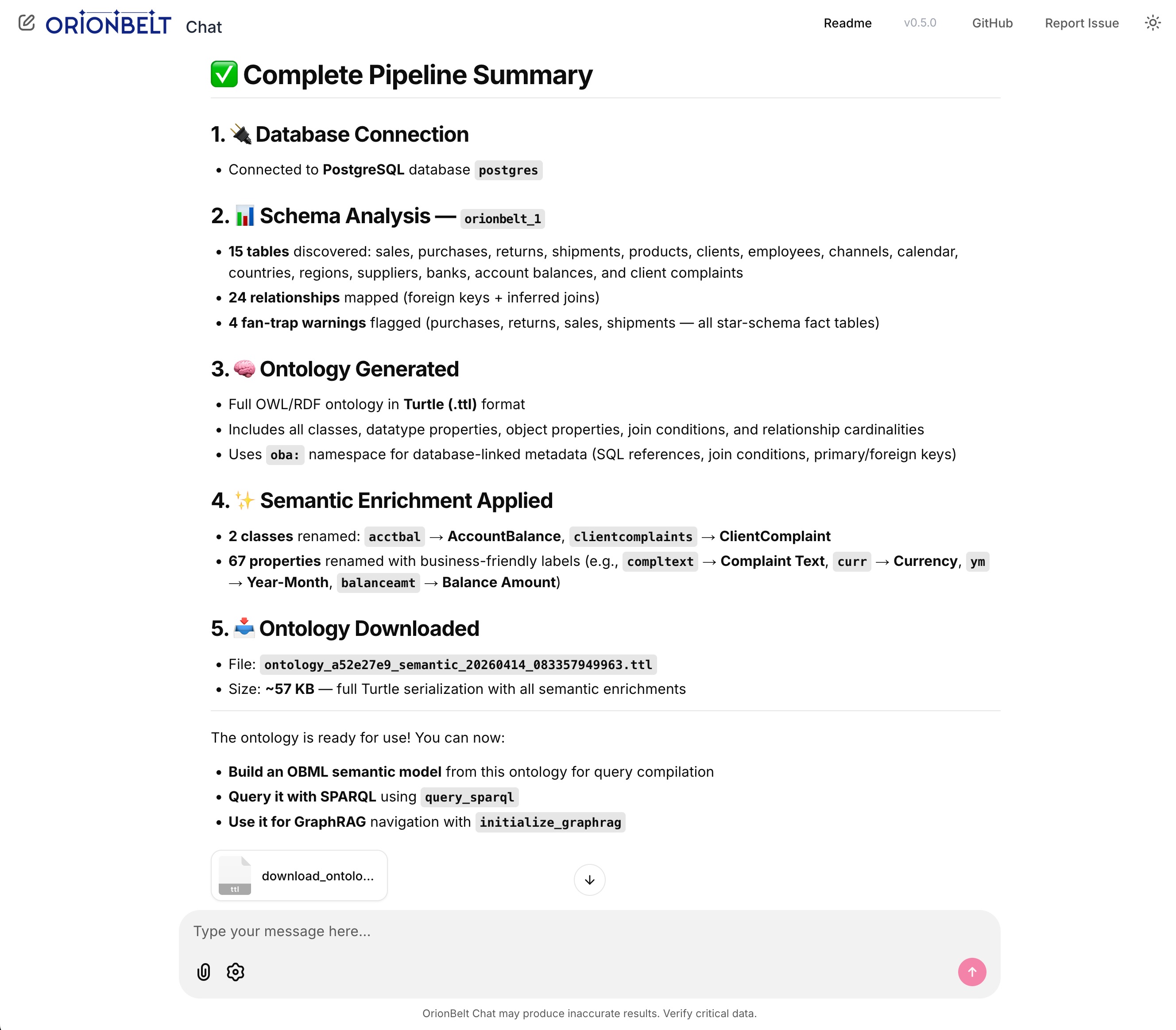
Full pipeline — schema analysis, ontology generation, semantic enrichment & file download
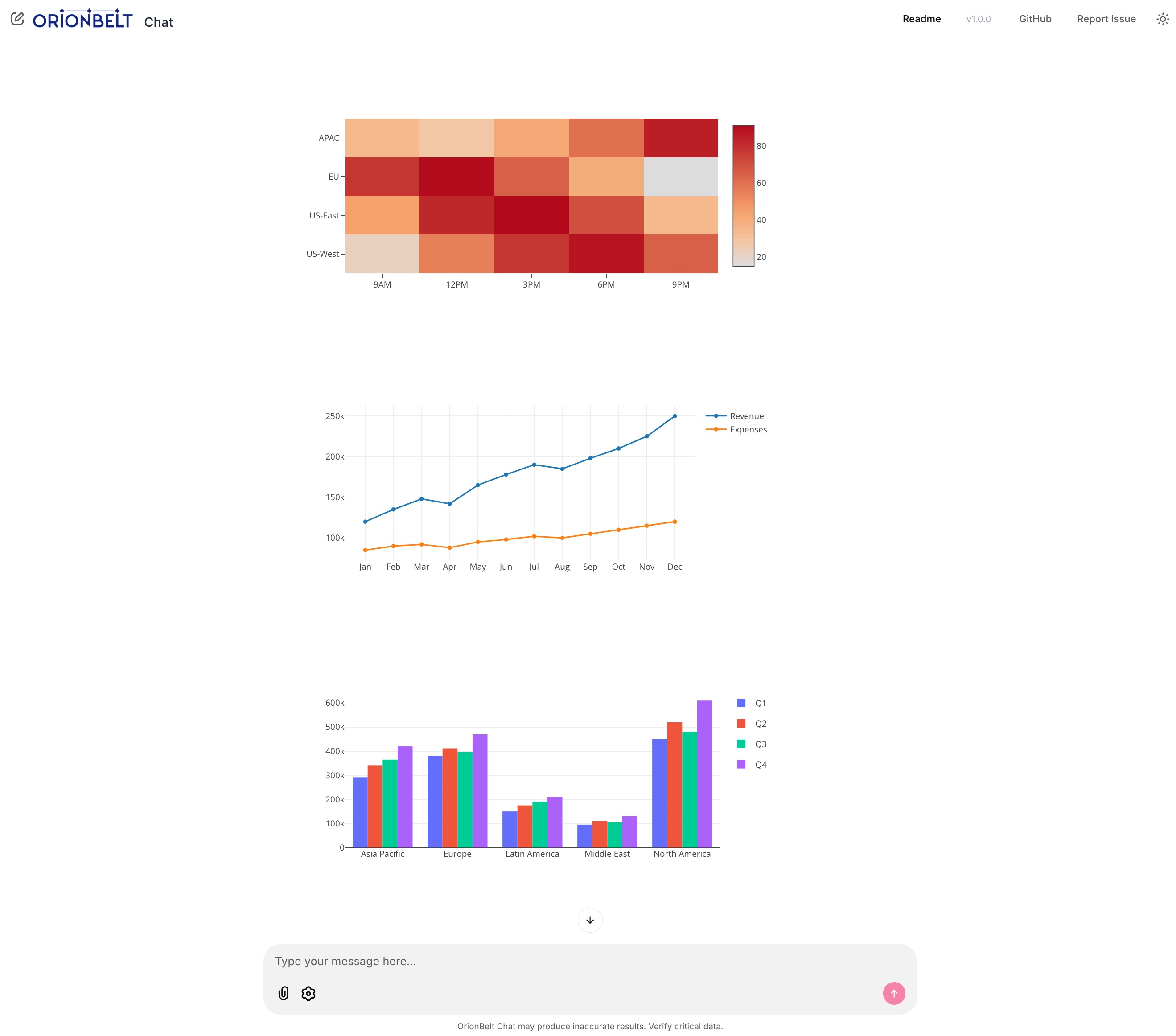
Interactive charts — heatmap, line & grouped bar rendered natively via Plotly.js
Key Features
Multi-Provider LLM Support
- OpenRouter - Access 300+ models via single API (recommended for production)
- MLX - Local inference on Apple Silicon with mlx-openai-server
- Ollama - Cross-platform local inference with easy setup
- Anthropic - Direct API access (bypass OpenRouter)
- OpenAI - Direct API access (bypass OpenRouter)
MCP Integration
- Dual MCP server support - Connect to Analytics and Semantic Layer simultaneously
- Graceful degradation - One unreachable server won't block the app; agent starts with available servers
- Auto-reconnection - Detects MCP session loss and reconnects automatically
- Tool call resilience - Retries failed tool calls up to 3 times; preserves conversation context on errors
- Flexible transport - Stdio (local subprocess) or Streamable HTTP (remote) per server
- Tool visibility - Collapsible steps show tool calls with arguments and results
- Multi-turn context - Full conversation history management with Pydantic AI
Interactive Charts
- Native Plotly rendering - Charts render inline via Chainlit's bundled Plotly.js (no Python plotly package needed)
- FastMCP Apps integration - Fetches chart data from
ui://resource URIs returned by MCP tools - Multiple chart types - Bar, line, scatter, heatmap with auto-detection
- Multiple extraction strategies - Handles Plotly figure dicts,
Plotly.newPlot()in HTML, and bare trace arrays
Mermaid Diagrams
- Client-side rendering - Mermaid.js loaded from CDN renders
erDiagram,flowchart,sequenceDiagram, and other diagram types inline - Auto-detection - Mermaid syntax in MCP tool results is automatically surfaced as a rendered diagram
- Theme-aware - Diagrams re-render when switching between light and dark mode
File Downloads
- Auto-detection - Recognizes downloadable content in tool results and LLM response code blocks
- Supported formats - Turtle/RDF (.ttl), JSON, CSV, SQL, SPARQL, YAML, XML
- Smart extraction - Handles dict-shaped tool returns (e.g.
{'success': True, 'content': '@prefix ...'}) - Inline attachments - Download buttons appear directly in the response message
Real-Time Streaming
- Token-by-token streaming - Smooth response rendering as the model generates
- Thinking indicator - Visual spinner while the model processes before responding
- Tool call tracking - Visual feedback for each MCP tool invocation with correct result matching
- Stop generation - Click the stop button or press Escape to cancel
- Error handling - Graceful failures with clear error messages
Chainlit UI
- Settings panel - Switch providers and models on the fly; header updates live
- Custom model input - Override default models with specific versions
- Customizable system prompt - Edit
system_prompt.mdor setSYSTEM_PROMPT_FILEenv var - Message recall - Press Arrow Up/Down in the input to navigate message history
- Responsive design - Works on desktop and mobile browsers
Quick Start
Prerequisites
- Python 3.11+ (3.13 recommended)
- uv package manager (install)
- OrionBelt Analytics and Semantic Layer repos cloned alongside this one
Installation
# Clone the repository
cd orionbelt-chat

# Install dependencies
uv sync

# Copy environment template
cp .env.example .env

# Edit .env and add your API keys
Configuration
Edit .env and configure your LLM provider:
Option 1: OpenRouter (recommended for cloud)
OPENROUTER_API_KEY=sk-or-v1-...
OPENROUTER_DEFAULT_MODEL=anthropic/claude-sonnet-4-5
DEFAULT_PROVIDER=openrouter
Option 2: Anthropic direct
ANTHROPIC_API_KEY=sk-ant-...
ANTHROPIC_DEFAULT_MODEL=claude-sonnet-4-6   # or claude-opus-4-6
DEFAULT_PROVIDER=anthropic
Option 3: OpenAI direct
OPENAI_API_KEY=sk-...
OPENAI_DEFAULT_MODEL=gpt-4o
DEFAULT_PROVIDER=openai
Option 4: MLX local (Apple Silicon)
# Start mlx-openai-server first:
mlx-openai-server launch \
  --model-path mlx-community/Qwen2.5-14B-Instruct-4bit \
  --model-type lm \
  --enable-auto-tool-choice \
  --port 8000

MLX_DEFAULT_MODEL=mlx-community/Qwen2.5-14B-Instruct-4bit
DEFAULT_PROVIDER=mlx
Option 5: Ollama local (cross-platform)
# Start Ollama first: ollama serve
OLLAMA_DEFAULT_MODEL=qwen2.5:14b
DEFAULT_PROVIDER=ollama
MCP Server Paths:
# Each can be a local directory (stdio) or HTTP(S) URL (Streamable HTTP):
ANALYTICS_SERVER_DIR=../orionbelt-analytics
SEMANTIC_LAYER_SERVER_DIR=../orionbelt-semantic-layer-mcp
# Remote example: ANALYTICS_SERVER_DIR=https://analytics.example.com/mcp
System Prompt (optional):
# Override the default system prompt file (defaults to system_prompt.md)
# SYSTEM_PROMPT_FILE=~/my_custom_prompt.md
Run
uv run chainlit run app.py --watch
Open http://localhost:8080 in your browser.
Usage Examples
Connect to database:
Connect to my PostgreSQL database at localhost
Schema analysis:
Analyze the schema and show me all tables with their relationships
Query with charts:
Show me revenue by product category as a bar chart
Download an ontology:
Generate an ontology for the schema and download it as Turtle
Explore semantic models:
What OBML models are available in the semantic layer?
Generate OBML model:
Create an OBML model for customer analytics with metrics for revenue, order count, and average order value
Architecture
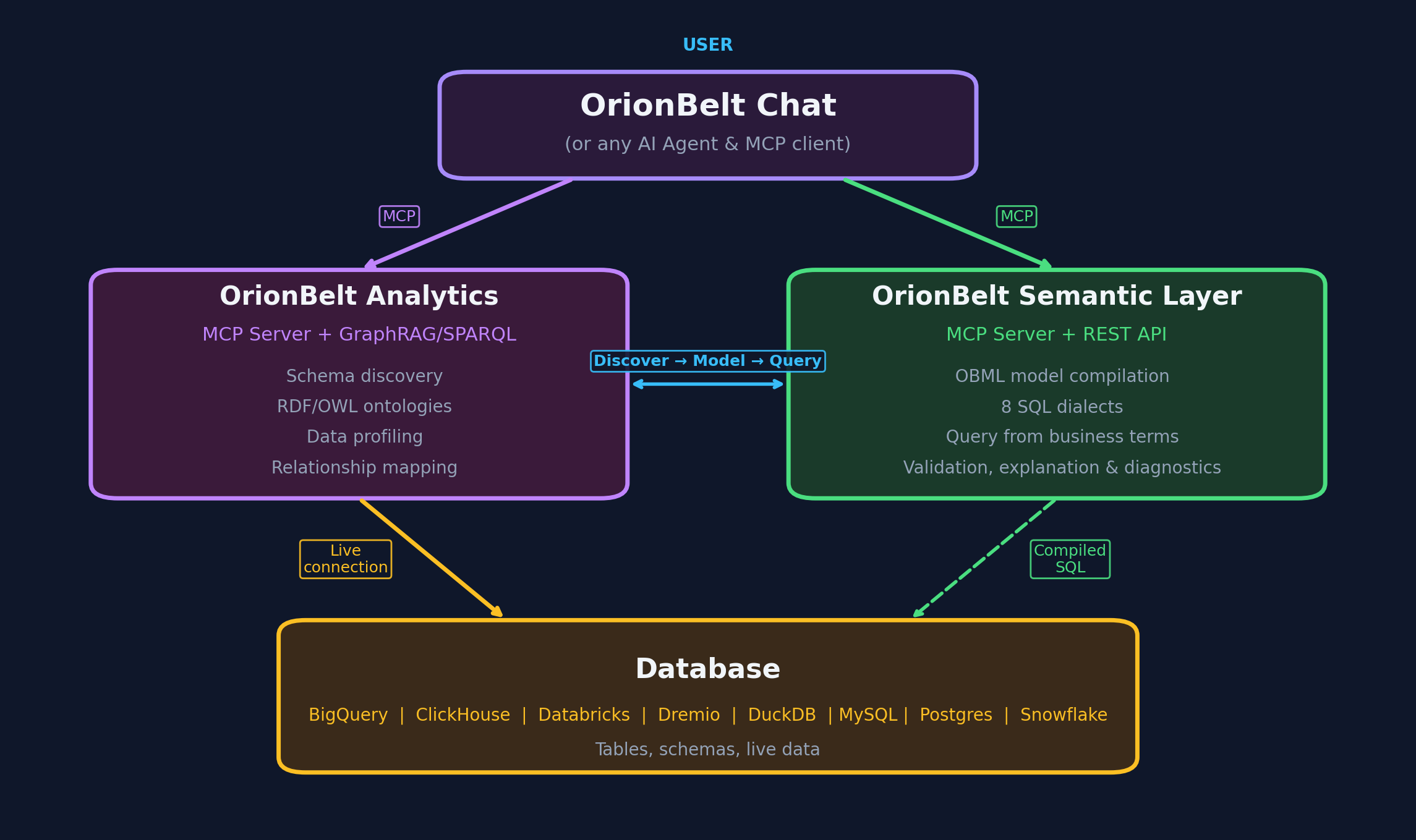
┌──────────────────────────────────────────────────────────────┐
│          OrionBelt Chat (Chainlit + Pydantic AI)             │
│                                                              │
│  ┌──────────┐         ┌──────────────────────────────────┐   │
│  │  Chat UI │         │  Pydantic AI Agent + MCP Client  │   │
│  │          │────────>│  - Multi-turn context            │   │
│  │ Chainlit │         │  - Streaming events              │   │
│  │  2.10+   │         │  - Tool orchestration            │   │
│  └──────────┘         └──────────────────────────────────┘   │
└──────────────────────────────────────────────────────────────┘
         │                      │
         │                      ├──> orionbelt-analytics (MCP stdio or HTTP)
         │                      │    - Schema analysis
         │                      │    - Ontology generation & download
         │                      │    - SQL execution
         │                      │    - Interactive Plotly charts
         │                      │
         │                      └──> orionbelt-semantic-layer (MCP stdio or HTTP)
         │                           - OBML model management
         │                           - Semantic query compilation
         │                           - Guaranteed-correct SQL
         │
         └──> LLM Provider (OpenRouter/MLX/Ollama/Anthropic/OpenAI)
Key Components:
- Chainlit 2.10+ - Chat UI framework with streaming, steps, and settings
- Pydantic AI 1.77+ - Agent framework with node-by-node iteration (
agent.iter()) - MCP Transport - Stdio (local subprocess) or Streamable HTTP (remote) per server
- Chart Renderer - Native Plotly rendering from FastMCP Apps
ui://resources - Mermaid Renderer - Client-side diagram rendering via Mermaid.js CDN
- File Downloads - Auto-detect downloadable content (TTL, JSON, CSV, SQL) in tool results
Development
# Install dev dependencies
uv sync --group dev

# Run tests (when available)
uv run pytest

# Format code
uv run ruff format

# Lint
uv run ruff check --fix
Provider Details
OpenRouter
- Access: 300+ models via single API
- Reliability: Best tool-calling support across vendors
- Recommended models:
anthropic/claude-sonnet-4-5- Best balance of speed and reasoninganthropic/claude-opus-4-5- Maximum intelligencegoogle/gemini-2.5-pro- Fast and cost-effective
- Setup: Get API key at openrouter.ai
Anthropic (direct)
- Access: Direct API, no intermediary
- Available models:
claude-sonnet-4-6- Fast, excellent tool use (default)claude-opus-4-6- Maximum intelligenceclaude-haiku-4-5-20251001- Fastest, lowest cost
- Setup: Get API key at console.anthropic.com
OpenAI (direct)
- Access: Direct API, no intermediary
- Available models:
gpt-4o- Best balance (default)gpt-4o-mini- Fast and cost-effectiveo3-mini- Reasoning model
- Setup: Get API key at platform.openai.com
MLX (Apple Silicon)
- Platform: Mac with Apple Silicon (M1/M2/M3/M4)
- Requirements:
mlx-openai-server - Recommended models:
mlx-community/Qwen2.5-14B-Instruct-4bit- Excellent tool usemlx-community/Qwen2.5-32B-Instruct-4bit- Better reasoning (requires 32GB+ RAM)
- Setup: Install with
pip install mlx-openai-server - Notes: Must use
--enable-auto-tool-choiceflag for tool calling
Ollama
- Platform: Cross-platform (Mac/Linux/Windows)
- Ease of use: Simplest local setup
- Recommended models:
qwen2.5:14b- Good balance of speed and accuracyqwen2.5:32b- Better reasoning (requires 32GB+ RAM)
- Setup: Download from ollama.com
- Notes: Built-in tool calling support with instruct models
Troubleshooting
MCP servers not connecting
Symptom: Status message shows "Failed to connect" for one or more servers
The app starts even when some servers are unreachable — it will show which connected and which failed. If a session drops mid-conversation, the app automatically reconnects.
Solutions:
- Ensure
ANALYTICS_SERVER_DIRandSEMANTIC_LAYER_SERVER_DIRpoint to correct paths - For local (stdio): check that repos have dependencies installed (
uv sync) - For remote (HTTP): verify the URL is reachable and the server is running
- Verify MCP servers can start independently (
uv run server.py)
Charts not rendering
Symptom: Charts don't appear after generate_chart tool call
Solutions:
- Verify
orionbelt-analyticshas MCP Apps support (v1.2.0+) - Check server logs for
Chart URI detectedandPlotly JSON extractedmessages - Ensure the analytics server returns a
ui://resource URI in the tool result - Verify the resource content contains parseable Plotly figure data
MLX model not calling tools
Symptom: Model ignores tools and tries to answer directly
Solutions:
- Ensure
--enable-auto-tool-choiceflag is set when starting mlx-openai-server - Use an instruct-tuned model (with
-Instructsuffix) - Try a different model (Qwen2.5 series has best tool support)
- Check mlx-openai-server logs for errors
Streaming stops or hangs
Symptom: Response stops mid-generation or "Thinking" indicator stays visible
Solutions:
- Press Escape or click the stop button to cancel, then retry
- Check MCP server logs for errors
- Verify tool calls are completing successfully (expand steps in the UI)
- Increase timeout settings if using slow local models
- Check the server console for detailed logs (each node transition is logged)
License
Licensed under the Business Source License 1.1 (BSL 1.1).
- Production use allowed for internal/personal use
- Commercial embedding/SaaS restrictions - contact licensing@ralforion.com
- Change Date: 2030-04-05
- Change License: Apache 2.0
See LICENSE for full terms.
Links
OrionBelt Platform
- OrionBelt Analytics - MCP server for database analysis and ontology generation
- OrionBelt Semantic Layer - MCP server for OBML models and semantic SQL compilation
- OrionBelt Ontology Builder - Visual ontology editor (Streamlit app)
Frameworks
- Chainlit - Chat UI framework
- Pydantic AI - Agent framework with MCP support
- Model Context Protocol - Tool integration standard
LLM Providers
- OpenRouter - Unified API for 300+ models
- MLX - Apple Silicon inference
- Ollama - Local LLM runtime



Download files
Download the file for your platform. If you're not sure which to choose, learn more about installing packages.
Source Distribution
Built Distribution
Filter files by name, interpreter, ABI, and platform.
If you're not sure about the file name format, learn more about wheel file names.
Copy a direct link to the current filters
File details
Details for the file orionbelt_chat-1.0.1.tar.gz.
File metadata
- Download URL: orionbelt_chat-1.0.1.tar.gz
- Upload date:
- Size: 965.6 kB
- Tags: Source
- Uploaded using Trusted Publishing? No
- Uploaded via: uv/0.8.15
File hashes
| Algorithm | Hash digest | |
|---|---|---|
| SHA256 |
6c7fa04097fcd461155ceb66842e6ad2dae7f71166d984641eeee3b81b9c0cbb
|
|
| MD5 |
687b78cb22a298f1944d02da4093698c
|
|
| BLAKE2b-256 |
57f6739b060d12bb90b090e1a26056127cac61c5407cc02656b5cb226bc7f39c
|
File details
Details for the file orionbelt_chat-1.0.1-py3-none-any.whl.
File metadata
- Download URL: orionbelt_chat-1.0.1-py3-none-any.whl
- Upload date:
- Size: 18.4 kB
- Tags: Python 3
- Uploaded using Trusted Publishing? No
- Uploaded via: uv/0.8.15
File hashes
| Algorithm | Hash digest | |
|---|---|---|
| SHA256 |
6c58a8e6d350c8a71bc83cab15774c4423703209f6eea47125e61b04f812cd67
|
|
| MD5 |
452065c80a9adfc1617de482a2814970
|
|
| BLAKE2b-256 |
37663530058e71ff21c78d5458deeedd0c2a4fa5be073aca99b5651d0dfb2bad
|






