
A Streamlit application for building, editing, and managing OWL ontologies
Verified details
These details have been verified by PyPIProject links
GitHub Statistics
Maintainers

Project description

OrionBelt Ontology Builder
A browser-based ontology workbench built with Streamlit and rdflib










Try it now: orionbelt.streamlit.app
What is this?
OrionBelt lets you build, edit, and maintain OWL ontologies and SKOS vocabularies in your browser. No Java, no desktop install - just pip install and go.
It works with OWL ontologies (classes as owl:Class, properties as owl:ObjectProperty / owl:DatatypeProperty). Pure RDFS vocabularies like schema.org that use rdfs:Class and rdf:Property are not currently surfaced in the Classes / Properties panels.
It's not trying to be Protégé. It's meant for people who want something lighter: a workbench that's easy to pick up, hard to break things with, and good enough for real ontology work.
What it's good at
Not losing your work. Every change creates an undo checkpoint. Deletes show you what will break before you confirm. Imports show a diff so you can review before applying.
Keeping your ontology clean. Validation catches orphan classes, duplicate labels, domain/range mismatches, missing annotations, and SKOS-specific issues like broader/narrower cycles. Not just "you have warnings" but "here's what's wrong and where."
Moving fast in large ontologies. Global search across everything. Usage/backlink views for any resource. Click a node in the graph and jump straight to the editor. Bulk add/edit/delete so you're not filling out forms one entity at a time.
Working with others. Merge-aware imports with three strategies (replace, merge, merge-overwrite). Conflict detection. Prefix reconciliation. Change reports you can download. You can actually review what an import would do before committing it.
Features
Ontology editing
Full CRUD for classes, object/data properties, individuals, restrictions, relations, and annotations. Hierarchy management, rename with reference updates, and tabbed editing per entity type.
Bulk operations
Every entity page has a Bulk Operations tab:
- Add - paste names (one per line) or CSV with headers like
Name, Label, Parent - Edit - spreadsheet view of all entities with editable labels, comments, parents
- Delete - multi-select and remove in one go
Annotations have their own bulk editor with per-row add/delete actions.
SKOS vocabularies
A dedicated page for building controlled vocabularies:
- Concept schemes with concept counts
- Concepts with prefLabel, definition, broader/narrower (inverses auto-managed)
- Hierarchy tree view, filterable by scheme
- Full SKOS relation support (broader, narrower, related, all match types)
- SKOS validation: missing prefLabels, orphans, duplicate labels, cycles
Templates
Five starter templates you can merge into or replace your current ontology: Organization, Product Catalog, Event, Person/Contact, and SKOS Thesaurus. Each is a valid Turtle snippet with a preview before you apply it.
Upper Ontologies
Start from a professionally built upper ontology instead of redefining foundational concepts for every project. Two options ship in the box:
- gist by Semantic Arts — a minimalist upper ontology covering ~100 classes (Event, Person, Organization, Agreement, Specification, etc.) and ~100 properties. Select which modules to load (Core, RDFS Annotations, SubClass Assertions, Media Types) and merge or replace your current ontology.
- gUFO (gentle UFO) — a lightweight OWL implementation of the Unified Foundational Ontology, suitable for OntoUML-style conceptual modeling with kinds, roles, phases, events, situations, qualities, and relators.
Reference Ontologies
A separate tab for importing widely-used domain and reference vocabularies. The loader supports both bundled vocabularies (instant) and on-demand downloads (verified against a pinned SHA256 and cached on disk). Currently ships with PROV-O, FOAF, and GoodRelations — all bundled.
Import & export
| Format | Extension | Import | Export |
|---|---|---|---|
| Turtle | .ttl | ✅ | ✅ |
| RDF/XML | .owl, .rdf | ✅ | ✅ |
| N-Triples | .nt | ✅ | ✅ |
| N3 | .n3 | ✅ | ✅ |
| JSON-LD | .jsonld | ✅ | ✅ |
Imports on an empty ontology go straight through. Otherwise you get a review panel: diff summary, conflict table, prefix changes, import mode selector, and a downloadable change report.
Validation & reasoning
- Missing labels, domains, ranges
- Orphan classes, duplicate labels, domain/range mismatches
- Untyped individuals
- SKOS checks (see above)
- RDFS and OWL-RL reasoning via owlrl
Visualization
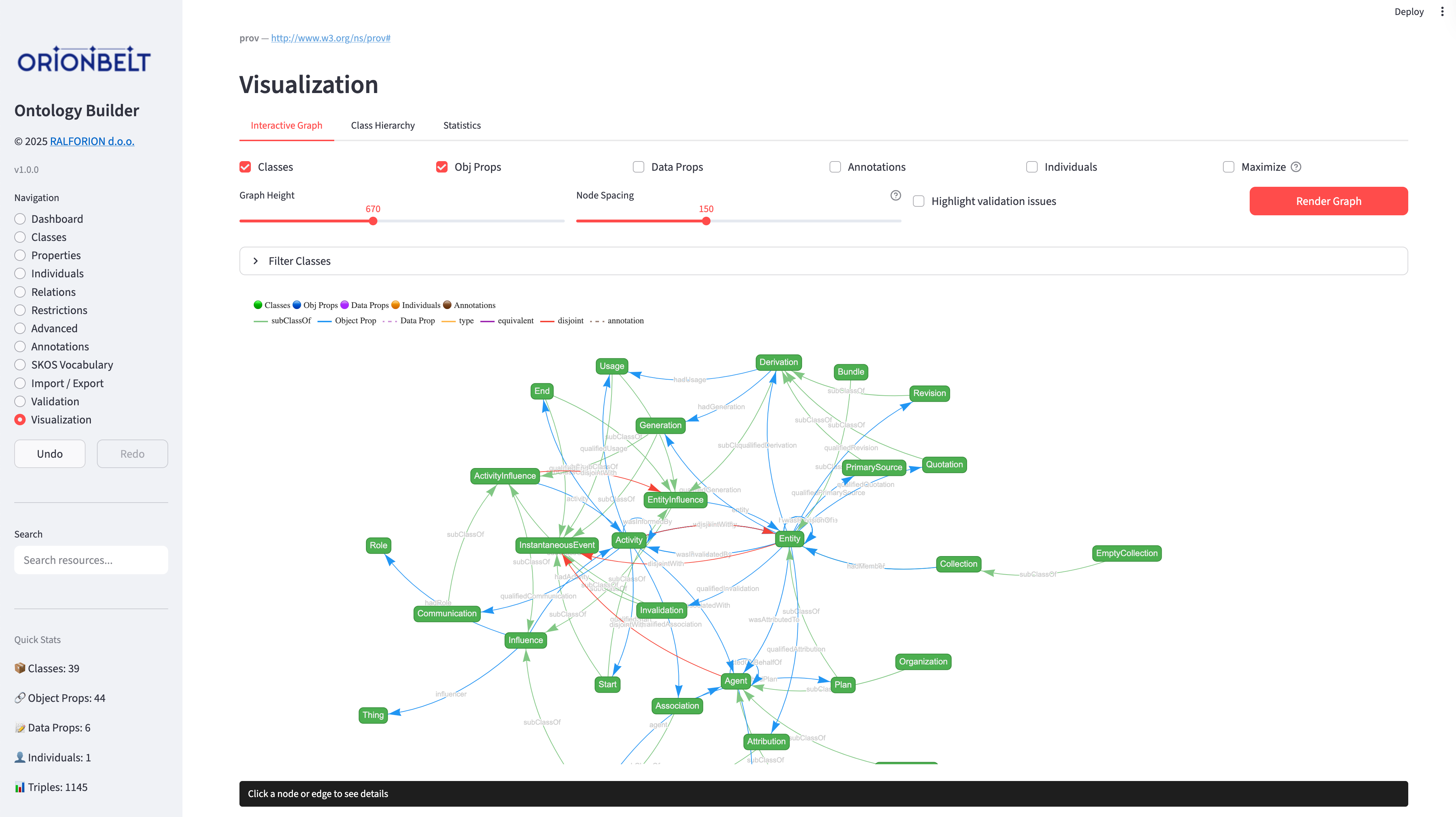
Interactive vis-network graph with class filtering, configurable node limits, click-to-navigate into the editor, hierarchy tree view, and statistics charts.
Safety
- Full undo/redo with labeled checkpoints
- Delete impact analysis before confirmation
- Bulk operations create a single undo point
- Namespace prefix management from the Dashboard
Quick Start
# Clone and install
git clone https://github.com/ralforion/orionbelt-ontology-builder.git
cd orionbelt-ontology-builder
pip install -r requirements.txt

# Or install from PyPI
pip install orionbelt-ontology-builder

# Run
streamlit run app.py
Open http://localhost:8501
Run as a command
Installing the package also provides an orionbelt-ontology-builder command that
launches the app for you, so there is no need to call streamlit run yourself:
# Install as an isolated tool and run it (uv or pipx)
uv tool install orionbelt-ontology-builder
orionbelt-ontology-builder            # boots the app, opens the browser

# Or run it one-off without installing
uvx orionbelt-ontology-builder
pipx run orionbelt-ontology-builder
Any extra arguments are forwarded to Streamlit, e.g.
orionbelt-ontology-builder --server.port 8502.
Run as a native desktop app
Prefer a native window over a browser tab? Install the optional desktop extra
and use the orionbelt-ontology-builder-desktop command. It runs the app in a
native window (via streamlit-desktop-app,
pywebview + a real Streamlit server), so there is no browser tab to manage and no
manual start/stop of the server:
pip install "orionbelt-ontology-builder[desktop]"
orionbelt-ontology-builder-desktop    # opens a native window
This is fully opt-in: the plain install and the orionbelt-ontology-builder
command above are unchanged.
Run with Docker
A prebuilt image is published to Docker Hub. No local Python setup required:
docker run --rm -p 8501:8501 ralforion/orionbelt-ontology-builder
Then open http://localhost:8501. Use :1.8.0 to pin a specific version instead of latest.
To build the image yourself from a checkout:
docker build -t ralforion/orionbelt-ontology-builder .
docker run --rm -p 8501:8501 ralforion/orionbelt-ontology-builder
The container runs Streamlit headless on 0.0.0.0:8501 as a non-root user.
Upload size limit
Imported files are capped at 200 MB by default (Streamlit's maxUploadSize).
To import larger ontologies, raise the limit in .streamlit/config.toml:
[server]
maxUploadSize = 1000   # MB
or pass it at launch:
streamlit run app.py --server.maxUploadSize 1000
Parsing happens in memory, so the practical ceiling is the host machine's available RAM rather than this setting. The hosted demo is RAM-limited and keeps the 200 MB default; raise the value only when self-hosting with enough memory.
Pages
| Page | What it does |
|---|---|
| Dashboard | Metadata, base URI, statistics, prefix management, validation |
| Classes | Class hierarchy, CRUD, bulk operations |
| Properties | Object & data properties, CRUD, bulk operations |
| Individuals | Instance management, property assertions, bulk operations |
| Relations | Class, property, and individual relations |
| Restrictions | OWL restrictions and cardinality constraints |
| Advanced | Advanced OWL features |
| Annotations | RDFS, SKOS, Dublin Core annotations with bulk editing |
| SKOS Vocabulary | Concept schemes, concepts, hierarchy, SKOS validation |
| Import / Export | File import with merge review, export, new ontology, templates |
| Source | Live Turtle source view of the ontology |
| Validation | Ontology validation and OWL reasoning |
| Visualization | Interactive graph (OWL + SKOS), hierarchy tree, statistics |
Project structure
orionbelt-ontology-builder/
├── app.py                              # Streamlit Cloud entry point (delegates to package)
├── ontology_manager.py                 # Backward-compat shim
├── templates.py                        # Backward-compat shim
├── orionbelt_ontology_builder/         # The actual installable package
│   ├── app.py                          # Streamlit UI
│   ├── ontology_manager.py             # Core OWL/SKOS engine (rdflib)
│   ├── templates.py                    # Built-in templates / upper / reference ontologies
│   ├── samples/                        # Bundled gist, gUFO, FOAF, PROV-O, GoodRelations, …
│   ├── lib/                            # Frontend libraries (vis-network, Tom Select)
│   ├── assets/                         # Logos and screenshots
│   └── favicon.png
├── pyproject.toml                      # Project metadata
└── tests/                              # pytest suite
Dependencies: streamlit, rdflib, owlrl, networkx, pyvis.
Companion Project
OrionBelt Analytics
An ontology-based MCP server that analyzes relational database schemas (PostgreSQL, Snowflake, Dremio) and generates RDF/OWL ontologies with embedded SQL mappings. Together with the Ontology Builder, they form a toolkit for ontology-driven data modeling.
License
Copyright 2025 RALFORION d.o.o.
Licensed under the Business Source License 1.1. The Licensed Work will convert to Apache License 2.0 on 2030-03-30.
By contributing to this project, you agree to the Contributor License Agreement.

Project details
Verified details
These details have been verified by PyPIProject links
GitHub Statistics
Maintainers
Release history Release notifications | RSS feed


Download files
Download the file for your platform. If you're not sure which to choose, learn more about installing packages.
Source Distribution
Built Distribution
Filter files by name, interpreter, ABI, and platform.
If you're not sure about the file name format, learn more about wheel file names.
Copy a direct link to the current filters
File details
Details for the file orionbelt_ontology_builder-1.8.0.tar.gz.
File metadata
- Download URL: orionbelt_ontology_builder-1.8.0.tar.gz
- Upload date:
- Size: 1.3 MB
- Tags: Source
- Uploaded using Trusted Publishing? Yes
- Uploaded via: twine/6.1.0 CPython/3.13.12
File hashes
| Algorithm | Hash digest | |
|---|---|---|
| SHA256 |
043edd14941628b83d3cb8ff93c938ae54cb5d8f7d7158a959307d1ebe7bd55b
|
|
| MD5 |
18483a6700de879df1181dac10857f17
|
|
| BLAKE2b-256 |
834b2874eec230359fdfee43507035b94cb978a07365742517ba75d544137082
|
Provenance
The following attestation bundles were made for orionbelt_ontology_builder-1.8.0.tar.gz:
Publisher:
pypi-publish.yml on ralforion/orionbelt-ontology-builder
-
Statement:
-
Statement type:
https://in-toto.io/Statement/v1 -
Predicate type:
https://docs.pypi.org/attestations/publish/v1 -
Subject name:
orionbelt_ontology_builder-1.8.0.tar.gz -
Subject digest:
043edd14941628b83d3cb8ff93c938ae54cb5d8f7d7158a959307d1ebe7bd55b - Sigstore transparency entry: 1981645187
- Sigstore integration time:
-
Permalink:
ralforion/orionbelt-ontology-builder@beacdba1a993a6c819c142e4fab9bdceeebbb681 -
Branch / Tag:
refs/tags/v1.8.0 - Owner: https://github.com/ralforion
-
Access:
public
-
Token Issuer:
https://token.actions.githubusercontent.com -
Runner Environment:
github-hosted -
Publication workflow:
pypi-publish.yml@beacdba1a993a6c819c142e4fab9bdceeebbb681 -
Trigger Event:
push
-
Statement type:
File details
Details for the file orionbelt_ontology_builder-1.8.0-py3-none-any.whl.
File metadata
- Download URL: orionbelt_ontology_builder-1.8.0-py3-none-any.whl
- Upload date:
- Size: 1.3 MB
- Tags: Python 3
- Uploaded using Trusted Publishing? Yes
- Uploaded via: twine/6.1.0 CPython/3.13.12
File hashes
| Algorithm | Hash digest | |
|---|---|---|
| SHA256 |
91ca23d711ab1cd112393612393af934e6660717f9fed9b26401476d3432c37a
|
|
| MD5 |
88a8ed435e404371e6f538cda5fc19a7
|
|
| BLAKE2b-256 |
35ddd3f117651ca49aa0536d85feaebda8f703a5725868182b668c7d346bfbe7
|
Provenance
The following attestation bundles were made for orionbelt_ontology_builder-1.8.0-py3-none-any.whl:
Publisher:
pypi-publish.yml on ralforion/orionbelt-ontology-builder
-
Statement:
-
Statement type:
https://in-toto.io/Statement/v1 -
Predicate type:
https://docs.pypi.org/attestations/publish/v1 -
Subject name:
orionbelt_ontology_builder-1.8.0-py3-none-any.whl -
Subject digest:
91ca23d711ab1cd112393612393af934e6660717f9fed9b26401476d3432c37a - Sigstore transparency entry: 1981645266
- Sigstore integration time:
-
Permalink:
ralforion/orionbelt-ontology-builder@beacdba1a993a6c819c142e4fab9bdceeebbb681 -
Branch / Tag:
refs/tags/v1.8.0 - Owner: https://github.com/ralforion
-
Access:
public
-
Token Issuer:
https://token.actions.githubusercontent.com -
Runner Environment:
github-hosted -
Publication workflow:
pypi-publish.yml@beacdba1a993a6c819c142e4fab9bdceeebbb681 -
Trigger Event:
push
-
Statement type:






