

Orionis Framework
Write Python. Build the whole application.
The async-first, full-stack framework for modern Python applications.




Get Started • Documentation • Benchmarks • Repositories • Website
About Orionis
Orionis brings a complete application framework to asynchronous Python. Build web applications, APIs and real-time services with expressive APIs, clear conventions and a foundation that connects the pieces for you.
An application is more than its HTTP endpoints. Orionis brings routing, data, security, background work and developer tools into one cohesive experience, so you can spend more time building your application.
- Expressive routing with controllers, middleware and ASGI / RSGI support.
- A powerful service container with dependency injection, scoped services, service providers and facades.
- An async ORM with fluent queries, model relationships, migrations, factories and seeders.
- Authentication and authorization with sessions, API tokens, roles, permissions and policies.
- Typed validation and server-rendered views with reusable schema rules, Jinja2 templates and localization.
- Queues and task scheduling for background jobs and recurring commands.
- Everyday application services for caching, mail, logging and local or cloud file storage.
- Real-time and MCP support with WebSockets, server-sent events and Model Context Protocol servers.
- Integrated developer tooling with code generators, an application CLI and an async-aware test runner.
From a small API to a full web application, start with the same tools and extend them through your own services and providers.
Installation
You will need Python 3.14+ and uv. Create a new application with the Orionis installer:
uvx --from orionis-installer orionis new
Then, from your application's directory, install its dependencies and start the development server:
uv sync
uv run orionis serve
Explore the available commands with uv run orionis list.
This repository contains the framework core; the installer creates your
application from the application skeleton.
Learning Orionis
The official documentation is the place to start, with guides and reference material for building with Orionis.
Visit the project website for an overview, explore the package on PyPI, or ask questions in GitHub Discussions.
HTTP Benchmarks
The HTTP comparison suite compares Orionis (RSGI and ASGI), FastAPI, Litestar and Starlette on the same Granian server with matching load settings.
The charts show median successful HTTP 200 requests per second with 1, 2, 3 and 4 Granian workers. Higher is better.
1 Worker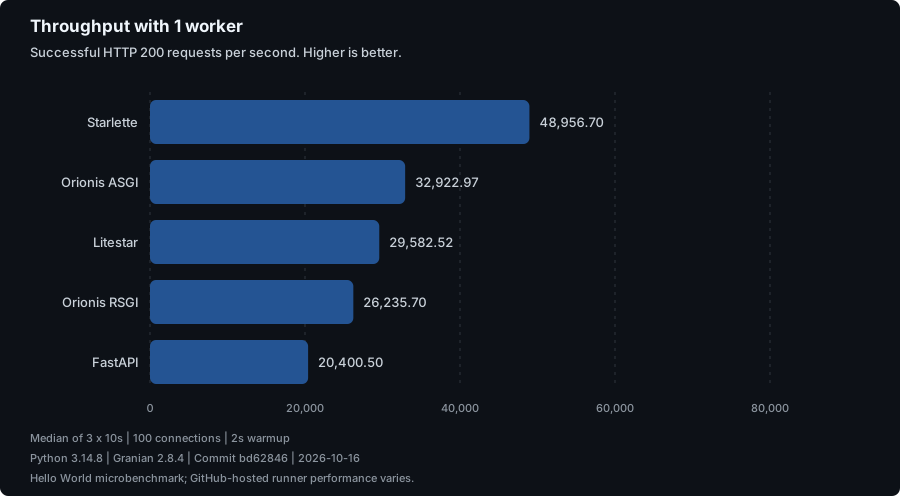
|
2 Workers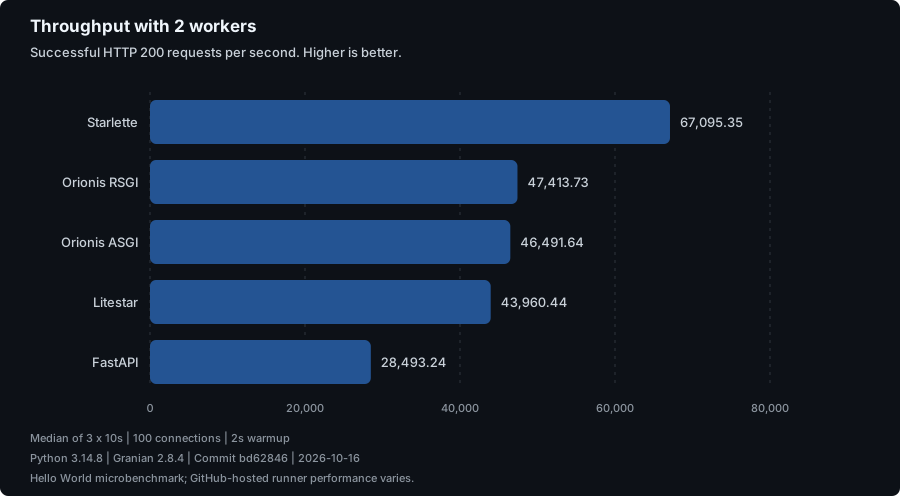
|
3 Workers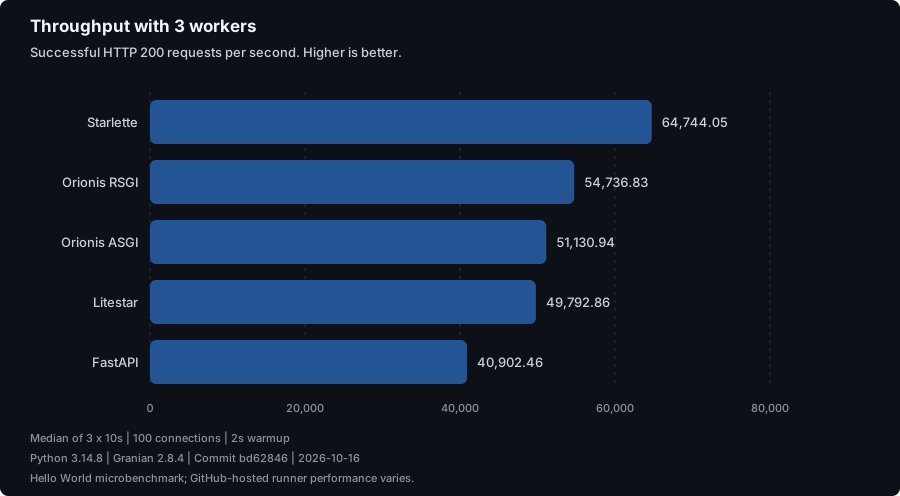
|
4 Workers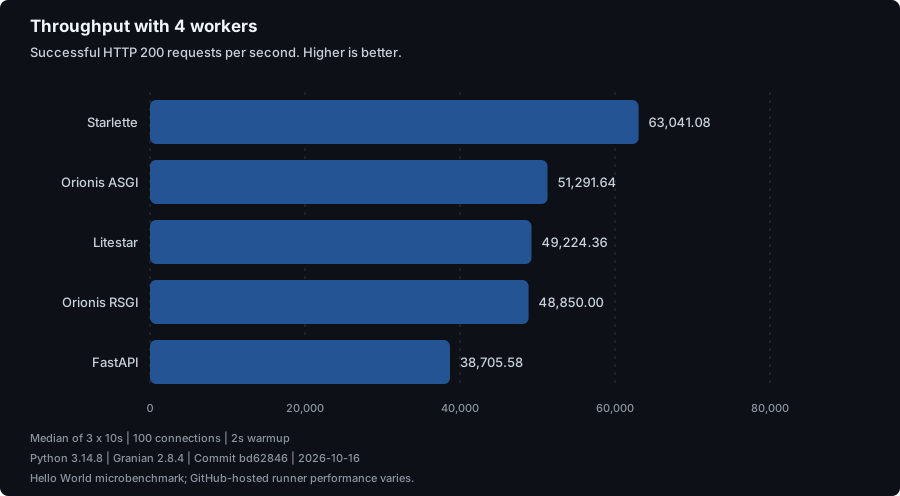
|
Charts update automatically after each successful comparison on 1.x.
View the full results
for latency, environment details and the source workflow run. Run the suite
locally or launch HTTP Framework Comparison from GitHub Actions to
download the reports and raw measurements.
This Hello World microbenchmark does not represent a full application. GitHub-hosted runner performance varies between runs. Cross-framework benchmarks run separately from the regular test suite.
Repositories
- Framework Core: the framework source code.
- Application Skeleton: the starting point for new applications.
- Documentation: guides and documentation website.
- CLI Installer: create a new Orionis application.
- Website: the Orionis project website.
Contributing
Help shape Orionis through code, documentation, bug reports and ideas. Report bugs or request features in GitHub Issues, and discuss ideas in GitHub Discussions.
Sponsors
Support the ongoing development and maintenance of Orionis through GitHub Sponsors.

Creator
Created and maintained by Raul Mauricio Uñate Castro.
License
Orionis is open-source software licensed under the MIT license.
1 maintainer

Metadata
1 maintainer
Release files for orionis 0.932.0
For a detailed explanation of source distributions (sdists) and built distributions (wheels), please see the package formats documentation.
Source distribution (sdist)
| File | Size | Uploaded | |
|---|---|---|---|
| orionis-0.932.0.tar.gz | 1.6 MB | Details |
Built distribution (wheel)
| File | Interpreter | ABI | Platform | Reset |
|---|---|---|---|---|
| orionis-0.932.0-py3-none-any.whl | Python 3 | none | any | Details |
Total release size: 3.6 MB
Release files / orionis-0.932.0.tar.gz
| Download URL | orionis-0.932.0.tar.gz |
|---|---|
| Size | 1.6 MB |
| Tags | Source |
|
SHA-256 checksum How to use checksums |
d178b9793e2469b308e9895d4b2fa0b3924d31cbcb13bfd2ca1804eae543a298
|
|
BLAKE2b-256 checksum How to use checksums |
095fbe3a0dd6381fa5a2c25ed70aa18da00c8e07bb3340a12972df2fc334e678
|
| Upload date | |
|
Uploaded using Trusted Publishing? What is trusted publishing? |
No |
| Uploaded via |
uv/0.11.30 {"installer":{"name":"uv","version":"0.11.30","subcommand":["publish"]},"python":null,"implementation":{"name":null,"version":null},"distro":null,"system":{"name":null,"release":null},"cpu":null,"openssl_version":null,"setuptools_version":null,"rustc_version":null,"ci":null}
|
Release files / orionis-0.932.0-py3-none-any.whl
| Download URL | orionis-0.932.0-py3-none-any.whl |
|---|---|
| Size | 2.0 MB |
| Tags | Python 3 |
|
SHA-256 checksum How to use checksums |
f0326b95fd507be760f604d87dd69f521414eaf8216e0d8003780008694cece5
|
|
BLAKE2b-256 checksum How to use checksums |
2821b434c19f78a33a9d0416cbd5c0ccaee4f59c08b5d99d30e10b47d9f868be
|
| Upload date | |
|
Uploaded using Trusted Publishing? What is trusted publishing? |
No |
| Uploaded via |
uv/0.11.30 {"installer":{"name":"uv","version":"0.11.30","subcommand":["publish"]},"python":null,"implementation":{"name":null,"version":null},"distro":null,"system":{"name":null,"release":null},"cpu":null,"openssl_version":null,"setuptools_version":null,"rustc_version":null,"ci":null}
|














