
oss-clarity
Self-hosted session replay, heatmaps and rules-based behaviour signals for Django.
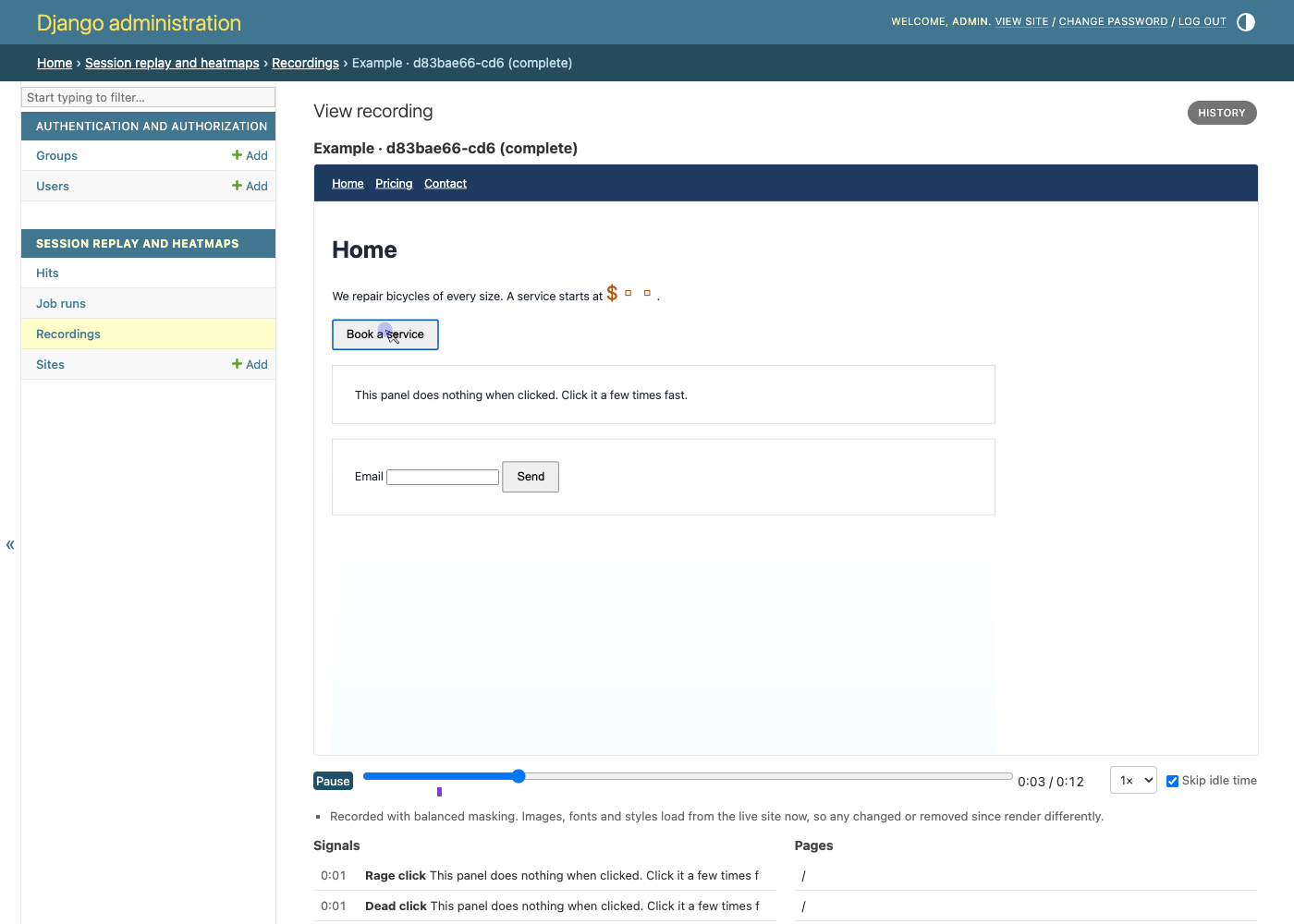
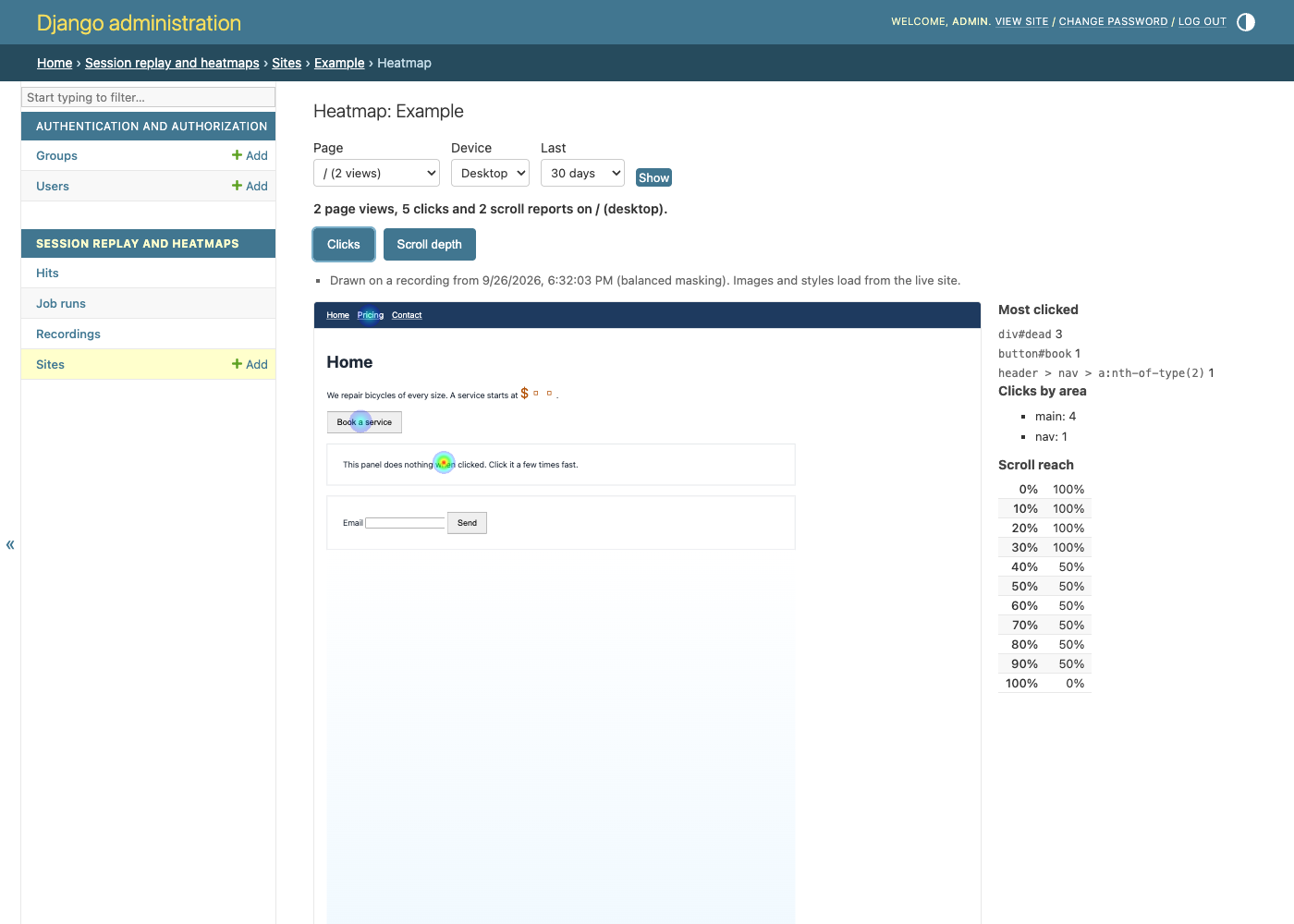
Add one script tag to your site. oss-clarity counts page views, clicks and scroll depth, records sampled visits with rrweb, and marks where people struggled: rage clicks, dead clicks, hesitations, form abandons and more. You watch the replays and heatmaps in your Django admin. Every byte stays on your servers.
Early release (0.1.2). Settings and the JSON API may still change.
What you get
- Tracking: page views (including single-page-app route changes), clicks with their position, and how far each page was scrolled. About 10 KB of JavaScript (4 KB gzipped), reporting after the page loads, with no cookies.
- Recording: sampled session replay, masked in the visitor's browser before anything is sent. Capped per visit by size, pages and minutes.
- Signals: 15 rules, each a documented, deterministic check with named thresholds, and a tool to measure those thresholds against your own recordings. See signals.
- Heatmaps: clicks and scroll depth per page and device, drawn over a recorded snapshot of the page.
- Viewer: replay and heatmap pages inside Django admin, and a read-only JSON API.
Privacy
- No AI. Signals are plain rules you can read. Recordings are never sent to any third party or model.
- Masked by default. Form fields are masked in every mode and cannot be
unmasked. The default mode also blanks digits and email addresses, and
data:andblob:images (a photo a visitor just picked, say) are never recorded. - Global Privacy Control is honoured. A browser that sends it is never recorded; its page views are still counted.
- Optional consent gate. Per site, nothing is recorded until your page calls
ossClarity("consent", true). - No IP addresses stored. The address is used in memory for rate limits only. Raw user agents are not stored either, only coarse device, browser and OS.
- No text from clicks. A click records where it landed and a selector for the element, never the element's text or link. Password, token and similar values in page URLs are replaced before storage.
- Crawlers are not recorded. Bots that run JavaScript are refused by the tracker and again by the collector.
- Erase on request.
ossClarity("visitorId")gives a visitor their id;manage.py oss_clarity_erase_visitor <id>deletes everything held about them.ossClarity("forget")clears the ids in their browser. - Retention. Hits and recordings are deleted after 30 days by default.
Install
pip install "oss-clarity[django]"
Python 3.11 to 3.14, Django 5.2, 6.0 and 6.1, SQLite or PostgreSQL.
Set up
1. Settings
INSTALLED_APPS = [..., "oss_clarity"]

MIDDLEWARE = [
    "oss_clarity.middleware.PublicEndpointsMiddleware",  # first
    ...,
]
The middleware is only needed if something else in your stack (django-cors-headers, a no-store cache policy) would override the public endpoints' headers. It is safe to always include. Every other setting has a default; see settings.
2. URLs
urlpatterns = [
    ...,
    path("oc/", include("oss_clarity.urls.public")),  # tracker and collector
    path("oc-api/", include("oss_clarity.urls.api")),  # read-only API, optional
]
Then python manage.py migrate.
3. Jobs, every five minutes from cron (or use the Celery tasks):
*/5 * * * * cd /srv/app && python manage.py oss_clarity_run_jobs
4. The snippet. Add a site in the admin (Session replay and heatmaps → Sites),
switch recording on in its recording settings if you want replays, and paste the
snippet it shows into your pages' <head>:
<script async src="https://your-app.example.com/oc/t/<site key>.js"></script>
Visits appear as hits straight away. Recordings are analysed a few minutes after a visit ends, and heatmaps update hourly.
To see it all working on your own machine first, run the example project.
Documentation
- Signals: what each one means
- Thresholds: the numbers, and how to measure them
- Settings: every key
- Storage: local disk or S3
- Jobs: cron or Celery
- JSON API
- Upgrading
Limits
- One recording per visit, at most 10 MiB, 128 pages and 120 minutes by default.
- Replays load images, fonts and styles from your live site, so ones changed or removed since render differently.
- Heatmaps group pages by path (query strings ignored, trailing slashes folded) and by device class. Clicks are placed on the element when the snapshot still has it, and by position otherwise.
- Automated browsers (
navigator.webdriver, headless Chrome) are treated as crawlers and never recorded. - No multi-tenant accounts, billing or quotas: that is your project's business.
Development
pip install -e ".[django,dev]"
pytest
ruff check . && ruff format --check .
cd js && npm ci && npm run typecheck && npm run build   # rebuilds the committed bundles
Licence
MIT. See LICENSE. The bundled rrweb and its dependencies are listed in THIRD_PARTY_NOTICES.md.
1 maintainer

Release files for oss-clarity 0.1.2
For a detailed explanation of source distributions (sdists) and built distributions (wheels), please see the package formats documentation.
Source distribution (sdist)
| File | Size | Uploaded | |
|---|---|---|---|
| oss_clarity-0.1.2.tar.gz | 530.8 kB | Details |
Built distribution (wheel)
| File | Interpreter | ABI | Platform | Reset |
|---|---|---|---|---|
| oss_clarity-0.1.2-py3-none-any.whl | Python 3 | none | any | Details |
Total release size: 714.1 kB
Release files / oss_clarity-0.1.2.tar.gz
| Download URL | oss_clarity-0.1.2.tar.gz |
|---|---|
| Size | 530.8 kB |
| Tags | Source |
|
SHA-256 checksum How to use checksums |
6779168cfa7ea5b198d5edabece0cd19392353ccc5cf610ae39acc31983955d1
|
|
BLAKE2b-256 checksum How to use checksums |
5c704ddff2e832774df93f183fdd7d1e7723e0a95de5b63b0eda2aee50a4589e
|
| Upload date | |
|
Uploaded using Trusted Publishing? What is trusted publishing? |
Yes |
| Uploaded via |
twine/7.0.0 CPython/3.13.14
|
Provenance
Provenance describes where a file came from. On PyPI, provenance is shared via attestations, which provide a verifiable record of the build or publishing details. View details, limitations and caveats.


PyPI Publish Attestation
PyPI verified that this artifact, at this checksum, originated from the publisher listed below.
Signed by GitHub Actions, verified by PyPI on Sep 27, 2026.
Transparency logRelease files / oss_clarity-0.1.2-py3-none-any.whl
| Download URL | oss_clarity-0.1.2-py3-none-any.whl |
|---|---|
| Size | 183.3 kB |
| Tags | Python 3 |
|
SHA-256 checksum How to use checksums |
0e7c37874102d600afb21ff47359a081e45b9bababf41a0346bf7628f48a92a4
|
|
BLAKE2b-256 checksum How to use checksums |
3acea08f8c2a1ed1553936603806b1a9bd2813cf86407b650989b38365b7813a
|
| Upload date | |
|
Uploaded using Trusted Publishing? What is trusted publishing? |
Yes |
| Uploaded via |
twine/7.0.0 CPython/3.13.14
|
Provenance
Provenance describes where a file came from. On PyPI, provenance is shared via attestations, which provide a verifiable record of the build or publishing details. View details, limitations and caveats.
PyPI Publish Attestation
PyPI verified that this artifact, at this checksum, originated from the publisher listed below.
Signed by GitHub Actions, verified by PyPI on Sep 27, 2026.
Transparency log












