
Utility to forecast risks associated with currently installed packages updates
Project description
OSS IQ



Quantify Maintenance Health. Control Your Drift.
OSS IQ is a free & open-source CLI tool that analyzes dependency drift at scale. Track version lag and transitive risk directly from your dependency files. It helps to move from reactive CVE-chasing to a planned, predictable maintenance rhythm.
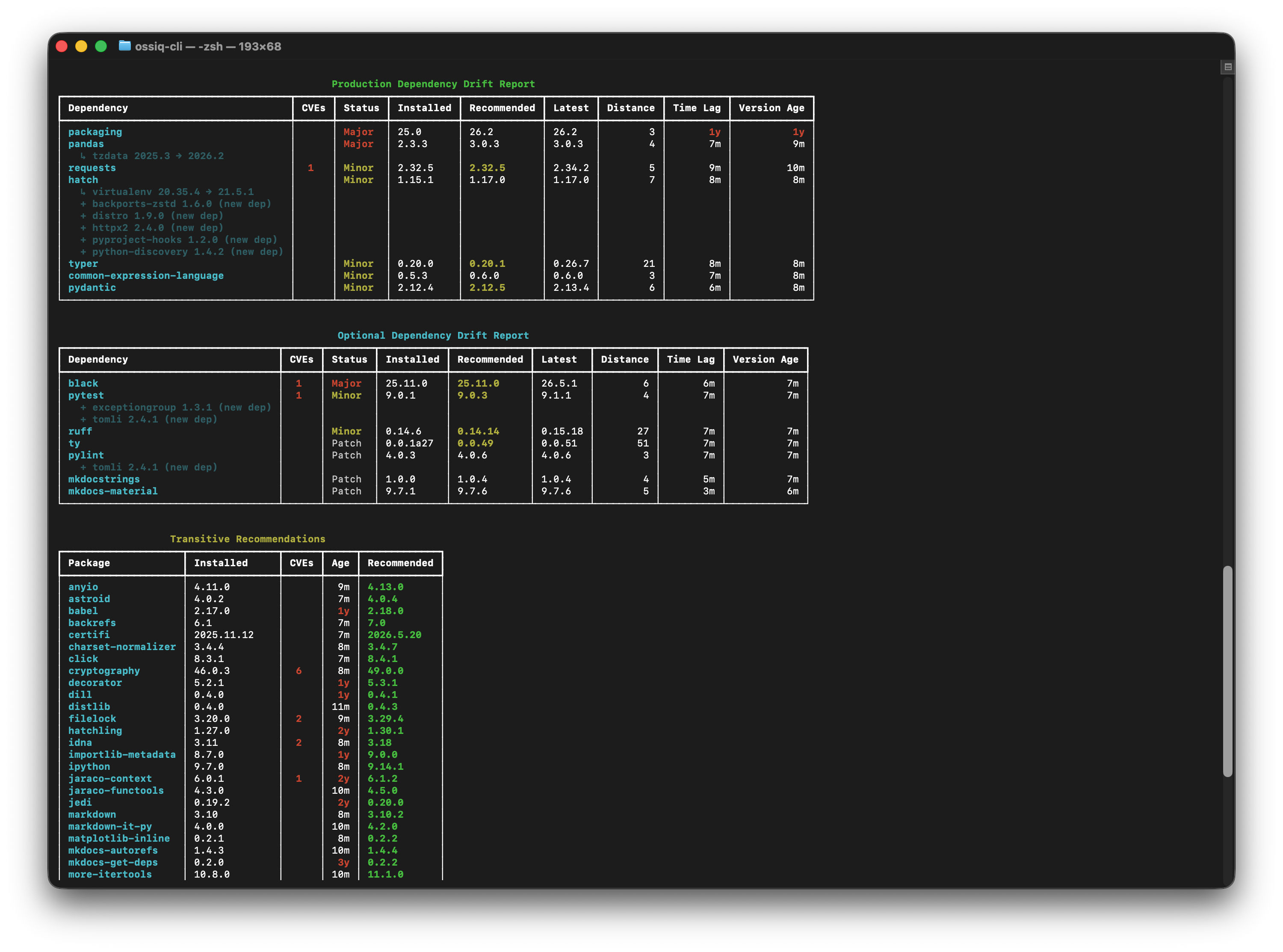
What is OSS IQ?
In a typical project with hundreds of dependencies, how do you answer these questions?
- How many dependencies have critical vulnerabilities?
- How far behind the latest versions are we?
- Which packages are unmaintained or abandoned?
- Which newer versions of dependencies would work best for my project?
Key Features
- Security Blind Spots: Go beyond
npm auditto see which vulnerabilities actually matter and how to prioritize them. - Multiple Output Formats: CLI and interactive HTML per-project dependencies exploration tools as well as export into clearly defined JSON or CSV schemas.
- CI/CD Integration: Use scores and metrics to build quality gates and enforce dependency policies automatically.
- Peer Dependency Analysis: Detect peer constraint violations, compliance-by-override status, and dead-end configurations where no compatible version exists across both npm and Python ecosystems.
- Transitive Impact Simulation: Before recommending an update, simulate the full transitive cascade — see exactly which downstream packages would change, whether conflicts arise, and get a fallback recommendation when the best version is blocked.
OSS IQ bridges the gap between raw dependency data and actionable intelligence. It analyzes version lag, CVEs, transitive dependencies, and maintainer activity to produce a single, holistic view of your project dependencies.
How It Works
- Run OSS IQ: Point the CLI to your project's manifest file (
package.json,pyproject.toml, etc.). OSS IQ supports NPM and Python (uv, pip). - Analyze Everything: Version lag, CVEs, transitive dependencies, and license compliance—all cross-referenced against public databases (OSV, npm, PyPI) using MSR Engine.
- Get Your Report: See your dependencies drift report, drill into each package details, and get a prioritized list of what to fix first.
- Build Quality Gates: Use your project metrics to set up policies and drive organization behavior.
Quick Start
1. Run OSS IQ
The fastest way is to run directly from PyPI with uvx with no install required:
# JavaScript / npm or Python / uv / pip — run from your project directory
uvx --from ossiq ossiq-cli status

# Generate HTML report
uvx --from ossiq ossiq-cli status --presentation=html --output report.html

# Show all packages, including up-to-date ones
uvx --from ossiq ossiq-cli status --full

# Narrow to CVE-affected packages only (security-first workflow)
uvx --from ossiq ossiq-cli status --security
OSS IQ automatically detects the dependency manifest (package.json, pyproject.toml, etc.) in the target directory.
GitHub Token
OSS IQ performs deep analysis by mining software repository history, which can involve hundreds of API requests to GitHub. To avoid being rate-limited, it's. best to provide a GitHub Personal Access Token (PAT).
export OSSIQ_GITHUB_TOKEN=$(gh auth token)
Temporal Analysis Options
Two global options let you control how OSS IQ perceives time. They apply to all subcommands (status, export, plan, apply, info) and can be combined freely.
| Option | Env var | Default | Description |
|---|---|---|---|
--cutoff-date YYYY-MM-DD |
OSSIQ_CUTOFF_DATE |
today | Treat versions published after this date as invisible (23:59:59 UTC of that day). Enables time-travel QA. |
--cooldown-period N |
OSSIQ_COOLDOWN_PERIOD |
7 |
Versions younger than N days receive a freshness soft-penalty in the solver, reducing the risk of picking very new releases. |
# Reproduce the exact state of your dependencies as of a past date
ossiq-cli --cutoff-date 2025-01-01 status

# Widen the freshness buffer to 14 days (versions < 14 days old are soft-penalized)
ossiq-cli --cooldown-period 14 status

# Both together: time-travel view with a custom freshness window
ossiq-cli --cutoff-date 2025-01-01 --cooldown-period 14 status

# Disable the freshness penalty entirely
ossiq-cli --cooldown-period 0 status
The options are also readable from environment variables, which is useful for CI pipelines:
OSSIQ_CUTOFF_DATE=2025-01-01 OSSIQ_COOLDOWN_PERIOD=14 ossiq-cli status
If you prefer a persistent install:
# Install with uv
uv add ossiq

# Or with pip
pip install ossiq

# Then run directly
ossiq-cli status
Using Docker
OSS IQ CLI is available as a Docker image for easy deployment without installing Python dependencies.
# Pull the latest image
docker pull ossiq/ossiq-cli

# Set your GitHub token (required)
export OSSIQ_GITHUB_TOKEN=$(gh auth token)

# Show dependency status
docker run --rm \
  -e OSSIQ_GITHUB_TOKEN \
  -v /path/to/your/project:/project:ro \
  ossiq/ossiq-cli status /project

# Generate an HTML report
docker run --rm \
  -e OSSIQ_GITHUB_TOKEN \
  -v /path/to/your/project:/project:ro \
  -v $(pwd)/reports:/output \
  ossiq/ossiq-cli status -p html -o /output/report.html /project

# Export to JSON for CI/CD pipelines
docker run --rm \
  -e OSSIQ_GITHUB_TOKEN \
  -v /path/to/your/project:/project:ro \
  -v $(pwd)/reports:/output \
  ossiq/ossiq-cli export -f json -o /output/metrics.json /project
Docker Image Tags:
ossiq/ossiq-cli:latest- Latest stable releaseossiq/ossiq-cli:0.1.3- Specific versionossiq/ossiq-cli:0.1- Latest patch in minor version
CI/CD Integration Example (GitHub Actions):
jobs:
  dependency-check:
    runs-on: ubuntu-latest
    steps:
      - uses: actions/checkout@v4
      - name: Analyze dependencies
        run: |
          docker run --rm \
            -e OSSIQ_GITHUB_TOKEN=${{ secrets.GITHUB_TOKEN }} \
            -v ${{ github.workspace }}:/project:ro \
            ossiq/ossiq-cli status /project
Dependency Update Plan
ossiq-cli plan shows what the solver recommends without touching any files. ossiq-cli apply executes those changes with rollback on failure.
# Show the plan table (read-only, no changes made)
ossiq-cli plan

# Emit a copy-pasteable bash script instead of the table
ossiq-cli plan --script

# Apply updates interactively (shows the plan, then prompts for confirmation)
ossiq-cli apply

# Apply updates non-interactively (skip confirmation, for CI)
ossiq-cli apply --yes
The solver simulates the full transitive impact of each recommendation before committing to it. When the top candidate would create a downstream conflict, it falls back to the next-best version automatically. The plan table shows a ↳ sub-row for each transitive package that would also move, and marks non-actionable entries with ✗.
npm — backs up package.json, injects all recommended versions as overrides in one pass, runs npm install --ignore-scripts, then removes the overrides block.
uv / pip — rewrites specifiers in pyproject.toml or requirements.txt in-place, then runs uv lock --upgrade-package / pip install -c <constraints>. Changes are rolled back automatically if the update fails.
Options
| Option | Description |
|---|---|
--production |
Limit to production dependencies only |
--registry-type npm|pypi |
Narrow to a specific ecosystem |
--security |
Include only CVE-affected packages (direct and transitive) in the update plan |
--allow-prerelease |
Include pre-release versions across all packages |
--allow-prerelease-package <name> |
Allow pre-release for a specific package (repeatable) |
--ignore <name>, -i |
Exclude a package from the update plan entirely (repeatable) |
--override <pkg>==<ver> |
Force a package to an exact version, bypassing the solver and the cooldown (repeatable) |
--pin-all |
Write ==new_version for every updated direct dependency, converting loose specifiers (^, ~=, >=) to exact pins |
--rewrite-versions |
Include already-pinned (==x.y.z) dependencies in the update and rewrite their pinned version |
--script |
(plan only) Print the bash script instead of the plan table — safe to pipe directly to bash |
--yes, -y |
(apply only) Skip the confirmation prompt |
All flags are accepted by both plan and apply (except where noted), so a plan invocation is always
a faithful preview of the matching apply.
Pinning workflow — --pin-all and --rewrite-versions
By default, packages already pinned with an exact specifier (==x.y.z) are frozen and excluded from the update plan. This prevents accidental upgrades when you have intentionally locked a version. Use --pin-all and --rewrite-versions together to manage a fully-pinned dependency file:
# Step 1: migrate all direct deps to exact pins (==x.y.z)
ossiq-cli apply --pin-all

# Step 2: on subsequent runs, preview what newer versions are available
#         (pinned deps are frozen and not shown by default)
ossiq-cli plan

# Step 3: upgrade and re-pin everything in one pass
ossiq-cli apply --pin-all --rewrite-versions

# Step 3 (selective): hold back specific packages while updating the rest
ossiq-cli apply --pin-all --rewrite-versions --ignore requests --ignore django
Flag behaviour summary:
| Flags | >=x (declared) |
~=x (narrowed) |
==x (pinned) |
|---|---|---|---|
| (none) | lockfile-only update | rewrite ~=new |
frozen / skipped |
--pin-all |
rewrite ==new |
rewrite ==new |
frozen / skipped |
--rewrite-versions |
lockfile-only update | rewrite ~=new |
rewrite ==new |
--pin-all --rewrite-versions |
rewrite ==new |
rewrite ==new |
rewrite ==new |
Cooldown: how freshness is handled
The --cooldown-period (default: 7 days) protects you from supply-chain attacks that ride on
freshly published releases. It acts at two levels:
- Inside the solver, versions younger than the cooldown receive a heavy soft-penalty, so an older stable version wins whenever one satisfies the constraints.
- After solving, any remaining recommendation younger than the cooldown is withheld from the plan and listed in a separate "Held for cooldown" section — it is never applied.
Two deliberate exceptions:
- CVE fixes bypass the hold. When the installed version of a package carries a known CVE, its
recommendation is applied even if the target version is brand-new — the known-vulnerability
exposure outweighs the freshness risk. These entries are tagged
CVEin the plan table, and acooldown bypassednote explains why a fresh version got through. - Brand-new transitive dependencies are outside the hold. When an upgrade pulls in a package
that was not previously in your tree, its version is resolved by npm/uv at apply time, not by the
solver. The plan's "New transitive dependencies" table shows the projected version and its age,
and flags entries younger than the cooldown with
⚠so you can review them before applying.
What if a quarantined version fixes a CVE?
Sometimes the only version that fixes a CVE is younger than your cooldown period — it is, in cooldown terms, still "quarantined". You are trading one risk against another: the known risk of the unpatched CVE versus the statistical risk of a very fresh release (supply-chain compromise, regressions). OSS IQ gives you three levers, from automatic to fully manual:
- Default behaviour — if the installed version carries a CVE, the fix is recommended and applied regardless of its age. For most teams this is the right default: a concrete CVE beats a hypothetical supply-chain risk.
--security— narrow the run to CVE-affected packages only:ossiq-cli apply --security --yespatches vulnerabilities and touches nothing else. Ideal for an out-of-band security patch while the regular update cadence stays on cooldown.--override pkg==version— force one exact version when you have vetted it yourself:ossiq-cli apply --override urllib3==2.0.7. This bypasses the solver's compatibility checks and the cooldown for that package. For a direct dependency the specifier is rewritten to the exact version; for a transitive dependency a persistent override entry is written (overridesinpackage.json,override-dependenciesunder[tool.uv]) so the forced version survives future installs. Remove the entry once a compatible release exists —ossiq-cli statusreports such packages with theOVERRIDEconstraint type so they stay visible.
Iterative updates: why a second plan can show more
The solver resolves updates in a single pass against your current lockfile. Applying a plan re-resolves the dependency tree — updated packages bring new constraints and sometimes new transitive dependencies — which can unlock further recommendations that were not visible before.
# Typical convergence loop: repeat until the plan is empty
ossiq-cli apply --yes
ossiq-cli plan       # may show new recommendations against the re-resolved tree
ossiq-cli apply --yes
ossiq-cli plan       # "No updates recommended" → converged
This is expected behaviour, not an incomplete first run: recommending against the actual resolved tree (rather than a speculative future tree) keeps every step verifiable. Most projects converge in one or two passes.
Supported Ecosystems
NPM
Supported:
- npm – Package manager for JavaScript (
package.json+package-lock.json)
Not yet supported:
- Yarn and pnpm – See the issue tracker for roadmap status.
Python
Supported:
- uv – Fast Rust-based package manager (
pyproject.toml+uv.lock) - pip lock – pylock.toml lockfile format (
pyproject.toml+pylock.toml) - pip classic – Traditional
requirements.txt(best withpip freezeoutput)
Not yet supported:
- Poetry – Consider exporting to
pylock.tomlas a workaround (discussion)
Data Sources
OSS IQ aggregates data from the following public sources:
| Source | Purpose |
|---|---|
| OSV | Open-source vulnerability database (CVEs, security advisories) |
| NPM Registry | Package metadata and version history for JavaScript packages |
| PyPI | Package metadata and version history for Python packages |
| GitHub | Repository activity, releases, and maintainer signals |
Development Mode
To contribute or run from source:
# Clone the repository
git clone https://github.com/ossiq/ossiq.git
cd ossiq

# Install dependencies
uv sync

# Run the CLI
uv run hatch run ossiq-cli status

# Generate HTML report
uv run hatch run ossiq-cli status -p html -o ./test_report.html
Package Deep-Dive
Inspect a single package in detail — drift status, CVEs, transitive vulnerabilities, and its exact path in the dependency tree:
ossiq-cli info react
ossiq-cli info lodash --registry-type npm
The output mirrors the structure of the dependency detail panel:
[01] DRIFT STATUS            — version lag bar, releases behind, latest version
[02] DEPENDENCY TREE TRACE   — ancestry path from root to the package
[03] POLICY COMPLIANCE       — declared constraint vs. resolved vs. latest
[04] SECURITY ADVISORIES     — direct CVEs with severity and source
[05] VIA TRANSITIVE DEPENDENCIES — CVEs in packages pulled in by this one
[08] PEER REQUIREMENTS       — per-requirement status: ok / violation / compliance-via-override
If the package appears in multiple places in the tree (hoisted duplicates, diamond dependencies), each occurrence is shown separately with a SHARED NODE indicator.
FAQ
Why another Software Composition Analysis tool?
OSS IQ is not another vulnerability scanner. It helps platform teams evaluate open-source dependencies as long-term engineering assets by analyzing lockfiles, dependency graphs, and maintenance signals, producing stable scores suitable for CI and platform governance.
How is OSS IQ different from npm audit or pip-audit?
Audit tools are great at finding known vulnerabilities. OSS IQ goes further by also analyzing non-security risks, such as how far behind you are from the latest version (technical debt) and whether a package is still actively maintained. We give you the full picture of dependency health, not just one part of it.
What ecosystems are supported?
OSS IQ currently supports popular ecosystems like npm for JavaScript and multiple dependency managers for Python (uv and classic pip). We are always working to add support for more ecosystems.
Is OSS IQ free?
Yes, OSS IQ is a completely free and open-source tool, licensed under the AGPL v3 license.
License
This project is licensed under the GNU Affero General Public License v3.0. See the LICENSE file for details.
Project details


Download files
Download the file for your platform. If you're not sure which to choose, learn more about installing packages.
Source Distribution
Built Distribution
Filter files by name, interpreter, ABI, and platform.
If you're not sure about the file name format, learn more about wheel file names.
Copy a direct link to the current filters
File details
Details for the file ossiq-0.1.9.tar.gz.
File metadata
- Download URL: ossiq-0.1.9.tar.gz
- Upload date:
- Size: 418.5 kB
- Tags: Source
- Uploaded using Trusted Publishing? Yes
- Uploaded via: twine/6.1.0 CPython/3.13.12
File hashes
| Algorithm | Hash digest | |
|---|---|---|
| SHA256 |
5eea3428aa6346c9658953bf4b7d5966f72c10ca31529b42c65ad2da735c9c0a
|
|
| MD5 |
d7b34dc50204dc6bf8448498ea358ff1
|
|
| BLAKE2b-256 |
bb351429574e16aa86d04ea1900c9adf215cc0208dd4656316c331fa47a9be37
|
Provenance
The following attestation bundles were made for ossiq-0.1.9.tar.gz:
Publisher:
release.yml on ossiq/ossiq
-
Statement:
-
Statement type:
https://in-toto.io/Statement/v1 -
Predicate type:
https://docs.pypi.org/attestations/publish/v1 -
Subject name:
ossiq-0.1.9.tar.gz -
Subject digest:
5eea3428aa6346c9658953bf4b7d5966f72c10ca31529b42c65ad2da735c9c0a - Sigstore transparency entry: 1931692502
- Sigstore integration time:
-
Permalink:
ossiq/ossiq@3a6f8dd36e2e65609b53d690a9a2733731ca647c -
Branch / Tag:
refs/tags/v0.1.9 - Owner: https://github.com/ossiq
-
Access:
public
-
Token Issuer:
https://token.actions.githubusercontent.com -
Runner Environment:
github-hosted -
Publication workflow:
release.yml@3a6f8dd36e2e65609b53d690a9a2733731ca647c -
Trigger Event:
release
-
Statement type:
File details
Details for the file ossiq-0.1.9-py3-none-any.whl.
File metadata
- Download URL: ossiq-0.1.9-py3-none-any.whl
- Upload date:
- Size: 357.0 kB
- Tags: Python 3
- Uploaded using Trusted Publishing? Yes
- Uploaded via: twine/6.1.0 CPython/3.13.12
File hashes
| Algorithm | Hash digest | |
|---|---|---|
| SHA256 |
91bf9f2256f0db3e77ce2f9555a10a583fe2d4ffb5d3be7248535e8e1710c587
|
|
| MD5 |
506954e225fb0cc0168ed48a35e3bf43
|
|
| BLAKE2b-256 |
7621da35a7c33d7f048d90f521b5bc97c6c5ba79a65900f0d216417c756e4c12
|
Provenance
The following attestation bundles were made for ossiq-0.1.9-py3-none-any.whl:
Publisher:
release.yml on ossiq/ossiq
-
Statement:
-
Statement type:
https://in-toto.io/Statement/v1 -
Predicate type:
https://docs.pypi.org/attestations/publish/v1 -
Subject name:
ossiq-0.1.9-py3-none-any.whl -
Subject digest:
91bf9f2256f0db3e77ce2f9555a10a583fe2d4ffb5d3be7248535e8e1710c587 - Sigstore transparency entry: 1931692560
- Sigstore integration time:
-
Permalink:
ossiq/ossiq@3a6f8dd36e2e65609b53d690a9a2733731ca647c -
Branch / Tag:
refs/tags/v0.1.9 - Owner: https://github.com/ossiq
-
Access:
public
-
Token Issuer:
https://token.actions.githubusercontent.com -
Runner Environment:
github-hosted -
Publication workflow:
release.yml@3a6f8dd36e2e65609b53d690a9a2733731ca647c -
Trigger Event:
release
-
Statement type:






