
ostrace
Stream, inspect and export iOS device logs — on Windows, macOS and Linux.
ostrace reads Apple's unified log over com.apple.os_trace_relay, the same
service Console.app uses. That means structured records: subsystem, category,
thread id and the emitting library, at DEBUG level and above — not just the
NOTICE-tier text that the legacy syslog_relay path returns.
Why
Measured on an iPhone18,2 running iOS 26.5.2, a 20-second capture:
| Level | Records | Share |
|---|---|---|
| DEBUG | 3,198 | 62.2% |
| INFO | 1,264 | 24.6% |
| NOTICE | 604 | 11.8% |
| ERROR | 74 | 1.4% |
Tools built on syslog_relay — including idevicesyslog — deliver
essentially only that NOTICE tier. The DEBUG and INFO records, the ones that
matter when you are debugging your own app, never arrive at all. Separately,
96.8% of records carry a subsystem and category that the text-based
pipeline discards.
os_trace_relay is still an ordinary lockdown service on iOS 26: no RemoteXPC
tunnel, no administrator privileges.
Install
pipx install "ostrace[gui]"
pipx (or uv tool install) is the recommended route. Files installed by a
package manager are never quarantined by macOS, so Gatekeeper never enters the
picture. Leave off [gui] for the command line alone, which is a much smaller
install.
| Python | 3.11 or newer |
| Windows | Apple Mobile Device Service must be installed. It ships with iTunes from apple.com — not the Microsoft Store build. See docs/troubleshooting.md. |
| macOS | Nothing beyond the pip install; usbmuxd is already present. The graphical viewer needs macOS 13 or newer, which is Qt 6.11's floor; the command line does not. |
| Linux | Nothing beyond the pip install, plus a running usbmuxd. |
| Device | Connected over USB and paired (tap Trust on the device). |
A note on install size: ostrace depends on pymobiledevice3, which pulls in
roughly 40 packages of its own, and the GUI extra brings PySide6. The full
install is in the hundreds of megabytes. This is documented rather than hidden;
see docs/adr/0002.
The viewer
ostrace-gui
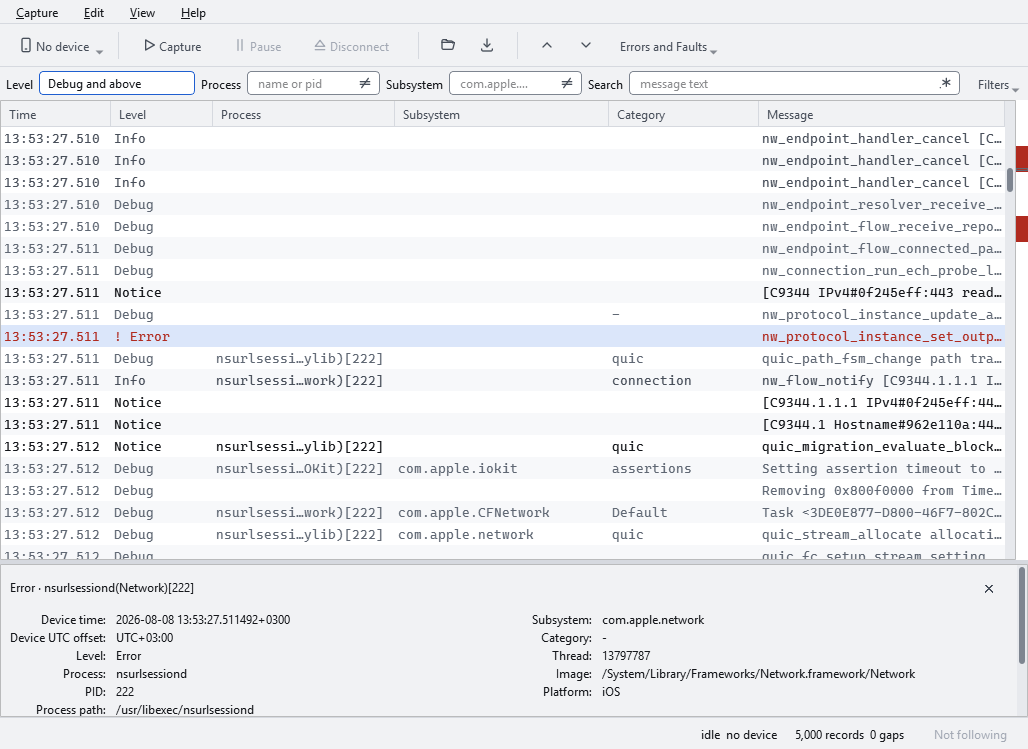
Capture streams from an attached device; Open reads a capture from disk. Either way the records go into a virtualised table coloured by severity, with every field of the selected row in the pane below — including the two that routinely get confused, the process executable and the library that emitted the line.
A few things it does deliberately:
- Pause freezes the view and nothing else. The capture keeps running and keeps writing every record to the session file, so nothing is lost by looking away. Disconnect is the control that releases the device, and it is named after its consequence rather than called "stop".
- A gap is a row. When the device disconnects mid-capture, the hole in the log appears in the table where it happened, in position, and it survives every filter. A filter says which records you want; a gap says whether the answer is complete, and hiding one to satisfy the other would make the view lie about the capture.
- The strip beside the table marks every error, gap and mark across the whole capture, not just the visible part. Clicking jumps there. It is the only thing that will tell you about a discontinuity forty thousand rows above where you are reading.
- Filters keep your place. Changing a filter anchors the selection and the viewport to the record you were reading, not to a row number, and falls back to the nearest survivor when that record is filtered away.
| Ctrl+R | Capture from the device |
| Ctrl+P | Pause the view |
| Ctrl+D | Disconnect, releasing the device |
| Ctrl+O | Open a capture |
| Ctrl+E | Export |
| Ctrl+F or / | Find |
| E / Shift+E | Next / previous error |
| ] / [ | Next / previous gap |
| M | Mark the row |
| F1 | Every binding, generated from the same table the menus use |
The command line
ostrace doctor                    # why can't I see my device?
ostrace devices --verbose         # list what is attached
ostrace capture --duration 60     # stream to a session file
ostrace export CAPTURE            # turn it into something readable
ostrace capture writes a session directory under your data directory and
prints the path. --max-records and --duration both stop it; so does Ctrl-C,
cleanly. If the device disconnects mid-capture it reconnects and records a gap
rather than pretending the log is continuous.
Start with doctor if anything is not working. Almost every problem here is
environmental rather than a bug, and it checks the causes in the order they
actually occur:
[ ok ] ostrace      0.1.1 on Python 3.13.14 (win32)
[ ok ] usbmux       Apple Mobile Device Service on 127.0.0.1:27015
[FAIL] devices      none connected
               Connect the device over USB and unlock it. A charge-only cable
               gives exactly this symptom.
Exporting
ostrace export needs no device, and the viewer's export dialog offers the
same formats. It reads a session directory or a bare capture file and writes
beside it, named after it.
--format |
What it is for |
|---|---|
agent-bundle (default) |
A directory of eight tab-separated text files to investigate with grep and bounded line reads. The only format that loses nothing — see docs/formats/agent-bundle.md. |
text |
Aligned columns, one record per line, for reading in a terminal. |
markdown |
A document with a summary and the records verbatim, to paste into an issue. |
jsonl |
One JSON object per record — the session format without the gzip. |
ai-report |
A summary that shrinks to a token budget, for handing to a model. |
trace |
Verbatim windows around each error, for following what led to one. |
ostrace export capture.ostrace                         # a bundle beside it
ostrace export capture.ostrace -f trace                # what led to each error
ostrace export capture.ostrace -f ai-report --budget-tokens 20000
Everything except the bundle is a summary, and each one states what it left out — the gaps in the capture, the patterns that did not fit, the anchors it could not reach. An export that quietly stops reads as complete, and a reader then draws conclusions from an absence that is an artefact of the export rather than a fact about the device.
What this is not
- There are no downloadable binaries. Install from PyPI; that is also what keeps macOS from quarantining anything.
- Nothing is code-signed. It does not need to be on the install route above.
- macOS is verified by CI, not by hand. The test suite and a screenshot job
run on a macOS runner every change, but no Mac has ever run this
interactively. Assumptions that could not be checked are marked
# UNVERIFIED-MACOSin the source. Reports from an actual Mac are welcome. - Only iOS is supported. The device layer is written around lockdown and
os_trace_relay.
Documentation
| docs/adr/ | Architecture decision records: what was decided and why |
| docs/design/gui.md | The viewer's behaviour contract, written before the code |
| docs/research/ | The measurements and comparisons the decisions rest on |
| docs/formats/ | On-disk format contracts |
| docs/troubleshooting.md | When no device shows up |
| CONTRIBUTING.md | Development setup |
Licence
GPL-3.0-or-later. See LICENSE.
ostrace imports pymobiledevice3, which is GPL-3.0-or-later; under the
standard FSF reading that makes a combined work, so matching the licence is the
clean answer rather than a reluctant one. Reasoning in
docs/adr/0003.
Acknowledgements
ostrace is a viewer on top of pymobiledevice3
by doronz88, which does the genuinely hard part: speaking Apple's lockdown and
usbmux protocols in pure Python.
1 maintainer

Download files
Download the file for your platform. If you're not sure which to choose, learn more about installing packages.
Source Distribution
Built Distribution
Filter files by name, interpreter, ABI, and platform.
If you're not sure about the file name format, learn more about wheel file names.
Copy a direct link to the current filters
File details
Details for the file ostrace-0.1.1.tar.gz.
File metadata
- Download URL: ostrace-0.1.1.tar.gz
- Upload date:
- Size: 1.0 MB
- Tags: Source
- Uploaded using Trusted Publishing? Yes
- Uploaded via:
twine/7.0.0 CPython/3.13.14
File hashes
| Algorithm | Hash digest | |
|---|---|---|
| SHA256 |
21423fe17c1726224be9bccb44fffc504c797fb7da6ffd6cc7e10a59a6206a70
|
|
| MD5 |
05a3b5b9599b0303fd2179de20e528ff
|
|
| BLAKE2b-256 |
0aac201e0c31b8feb790ae53217db4ccc3efcd4299a41fe84a0f4daba37ee296
|
Provenance
The following attestation bundles were made for ostrace-0.1.1.tar.gz:
Publisher:
release.yml on BerkayCaglar/ostrace
-
Statement:
-
Statement type:
https://in-toto.io/Statement/v1 -
Predicate type:
https://docs.pypi.org/attestations/publish/v1 -
Subject name:
ostrace-0.1.1.tar.gz -
Subject digest:
21423fe17c1726224be9bccb44fffc504c797fb7da6ffd6cc7e10a59a6206a70 - Sigstore transparency entry: 2400990881
- Sigstore integration time:
-
Permalink:
BerkayCaglar/ostrace@ff9a18bd579e9f39269ebe51da0bfd710b28e8c9 -
Branch / Tag:
refs/tags/v0.1.1 - Owner: https://github.com/BerkayCaglar
-
Access:
public
-
Token Issuer:
https://token.actions.githubusercontent.com -
Runner Environment:
github-hosted -
Publication workflow:
release.yml@ff9a18bd579e9f39269ebe51da0bfd710b28e8c9 -
Trigger Event:
push
-
Statement type:
File details
Details for the file ostrace-0.1.1-py3-none-any.whl.
File metadata
- Download URL: ostrace-0.1.1-py3-none-any.whl
- Upload date:
- Size: 205.6 kB
- Tags: Python 3
- Uploaded using Trusted Publishing? Yes
- Uploaded via:
twine/7.0.0 CPython/3.13.14
File hashes
| Algorithm | Hash digest | |
|---|---|---|
| SHA256 |
0edc98b1704b6a756638f485b3b7af41634f05c7171cb6bd71c06065d948c81f
|
|
| MD5 |
b56ee404e0128347316153d5f3f3eaa5
|
|
| BLAKE2b-256 |
16d5c871421054cc82c787494b5e34b41aff1772d9af942cc86a3ede9af90192
|
Provenance
The following attestation bundles were made for ostrace-0.1.1-py3-none-any.whl:
Publisher:
release.yml on BerkayCaglar/ostrace
-
Statement:
-
Statement type:
https://in-toto.io/Statement/v1 -
Predicate type:
https://docs.pypi.org/attestations/publish/v1 -
Subject name:
ostrace-0.1.1-py3-none-any.whl -
Subject digest:
0edc98b1704b6a756638f485b3b7af41634f05c7171cb6bd71c06065d948c81f - Sigstore transparency entry: 2400991005
- Sigstore integration time:
-
Permalink:
BerkayCaglar/ostrace@ff9a18bd579e9f39269ebe51da0bfd710b28e8c9 -
Branch / Tag:
refs/tags/v0.1.1 - Owner: https://github.com/BerkayCaglar
-
Access:
public
-
Token Issuer:
https://token.actions.githubusercontent.com -
Runner Environment:
github-hosted -
Publication workflow:
release.yml@ff9a18bd579e9f39269ebe51da0bfd710b28e8c9 -
Trigger Event:
push
-
Statement type:














