
osuplaylist

- Extract all osu songs, collection,run a regex search in .osu tag line , apply daterange
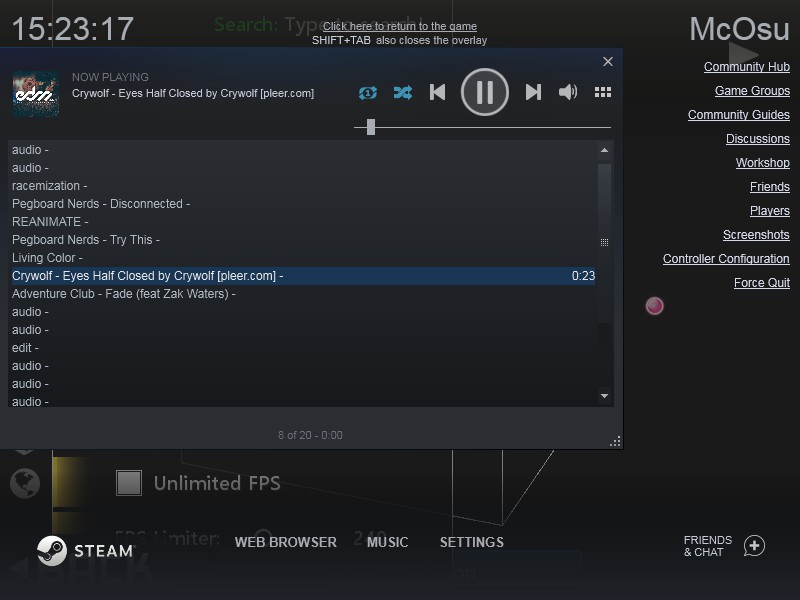
- Export audio to directory/to ingame collection/to steam queue or create m3u8 playlist
- Import your songs in .mp3 format to osu
- Use as a module
Installation
Python version >= 3.6
pip install osuplaylist
update pip install osuplaylist -U
Limitations
- refresh
<F5>if beatmap library is not correct - creation of ingame collection requires to restart client
- importing your mp3 requires restart & refresh
F5& ascii name
Commands
export all songs as .m3u8 playlist, may take a while
osuplaylist
apply daterange (optional)
osuplaylist --date_range "daterange",daterange format:Year.month.day
example: >2020.1.1 older than, 2020.1.1:2020.1.24 in this range
this will include last played beatmaps in that timeframe.
export collection. Name might be case insensitive or with typos
osuplaylist --collection "name of collection"
export to ingame collection. Name will be with current timestamp. (optional)
osuplaylist --update_db "name of collection"
run a regex search on tags provided from .osu file
osuplaylist --regtag "regex"
run an inversed regex search on tags (optional)
osuplaylist -r "regex" -i
provide path to export audio.(optional) if used without arg - all songs
osuplaylist --to_dir "path"
export to steam queue.m3u8
osuplaylist -r "step" -s close steam first, this will overwrite queue.m3u8 from _database of steam, you will be asked just one time to provide full path
import mp3s
osuplaylist -m "E:Installation\music" -n "in_game_collection_name", name ascii only and you need manually click all mp3s, search mp3 in osu,and click,otherwise collections will not work
info
osuplaylist --help
Examples
Example with mpv:
mpv --playlist=playlist.m3u8 --shuffle --volume 35
Example regex search + inverse + to directory:
osuplaylist -r "(azer|step)" -i -d "E:/music/osuplaylist"
-r "(azer|step)" will match all songs which contain azer or step
-i (optional) return an inverted result , all songs which NOT contain azer or step
-d (optional) export .mp3 to directory E:/music/osuplaylist
Example combine regex + daterange + to steam
osuplaylist -r "step" -t ">2020.1.1" -s
Using osuplaylist.py as module
See tests
Contribute
Contributions are welcome!
See also
- https://github.com/osufiles/osu-bgchanger - A simple tool for automatically changing all your osu! beatmap backgrounds to a custom one .
- https://github.com/upgradeQ/OSU-STREAM-DETECTOR - osu standard stream map identifier & exporter to ingame collection .
- https://github.com/Piotrekol/CollectionManager - gui collections creator & manager for osu
- https://gitlab.com/esrh/osu-cplayer - tui (urwid) osu player based on mpv
1 maintainer

Metadata
1 maintainer
Release files for osuplaylist 3.1.0
For a detailed explanation of source distributions (sdists) and built distributions (wheels), please see the package formats documentation.
Source distribution (sdist)
| File | Size | Uploaded | |
|---|---|---|---|
| osuplaylist-3.1.0.tar.gz | 66.9 kB | Details |
Built distribution (wheel)
| File | Interpreter | ABI | Platform | Reset |
|---|---|---|---|---|
| osuplaylist-3.1.0-py3-none-any.whl | Python 3 | none | any | Details |
Total release size: 133.3 kB
Release files / osuplaylist-3.1.0.tar.gz
| Download URL | osuplaylist-3.1.0.tar.gz |
|---|---|
| Size | 66.9 kB |
| Tags | Source |
|
SHA-256 checksum How to use checksums |
317174fd630cab078d3a0ef0f326518be43a0273e3801832a20de7d0637469a7
|
|
BLAKE2b-256 checksum How to use checksums |
199018f65edec35fe759af79aa480b1fc307f4b0d8b91e937568e10c6efa96d5
|
| Upload date | |
|
Uploaded using Trusted Publishing? What is trusted publishing? |
No |
| Uploaded via |
poetry/1.0.10 CPython/3.8.0 Windows/7
|
Release files / osuplaylist-3.1.0-py3-none-any.whl
| Download URL | osuplaylist-3.1.0-py3-none-any.whl |
|---|---|
| Size | 66.4 kB |
| Tags | Python 3 |
|
SHA-256 checksum How to use checksums |
81d228655c623b42f84e8d1ce4e74860d916ab3142870aa7ee0e2dbb5cc73548
|
|
BLAKE2b-256 checksum How to use checksums |
66cf00dd7c30c82c61f6f1fbe691bfbc1f81ab0e3a0fa1cc7bc0cd75607c2184
|
| Upload date | |
|
Uploaded using Trusted Publishing? What is trusted publishing? |
No |
| Uploaded via |
poetry/1.0.10 CPython/3.8.0 Windows/7
|













