
This release has been yanked by its maintainers, and will be ignored by installers, except when explicitly specified.
Consider using release 0.4.2 instead.
otaku



One terminal client for all your local model servers. Chat, pipe, search your history, and manage RAM across Ollama, LM Studio, MLX (omlx), and any OpenAI-compatible endpoint — from a single command.
Why otaku
Running local models usually means juggling ollama run, the LM Studio GUI,
and curl. otaku gives every backend one front end:
- One command, every backend.
otaku llama3finds the model in whichever provider has it — Ollama, LM Studio, omlx, or any server speaking OpenAI's/v1/chat/completions.PROVIDER/MODELdisambiguates when needed. - Manage the whole fleet.
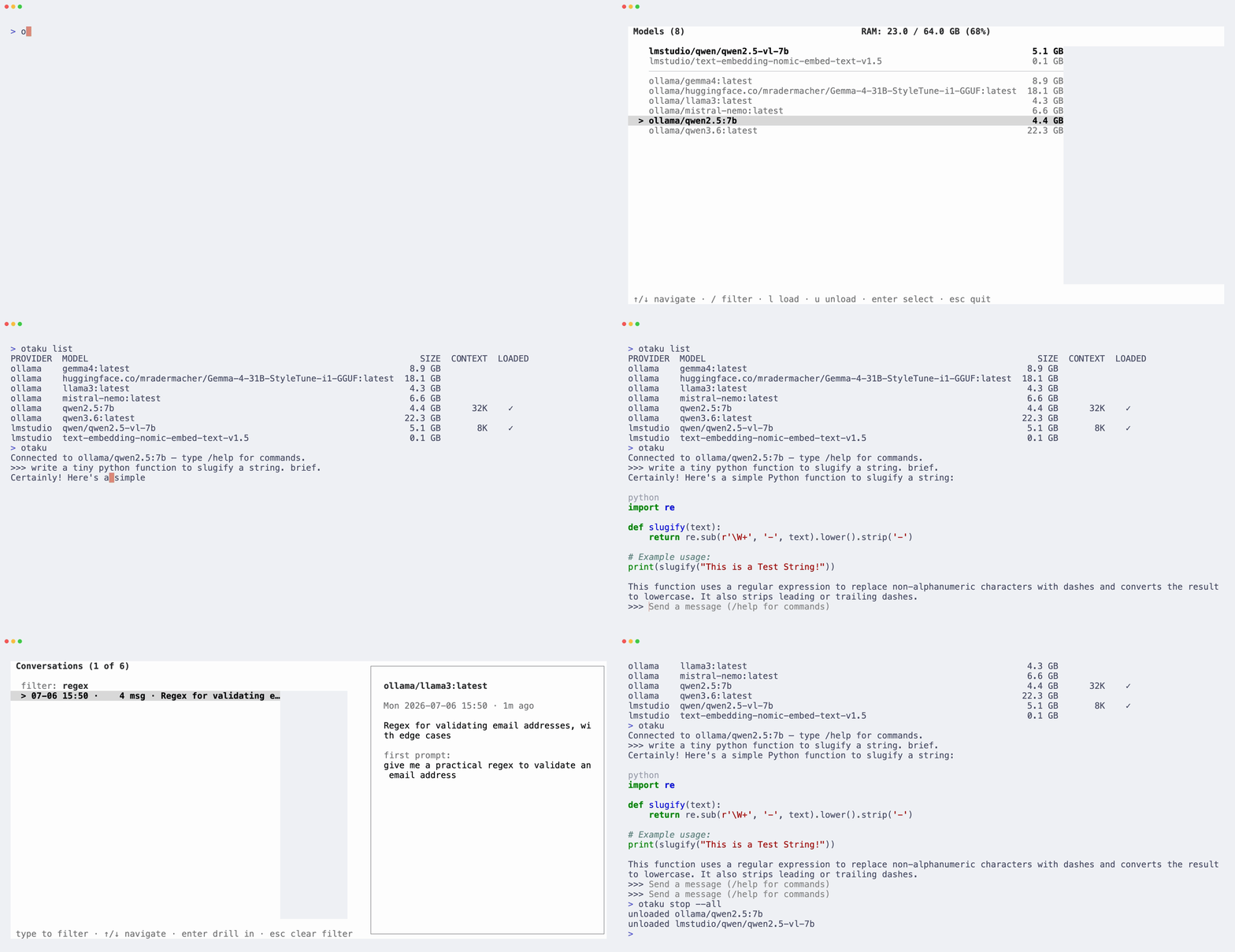
otaku listshows every model from every provider with size, context window, and load state (--runningispsacross all of them).otaku stop --allfrees your RAM everywhere. The full-screen picker loads and unloads with a live RAM gauge. - A history you can actually find things in. Every conversation is
searchable by full message content, resumable from any turn (with
fork-instead-of-overwrite protection), and labeled by background
LLM-generated summaries and your own
/titles. - A proper Unix citizen.
otaku llama3 "prompt"andcat err.log | otaku llama3 "explain"print a plain answer and exit — no spinner, no styling on stdout — so otaku drops into any pipeline. - Private by default. History lives in a local SQLite file, encrypted client-side with AES-256-GCM; the key is wrapped by your OS keychain. Nothing ever leaves your machine.
- A REPL with craft. Streaming markdown with syntax-highlighted code
blocks, thinking-effort control, Ollama-style
"""multiline input, in-chat model switching,/copythat works over SSH (OSC 52), instant exit.
Install
# uv — pulls Python 3.11+ automatically, isolated in its own venv
uv tool install otaku

# Homebrew — via the enclavum tap
brew install enclavum/tap/otaku

# pipx works too:  pipx install otaku
# latest development version:  uv tool install git+https://github.com/enclavum/otaku
Either one puts otaku on your PATH in its own isolated environment. Update
with uv tool upgrade otaku / brew upgrade otaku.
You'll need at least one model server running — Ollama (:11434), LM Studio
(server enabled, :1234), omlx, or any other OpenAI-compatible endpoint. See
Requirements.
uv details — PATH setup and installing from a local clone
# Install uv if you don't have it
brew install uv
# or:  curl -LsSf https://astral.sh/uv/install.sh | sh

# Put uv's tool-bin directory on your PATH (one-time; restart your shell after)
uv tool update-shell

# Install from a local clone instead of straight from GitHub
git clone https://github.com/enclavum/otaku.git otaku
uv tool install ./otaku
There is no other setup. On first run otaku writes ~/.otaku/config.toml
(auto-detecting each engine's port), generates an encryption key wrapped by
your OS keychain, and creates the history database — see
Privacy and storage.
Quick start
otaku                        # pick a model full-screen, then chat
otaku llama3                 # chat; bare names resolve across all providers
otaku ollama/llama3          # …or be explicit
otaku llama3 "2 + 2?"        # one-shot: print the answer and exit
git diff | otaku llama3 "write a commit message"    # Unix filter
otaku list                   # every model, every provider, sizes + load state
otaku stop --all             # unload everything, everywhere
Inside the chat: type and press Enter. /? lists commands. Ctrl+T searches
and resumes past conversations, Ctrl+R regenerates, Ctrl+U undoes the
last turn, Ctrl+D exits.
For multiline input (stack traces, code blocks), open and close with """ —
the same convention as Ollama:
>>> """
... def greet(name):
...     return f"hello {name}"
... """
Text wrapped in """ is always sent verbatim, even if it looks like a slash
command. A one-liner works too: """text""".
Usage
otaku — the model picker
Bare otaku opens a full-screen picker: models grouped by provider, loaded
ones bold, disk sizes shown, RAM gauge in the header. Enter chats with the
selection (loading it first if needed); l/u load and unload in place; /
filters. Your last choice is remembered between runs.
otaku <model> — chat
The first argument can be a bare name (llama3 — every provider is
queried and the unique match wins; otaku errors with a hint if two providers
have it) or PROVIDER/MODEL (ollama/llama3,
ollama/hf.co/bartowski/SomeModel:Q8_0 — the model part may itself contain
slashes). A name that collides with a subcommand (list, stop) is treated
as the command; use PROVIDER/MODEL to disambiguate.
One-shot and pipes
Add a prompt argument and/or pipe stdin, and otaku runs a single completion, prints the plain reply to stdout, and exits — no REPL:
otaku llama3 "write a haiku about pipes"           # prompt argument
git diff | otaku llama3 "write a commit message"   # piped content
cat error.log | otaku llama3 "explain this error"  # both: prompt + stdin
otaku llama3 "summarize" < notes.md                # stdin redirect
Prompt and stdin are combined instruction-first — prompt, blank line, then
the piped content. Output is deliberately plain (no spinner, markdown, or
stats) so it composes: … | otaku m "…" | pbcopy. The exchange is still saved
to your encrypted history; pass -nr to skip that.
otaku list — every model, every provider
$ otaku list
PROVIDER  MODEL                                 SIZE  CONTEXT  LOADED
ollama    llama3:latest                       4.7 GB       8K    ✓
ollama    mistral:latest                      4.1 GB        —
lmstudio  qwen3-coder-30b-a3b-instruct-mlx   17.5 GB     128K    ✓
CONTEXT is the loaded context window (populated for models in memory).
--running / -r filters to loaded models only — ollama ps, but spanning
every configured provider.
otaku stop — free your RAM
otaku stop llama3            # bare name, resolved against *loaded* models
otaku stop ollama/llama3     # explicit
otaku stop --all             # unload everything in every provider
In the REPL
/clear                       Clear context, stay in the same conversation
/new                         Clear context and start a new conversation
/model [PROVIDER/MODEL]      Switch model in-place (opens the picker with no arg);
                             remembered as last used
/undo                        Discard the last prompt and response (Ctrl+U)
/regenerate                  Re-run the last prompt (Ctrl+R)
/history                     Browse saved conversations and resume any turn (Ctrl+T)
/fork                        Snapshot the current conversation as a new branch
/info                        Show details about the current model + session
/print                       Dump the full message history (what the model sees)
/copy [all]                  Copy the last reply (or the whole chat) to the clipboard
/save <file>                 Save the conversation to a Markdown file
/title <text>                Name this conversation (shown in /history)
/remember                    Save current system/think/params as this model's defaults
/set verbose on|off          Show the stats line after each reply (off by default)
/set system <text>           Set the system prompt
/set think <level>           Set thinking effort: on|off|none|low|medium|
                             high|max|default. Off by default. `off`
                             actively disables thinking; `default` removes
                             the request so the model uses its own default.
                             How it's sent is provider-specific (Ollama:
                             reasoning_effort; omlx: enable_thinking).
/set parameter <name> [val]  Set or clear an inference parameter
                             (temperature, top_p, max_tokens, presence_penalty,
                             frequency_penalty, seed, stop)
/bye                         Exit (Ctrl+D)
/?, /help                    Show this help
| Key | Effect |
|---|---|
""" |
Begin a multiline message; close it with """ |
Tab |
Complete slash commands |
Up/Down |
Walk this session's prompt history |
Ctrl+R |
/regenerate last response (during stream: cancel + regenerate) |
Ctrl+U |
/undo the last turn |
Ctrl+T |
Open the /history picker |
Ctrl+D |
/bye (also exits on empty line) |
Ctrl+C |
Clear the current line; cancel an in-flight reply |
Replies stream as rendered markdown — headers, lists, blockquotes, rules, and
fenced code blocks, syntax-highlighted via
Pygments. /set verbose on appends a
[ N tokens · R tok/s · Ts ] stats line after each reply.
History: search, resume, fork
Ctrl+T (or /history) opens a two-stage picker:
- Conversation list — each row shows
title / summary, falling back to the first prompt when neither is set. Press/to filter — the filter matches full message content, not just titles, so you can find a chat by anything said in it. The preview pane shows the model, timestamp, title, summary, and first prompt.Deldeletes (with confirmation). - Turn list — pick the turn to resume from; the conversation loads up to and including it.
Summaries are generated by a background worker while you're idle at the prompt
— never on exit, so quitting is always instant and a goodbye never reloads a
cold model. Name a chat yourself with /title <text>.
Resuming from a turn that isn't the last would overwrite the later turns on the next save. otaku catches this and offers to fork instead:
Resuming at turn 5 of 12 would discard 7 later message(s) on next save. Fork into a new conversation? [Y/n]
y (or Enter) forks a fresh conversation containing the turns up to your
pick, leaving the original intact; n resumes destructively.
Persistent defaults
/set system, /set think, /set verbose, and parameters normally reset
when you exit. To make settings stick, otaku reads declarative defaults at
launch (no surprising "sticky" auto-save):
-
Global — a
[defaults]section in~/.otaku/config.toml:[defaults] system = "Be concise." think = "none" # none | low | medium | high | max | default verbose = false # stats line after each reply (global only — not per-model) no_record = false # open every session in --no-record mode create_summaries = true # generate conversation summaries in the background summary_idle_seconds = 5 # summarize after this many seconds idle at the prompt [defaults.parameters] temperature = 0.7
-
Per-model — overrides keyed by bare model name, layered over the globals. Write them from a session with
/remember, or edit~/.otaku/model_defaults.jsonby hand:{ "deepseek-r1": { "think": "high", "parameters": { "temperature": 0.6 } } }
So a deepseek-r1 user runs /set think high once, then /remember, and every
future otaku deepseek-r1 starts with thinking on — while llama3 is
unaffected. Precedence, low to high: built-in → [defaults] → per-model →
-nr flag → in-session /set.
Off the record: -nr / --no-record
Opens the database read-only for the session: nothing is written, existing
history stays browsable, deletes are blocked. Accepted before or after the
model (otaku -nr, otaku llama3 -nr); the banner shows (not recorded).
Set [defaults].no_record = true to make it every session's default.
Configuration
~/.otaku/config.toml:
[database]
url = "sqlite:///~/.otaku/history.db"

[encryption]
provider = "keychain"   # keychain | passphrase | command | disk

[providers.ollama]
url = "http://localhost:11434/v1"
api_key = ""
supports_thinking = true
keep_alive = "24h"

[providers.omlx]
url = "http://localhost:8000/v1"
api_key = ""
supports_thinking = false
smoothen_streaming = true

[providers.lmstudio]
url = "http://localhost:1234/v1"
api_key = ""
supports_thinking = false
Add providers by adding [providers.<name>] sections — each needs a url
(the OpenAI-compat base, including /v1); api_key, supports_thinking, and
keep_alive are optional. otaku probes each URL on first use to detect the
backend kind (Ollama, LM Studio, omlx, or generic OpenAI-compat), which
determines whether load/unload and sizes are available. Probes have a short
(0.5s) timeout and run concurrently, so one configured-but-down provider
never slows the others; when nothing is reachable, otaku lists each provider,
whether it answered, and points at the config file to fix.
Provider option reference — keep_alive, smoothen_streaming, port auto-detection, OTAKU_DATABASE_URL, OTAKU_CONFIG_DIR
keep_alive (default "24h", Ollama only) is forwarded to Ollama on the
explicit load action from the model picker — how long the model stays in
memory. Standard Ollama duration syntax: "5m", "24h", 0 (unload right
after the request), -1 (never auto-unload).
smoothen_streaming (default true, omlx only) de-jitters omlx's output.
omlx batches tokens before flushing, so its stream arrives in bursts and
looks choppy even though it's not slow. otaku buffers the bursts and
reprints them at a steady pace (~150 ms display lag); set it to false to
print bursts as they arrive.
Port auto-detection runs once, when ~/.otaku/config.toml is first
written: each built-in engine's port (and omlx's API key) is read from your
environment (OLLAMA_HOST) or the engine's own settings file
(~/.lmstudio/.internal/http-server-config.json, ~/.omlx/settings.json),
falling back to the standard default. The written sections are yours to edit
afterwards and are never re-detected — delete the config file to re-detect
from scratch.
OTAKU_DATABASE_URL overrides [database].url for a single run — handy
for a throwaway DB:
OTAKU_DATABASE_URL="sqlite:////tmp/otaku-test.db" otaku
OTAKU_CONFIG_DIR relocates otaku's entire state directory —
config.toml, keys.json, model_defaults.json, last_model, and the
default history.db location. A custom dir also gets its own OS-keychain
entry, so it is a fully isolated setup: nothing is shared with (or can
touch) ~/.otaku, which makes it safe for throwaway experiments or parallel
installs:
OTAKU_CONFIG_DIR=~/.otaku-work otaku
Privacy and storage
Everything is local: history lives in a SQLite file at ~/.otaku/history.db
(WAL mode) — no server, no cloud, no telemetry. On top of that, every message,
summary, and title is encrypted client-side with AES-256-GCM before it
touches disk; the database never sees plaintext.
Keys use an envelope scheme: a random data key encrypts the blobs and is
itself wrapped by a key from the provider you pick in [encryption] — only
the wrapped form is stored (~/.otaku/keys.json, mode 0600):
| provider | where the key lives |
|---|---|
keychain |
your OS keychain (macOS security, Linux secret-tool). Default. |
command |
fetched by [encryption].retrieve_command — 1Password op, pass, gpg, … (must print base64 of 32 bytes to stdout). |
passphrase |
derived from a passphrase via scrypt; prompted each launch, nothing stored. |
disk |
plaintext ~/.otaku/kek.key (0600); the automatic fallback when no keychain tool is found. |
Key setup is strictly additive: if a key already exists — a keychain item from
an earlier install, or one your retrieve_command returns — otaku reuses it
rather than minting a new one, and it never overwrites an existing key or
keys.json. Restoring a backed-up keys.json therefore keeps working.
With an interactive key provider (passphrase, or a command that prompts —
a hardware token, say), bare otaku asks for the key up front, before the
model picker opens.
[!IMPORTANT] Back up
~/.otaku/keys.jsontogether with your KEK (the keychain item, or whateverretrieve_commandreads). Either alone is useless — and losing the KEK makes your history permanently unreadable. Switching providers is not yet automated; it currently means starting from a fresh~/.otaku.
Provider support matrix
| feature | Ollama | LM Studio | omlx | other OpenAI-compat |
|---|---|---|---|---|
| chat | ✓ | ✓ | ✓ | ✓ |
| model picker | ✓ | ✓ | ✓ | ✓ (no load/unload) |
| disk size shown | ✓ | ✓ | ✓ | — |
| load / unload | ✓ | ✓ | ✓ | — |
reasoning_effort |
✓ * | (model) | (model) | (model) |
* Ollama needs supports_thinking = true in its provider section to forward
the reasoning_effort parameter.
Requirements
- One or more model servers reachable over HTTP: Ollama, LM Studio (server enabled), omlx, or anything speaking OpenAI v1 chat completions.
- Python ≥ 3.11 — the recommended installers fetch it automatically if needed.
- macOS, Linux, or Windows. On Windows the one feature that needs a POSIX terminal — cancel-and-regenerate (Ctrl+R) while a reply is streaming — is disabled (everything else, including Ctrl+C to cancel, works); use WSL for full parity.
Contributing
See CONTRIBUTING.md for development setup, the lint,
type-check, and test workflow (pytest — a full unit + CLI suite in
tests/), and how to smoke-test against a real backend.
License
MIT.
1 maintainer

Download files
Download the file for your platform. If you're not sure which to choose, learn more about installing packages.
Source Distribution
Built Distribution
Filter files by name, interpreter, ABI, and platform.
If you're not sure about the file name format, learn more about wheel file names.
Copy a direct link to the current filters
File details
Details for the file otaku-0.1.2.tar.gz.
File metadata
- Download URL: otaku-0.1.2.tar.gz
- Upload date:
- Size: 1.2 MB
- Tags: Source
- Uploaded using Trusted Publishing? No
- Uploaded via:
uv/0.5.9
File hashes
| Algorithm | Hash digest | |
|---|---|---|
| SHA256 |
4a590c437ff9df728ab8518e6bbbcd414e21dbb94cd2c08243bdce5e4d1480c7
|
|
| MD5 |
b0c08bb4b3cb40565e8601773e3c1abe
|
|
| BLAKE2b-256 |
b42be6034e8b340e07d8315c520d786bf42d47796f0a7c6c12d4ffb7e44fc681
|
File details
Details for the file otaku-0.1.2-py3-none-any.whl.
File metadata
- Download URL: otaku-0.1.2-py3-none-any.whl
- Upload date:
- Size: 81.0 kB
- Tags: Python 3
- Uploaded using Trusted Publishing? No
- Uploaded via:
uv/0.5.9
File hashes
| Algorithm | Hash digest | |
|---|---|---|
| SHA256 |
39665976c354a785a39e33afea2b619dc73463dd1b2570e8ff581c7ad0515e42
|
|
| MD5 |
9406b2f256060f7ad32ed9591d31115e
|
|
| BLAKE2b-256 |
40c2d901bc258d684bf7f6db7e6bfeefdf5be734a6a89fe8a91bf4676d2f5279
|














