
Outerloop


Autoresearch agents that improve your benchmark.
Outerloop runs AI agents on your own research code. An agent proposes a change, runs the experiment on your cluster, and opens a pull request only when your benchmark actually improves. Every attempt ends in a short written report, including the attempts that failed.
You run it yourself, with your own keys, your own compute and your own repositories, and nothing reports back to us. It is built and used every day by the Agentic Learning AI Lab at NYU, where it co-develops our research codebases.
Get started
To see a run first, the quickstart runs two CPU benchmarks on your own machine, with no GitHub account and no cluster. You need Python 3.12 or later, uv, Git 2.38 or later and an Anthropic API key:
pip install outerloop-science
outerloop init --forge local --compute local --no-image --target me/quickstart \
  --forge-source https://github.com/outerloop-science/quickstart
outerloop start
On macOS, sessions and evaluations run under a Seatbelt profile: they write their workspace and a scratch directory, read system and toolchain paths, and cannot read the rest of your home. On Linux without a container they can read any file your account can. Either way, use a spend-capped API key.
For your own repository: three commands and one file. You need a repo with a benchmark command, an API key for the model that will write the code, and a Slurm cluster or one machine with a GPU.
pip install outerloop-science
outerloop init     # where the loop runs, which repo, which model and its key, your GitHub identity
The wizard asks for a GitHub identity for the agents to open pull requests
as. Pick app and it walks you through creating a GitHub App under your
account and installing it on the repo. Pick pat if you already have a
token, and it writes the config and the key files either way. To try it
without GitHub, outerloop init --forge local keeps the repository and its
pull requests in a git repository on the same machine. Then add one file,
.outerloop.yaml, to the repo you want improved:
benchmarks:
  - name: my-benchmark
    command: uv run python -m mypkg.eval --json   # prints {"success_rate": 0.42}
    metric: success_rate
    direction: max
budgets:
  gpu_hours_per_run: 8
  runs_per_week: 10
scope:
  allowed: [src/mypkg/solver/]   # the only paths an agent may change
roadmap: docs/roadmap.md # what the agents read for direction; never written
outerloop start # on a Slurm login node this submits the loop; without Slurm it runs in the foreground
The install guide walks through every step, including the other model backends. The contract guide explains the decisions the contract asks you to make.
The loop
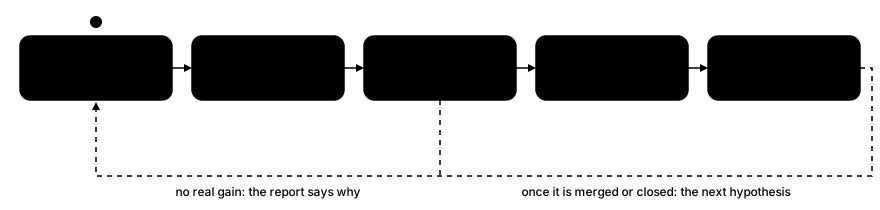
- Propose. An agent picks a hypothesis and writes the code change.
- Experiment. It runs the training on your cluster and reads the results.
- Measure. Outerloop scores the change against the base tree at the same seed. Noise does not count as an improvement.
- Review. Judges read the change and the claim. If both hold up, a pull request opens.
- Record. Every attempt gets a short report: hypothesis, change, outcome, next step. Negative results included.
An agent's whole workspace is mounted writable, so scope is not a per-path
sandbox: the kernel rejects a candidate whose changes fall outside the paths
the contract allows, or touch the contract, your roadmap or .github/. Keep
the benchmark's own eval code outside those allowed paths, so a doctored
ruler cannot survive into a measured candidate. Your branch protection and required checks
apply to them as to any contributor. By default a pull request waits for a
human, and a repo can also let clean ones merge themselves. The full
picture is in
how it works, and the
operate guide covers running
and steering runs.
Pull request reviews only
The reviewer works on its own, with one workflow file and an API key, about five minutes of setup, and no bot account or cluster. It comments on pull requests with concrete findings and never approves, blocks, or fails your build. See the reviewer guide.
Safety by design
- Opt-in and contract-bound. A repo takes part by granting the bot
access and committing a contract. The kernel rejects a change that touches
the contract, your roadmap, or
.github/. - Nothing on trust. In the default gate mode, Outerloop measures every claim itself, on committed trees, and re-verifies before a pull request exists. A repo can instead opt into labelled self-reported numbers.
- Untrusted input. Pull request text, diffs, issues, web pages, and job output are rendered to the agent as fenced data, not instructions, which lowers the risk of injected text being followed without guaranteeing it. A contained session gets no GitHub credential in its environment and cannot read the operator's key files. Without a container, a macOS session runs under Seatbelt; a Linux session can read any file you can, key files included.
- Budgets in code. Launches, GPU-hours, and runs per week are enforced by the kernel, not left to the agent.
- No model lock-in. Claude Code, Codex, and hermes-agent are wired today, including self-hosted endpoints.
Further reading: the architecture page for the full design, the roadmap for what is planned, and the community page for where to ask questions.
Developing
uv sync
uv run pre-commit install
uv run pytest
| Path | Purpose |
|---|---|
src/outerloop/ |
The kernel: contract, tick (the Slurm chain), attempt/orchestrator (the climb), measure/dispatch (evals as jobs), syscall (the author's tool), panel/verifier/review, github, harness backends |
tests/ |
Tiers: unit (default), slow, llm, slurm markers |
scripts/ |
Committed operational scripts (the tick chain, provisioning) |
docs/ |
The manual (deployed at docs.outerloop.science), architecture and design notes, roadmap |
License
1 maintainer

Metadata
1 maintainer
Release files for outerloop-science 0.6.0
For a detailed explanation of source distributions (sdists) and built distributions (wheels), please see the package formats documentation.
Source distribution (sdist)
| File | Size | Uploaded | Provenance | Actions |
|---|---|---|---|---|
| outerloop_science-0.6.0.tar.gz | 1.7 MB | With provenance | Details for outerloop_science-0.6.0.tar.gz |
Built distribution (wheel)
| File | Interpreter | ABI | Platform | Actions Reset |
|---|---|---|---|---|
| outerloop_science-0.6.0-py3-none-any.whl | Python 3 | none | any | Details for outerloop_science-0.6.0-py3-none-any.whl |
Total release size: 2.3 MB
Release files / outerloop_science-0.6.0.tar.gz
| Download URL | outerloop_science-0.6.0.tar.gz |
|---|---|
| Size | 1.7 MB |
| Tags | Source |
|
SHA-256 checksum How to use checksums |
0dc9a01f02a4aacb6629f866bd31ba643366947718f816214e083deea97b8fd5
|
|
BLAKE2b-256 checksum How to use checksums |
543b59f9dff1cfca4a2bb18a9da1353fdd9f319c0638936d8afbb267da856720
|
| Upload date | |
|
Uploaded using Trusted Publishing? What is trusted publishing? |
Yes |
| Uploaded via |
twine/7.0.0 CPython/3.13.16
|
Provenance
Provenance describes where a file came from. On PyPI, provenance is shared via attestations, which provide a verifiable record of the build or publishing details. View details, limitations and caveats.


PyPI Publish Attestation
PyPI verified that this artifact, at this checksum, originated from the publisher listed below.
Signed by GitHub Actions, verified by PyPI on Oct 27, 2026.
Transparency logRelease files / outerloop_science-0.6.0-py3-none-any.whl
| Download URL | outerloop_science-0.6.0-py3-none-any.whl |
|---|---|
| Size | 675.0 kB |
| Tags | Python 3 |
|
SHA-256 checksum How to use checksums |
19c7b0a1209e6109b63ad31f0e0c3e97333b79391ec535a9639213adeeece6ed
|
|
BLAKE2b-256 checksum How to use checksums |
3c4a6d52d95badd313469c03acf68628ef76091446697669f44634b70baa58bd
|
| Upload date | |
|
Uploaded using Trusted Publishing? What is trusted publishing? |
Yes |
| Uploaded via |
twine/7.0.0 CPython/3.13.16
|
Provenance
Provenance describes where a file came from. On PyPI, provenance is shared via attestations, which provide a verifiable record of the build or publishing details. View details, limitations and caveats.
PyPI Publish Attestation
PyPI verified that this artifact, at this checksum, originated from the publisher listed below.
Signed by GitHub Actions, verified by PyPI on Oct 27, 2026.
Transparency logSecurity for outerloop-science 0.6.0
Provenance
Provenance describes where a file came from. On PyPI, provenance is shared via attestations, which provide a verifiable record of the build or publishing details. View details, limitations and caveats.
Full provenance
Both files in this release have been uploaded with provenance metadata.
Attestation for outerloop_science-0.6.0.tar.gz
PyPI Publish Attestation
PyPI verified that this artifact, at this checksum, originated from the publisher listed below.
Signed by GitHub Actions, verified by PyPI on Oct 27, 2026.
Transparency logA note on package security
PyPI is a repository for distributing packages, not a service for auditing them. While third-party security researchers and our staff do their best to detect and remove malicious packages, PyPI cannot guarantee the quality, security or suitability of any given package.
To learn more about protecting yourself from malicious actors, visit our package security documentation.














