
Python library to print tables and line charts in Terminal.
Verified details
These details have been verified by PyPIProject links
GitHub Statistics
Maintainers

Project description
outfancy
Table printing and Line plotting in Terminal





What is it?
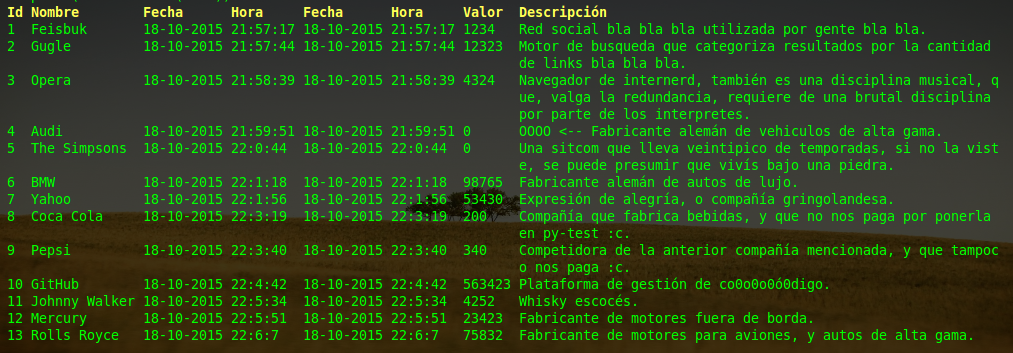
Outfancy is a Python library for printing tables and charts in the terminal. It's a quick way to visualize data when you don't have a GUI, and it integrates easily into your programs. You can install it with uv or pip and use it anywhere.
This was the first library I ever built when I was 16 :). It's been modernized to support Python 3.10+, fix bugs, add type hints, improve logging, and enhance performance, but the original style is still there: raw, exploratory teenage code.
Documentation
- DeepWiki Docs - Comprehensive documentation
- LOGGING.md - Logging system configuration and usage
- logging_example.py - Practical logging examples
Installation
Install as a library (uv)
uv add outfancy
Install as a CLI tool (uv)
uv tool install outfancy
Install with pip
pip install outfancy
Features
- Quick table printing - Print formatted tables in the terminal with automatic column width detection
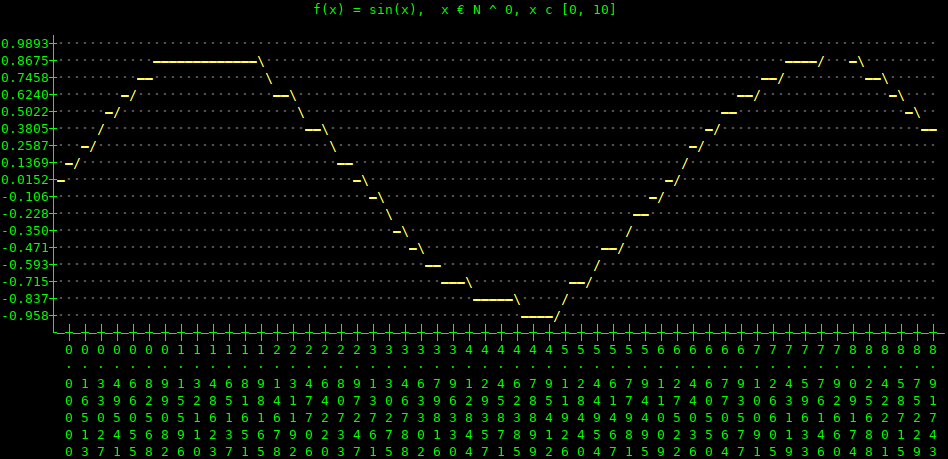
- LineChart plotting - Create line charts with linear interpolation
- Customizable formatting - Configure separators, widths, and column priorities
- Real-time column rearrangement - Dynamically reorder columns
- Auto-generated labels - Automatic label creation above tables
- Oneline printing - Single-line updates for real-time applications
- Color support - Add ANSI colors to table fields
- Type hints - Full type annotation support for better IDE integration
- Configurable logging - Flexible logging system with multiple severity levels
- Data type auto-detection - Automatic detection of ID, name, date, time, value, and description columns
Quick Start
Basic Table
import outfancy.table

table = outfancy.table.Table()
dataset = [(1, 'Marie'), (2, 'Joseph')]
print(table.render(dataset))
Line Chart
import outfancy.chart
from math import sin

line_chart = outfancy.chart.LineChart()
dataset = [(i, sin(i)) for i in range(10)]
line_chart.plot(dataset)
print(line_chart.render(color=True))
Large Table with Pagination
from outfancy.table import LargeTable

large_table = LargeTable()
large_dataset = [(i, f'User {i}', f'user{i}@example.com') for i in range(100)]
print(large_table.render(large_dataset))
Empty State Customization
from outfancy.table import Table, LargeTable

t = Table()
t.set_empty_string('No data available')

lt = LargeTable()
lt.set_empty_string('No data available')
This sets the string displayed when a table cell has no value.
CLI (Added in 2026)
After installing outfancy, the outfancy command is available in your terminal.
Table
Render tabular data from stdin or a file:
# CSV from stdin (first row used as headers)
printf "id,name,value\n1,foo,100\n2,bar,200" | outfancy table

# From a file
outfancy table data.csv

# TSV input
cat data.tsv | outfancy table --tsv

# JSON input (array of objects or array of arrays)
cat data.json | outfancy table --json

# Custom headers
printf "1,foo,100\n2,bar,200" | outfancy table --labels "ID,Name,Value"

# Hide headers
cat data.csv | outfancy table --no-labels

# Select and reorder columns
cat data.csv | outfancy table --order 0,2,1

# Custom column separator
cat data.csv | outfancy table --separator " | "

# Equal width for all columns
cat data.csv | outfancy table --width-equal

# Use first row as column headers (CSV/TSV)
cat data.csv | outfancy table --has-headers
Chart
Render x,y pairs as a line chart:
# From stdin (one x,y pair per line)
printf "1,10\n2,25\n3,15\n4,30\n5,20" | outfancy chart

# With title and colors
printf "1,10\n2,25\n3,15\n4,30\n5,20" | outfancy chart --name "Sales" --color

# From a file
outfancy chart data.csv
Demo
Run the interactive demo:
outfancy-demo
Version
Print the installed version:
outfancy --version
Development
Development installation (pip)
git clone https://github.com/carlosplanchon/outfancy.git
cd outfancy
pip install -e .
Development installation (uv)
git clone https://github.com/carlosplanchon/outfancy.git
cd outfancy
uv venv
uv pip install -e "."
Running tests
Install the development dependencies (adds pytest and pytest-cov):
uv pip install -e ".[dev]"
# or with pip:
pip install -e ".[dev]"
Run the test suite:
# Run all tests
pytest

# Run with verbose output
pytest -v

# Run tests with coverage
pytest --cov=outfancy --cov-report=term-missing
The tests live in tests/ and characterize the current behavior of the library
(the Table, Oneline, LargeTable and LineChart classes, the CLI, and the
pure helpers in widgets/window/colors), so any change that alters the
rendered output is caught early.
Logging Configuration
Outfancy uses a configurable logging system. By default, only WARNING and above messages are shown:
import logging
import outfancy.table

# Enable debug logging
logging.getLogger('outfancy').setLevel(logging.DEBUG)

# Create table with debug output
table = outfancy.table.Table()
See LOGGING.md for detailed logging configuration options.
Contributing
Contributions are welcome! Here's how you can help:
- Report bugs - Open an issue describing the problem
- Suggest features - Share your ideas for improvements
- Submit pull requests - Fix bugs or implement features
- Improve documentation - Help make the docs clearer
- Write tests - Add test coverage for edge cases
Code style
- Follow existing code patterns
- Add type hints to new functions
- Include tests for new features
- Update documentation as needed
Examples & Demos
- Funny demo with colors - Colorful table demonstration
Line Chart Example
License
MIT License - see LICENSE file for details
Project details
Verified details
These details have been verified by PyPIProject links
GitHub Statistics
Maintainers
Release history Release notifications | RSS feed


Download files
Download the file for your platform. If you're not sure which to choose, learn more about installing packages.
Source Distribution
Built Distribution
Filter files by name, interpreter, ABI, and platform.
If you're not sure about the file name format, learn more about wheel file names.
Copy a direct link to the current filters
File details
Details for the file outfancy-0.11.tar.gz.
File metadata
- Download URL: outfancy-0.11.tar.gz
- Upload date:
- Size: 40.2 kB
- Tags: Source
- Uploaded using Trusted Publishing? Yes
- Uploaded via: uv/0.11.26 {"installer":{"name":"uv","version":"0.11.26","subcommand":["publish"]},"python":null,"implementation":{"name":null,"version":null},"distro":{"name":"Ubuntu","version":"24.04","id":"noble","libc":null},"system":{"name":null,"release":null},"cpu":null,"openssl_version":null,"setuptools_version":null,"rustc_version":null,"ci":true}
File hashes
| Algorithm | Hash digest | |
|---|---|---|
| SHA256 |
48d4fd79bb31b10d4f60eb9ec3e1ed266aac82ab75a090ff19204018bcc7ee68
|
|
| MD5 |
ec750463ee9c1b75bf42be9760b783e7
|
|
| BLAKE2b-256 |
e7739afb70e3bb8e45d8b754a6f7a3ea3fcfafea15d27715232cd50c2755a730
|
File details
Details for the file outfancy-0.11-py3-none-any.whl.
File metadata
- Download URL: outfancy-0.11-py3-none-any.whl
- Upload date:
- Size: 33.4 kB
- Tags: Python 3
- Uploaded using Trusted Publishing? Yes
- Uploaded via: uv/0.11.26 {"installer":{"name":"uv","version":"0.11.26","subcommand":["publish"]},"python":null,"implementation":{"name":null,"version":null},"distro":{"name":"Ubuntu","version":"24.04","id":"noble","libc":null},"system":{"name":null,"release":null},"cpu":null,"openssl_version":null,"setuptools_version":null,"rustc_version":null,"ci":true}
File hashes
| Algorithm | Hash digest | |
|---|---|---|
| SHA256 |
37c3b92358e9f73a593ccac2d2c7cf41710732fa1aeec5f034d6b46d0dcf38b4
|
|
| MD5 |
da07c158f8e55ab90ac33ebc524b9a1d
|
|
| BLAKE2b-256 |
b25bc2d6a36ab861776aedd48735e732c31fd3e807dea427a3b88dd5f327ff0d
|






