
outleap

A Python library using asyncio to control a Second Life viewer over the LEAP protocol.
See https://bitbucket.org/lindenlab/leap/src/main/ for more details on LEAP.
Installing
pip install outleap, or pip install -e . to install from source.
If you want to use the LEAP REPL or UI inspector, do pip install outleap[tools], or pip install -e .[tools].
Usage
Look in the "examples" directory.
You can run a LEAP script with your_viewer --leap some_script.py if you have the executable bit set.
import asyncio
import sys

from outleap import LEAPClient, LLViewerControlAPI


async def amain():
    # Create a client speaking LEAP over stdin/stdout and connect it
    async with await LEAPClient.create_stdio_client() as client:
        # Use our typed wrapper around the LLViewerControl LEAP API
        viewer_control_api = LLViewerControlAPI(client)
        # Ask for a config value and print it in the viewer logs
        print(await viewer_control_api.get("Global", "StatsPilotFile"), file=sys.stderr)


asyncio.run(amain())
If you just want to play around with the LEAP APIs:
$ outleap-repl
# ... in another terminal ...
$ viewer --leap outleap-agent
will give you an interactive REPL with a LEAP client object, with all the
API wrappers already imported:
>>> floater_api = LLFloaterRegAPI(client)
>>> floater_api.show_instance(name="preferences")
>>> window_api = LLWindowAPI(client)
>>> prefs_path = UIPath.for_floater("Preferences")
>>> pprint.pp(await window_api.get_info(prefs_path))
{'available': True,
 'class': '19LLFloaterPreference',
 'enabled': 1,
 'enabled_chain': 1,
 'path': '/main_view/menu_stack/world_panel/Floater View/Preferences',
 'rect': {'bottom': 234, 'left': 593, 'right': 1255, 'top': 762},
 'value': None,
 'visible': 1,
 'visible_chain': 1}
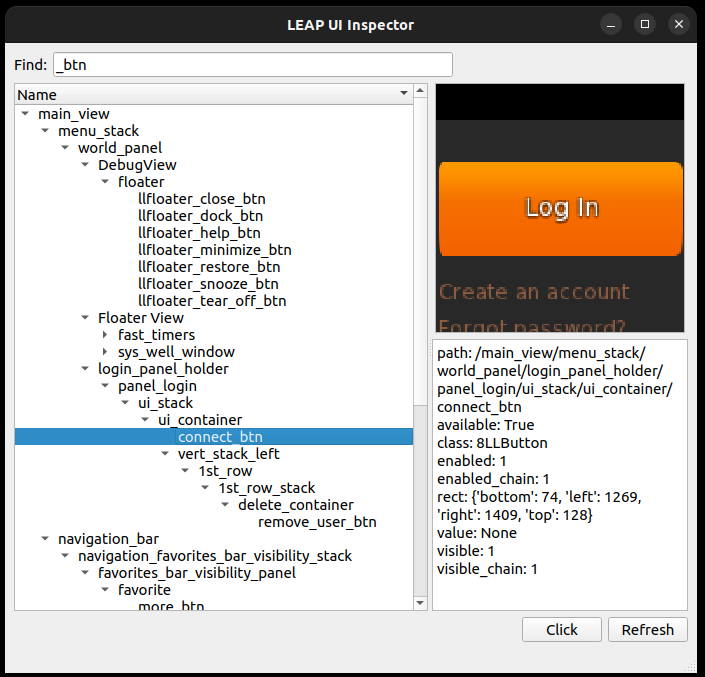
Similarly, there's an interactive UI tree inspector available through outleap-inspector.
It can be launched through viewer --leap outleap-inspector.
What viewers does LEAP even work in?
Due to the fact that LEAP has only historically been used internally for testing, or for integration with the official viewer's updater, many viewers have disabled LEAP both intentionally or accidentally.
The code in the upstream viewer also appears to refuse to launch LEAP scripts if the updater isn't present, which I don't entirely understand. I can't compile it to check.
Does it work in Firestorm?
No, the code to launch LEAP scripts is commented out. If you do your own build with those lines uncommented it'll work fine.
Does it work in Alchemy?
Probably not, and definitely not on Linux. Alchemy does the same SL updater presence checks as upstream before attempting to launch LEAP scripts, which I imagine wouldn't succeed. Haven't tried.
Does it work in LL's official viewer?
Yeah, probably.
Does it work in <other viewer>?
No, probably not.
Credits
The project scaffolding is based on code from https://github.com/MatthieuDartiailh/bytecode
1 maintainer

Metadata
1 maintainer
Release files for outleap 0.9.0
For a detailed explanation of source distributions (sdists) and built distributions (wheels), please see the package formats documentation.
Source distribution (sdist)
| File | Size | Uploaded | |
|---|---|---|---|
| outleap-0.9.0.tar.gz | 162.0 kB | Details |
Built distribution (wheel)
| File | Interpreter | ABI | Platform | Reset |
|---|---|---|---|---|
| outleap-0.9.0-py3-none-any.whl | Python 3 | none | any | Details |
Total release size: 196.9 kB
Release files / outleap-0.9.0.tar.gz
| Download URL | outleap-0.9.0.tar.gz |
|---|---|
| Size | 162.0 kB |
| Tags | Source |
|
SHA-256 checksum How to use checksums |
403685e515a89bd4bebd886179cdb670db5b50d8b70596b542a428178877d438
|
|
BLAKE2b-256 checksum How to use checksums |
47176911269e3ad60cf184132c6e423ba04523ade757064216ff50c804e9ab1c
|
| Upload date | |
|
Uploaded using Trusted Publishing? What is trusted publishing? |
No |
| Uploaded via |
twine/7.0.0 CPython/3.13.14
|
Release files / outleap-0.9.0-py3-none-any.whl
| Download URL | outleap-0.9.0-py3-none-any.whl |
|---|---|
| Size | 34.9 kB |
| Tags | Python 3 |
|
SHA-256 checksum How to use checksums |
a6f23ac934cabbd064e4e53fdbc43d8b1656fbbccb04fcd1b9b5bd4bdf024b66
|
|
BLAKE2b-256 checksum How to use checksums |
4fe28c88801c0afcbbb4ddb2c5d5ef41bee63b1c2ee46cd50a36e4df2b207b6b
|
| Upload date | |
|
Uploaded using Trusted Publishing? What is trusted publishing? |
No |
| Uploaded via |
twine/7.0.0 CPython/3.13.14
|














