

What a PDF says out loud.
The PDF accessibility checker that runs anywhere: PDF/UA-1 and WCAG 2.2, in your terminal, your CI and your browser.
It finds what validators find, and then what they cannot.






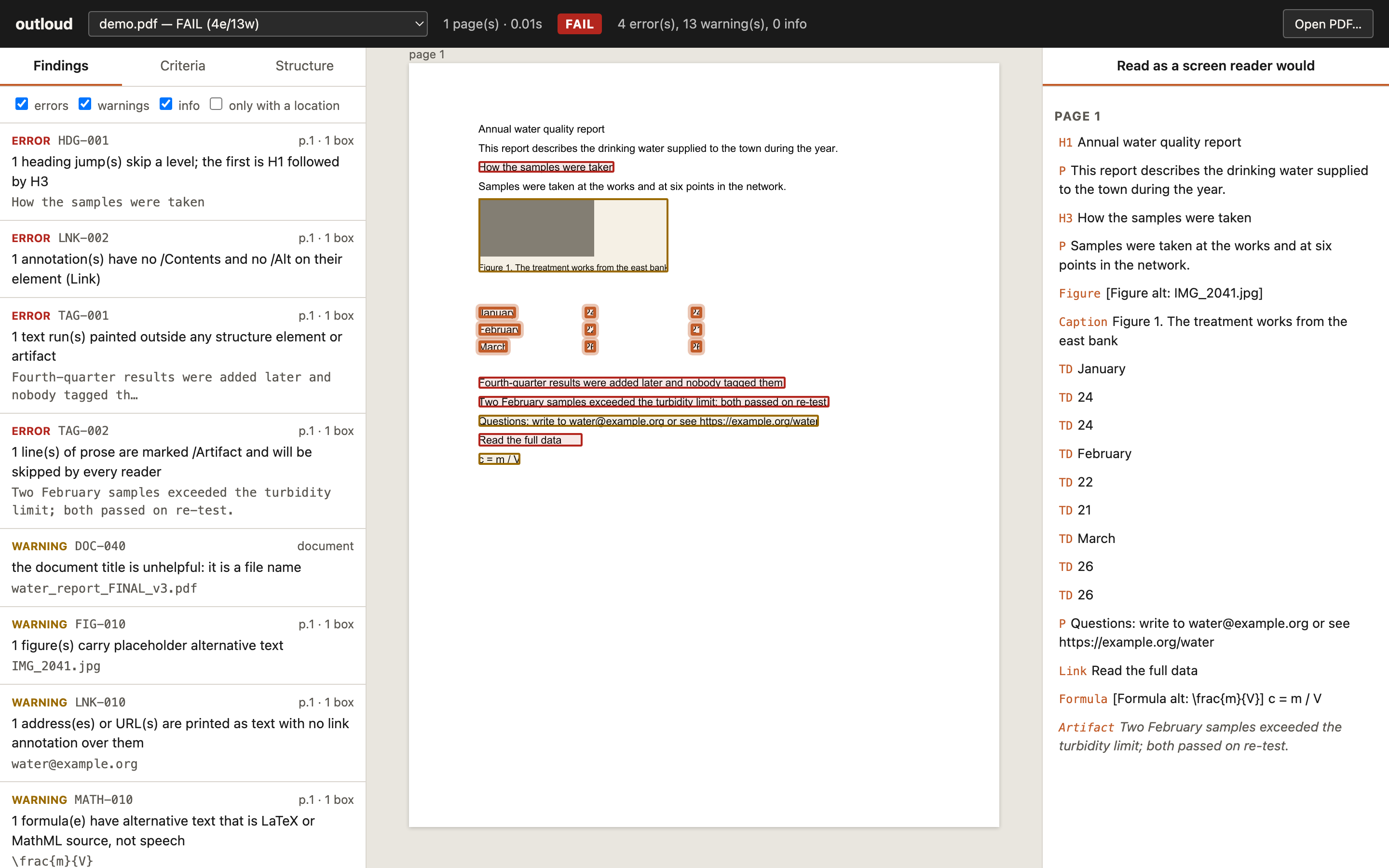
pipx install outloud          # or: uv tool install outloud
outloud report.pdf            # check it
outloud --view                # or open the app and drop files in
No Java. No Windows. No upload. Nothing leaves your machine.
Why
The standard tools for checking a PDF's accessibility are PAC, which is a Windows desktop program, and veraPDF, which is a Java validator built for conformance labs. If you are on a Mac, in a CI pipeline, or just want an answer in two seconds, there has been nothing.
And both of them test whether the keys exist. A figure has alternative text: pass. A table has header cells: pass. They cannot tell you that the alternative text is IMG_2041.jpg, that the header cells are empty, or that a sentence on the page is marked as decoration so every screen reader skips it.
This is a published, professionally remediated report. veraPDF passes it. Its appendix table has header cells with nothing in them, so a screen reader announces every value in it against silence:
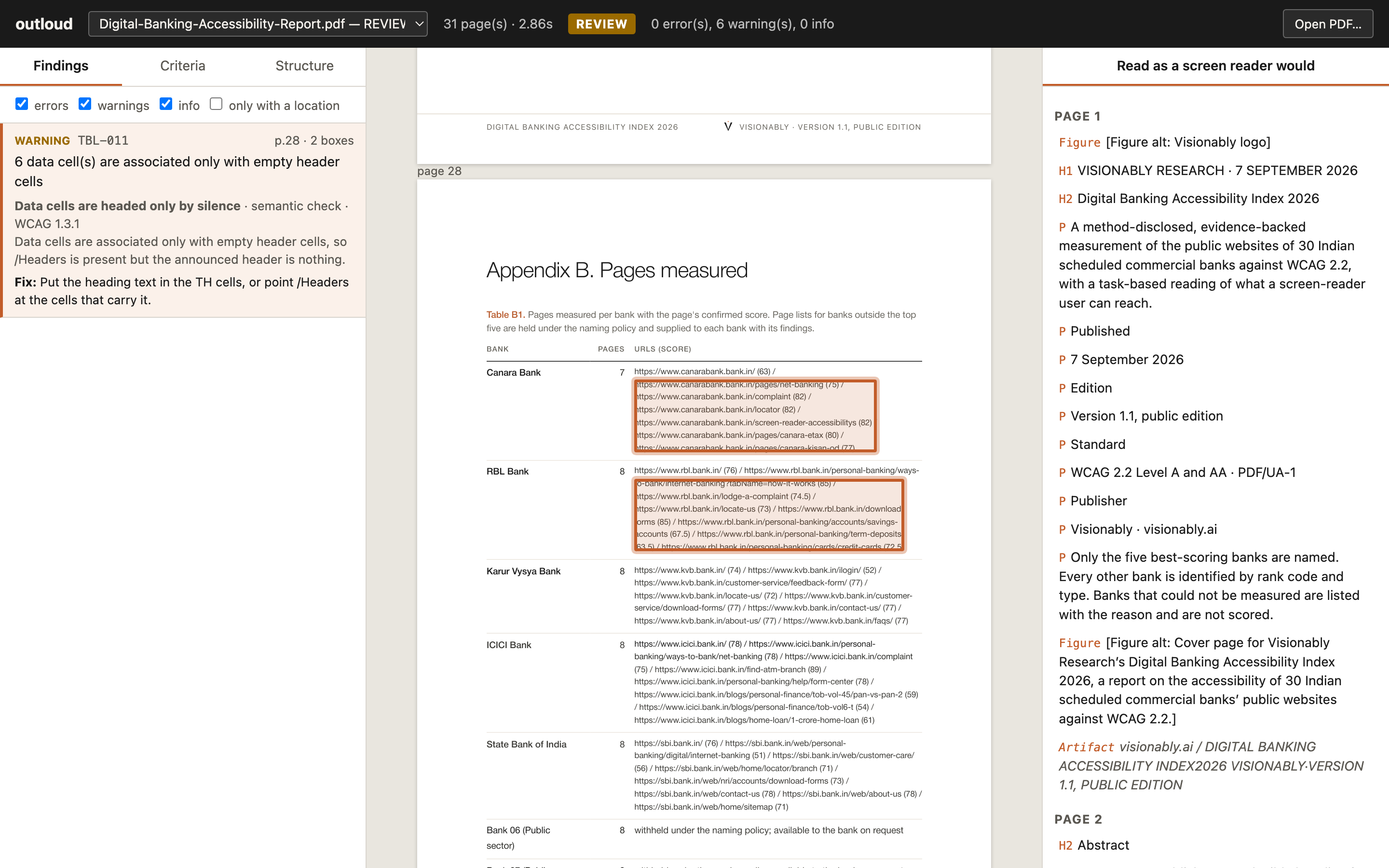
outloud exists for findings like that one.
What you get
Two layers, kept apart. Conformance rules test a requirement of ISO 14289-1 (PDF/UA-1), the same ones veraPDF and PAC test, and are calibrated to agree with veraPDF: on 58 one-defect fixtures and 102 real files, they agree on all 160. Semantic rules test what a conformant file still gets wrong: words printed on the page that no tag announces, prose marked as an artifact, header cells that are empty or shredded one word per row, alternative text that is a file name or LaTeX source, a "formula" that swallowed a sentence, a page painted in a different order from its tags, a title that is the file name. Each names its evidence so a person can judge. No validator runs these.
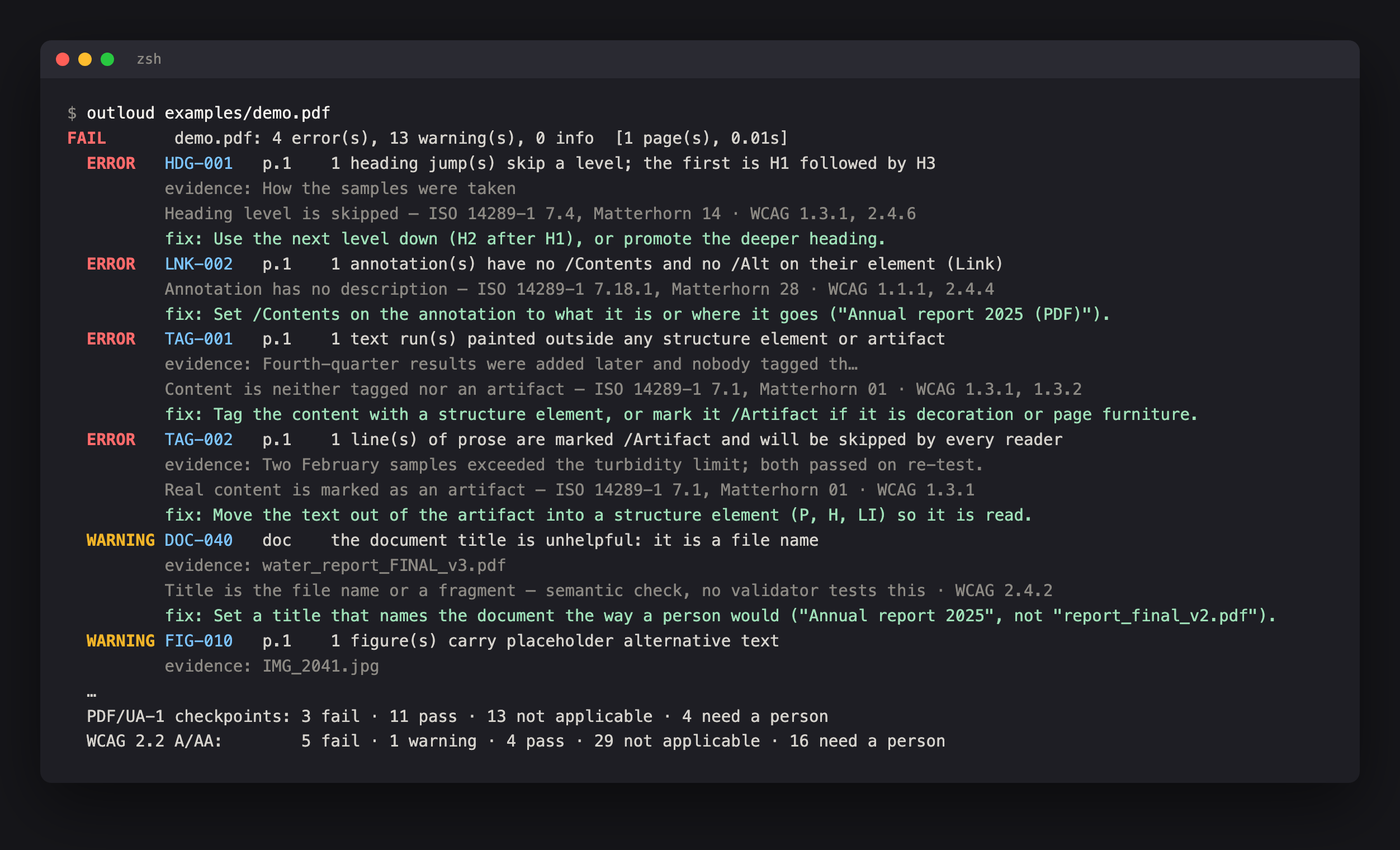
Every finding tells you what to do. Page, evidence, the ISO clause and Matterhorn checkpoint it rests on, the WCAG 2.2 criteria it affects, and a one-line fix.
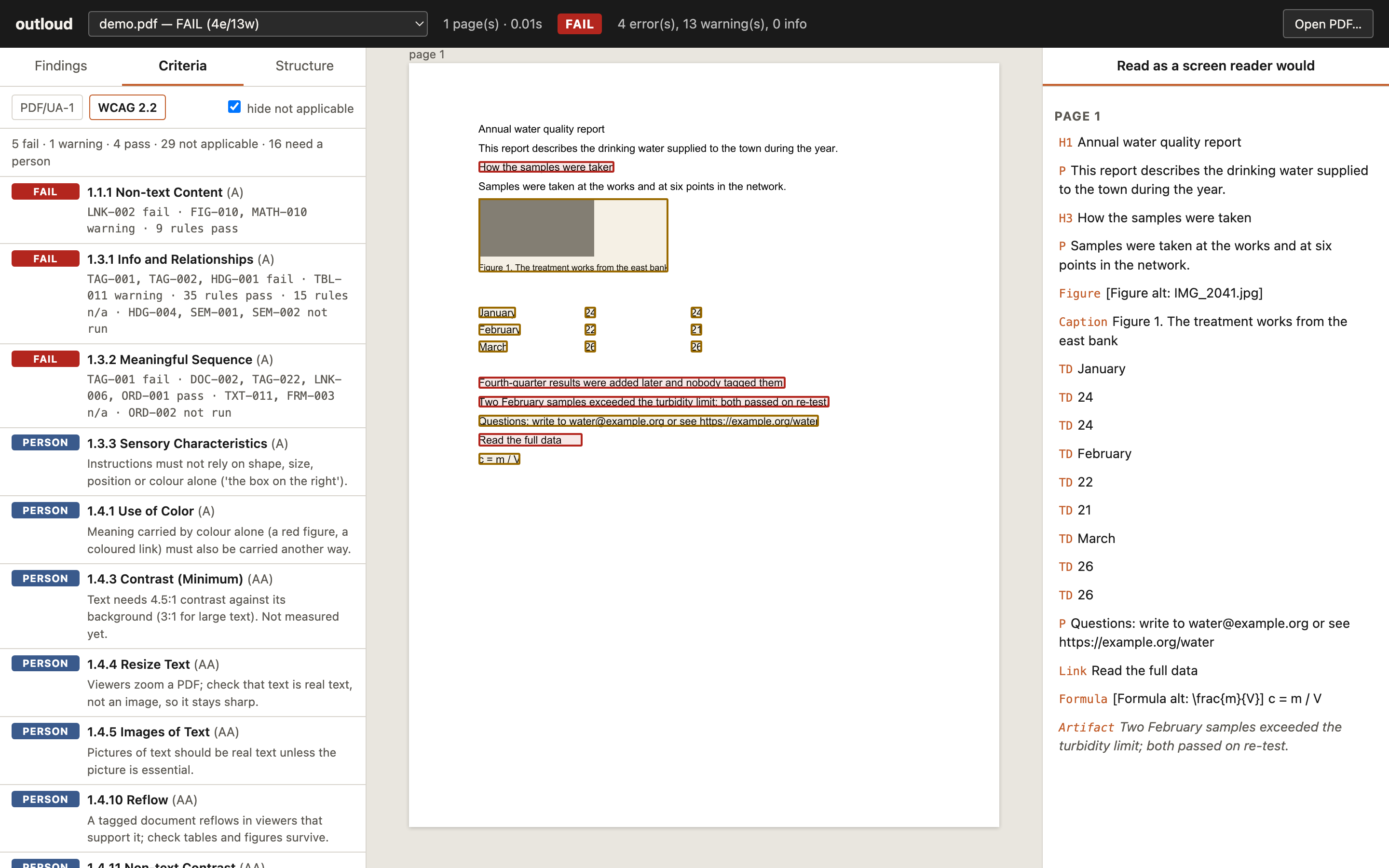
Pass and fail by criterion, like PAC's two tabs. Every checkpoint of the Matterhorn Protocol 1.1 (31) and every WCAG 2.2 success criterion at A and AA (55), each with one of five honest statuses: fail, warning, pass, not applicable (no forms in this file, so nothing to label) and needs a person, with a sentence on what to look at. A file without tables does not "pass" the table rules.
See where. Findings carry bounding boxes. The app outlines them on the rendered page, shows the structure tree (click an element to see where it sits), and reads each page back in the order a screen reader would, with artifacts shown as what a reader skips.
Built for pipelines. Exit codes, JSON, SARIF 2.1.0 for GitHub code scanning (with the fix as help text and a WCAG taxonomy), and a single-file HTML report.
Use
outloud file.pdf                          # findings on the terminal, exit 1 if any error
outloud a.pdf b.pdf reports/              # several files; directories are searched
outloud file.pdf --criteria               # add the PDF/UA-1 and WCAG 2.2 tables
outloud out.pdf --source in.pdf           # also compare a remediated file with its original
outloud *.pdf --json r.json --sarif r.sarif --html r.html
outloud file.pdf --layer conformance      # only what a validator would run
outloud file.pdf --only TBL-011,TAG-003   # or --skip
outloud --list-rules
Verdicts: pass, review (warnings only), fail (at least one error), unreadable. --fail-on warning makes warnings fail the exit status; --fail-on never reports without failing.
Try it on the bundled example, one page with nine different defects:
outloud examples/demo.pdf --view
The app
outloud --view                 # opens empty: drop PDFs in, pick them, or type a path
outloud report.pdf --view      # opens with that file already checked
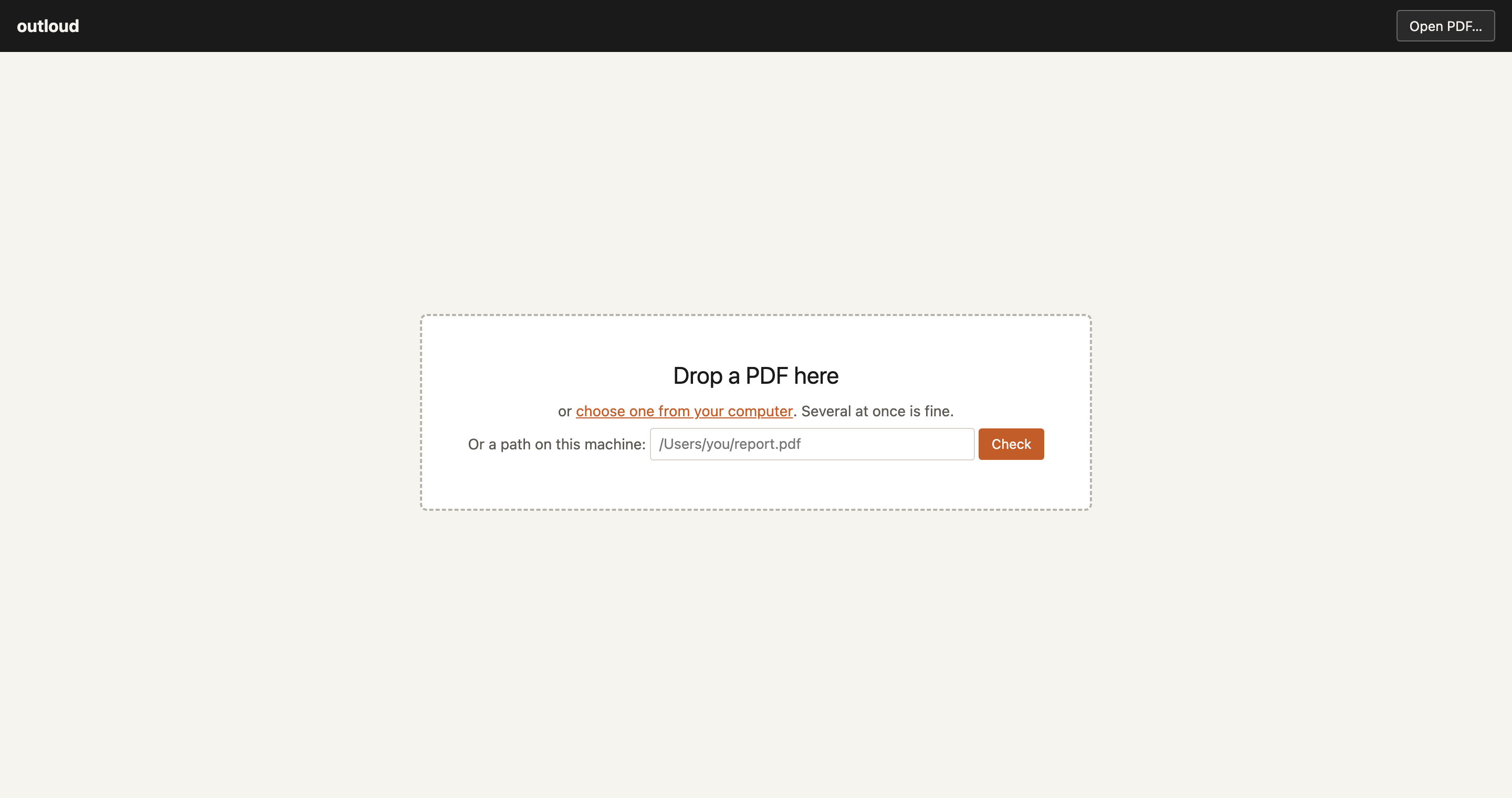
A small local server from the Python standard library. It binds to localhost, keeps dropped files in a temporary folder it removes on exit, and stops with Ctrl+C. Deep links work: ?doc=report&tab=crit&fw=wcag22&f=TBL-011.
In CI
- run: pipx install outloud
- run: outloud dist/*.pdf --sarif outloud.sarif
- uses: github/codeql-action/upload-sarif@v3
  if: always()
  with: { sarif_file: outloud.sarif }
As a library
from outloud import check

result = check("report.pdf")
print(result.verdict, result.errors, result.warnings)
for f in result.sorted_findings():
    print(f.rule, f.page, f.message, f.boxes)
for row in result.criteria["wcag22"]:
    print(row["id"], row["name"], row["status"])
How it compares
| outloud | PAC | veraPDF | pdfa11y | |
|---|---|---|---|---|
| Runs on macOS and Linux | ✅ | ❌ Windows only | ✅ needs a JVM | ✅ |
| Command line, exit codes, CI | ✅ | ❌ | ✅ | ✅ |
| PDF/UA-1 conformance | ✅ calibrated to veraPDF | ✅ | ✅ reference | ✅ subset |
| PDF/UA-2 | ❌ not yet | ✅ | ✅ | ✅ |
| Per-criterion view, PDF/UA and WCAG | ✅ | ✅ | ❌ | ❌ |
| Not-applicable and needs-a-person statuses | ✅ | partly | ❌ | ✅ per check |
| Semantic checks (tags match the page, words make sense) | ✅ 35 rules | ❌ | ❌ | ❌ |
| Findings outlined on the page | ✅ | ✅ | ❌ | ❌ |
| Screen-reader preview, structure tree | ✅ | ✅ | ❌ | ❌ |
| A fix on every finding | ✅ | ❌ | ❌ | ✅ |
| JSON, SARIF, HTML | ✅ | PDF report | JSON, XML, HTML | JSON, HTML, PDF |
| Compare a remediated file with its source | ✅ | ❌ | ❌ | ❌ |
| Licence | Apache 2.0 | proprietary, free | GPL / MPL | MIT |
Measured on 17 September 2026 on one machine: veraPDF 1.26.5 (--flavour ua1) and outloud timed per file including start-up; pdfa11y (built from its 25 July 2026 source) timed as one process per corpus, which is how it is meant to run.
| Corpus | Files | outloud agrees with veraPDF | pdfa11y agrees with veraPDF | veraPDF | outloud | pdfa11y |
|---|---|---|---|---|---|---|
| Fixtures (one defect each, built from scratch) | 59 | 59 of 59 comparable rules | 51 | 34.5 s | 0.2 s | 0.1 s |
| Bank letters, remediated to PDF/UA-1 | 29 | 29 of 29 | 0 | 30.8 s | 6.9 s | 0.8 s |
| Bank letters, as printed by Chrome | 29 | 29 of 29 | 29 | 23.7 s | 2.4 s | 0.3 s |
| Production corpus, originals | 23 | 23 of 23 | 23 | 20.9 s | 9.8 s | 1.2 s |
| Production corpus, remediated | 21 | 21 of 21 | 1 | 20.2 s | 9.5 s | 0.4 s |
On the 21 remediated production files that veraPDF calls compliant, outloud's semantic layer still reports something on 9. Those are the findings the tool is for.
Speed is honest rather than headline: 2 to 10 times faster than veraPDF, mostly because there is no JVM to start, and 5 to 20 times slower than pdfa11y, because the walker is Python and every glyph costs a loop iteration. A compiled core is planned once the rule set settles. pdfa11y is a well-built tool and reading its code made outloud better; where the two disagree, and who we think is right, is written up rule by rule in docs/COMPARISON-pdfa11y.md. Run the comparisons on your own files with scripts/compare_verapdf.py and scripts/compare_pdfa11y.py.
The rules
91 rules, 89 implemented, 2 planned and reported as "not run" so the gap is visible. Every rule is data in catalogue.yaml and documented in docs/RULES.md, which is generated from it, along with an index by Matterhorn checkpoint and by WCAG criterion.
| Group | Examples |
|---|---|
| Document | tagged, titled, language, PDF/UA identifier, permissions, optional content, XFA |
| Tagging | untagged content, real content artifacted, role map, shared or dangling marked content, alternative text that hides content |
| Text and fonts | embedding, Unicode mapping, .notdef, invisible text, mappings that are legal but wrong |
| Headings | skipped levels, first heading, mixed forms, a heading that is a salutation or a paragraph |
| Tables | headers, scope, nesting, irregular grids, shredded headers, silent headers, a drawn grid nobody tagged |
| Lists, figures, links, forms, notes, math | structure and naming, placeholder alt text, unlinked URLs, field names that are internal ids, LaTeX as alt text |
| Reading order, navigation, pagination | paint order against tag order, bookmarks on long files, running heads tagged as content |
| Source comparison | structure, text and appearance lost between an original and its remediated copy |
How it works
model.py reads the file once with pikepdf and resolves what is easy to get wrong: role-mapped types, inherited page references, marked content inside form XObjects, attributes by owner, fonts with their Unicode mapping. content.py walks each page's content stream and records every painted text run with its characters, position and tag. Glyph-by-glyph text operators are merged into words and lines, kerning gaps become spaces, ligatures are normalised, because otherwise no rule can find a word in a file written by Chrome, Word or TeX. Rules read that model and nothing else, and the registry works out once per file which rules apply.
Fixtures are built from nothing by tests/builder.py: a subset TrueType font with a ToUnicode map, marked content, a structure tree with a parent tree, XMP. Every negative test bends exactly one thing in a clean baseline and asserts that one rule fires.
.venv/bin/python -m pytest              # 95 tests
.venv/bin/python scripts/make_fixtures.py
.venv/bin/python scripts/make_screenshots.py    # regenerates the pictures on this page
What it is not
An evaluation, not a certification, and not legal advice. Semantic rules are heuristics; they name what they saw and can be wrong about what it means. A "pass" on a WCAG criterion means the automated rules mapped to it found nothing, not that the criterion is met; the criteria that need a person say so. It does not measure colour contrast yet, tests PDF/UA-1 only, and the Matterhorn failure-condition ids are not yet verified against the protocol text, so the catalogue cites checkpoints.
Roadmap
- Colour contrast (WCAG 1.4.3, 1.4.11)
- PDF/UA-2
- Per-element language (3.1.2)
- A compiled core for the content walker
- A GitHub Action
- Heading levels beyond H6, cross-page reading order
Contributing
The most useful thing you can send is a PDF that outloud gets wrong. A rule is a catalogue entry, a function and a fixture; CONTRIBUTING.md has the five-minute version.
If outloud found something in your files that a validator passed, a star helps other people find it.
Licence
Apache 2.0. Built by Visionably and released so that checking a PDF for accessibility costs nothing and runs anywhere.
1 maintainer

Metadata
1 maintainer
Release files for outloud 0.2.1
For a detailed explanation of source distributions (sdists) and built distributions (wheels), please see the package formats documentation.
Source distribution (sdist)
| File | Size | Uploaded | |
|---|---|---|---|
| outloud-0.2.1.tar.gz | 103.1 kB | Details |
Built distribution (wheel)
| File | Interpreter | ABI | Platform | Reset |
|---|---|---|---|---|
| outloud-0.2.1-py3-none-any.whl | Python 3 | none | any | Details |
Total release size: 207.5 kB
Release files / outloud-0.2.1.tar.gz
| Download URL | outloud-0.2.1.tar.gz |
|---|---|
| Size | 103.1 kB |
| Tags | Source |
|
SHA-256 checksum How to use checksums |
985876ca5dfbf44910243a82f67805613ab11f30f035b7a7f72a953ab7b63933
|
|
BLAKE2b-256 checksum How to use checksums |
f40edab344070d34073e088effe2609ea3693aaf7521bc3c14ab7b2ae0e4b747
|
| Upload date | |
|
Uploaded using Trusted Publishing? What is trusted publishing? |
Yes |
| Uploaded via |
twine/7.0.0 CPython/3.13.14
|
Provenance
Provenance describes where a file came from. On PyPI, provenance is shared via attestations, which provide a verifiable record of the build or publishing details. View details, limitations and caveats.


PyPI Publish Attestation
PyPI verified that this artifact, at this checksum, originated from the publisher listed below.
Signed by GitHub Actions, verified by PyPI on Oct 6, 2026.
Transparency logRelease files / outloud-0.2.1-py3-none-any.whl
| Download URL | outloud-0.2.1-py3-none-any.whl |
|---|---|
| Size | 104.4 kB |
| Tags | Python 3 |
|
SHA-256 checksum How to use checksums |
c10c46010bc68ad4c956d7525d7234b8f4ebb4473c312bd10f9cea6f97209db5
|
|
BLAKE2b-256 checksum How to use checksums |
ea1aaf0b4b06500cf4e082c0b2b571ab2789fc61d63858668a20e25ac5682add
|
| Upload date | |
|
Uploaded using Trusted Publishing? What is trusted publishing? |
Yes |
| Uploaded via |
twine/7.0.0 CPython/3.13.14
|
Provenance
Provenance describes where a file came from. On PyPI, provenance is shared via attestations, which provide a verifiable record of the build or publishing details. View details, limitations and caveats.
PyPI Publish Attestation
PyPI verified that this artifact, at this checksum, originated from the publisher listed below.
Signed by GitHub Actions, verified by PyPI on Oct 6, 2026.
Transparency log













