
ovos-core listener daemon client

Project description
OpenVoiceOS Dinkum Listener
Dinkum Listener made standalone, the voice loop is now a much more responsive state machine
the usual configuration files are loaded, some new params are exposed under the
"listener" section but not yet documented (check the code...)
Install
using ovos-vad-plugin-silero is strongly recommended instead of the default webrtcvad plugin
Configuration
you can set the Wakeword, VAD, STT and Microphone plugins
eg, to run under MacOS you should use https://github.com/OpenVoiceOS/ovos-microphone-plugin-sounddevice
{
  "stt": {
    "module": "ovos-stt-plugin-server",
    "fallback_module": "",
    "ovos-stt-plugin-server": {"url": "https://stt.openvoiceos.com/stt"}
  },
  "listener": {
    // NOTE, multiple hotwords are supported, these fields define the main wake_word,
    // this is equivalent to setting "active": true in the "hotwords" section
    // see "hotwords" section at https://github.com/OpenVoiceOS/ovos-config/blob/dev/ovos_config/mycroft.conf
    "wake_word": "hey_mycroft",
    "stand_up_word": "wake_up",
    "microphone": {
      "module": "ovos-microphone-plugin-alsa"
    },
    VAD": {
     // recommended plugin: "ovos-vad-plugin-silero"
     "module": "ovos-vad-plugin-silero",
     "ovos-vad-plugin-silero": {"threshold": 0.2},
     "ovos-vad-plugin-webrtcvad": {"vad_mode": 3}
    },
    // Seconds of speech before voice command has begun
    "speech_begin": 0.1,
    // Seconds of silence before a voice command has finished
    "silence_end": 0.5,
    // Settings used by microphone to set recording timeout with and without speech detected
    "recording_timeout": 10.0,
    // Settings used by microphone to set recording timeout without speech detected.
    "recording_timeout_with_silence": 3.0,
    // continuous listen is an experimental setting, it removes the need for
    // wake words and uses VAD only, a streaming STT is strongly recommended
    // NOTE: depending on hardware this may cause mycroft to hear its own TTS responses as questions
    "continuous_listen": false,

    // hybrid listen is an experimental setting,
    // it will not require a wake word for X seconds after a user interaction
    // this means you dont need to say "hey mycroft" for follow up questions
    "hybrid_listen": false,
    // number of seconds to wait for an interaction before requiring wake word again
    "listen_timeout": 45
  }
}
mycroft-dinkum vs ovos-dinkum-listener
- release 0.0.0 is the extracted dinkum listener, plugins are hardcoded options
- release 0.0.1 adds OPM support
- release 0.1.0 adds full feature parity with ovos-listener and has very little dinkum left
ovos exclusive features:
- fallback STT
- non-streaming STT support
- compatible with all existing wake-word/STT plugins
- continuous listening (no wakeword, VAD only)
- hybrid listening (no wakeword for follow up commands)
- multiple wakewords
- assign a STT lang per wakeword (multilingual support)
- hotword types (perform actions other than listen)
- sleep mode (no stt -> no accidental activations)
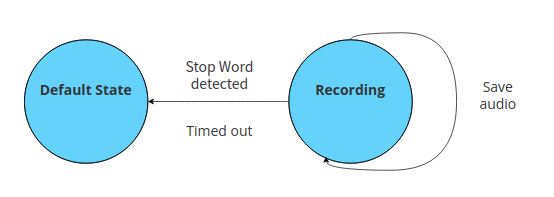
- recording mode (save speech to file instead of STT)
- OPM bus api (query available plugins)
- sample upload (DatasetApi ovos-backend-client)
- XDG path standards for recorded audio data
- neon-transformers support
How does it work
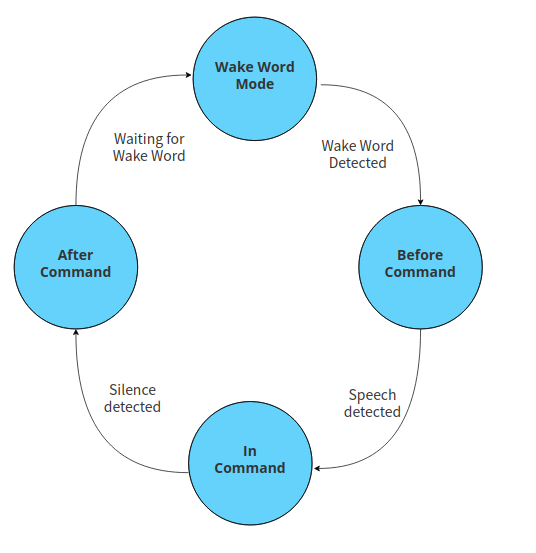
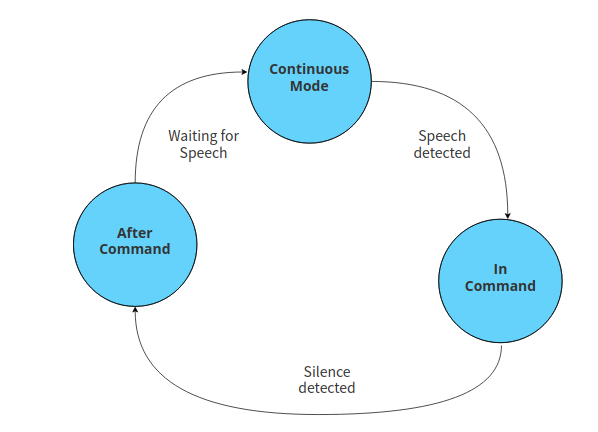
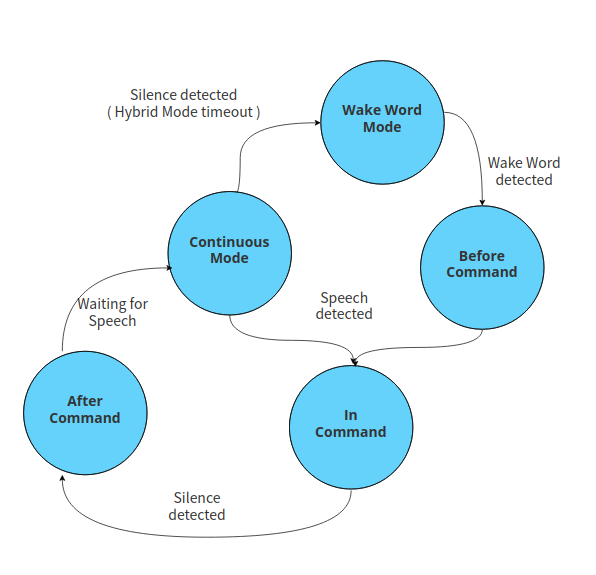
There are 3 modes to run dinkum, wakeword, hybrid, of continuous (VAD only)
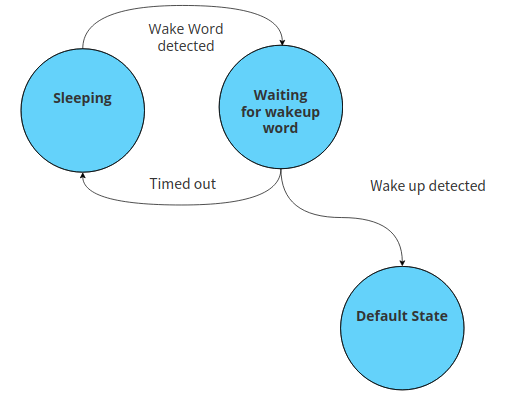
Additionally here are 2 temporary modes that can be triggered via bus events / companion skills
Wake Word mode
Continuous mode
Hybrid mode
Sleep mode
Can be used via Naptime skill
Recording mode
Can be used via Recording skill
Usage
/home/miro/.venvs/ovos-core/bin/python /home/miro/PycharmProjects/mycroft-dinkum-listener/ovos_dinkum_listener/__main__.py
2023-04-23 00:57:58.713 - OVOS - ovos_config.models:load_local:105 - DEBUG - Configuration /home/miro/PycharmProjects/ovos-core/mycroft/configuration/mycroft.conf loaded
2023-04-23 00:57:58.753 - OVOS - ovos_config.models:load_local:111 - DEBUG - Configuration '/etc/mycroft/mycroft.conf' not defined, skipping
2023-04-23 00:57:58.793 - OVOS - ovos_config.models:load_local:111 - DEBUG - Configuration '/home/miro/.config/mycroft/web_cache.json' not defined, skipping
2023-04-23 00:57:58.834 - OVOS - ovos_config.models:load_local:111 - DEBUG - Configuration '/home/miro/.config/mycroft/mycroft.conf' not defined, skipping
2023-04-23 00:57:58.872 - OVOS - ovos_config.models:load_local:111 - DEBUG - Configuration '/etc/xdg/mycroft/mycroft.conf' not defined, skipping
2023-04-23 00:57:58.919 - OVOS - ovos_config.models:load_local:111 - DEBUG - Configuration '/home/miro/.config/kdedefaults/mycroft/mycroft.conf' not defined, skipping
2023-04-23 00:57:58.968 - OVOS - ovos_config.models:load_local:111 - DEBUG - Configuration '/home/miro/.mycroft/mycroft.conf' not defined, skipping
2023-04-23 00:57:59.023 - OVOS - ovos_utils.configuration:get_xdg_config_save_path:141 - WARNING - configuration moved to the `ovos_config` package. This submodule will be removed in ovos_utils 0.1.0
2023-04-23 00:57:59.042 - OVOS - ovos_utils.configuration:get_xdg_base:76 - WARNING - configuration moved to the `ovos_config` package. This submodule will be removed in ovos_utils 0.1.0
2023-04-23 00:57:59.062 - OVOS - __main__:before_start:141 - INFO - Starting service...
2023-04-23 00:57:59.062 - OVOS - ovos_bus_client.conf:load_message_bus_config:19 - INFO - Loading message bus configs
2023-04-23 00:57:59.065 - OVOS - ovos_bus_client.client.client:on_open:85 - INFO - Connected
2023-04-23 00:57:59.066 - OVOS - ovos_bus_client.session:reset_default_session:171 - INFO - New Default Session Start: f1ec40cd-a5b5-40aa-ab6c-2a9d90a77d88
2023-04-23 00:57:59.066 - OVOS - __main__:_connect_to_bus:261 - INFO - Connected to Mycroft Core message bus
2023-04-23 00:57:59.070 - OVOS - ovos_dinkum_listener.voice_loop.microphone:_run:91 - DEBUG - Opening microphone (device=default, rate=16000, width=2, channels=1)
2023-04-23 00:57:59.159 - OVOS - ovos_dinkum_listener.voice_loop.hotwords:load_hotword_engines:64 - INFO - creating hotword engines
2023-04-23 00:57:59.160 - OVOS - ovos_plugin_manager.wakewords:load_module:110 - INFO - Loading "hey_mycroft" wake word via ovos-ww-plugin-precise-lite
2023-04-23 00:57:59.388057: I tensorflow/core/util/port.cc:110] oneDNN custom operations are on. You may see slightly different numerical results due to floating-point round-off errors from different computation orders. To turn them off, set the environment variable `TF_ENABLE_ONEDNN_OPTS=0`.
2023-04-23 00:57:59.410033: I tensorflow/tsl/cuda/cudart_stub.cc:28] Could not find cuda drivers on your machine, GPU will not be used.
2023-04-23 00:57:59.516648: I tensorflow/tsl/cuda/cudart_stub.cc:28] Could not find cuda drivers on your machine, GPU will not be used.
2023-04-23 00:57:59.517355: I tensorflow/core/platform/cpu_feature_guard.cc:182] This TensorFlow binary is optimized to use available CPU instructions in performance-critical operations.
To enable the following instructions: AVX2 AVX512F AVX512_VNNI FMA, in other operations, rebuild TensorFlow with the appropriate compiler flags.
2023-04-23 00:58:00.110092: W tensorflow/compiler/tf2tensorrt/utils/py_utils.cc:38] TF-TRT Warning: Could not find TensorRT
2023-04-23 00:58:00.855 - OVOS - ovos_plugin_manager.wakewords:load_module:117 - INFO - Loaded the Wake Word plugin ovos-ww-plugin-precise-lite
2023-04-23 00:58:00.862 - OVOS - ovos_plugin_manager.wakewords:load_module:110 - INFO - Loading "wake_up" wake word via ovos-ww-plugin-pocketsphinx
2023-04-23 00:58:00.870 - OVOS - ovos_plugin_manager.wakewords:load_module:117 - INFO - Loaded the Wake Word plugin ovos-ww-plugin-pocketsphinx
INFO: Created TensorFlow Lite XNNPACK delegate for CPU.
2023-04-23 00:58:00.934 - OVOS - ovos_dinkum_listener.plugins:load_stt_module:61 - DEBUG - Using FakeStreamingSTT wrapper
2023-04-23 00:58:27.211 - OVOS - __main__:_record_begin:283 - DEBUG - Record begin
2023-04-23 00:58:29.892 - OVOS - ovos_dinkum_listener.voice_loop.voice_loop:_after_cmd:431 - DEBUG - transformers metadata: {'client_name': 'ovos_dinkum_listener', 'source': 'audio', 'destination': ['skills']}
2023-04-23 00:58:30.089 - OVOS - __main__:_stt_text:408 - DEBUG - Record end
2023-04-23 00:58:30.091 - OVOS - __main__:_stt_text:420 - DEBUG - STT: thank you
Credits
Voice Loop state machine implementation by @Synesthesiam for mycroft-dinkum
Release history Release notifications | RSS feed


Download files
Download the file for your platform. If you're not sure which to choose, learn more about installing packages.
Source Distribution
Built Distribution
Filter files by name, interpreter, ABI, and platform.
If you're not sure about the file name format, learn more about wheel file names.
Copy a direct link to the current filters
File details
Details for the file ovos-dinkum-listener-0.0.3a6.tar.gz.
File metadata
- Download URL: ovos-dinkum-listener-0.0.3a6.tar.gz
- Upload date:
- Size: 103.7 kB
- Tags: Source
- Uploaded using Trusted Publishing? No
- Uploaded via: twine/4.0.2 CPython/3.11.5
File hashes
| Algorithm | Hash digest | |
|---|---|---|
| SHA256 |
bc9944fe79e043b2f65dbf58d669c289073dda9380c00c13b00405a38e8d1ea2
|
|
| MD5 |
78d1b674995f70fc0558383c031179b7
|
|
| BLAKE2b-256 |
39ca7bab26612d2cdcc47bd23f7b675904b4ac430b7748e47e1a0ec70b87150f
|
File details
Details for the file ovos_dinkum_listener-0.0.3a6-py3-none-any.whl.
File metadata
- Download URL: ovos_dinkum_listener-0.0.3a6-py3-none-any.whl
- Upload date:
- Size: 101.3 kB
- Tags: Python 3
- Uploaded using Trusted Publishing? No
- Uploaded via: twine/4.0.2 CPython/3.11.5
File hashes
| Algorithm | Hash digest | |
|---|---|---|
| SHA256 |
0b36fd9df353e47a9708eef94c4b3c759c38be3428baacc02f19e177ce7c6f85
|
|
| MD5 |
d209442bf8c61ea9ccd4c2256b9e7c51
|
|
| BLAKE2b-256 |
74032053c0eb322fec45b920e6fdb181addae3ff7cb0e6cbcc30fb547af9aa78
|






