
This release is a pre-release and may not be stable for production use.
OCP Pipeline
The OCP (Open Common Play) pipeline plugin turns media utterances into playback actions in OVOS. Utterances such as "play metallica", "put on some movie", "pause", or "next" pass through this plugin as an intent pipeline stage. On a match, the plugin searches registered media skills over the message bus and drives playback through the OCP API.
The plugin exposes two entry points under the opm.pipeline group:
ovos-ocp-pipeline-plugin(OCPPipelineMatcher), the main pipeline. It matchesplay,open,media_stop,next,prev,pause,resume,save_game, andload_gameintents at high, medium, or low confidence.ovos-ocp-pipeline-plugin-legacy(MycroftCPSLegacyPipeline), a bridge for older Mycroft CommonPlay skills, using theplay:query/play:query.response/play:starthandshake.
OCPPipelineMatcher also classifies media type, such as music, movie, or podcast. It extracts named entities with ahocorasick-ner, using per-language vocabulary files and optional user-supplied entity CSVs (the entity_csvs config option). It tracks player state per session through an OCPPlayerProxy, kept in sync with ovos.common_play.status and track.state bus events.
Architecture
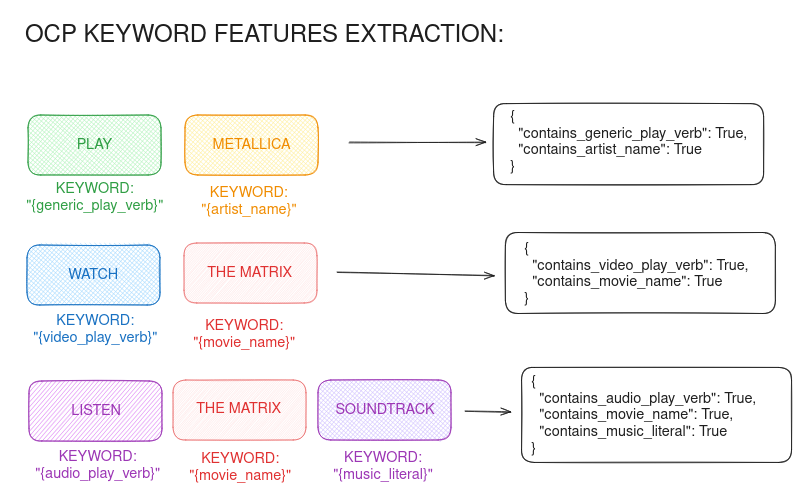
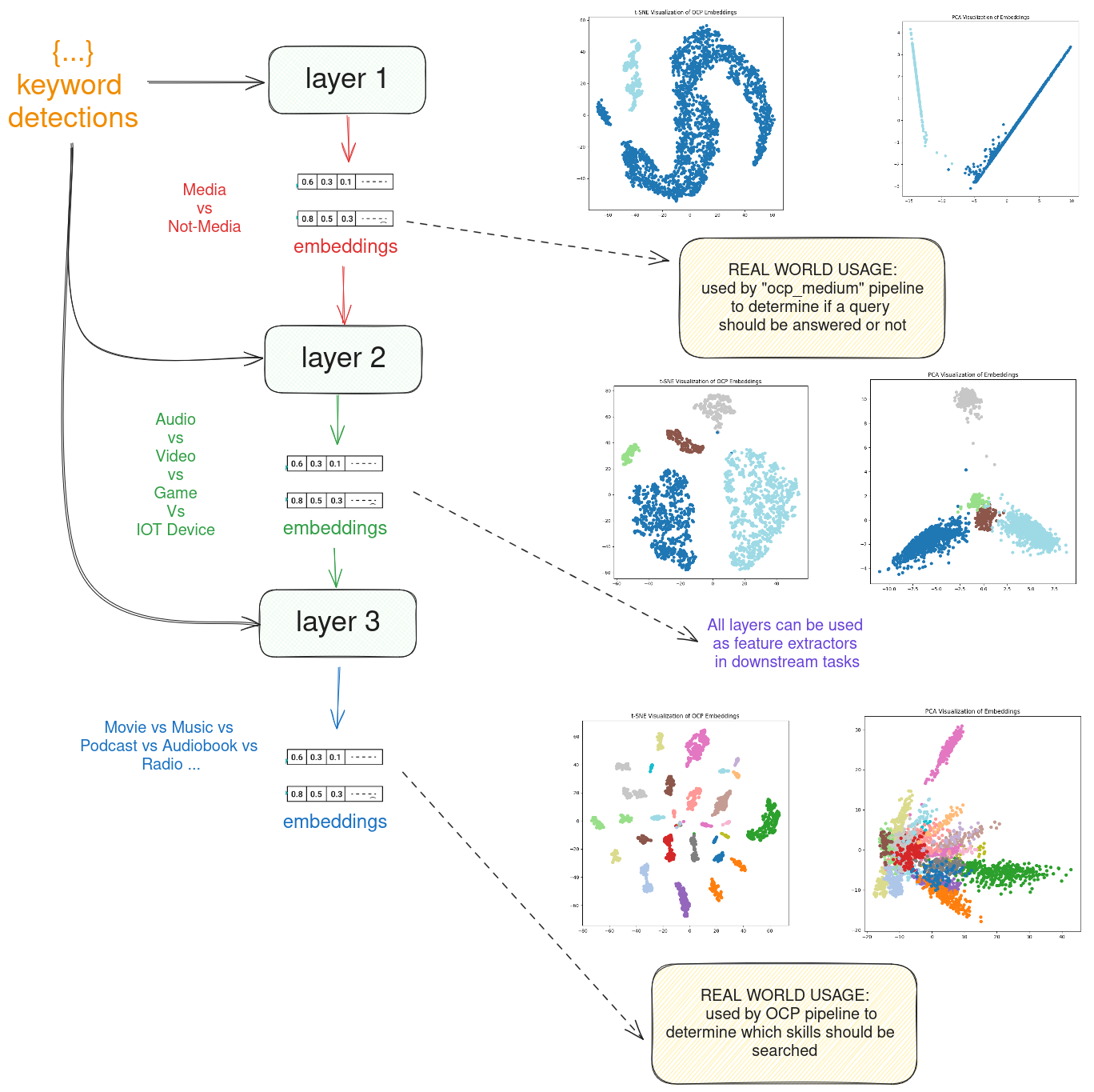
Media classification
Media-type classification, the rich provider-ready descriptive Signals, and the
content filter are all delegated to the standalone
ovos-media-classifier.
The pipeline builds the classifier's two context inputs from its own state — the
per-session now-playing PlayerStatus and the skill-registered entities
(ner_list) — so relative control follow-ups ("next", "pause", "something else")
and entity routing work, and it forwards the classifier's lossless
mediavocab.Signals (medium / playback_type / content_genres / content_form /
programme_format / variant_kind / accessibility / picture_format) to the
MediaProviders alongside the legacy media_type.
With no extra configuration the lean keyword (.voc) backend is used — the
zero-ML-dependency floor (all heavy backends OFF, online OFF, adult content
blocked). The classifier is configured under the pipeline config (or a nested
media_classifier block); every key is optional.
Backend selection
| Key | Default | Description |
|---|---|---|
media_classifier_plugin |
unset | name of an external opm.media.classifier entry-point plugin to load |
media_classifier_onnx_model |
unset | path to an opt-in ONNX trained bundle (requires the [onnx] extra) |
media_classifier_embedding_router |
unset | path to a learned embedding-router bundle (requires the [onnx] extra) |
media_classifier_embedding_router_hybrid |
true |
run the router as a keyword+router hybrid (false = router standalone) |
On any failure (missing extra, bad bundle, unknown plugin) the classifier falls back to the keyword backend, so the zero-ML default is always preserved.
Gazetteer / entity library (embedding-router backend only)
| Key | Default | Description |
|---|---|---|
media_classifier_gazetteer |
true |
inject the bundled offline gazetteer of common real titles so bare titles route without a network call |
media_classifier_gazetteer_size |
classifier default | cap on titles per media type |
media_classifier_entity_library |
unset | {label: [titles]} of the user's own media library, injected at runtime (no retraining) |
Online metadata layer (embedding-router hybrid only)
| Key | Default | Description |
|---|---|---|
media_classifier_online_metadatarr |
false |
opt into the online metadatarr last-resort layer (adds latency) |
media_classifier_online_timeout |
4.0 |
per-request timeout, seconds |
media_classifier_online_min_confidence |
0.5 |
minimum confidence to accept an online answer |
Content filter (applied at routing)
Blocked content (adult by default) is never routed to providers.
| Key | Default | Description |
|---|---|---|
allow_adult_content |
false |
top-level convenience flag; true lifts the default adult block |
media_content_filter.enabled |
true |
master switch for the filter |
media_content_filter.blocked_genres |
["adult"] |
genres to block |
media_content_filter.blocked_media_types |
[] |
media types to block |
Install
pip install ovos-ocp-pipeline-plugin
Usage
OVOS core loads this plugin automatically once installed, through the opm.pipeline entry-point group. Enable it in mycroft.conf under the intents section:
{
  "intents": {
    "ovos-ocp-pipeline-plugin": {
      "entity_csvs": []
    }
  }
}
The plugin reads the pipeline's intents config block, then falls back to a legacy OCP config block for backward compatibility.
Related projects
- OpenVoiceOS/ovos-plugin-manager defines the
ConfidenceMatcherPipelinebase class and theopm.pipelineentry-point group this plugin implements. - OpenVoiceOS/ovos-workshop provides
OVOSAbstractApplication, the bus-app base class this plugin also subclasses. - OpenVoiceOS/ovos-bus-client provides the OCP message-bus API (
OCPInterface) used to search and control playback.
License
Apache-2.0
1 maintainer

Release files for ovos-ocp-pipeline-plugin 1.4.0a1
For a detailed explanation of source distributions (sdists) and built distributions (wheels), please see the package formats documentation.
Source distribution (sdist)
| File | Size | Uploaded | |
|---|---|---|---|
| ovos_ocp_pipeline_plugin-1.4.0a1.tar.gz | 193.9 kB | Details |
Built distribution (wheel)
| File | Interpreter | ABI | Platform | Reset |
|---|---|---|---|---|
| ovos_ocp_pipeline_plugin-1.4.0a1-py3-none-any.whl | Python 3 | none | any | Details |
Total release size: 410.5 kB
Release files / ovos_ocp_pipeline_plugin-1.4.0a1.tar.gz
| Download URL | ovos_ocp_pipeline_plugin-1.4.0a1.tar.gz |
|---|---|
| Size | 193.9 kB |
| Tags | Source |
|
SHA-256 checksum How to use checksums |
e6dbb3cba4bf8983064d2db5df36c543b831f320ca57a4a831f96ec45c14dd22
|
|
BLAKE2b-256 checksum How to use checksums |
6e29dabf0c9f08bd4e0a93c84b0dbb29f41663f2b3948f83abf6fad8468e0e2d
|
| Upload date | |
|
Uploaded using Trusted Publishing? What is trusted publishing? |
No |
| Uploaded via |
twine/7.0.0 CPython/3.13.14
|
Release files / ovos_ocp_pipeline_plugin-1.4.0a1-py3-none-any.whl
| Download URL | ovos_ocp_pipeline_plugin-1.4.0a1-py3-none-any.whl |
|---|---|
| Size | 216.6 kB |
| Tags | Python 3 |
|
SHA-256 checksum How to use checksums |
d500b7f78fe558367953709a0eddcaa6a81762ba4b00877136de0326eac9e8e0
|
|
BLAKE2b-256 checksum How to use checksums |
c01cba898534ac9f41f81712dfef771b2f2cf2b0ec7d59b4d78583e59ff04205
|
| Upload date | |
|
Uploaded using Trusted Publishing? What is trusted publishing? |
No |
| Uploaded via |
twine/7.0.0 CPython/3.13.14
|














