
This package implements a simple GUI to calculate real positive Fourier transforms from data stored in a plain text file, e.g., the recording data of an accelerometer. It aims to be an educational resource for the structural dynamics course at the Barcelona School of Civil Engineering.
Installation
The recommended installation is via pip:
pip install -u owlfft
Usage
The package can be called as a module from any location, like
python -m owlfft
Alternatively, you can create a python launcher (e.g., fft.pyw) to run it without opening the commandline. The file should contain the following lines:
import owlfft
owlfft.main()
Example
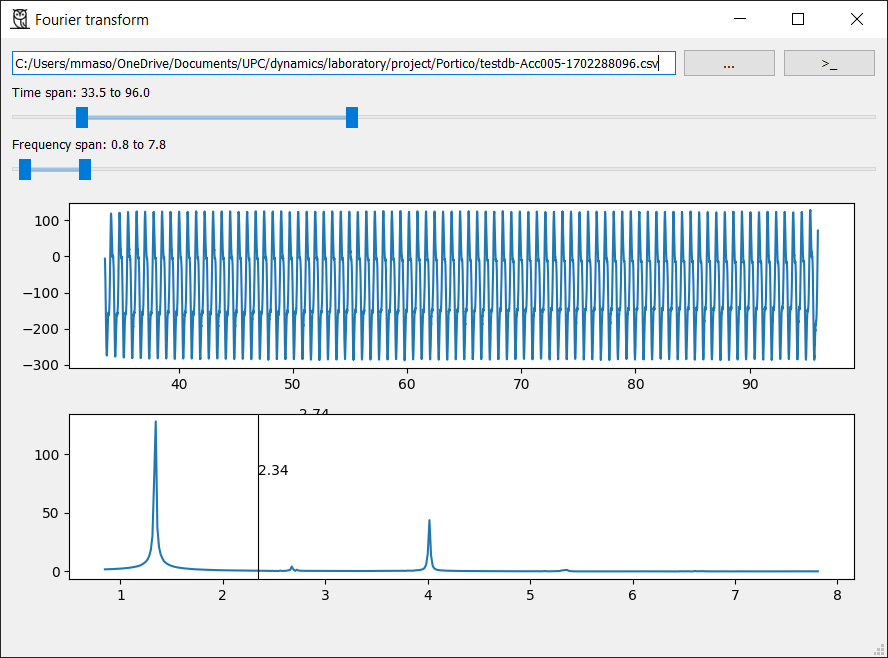
The above window will be opened. It allows to select .csv or .txt files and to specify how to read it (custom delimiter, columns where to read data, etc.). There are also two range sliders to trim the time and the frequency domains. Finally, a cursor is added to the FFT spectrum plot.
Why an owl?
Because the python project must be unique, because the author likes birds and because the name is short.
Thanks
The author gratefully acknoledge Flaticon for the design of the icon.
1 maintainer

Metadata
1 maintainer
Release files for owlfft 0.1.0
For a detailed explanation of source distributions (sdists) and built distributions (wheels), please see the package formats documentation.
Source distribution (sdist)
| File | Size | Uploaded | |
|---|---|---|---|
| owlfft-0.1.0.tar.gz | 106.1 kB | Details |
Built distribution (wheel)
| File | Interpreter | ABI | Platform | Reset |
|---|---|---|---|---|
| owlfft-0.1.0-py3-none-any.whl | Python 3 | none | any | Details |
Total release size: 113.8 kB
Release files / owlfft-0.1.0.tar.gz
| Download URL | owlfft-0.1.0.tar.gz |
|---|---|
| Size | 106.1 kB |
| Tags | Source |
|
SHA-256 checksum How to use checksums |
cd3958cb32e641215f972aa2725d6af04c36bde21cabb4021661c278fec05123
|
|
BLAKE2b-256 checksum How to use checksums |
89d269ed0e6c770fa1913ca9906b62cb06465757c8af4ab0bce6313ca9a52532
|
| Upload date | |
|
Uploaded using Trusted Publishing? What is trusted publishing? |
Yes |
| Uploaded via |
twine/6.1.0 CPython/3.13.7
|
Provenance
Provenance describes where a file came from. On PyPI, provenance is shared via attestations, which provide a verifiable record of the build or publishing details. View details, limitations and caveats.


PyPI Publish Attestation
PyPI verified that this artifact, at this checksum, originated from the publisher listed below.
Signed by GitHub Actions, verified by PyPI on Oct 30, 2025.
Transparency logRelease files / owlfft-0.1.0-py3-none-any.whl
| Download URL | owlfft-0.1.0-py3-none-any.whl |
|---|---|
| Size | 7.7 kB |
| Tags | Python 3 |
|
SHA-256 checksum How to use checksums |
ad537cc0c248fe2d9508849ad7208fa4f6e2ef7b94acd650f1637e202829fa11
|
|
BLAKE2b-256 checksum How to use checksums |
8ad39a17989da92d2c4b437e627859cd3b53f05e6ddf6a4fb96dfa0debd86c84
|
| Upload date | |
|
Uploaded using Trusted Publishing? What is trusted publishing? |
Yes |
| Uploaded via |
twine/6.1.0 CPython/3.13.7
|
Provenance
Provenance describes where a file came from. On PyPI, provenance is shared via attestations, which provide a verifiable record of the build or publishing details. View details, limitations and caveats.
PyPI Publish Attestation
PyPI verified that this artifact, at this checksum, originated from the publisher listed below.
Signed by GitHub Actions, verified by PyPI on Oct 30, 2025.
Transparency log













