
Owl - Optimal wealth lab: Retirement planner with great wisdom

Project description
Owl - Optimal wealth lab







Open-source retirement planning optimizer powered by Actual Intelligence — connect it to your AI assistant
Roth conversion optimizer · Social Security claiming strategy · Monte Carlo retirement simulator · Python retirement calculator · AI retirement planner · MCP retirement tool · Claude Gemini Cursor Zed VS Code
TL;DR
Owl is an open-source retirement planning tool that helps US retirees answer the hardest questions in retirement income planning: when to claim Social Security, how much to convert to Roth each year, which accounts to withdraw from first, and how to minimize lifetime taxes. It uses mixed-integer linear programming to optimize withdrawal strategies rather than merely simulate them, finding the mathematically best sequence of decisions across all accounts simultaneously.
Users can stress-test their plan with historical back-testing, Monte Carlo simulation with sequence-of-returns risk, or fixed rates derived from historical averages.
Owl covers the full US tax landscape: federal income tax, state income taxes for all 50 states and DC, long-term capital gains, NIIT, Medicare IRMAA surcharges, ACA marketplace premiums, RMDs, and Roth conversion rules — all embedded directly in the optimizer so that tax-efficient retirement income planning is built into every result, not applied as an afterthought.
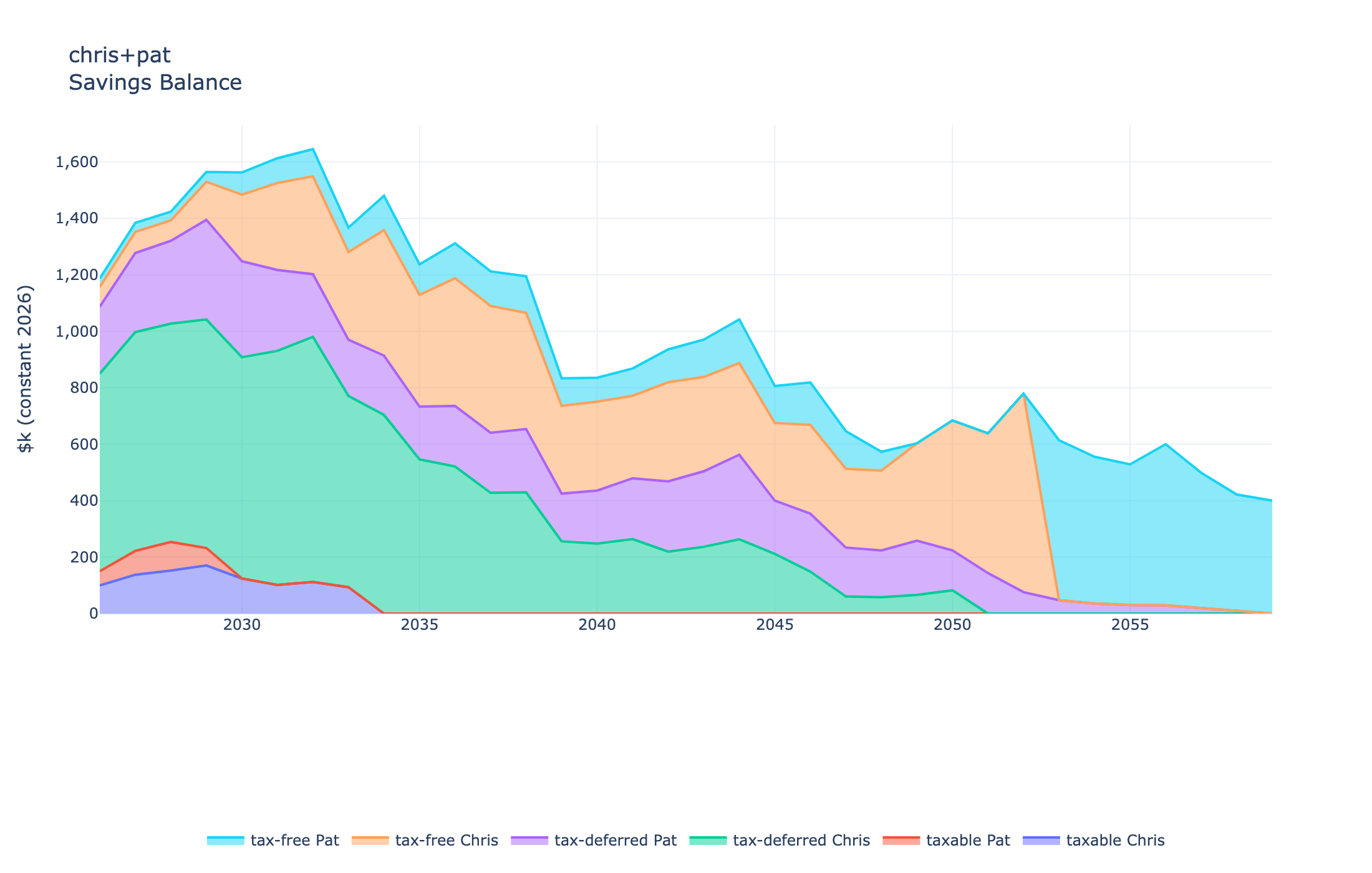
Optimized account balances over time (today's dollars): Owl draws down tax-deferred
accounts while growing tax-free Roth balances through early-retirement conversions.
Key capabilities:
- Tax optimization — federal + state income tax (all 50 states + DC), LTCG brackets, NIIT, Medicare IRMAA, and ACA premiums all embedded in the optimizer
- Account types — taxable, tax-deferred (401k/IRA), Roth, and HSA accounts with full contribution and withdrawal rules
- Roth conversions — amounts and timing co-optimized with spending and bequest goals
- Social Security — own, spousal, and survivor benefits; optional MILP co-optimization of claiming age (monthly resolution, 62–70)
- Pension & SPIA — pension income with survivor fractions; IRA-funded SPIA with optional CPI indexing and joint-and-survivor benefit
- Two objectives — maximize net spending subject to a bequest floor, or maximize after-tax bequest subject to a spending floor
- Spending profile — flat or smile-curve shape with survivorship factor; optional time-preference discounting to reduce end-of-life back-loading
- Asset allocation — user-specified glide path (linear or s-curve) across four asset classes (equities, corporate bonds, T-notes, cash); per-account, per-individual, or household-wide
- Stochastic analysis — Monte Carlo with optional longevity risk (mortality tables by sex and category: SSA, VBT, RP-2014, IAM-2012, Pub-2010); spending efficiency frontier tracing the optimal spending vs. shortfall-risk trade-off
- Rate models — 14 models including historical replay, bootstrap, VAR, GARCH-DCC, HMM, GMM, and Gaussian copula
- AI assistant — MCP server lets Claude Desktop, Claude Code, Gemini CLI, Cursor, Zed, VS Code (Copilot/Cline), and other MCP-compatible AI clients run optimizations, compute probability-of-success frontiers, and compare scenarios through natural conversation — no TOML files required:
"I'm 65, have $800k in my IRA and $200k taxable, $2,400/month Social Security at 67 — what can I safely spend each year with 90% historical probability of success?"
Among open-source retirement planning tools, Owl stands out for the breadth and rigor of its financial modeling. While the full API rewards those willing to invest time, the Streamlit web interface provides an accessible entry point for all users.
There are four ways to run Owl (from easiest to more complex):
-
Streamlit Hub: Run Owl remotely as hosted on the Streamlit Community Cloud at owlplanner.streamlit.app.
-
Docker Container: Run Owl locally on your computer using a Docker image. Follow these instructions for using this option.
-
Self-hosting: Run Owl locally on your computer using Python code and libraries. Follow these instructions to install from the source code and self-host on your own computer.
-
AI assistant (MCP): Connect Owl as a tool to an AI assistant — Claude Desktop, Claude Code, Gemini CLI, Cursor, Zed, VS Code (Copilot or Cline), or any MCP-compatible client. The AI can discover cases, run optimizations, compute probability-of-success frontiers, and compare scenarios through natural conversation — no TOML files required. Requires a local installation; see info/mcp.md for setup.
Documentation
| Document | Description |
|---|---|
| 📥 Installation Guide | Installation, Python environment setup, and developer build steps |
| 📋 Changelog | Version history and changelog |
| 🤝 Contributing | Guidelines for contributing code, issues, and pull requests |
| 📊 Modeling Capabilities | Summary of modeled components, assumptions, and limitations |
| 📖 User Guide | Python API usage with examples for Jupyter notebooks and scripts |
| ⚙️ Parameter Reference | Complete reference for TOML case file parameters |
| 📈 Rate Models | Available rate models (historical, stochastic, bootstrap, etc.) |
| 🤖 MCP Server | MCP server setup for AI-native access via Claude, Gemini, Cursor, Zed, VS Code, and other clients |
| 🖥️ Web App Guide | Guide to the Streamlit web app user interface |
| 📐 Mathematical Foundations | The LP formulation paper (owl.pdf) |
Credits and Acknowledgements
See CREDITS.md.
Bugs and Feature Requests
Please submit bugs and feature requests through GitHub if you have a GitHub account or directly by email. Or just drop me a line to report your experience with the tool.
Privacy
This app does not store or forward any information. All data entered is lost after a session is closed. However, you can choose to download selected parts of your own data to your computer before closing the session. These data will be stored strictly on your computer and can be used to reproduce a case at a later time.
Copyright © 2024-2026 - Martin-D. Lacasse
The source code is licensed under the GPLv3 (see LICENSE). The Owl - Optimal
wealth lab name and the logo/icon image files in the assets/ directory are not
covered by the GPLv3 — they are Copyright © 2024-2026 Martin-D. Lacasse, all rights
reserved, and may not be reproduced or modified without permission (see
assets/LICENSE).
Disclaimers: Owl is for educational and research purposes only. Nothing in this session constitutes financial, tax, or investment advice—consult a qualified professional for decisions specific to your situation.
Code output has been verified with analytical solutions when applicable, and comparative approaches otherwise. Nevertheless, accuracy of results is not guaranteed.
Release history Release notifications | RSS feed


Download files
Download the file for your platform. If you're not sure which to choose, learn more about installing packages.
Source Distribution
Built Distribution
Filter files by name, interpreter, ABI, and platform.
If you're not sure about the file name format, learn more about wheel file names.
Copy a direct link to the current filters
File details
Details for the file owlplanner-2026.6.18.tar.gz.
File metadata
- Download URL: owlplanner-2026.6.18.tar.gz
- Upload date:
- Size: 22.8 MB
- Tags: Source
- Uploaded using Trusted Publishing? No
- Uploaded via: uv/0.10.4 {"installer":{"name":"uv","version":"0.10.4","subcommand":["publish"]},"python":null,"implementation":{"name":null,"version":null},"distro":{"name":"macOS","version":null,"id":null,"libc":null},"system":{"name":null,"release":null},"cpu":null,"openssl_version":null,"setuptools_version":null,"rustc_version":null,"ci":null}
File hashes
| Algorithm | Hash digest | |
|---|---|---|
| SHA256 |
275b72698e383786e631d0d498929a0835053742ed5b3cb0e537b6c235814073
|
|
| MD5 |
c5f9b6b3a6deb77fd2c8af561b622ff5
|
|
| BLAKE2b-256 |
0fca220380e745676bef0c093bfcf47df286de9a97998ae0434122a61968062e
|
File details
Details for the file owlplanner-2026.6.18-py3-none-any.whl.
File metadata
- Download URL: owlplanner-2026.6.18-py3-none-any.whl
- Upload date:
- Size: 371.8 kB
- Tags: Python 3
- Uploaded using Trusted Publishing? No
- Uploaded via: uv/0.10.4 {"installer":{"name":"uv","version":"0.10.4","subcommand":["publish"]},"python":null,"implementation":{"name":null,"version":null},"distro":{"name":"macOS","version":null,"id":null,"libc":null},"system":{"name":null,"release":null},"cpu":null,"openssl_version":null,"setuptools_version":null,"rustc_version":null,"ci":null}
File hashes
| Algorithm | Hash digest | |
|---|---|---|
| SHA256 |
e237eddf4ce52760f6b9719bb6f4af3247d7027c2b8fd9c2f7dfa87291e4bda8
|
|
| MD5 |
f9fb435d7045cd2b18227ea6be686a7a
|
|
| BLAKE2b-256 |
649d9d2b110cad7f73134602879c3aa8b2051cb027c4e8dccd1704af5cd095e5
|






