
paces_calc
paces to distances conversion, a command line tool.
The main use cases of the tool are:
- Converting a workout pace at a given distance to what it's splits will be at some specified distances
- Comparing average race splits across different times at given distance in a readable format
- Converting paces from and to meters (m), miles (mi), and kilometers (km or k)
Installation
To install the command line tool, run:
pip3 install paces_calc
The command line tool will be installed as pace to bin on
Linux (e.g. /usr/bin); or as pace.exe to Scripts in your
Python installation on Windows (e.g. C:\Python39\Scripts\pace.exe).
You may consider installing only for the current user:
pip3 install paces_calc --user
In this case the command line utility will be installed to
~/.local/bin/pace on Linux and to
%APPDATA%\Python\Scripts\pace.exe on Windows.
Usage
From the command line, use the installed pace script:
pace 4:12 -a 1600m -t 200m 400m 800m
Shorthand for the above operation would be:
pace 4:12 1600m 200m 400m 800m
use pace -h or pace --help for the quick help output, or use pace man for the full man page of the utility.
usage: pace [-h] [-v] [-g] [-a DISTANCE] [-t [DISTANCE ...]] [pace ...]

Easy pace conversion from the command line. When stdin is 'pace' (H:M:S or M:S or S), considered mile pace, and paces (400m, distance) at other
distances are put to stdout.

positional arguments:
pace               The initial pace, so 0:6:12 is 0 hourse, 6 minutes, and 12 seconds

options:
-h, --help         show this help message and exit
-v, --version      show program's version number and exit
-g, --gui          open window application for pace distance conversions outside of command line
-a, --at DISTANCE  specify the distance pace is at (i.e. 1600m)
-t, --to DISTANCE  specify to what distance(s) you are converting to (i.e. 200m 400m 1mi)
Subtleties
When pace is used shorthand style (without options -a or -t), only the first argument given is taken as the given pace, teh second argument is the distance that pace was run at, and the rest of the arguments are treated as the distances to convert to:
pace 12:14 -a 2mi -t 400m 800m 1kmis equivalent topace 12:14 2mi 400m 800m 1km
When no distance unit is included with a distance value, the distance is considered to have been given in meters:
pace 4:16 -a 1600 -t 400 800is treated aspace 4:16 -a 1600m -t 400m 800m
Using options instead of shorthand allows for multiple paces to be given as the starting parameter before -a, meaning different converted paces can be compared. Each starting pace to convert will be a seperate column in the printed out table:
pace 27:05 26:43 26:15 -a 8km -t 400m 1mi 3km 5km 10kmWill produce 3 columns for 27:05, 26:43, and 26:15, with the rows holding the conversions for each of these 8km times to the given -t distances
calc is short for calculator by the way, it's slang
Examples
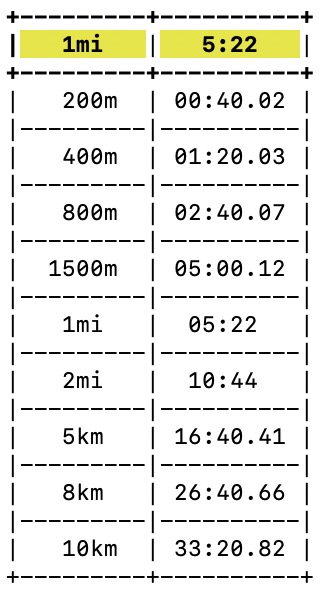
Default usage:
pace 5:22
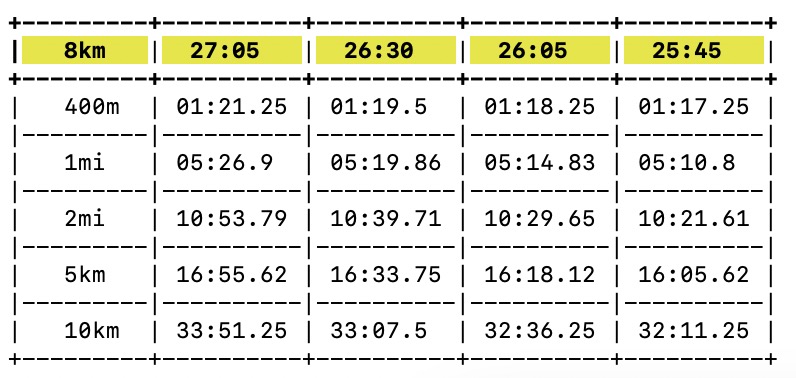
Multiple 8km race times and their avergae splits at specified distances:
pace 27:05 26:30 26:05 25:45 -a 8km -t 400m 1mi 2mi 5km 10km
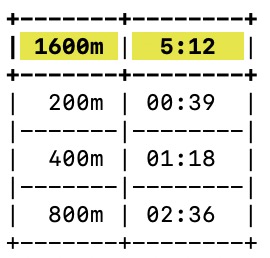
A 5 minute 12 second 1600m workout time and the splits to hit it:
pace 5:12 1600m 200m 400m 800m
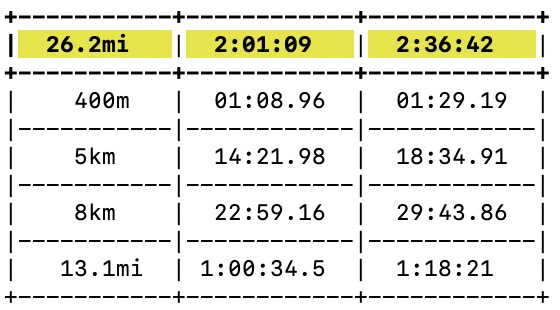
Elian Kipchoge's 2022 Berlin marathon time compared to a 2:36:42 time:
pace 2:01:09 2:36:42 -a 26.2mi -t 400m 5km 8km 13.1mi
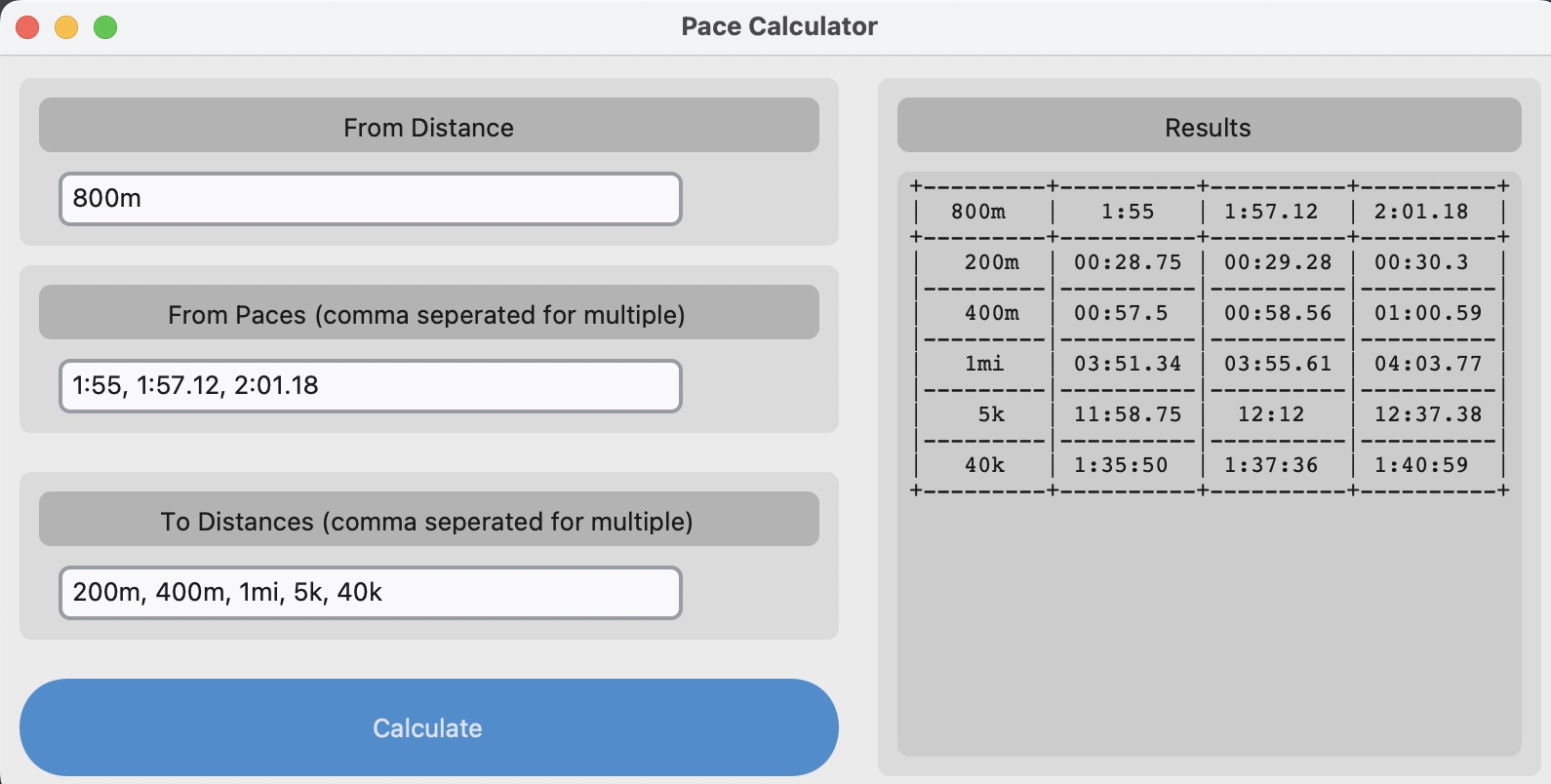
The GUI interface and how it looks:
pace -g
1 maintainer

Metadata
1 maintainer
Release files for paces-calc 1.0.1
For a detailed explanation of source distributions (sdists) and built distributions (wheels), please see the package formats documentation.
Source distribution (sdist)
| File | Size | Uploaded | |
|---|---|---|---|
| paces_calc-1.0.1.tar.gz | 10.6 kB | Details |
Built distribution (wheel)
| File | Interpreter | ABI | Platform | Reset |
|---|---|---|---|---|
| paces_calc-1.0.1-py3-none-any.whl | Python 3 | none | any | Details |
Total release size: 21.1 kB
Release files / paces_calc-1.0.1.tar.gz
| Download URL | paces_calc-1.0.1.tar.gz |
|---|---|
| Size | 10.6 kB |
| Tags | Source |
|
SHA-256 checksum How to use checksums |
e6f5fdf2b12039b45114f0ade162aa561765bd6ab6b1f3b4be65fcd6ab15cc3f
|
|
BLAKE2b-256 checksum How to use checksums |
0703c71e5f3c888eebc3864abfd42a353f739dc0bd61dc669b6789d5063b6cf2
|
| Upload date | |
|
Uploaded using Trusted Publishing? What is trusted publishing? |
No |
| Uploaded via |
twine/5.1.1 CPython/3.13.0
|
Release files / paces_calc-1.0.1-py3-none-any.whl
| Download URL | paces_calc-1.0.1-py3-none-any.whl |
|---|---|
| Size | 10.4 kB |
| Tags | Python 3 |
|
SHA-256 checksum How to use checksums |
b806ab8e626350c705536a74bc6129c47cde0b5fedfe8f3bb6874b28671f57be
|
|
BLAKE2b-256 checksum How to use checksums |
92d7aacb90a976adb829a51c3ed77d4f8b5409b2ee50fafa103a81d58a59cd7b
|
| Upload date | |
|
Uploaded using Trusted Publishing? What is trusted publishing? |
No |
| Uploaded via |
twine/5.1.1 CPython/3.13.0
|














