
packaged
The easiest way to ship python applications.
Demo apps available on the website: packaged.live
packaged can take any Python project, and package it into a self contained
executable, that can run on other machines without needing Python installed.
Installation
pip install packaged
Usage
packaged <output_path> <build_command> <startup_command> [<source_directory>] [--python-version=3.12]
Such as:
packaged my_project.sh 'pip install .' 'python -m your_package' path/to/project
This will package Python 3.12 with your application by default.
To specify a different Python version, use the --python-version flag, like so:
packaged my_project.sh 'pip install .' 'python -m your_package' path/to/project --python-version=3.10
Examples
All examples below create a self contained executable. You can send the produced binary file to another machine with the same OS and architecture, and it will run the same.
You can also find the pre-built binaries on the Releases page.
Mandelbrot (numpy, matplotlib, GUI)
packaged ./mandelbrot.sh 'pip install -r requirements.txt' 'python mandelbrot.py' ./example/mandelbrot --python-version=3.10
This produces a ./mandelbrot.sh binary with:
- Python 3.10
matplotlibnumballvmlitepillow
That outputs an interactive mandelbrot set GUI.
Minesweeper (using packaged.toml for configuration)
You can use a packaged.toml file and simply do packaged path/to/project to
create your package. For example, try the minesweeper project:
packaged ./example/minesweeper
This configuration
is used for building the package. The equivalent command to build the project
without pyproject.toml would be:
packaged minesweeper.sh 'pip install .' 'python -m minesweeper' ./example/minesweeper
Posting (TUI based API testing app)
Posting is a Postman alternative that runs entirely in the terminal. A perfect candidate to build an executable out of!
Since the dependencies themselves contain all the source code needed, you can skip the last argument. With this, no other files will be packaged other than what is produced in the build step.
packaged ./posting.sh 'pip install posting' 'posting'
This will simply package the posting app into a single file.
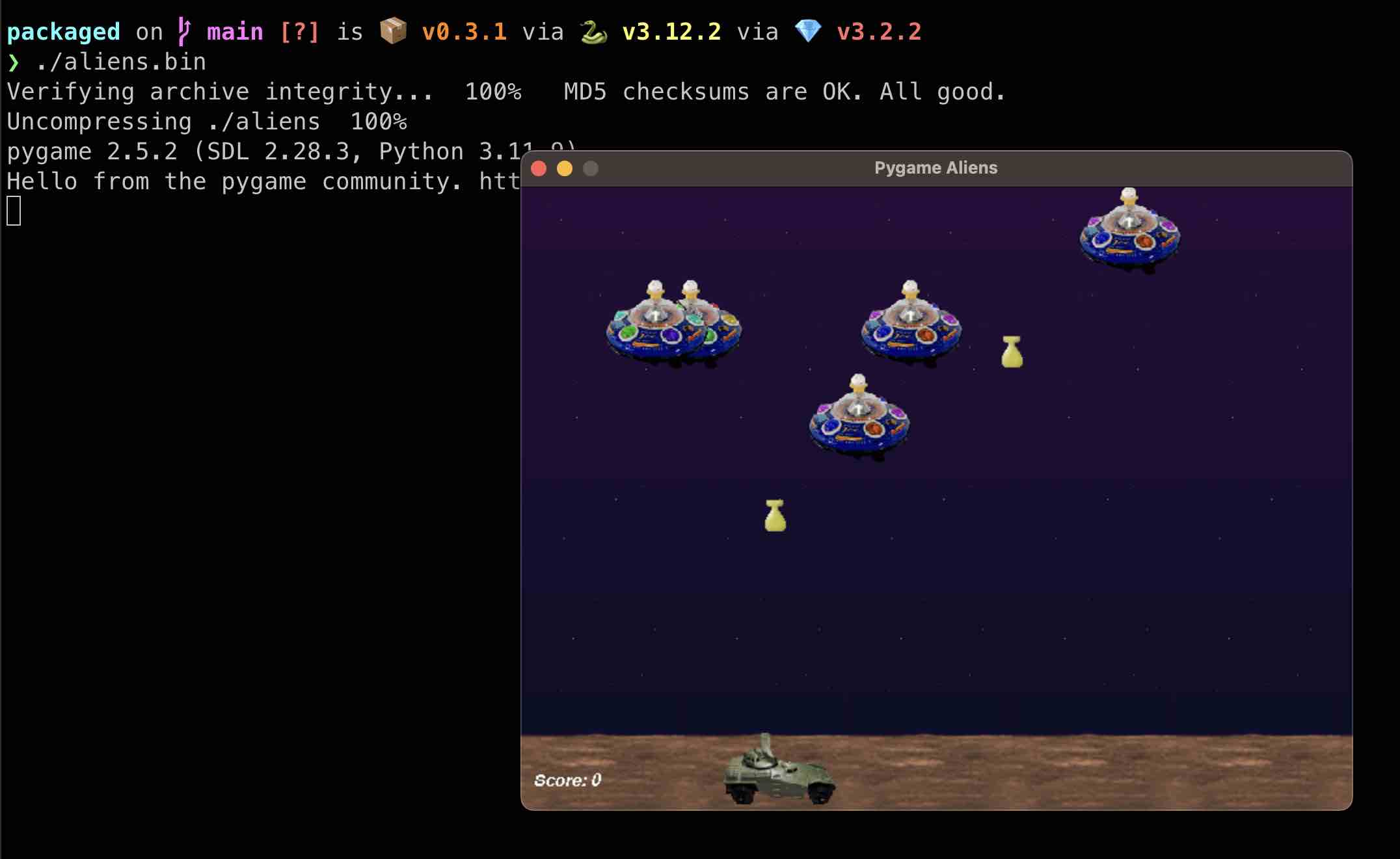
Aliens (pygame)
Pygame ships with various games as well, pygame.examples.aliens is one of them:
packaged ./aliens 'pip install pygame' 'python -m pygame.examples.aliens'
Another one that you can try out is pygame.examples.chimp.
IPython (console scripts)
Packages that expose shell scripts (like ipython) should also just work when
creating a package, and these scripts can be used as the startup command:
packaged ./ipython 'pip install ipython' 'ipython'
Now running ./ipython runs a portable version of IPython!
Local Development / Testing
To test and modify the package locally:
- Create and activate a virtual environment
- Run
pip install -r requirements-dev.txtto do an editable install - Run
pytestto run tests - Make changes as needed
Type Checking
Run mypy .
Create and upload a package to PyPI
Make sure to bump the version in setup.cfg.
Then run the following commands:
rm -rf build dist
python setup.py sdist bdist_wheel
Then upload it to PyPI using twine:
twine upload dist/*
License
The package is Licensed under GNU General Public License v2 (GPLv2). However,
note that the packages created with packaged are NOT licensed under GPL.
This is because the archives created are just data for the package, and
packaged is not a part of the archives created.
That means that you can freely use packaged for commercial use.
Read the License section for Makeself for more information.
1 maintainer

Metadata
1 maintainer
Release files for packaged 0.6.1
For a detailed explanation of source distributions (sdists) and built distributions (wheels), please see the package formats documentation.
Source distribution (sdist)
| File | Size | Uploaded | |
|---|---|---|---|
| packaged-0.6.1.tar.gz | 27.9 kB | Details |
Built distribution (wheel)
| File | Interpreter | ABI | Platform | Reset |
|---|---|---|---|---|
| packaged-0.6.1-py3-none-any.whl | Python 3 | none | any | Details |
Total release size: 56.4 kB
Release files / packaged-0.6.1.tar.gz
| Download URL | packaged-0.6.1.tar.gz |
|---|---|
| Size | 27.9 kB |
| Tags | Source |
|
SHA-256 checksum How to use checksums |
5a12ad2f48106d25fdb25fe5c7f31930ebb605ad30f7f0f6fb9f3dcdc7cda174
|
|
BLAKE2b-256 checksum How to use checksums |
02da381cbd71d7dd52484771ba25e3d72cd9223163d29eafbd07c48f7a2eae09
|
| Upload date | |
|
Uploaded using Trusted Publishing? What is trusted publishing? |
No |
| Uploaded via |
twine/5.1.0 CPython/3.12.3
|
Release files / packaged-0.6.1-py3-none-any.whl
| Download URL | packaged-0.6.1-py3-none-any.whl |
|---|---|
| Size | 28.5 kB |
| Tags | Python 3 |
|
SHA-256 checksum How to use checksums |
ad41a5df4205f529a6eebfa81c25f02ef8ead336d888109bb907d918e4ac36ea
|
|
BLAKE2b-256 checksum How to use checksums |
9016ad3287132142a2319a92ced74da397ef091605f2dd65069e269f85827043
|
| Upload date | |
|
Uploaded using Trusted Publishing? What is trusted publishing? |
No |
| Uploaded via |
twine/5.1.0 CPython/3.12.3
|














