
Tell your AI "create a network with 3 routers, OSPF and DHCP" — it plans, validates, generates, and deploys the topology directly into Cisco Packet Tracer in real time.








| 61 MCP Tools | 5 MCP Resources | 74 Device Models | 151 Modules | 15 Cable Types |
🌐 Website: https://www.mcpnetwork.top • 📚 Documentation: https://mats2208.github.io/MCP-Packet-Tracer/
Showcase
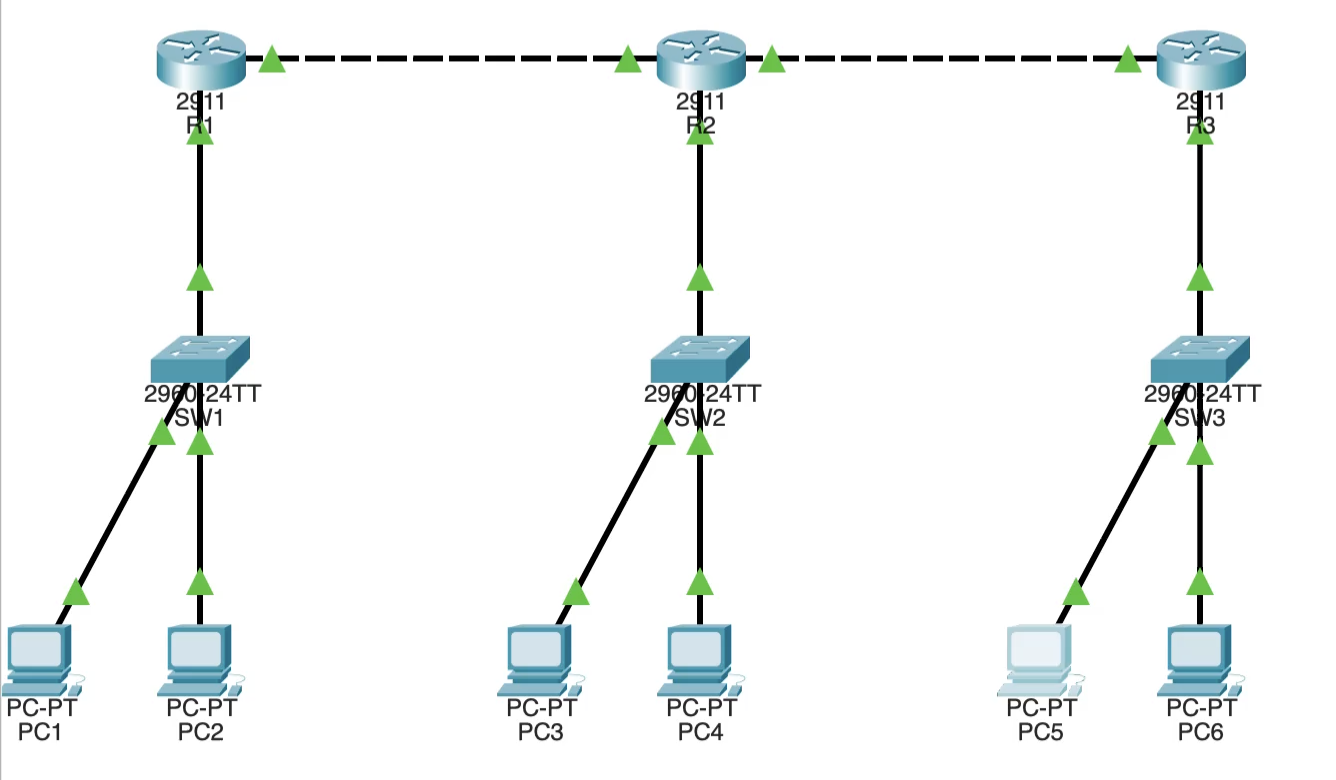
3-router linear topology with OSPF, DHCP, and 6 PCs — planned and deployed via MCP tools
|
Full build + live deploy pipeline in VS Code |
Auto-generated IOS CLI configs with OSPF & DHCP |
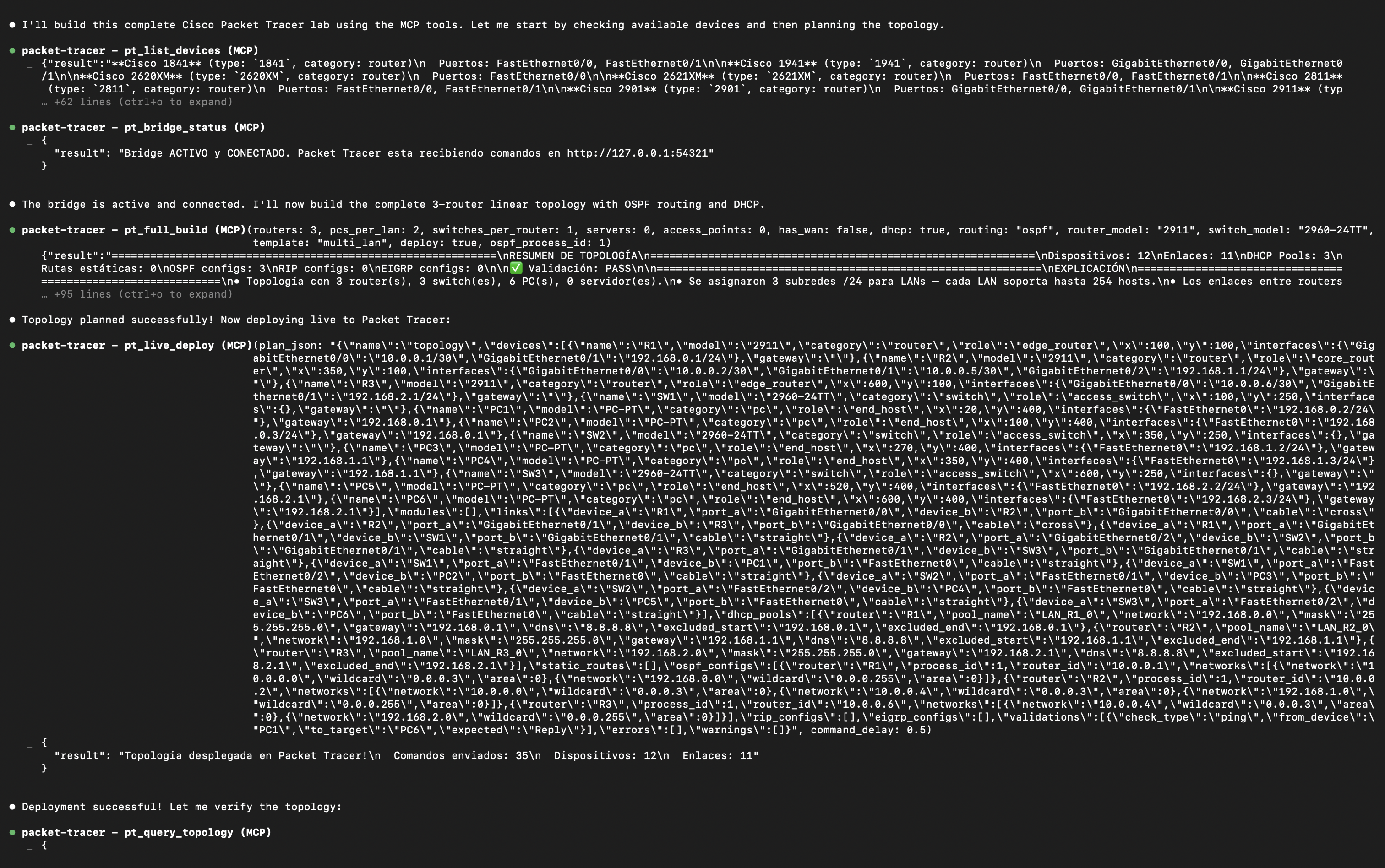
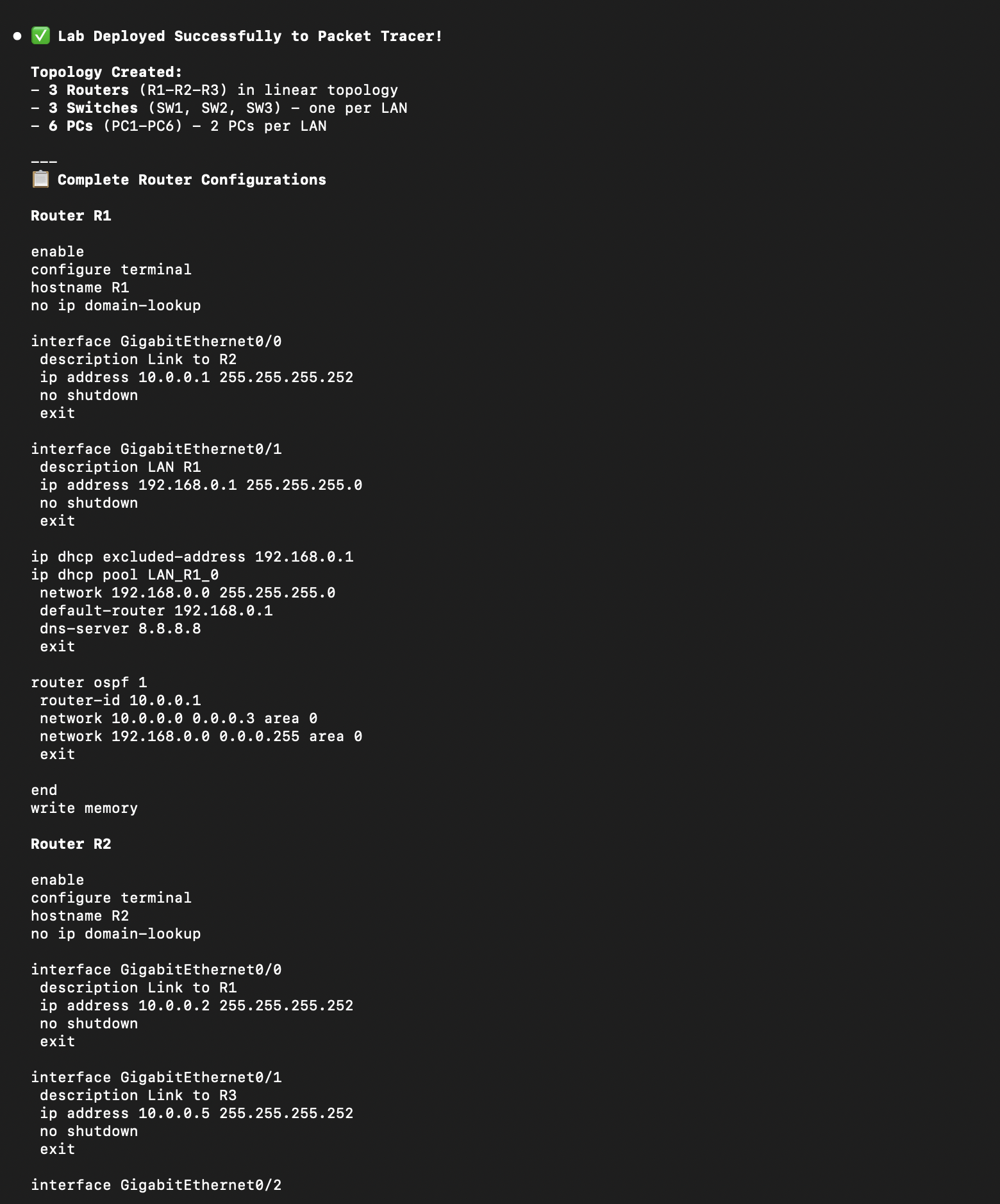
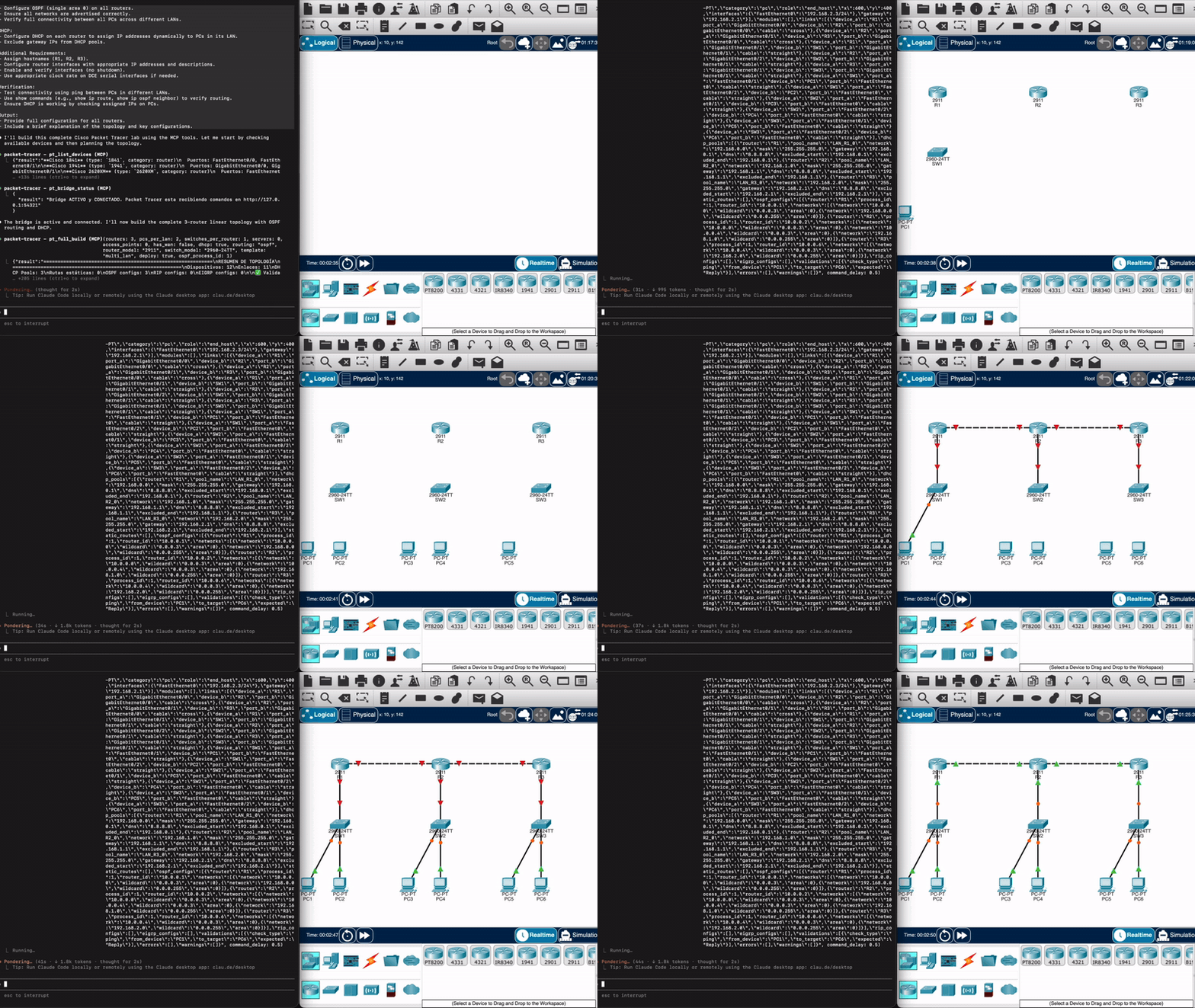
Live deploy — from a natural-language prompt to a running topology in Packet Tracer
What it does
A Model Context Protocol (MCP) server that gives any LLM (Claude, GitHub Copilot, Codex, …) full programmatic control over Cisco Packet Tracer.
| Feature | Details | |
|---|---|---|
| Planning | Natural language → topology | A single prompt becomes a complete TopologyPlan |
| IP / DHCP | Auto /24 LANs + /30 links, DHCP pools | Sequential, gateway at .1 |
| Routing | Static · OSPF · EIGRP · RIP | Full IOS generation |
| Switching | VLANs, trunks, inter-VLAN routing (router-on-a-stick), STP, port-security | .1q subinterfaces + per-VLAN DHCP |
| Security | Device hardening (SSH, local users, enable-secret, banner), ACL/NAT | On live devices via the bridge |
| IPv6 | Dual-stack addressing | Routers via CLI, hosts via SLAAC |
| Wireless | WiFi laptops + auto-associated Access Points | NIC swap → Wireless0, default-SSID assoc |
| Validation | Typed errors + auto-fixer | Wrong cables, missing ports, model upgrades |
| Verification | Plan-vs-live diff, health check, real ping (pt_verify_connectivity) |
Drift, down links, duplicate IPs — and actual reachability |
| Security audit | pt_audit_security grades the live config: missing enable secret, reversible (type 7) credentials, service password-encryption off, config-register 0x2142 |
Reads the device, not the plan. Credentials never leave it — only the algorithm label |
| Live inspection | pt_inspect_ports, pt_read_vlans, pt_device_power |
Per-port protocol/duplex/NAT/ACL state, real VLAN database, power-cycle with read-back |
| Packet tracing | pt_simulation_mode, pt_simulation_step, pt_read_packet_trace |
Step the simulation and read why each packet did what it did — PT's own per-OSI-layer decision log, not just pass/fail |
| Telemetry | pt_apply_netflow configures a NetFlow exporter directly and reads it back; pt_read_qos verifies class-maps and policy-maps |
Collector address, UDP port, version, source interface |
| Backup | pt_backup_config, pt_project_metadata, pt_workspace_options |
Real startup-config + serial + config-register; project info; auto-cabling and real-network-access toggles |
| Deploy | Real-time bridge to PT (auto-reconciles) | No copy-paste — commands stream directly |
| Two channels | HTTP when the extension window is open, file-bridge when it's closed | PT keeps executing with the window minimized/closed |
| Projects | Save / open the real .pkt (pt_save_project / pt_open_project) |
Persist the running topology, not just the plan JSON |
| Export | Plans, JS scripts, CLI configs | Reusable project files on disk |
👉 Full tool reference, device catalog, networking guides and architecture live in the documentation site.
Installation
1. Install the server
git clone https://github.com/Mats2208/MCP-Packet-Tracer
cd MCP-Packet-Tracer
pip install -e .
2. Connect your MCP client (Claude Code shown)
Linux · macOS · Git Bash · Windows cmd.exe:
claude mcp add --scope user --transport stdio packet-tracer -- python -m packet_tracer_mcp --stdio
Windows PowerShell — quote the -- separator, or PowerShell swallows it and Claude aborts with error: unknown option '-m':
claude mcp add --scope user --transport stdio packet-tracer "--" python -m packet_tracer_mcp --stdio
Verify with claude mcp list (look for packet-tracer … ✓ Connected).
3. Install the live-deploy extension — only if you want real-time deploy into a running Packet Tracer
Download V5.pts from Releases, then in Packet Tracer go to Extensions → Scripting → Configure PT Script Modules → Add… and select it. Full walkthrough in Live deploy below.
v0.6.0+ requires V5. The bridge now authenticates with a per-machine token that the V5 extension reads automatically; builds before V5 can't authenticate.
4. Install the Claude Code Skill — recommended; makes the AI use the MCP correctly instead of guessing
The repo ships a companion Agent Skill that teaches the model the exact tool catalog, the discover→plan→validate→deploy workflow, and the precise Script-Engine API (so it never invents method/model/port names). Install it globally from the repo root:
Linux · macOS · Git Bash:
mkdir -p ~/.claude/skills/packet-tracer && cp skill/SKILL.md ~/.claude/skills/packet-tracer/SKILL.md
Windows PowerShell:
New-Item -ItemType Directory -Force "$HOME\.claude\skills\packet-tracer" | Out-Null; Copy-Item skill\SKILL.md "$HOME\.claude\skills\packet-tracer\SKILL.md"
Then run /reload-skills in Claude Code (or restart it) and confirm with /skills. Details →
Skill docs.
Requires Python 3.11+ (deps
mcp[cli]>=1.13,pydantic>=2.11install automatically). Full setup for every client → Installation docs.
Quick start
Just talk to your AI:
"Build a network with 2 routers, 2 switches, 4 PCs, DHCP and static routing."
The LLM calls pt_full_build, which plans → validates → generates → deploys.
See the Quick Start guide.
Live deploy
Stream topologies into a running Packet Tracer in real time. Install this repo's
own MCP Control Center extension once — the .pts from
Releases — via
Extensions → Scripting → Configure PT Script Modules → Add…, then open
Extensions → MCP BUILDER. It auto-connects to the bridge — no snippet to paste.
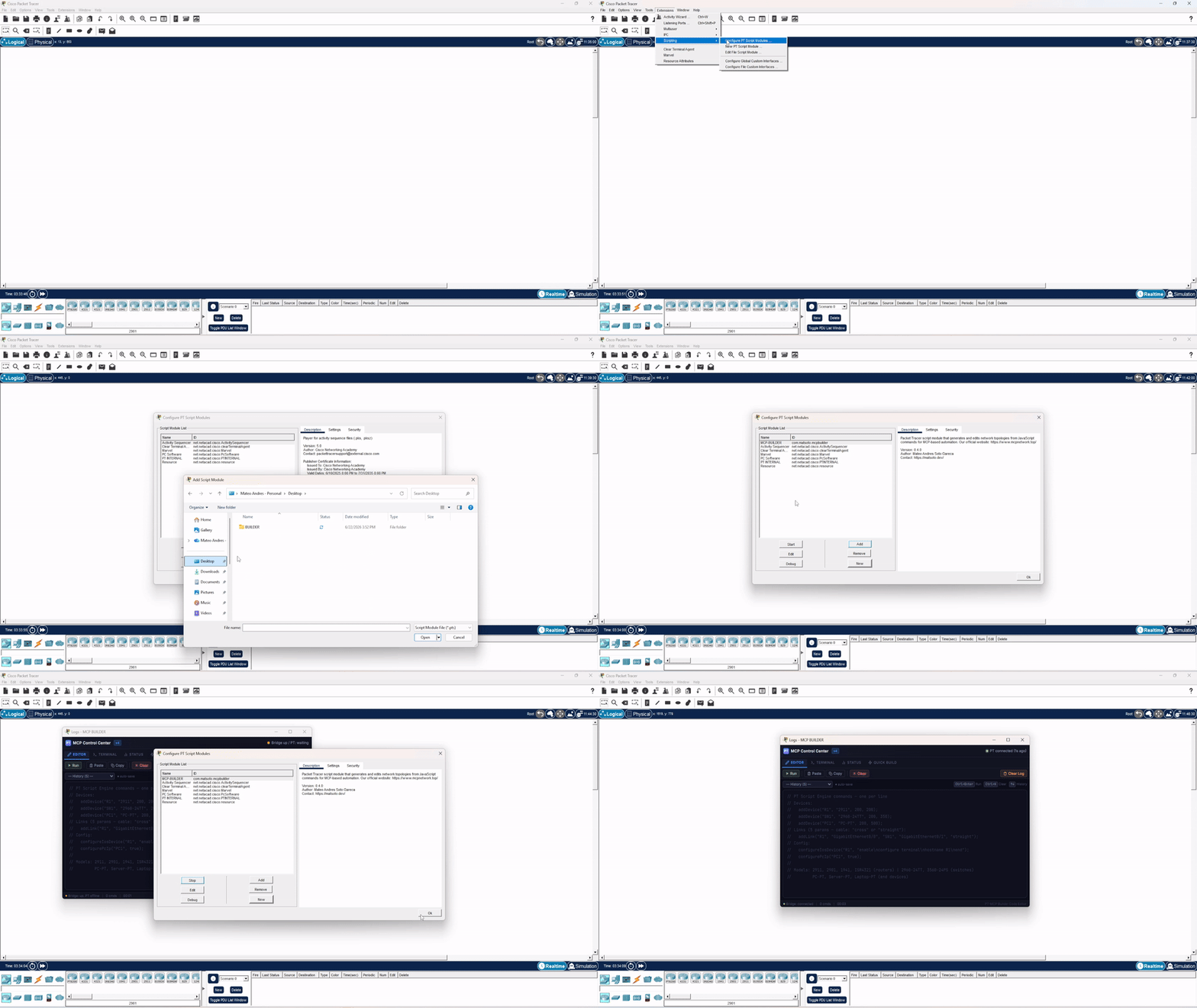
Installing the MCP Control Center extension (V5) in Packet Tracer
📖 Full steps → Live Deploy Setup.
Clients
Any MCP client drives this server — Claude Code, Cursor, Claude Desktop, VS Code with Copilot, Codex. Nothing in it is client-specific.
There is also one built on it: PacketSmith,
a terminal app that runs these 61 tools with the network drawn beside the conversation — a
fabric tree and a canvas plan derived from the pt_* results themselves, so a device the
model says it created but did not never shows up.
| This server alone | This server + PacketSmith | |
|---|---|---|
| Where you talk | the MCP client you already use | a terminal app built for this one job |
| What you see | a chat log, plus PT in another window | split screen: reply left, live topology right |
| Topology | read out of the tool output | fabric tree and canvas plan, drawn for you |
| Tools loaded | every MCP server you have configured | this one only — measurably faster to start |
| Engine | whatever your client speaks | Claude, or ~150 providers |
You need this server either way — PacketSmith runs it underneath, and its setup installs it for you. If you already live in Claude Code, you are done here; the client is for when you want the topology in front of you instead of buried in a scrollback.
npm i -g packetsmith # beta · MIT
Credits & Acknowledgements
Live deploy runs through our own Packet Tracer extension — the MCP Control
Center (the .pts in Releases).
Its Script-Engine helper layer was inspired by
PTBuilder by
Kim Knight (@kimmknight), who pioneered driving
Packet Tracer's Script Engine from JavaScript — thanks for the groundwork. 🙏
PTBuilder and Packet Tracer MCP are separate, independent projects. You install our extension, not PTBuilder. Full Credits & Attribution.
Security
Driving Packet Tracer from outside means running a local HTTP bridge whose whole job is to hand JavaScript to PT's Script Engine — code that executes with PT's own privileges, including disk access. That makes the bridge a genuine attack surface, not an implementation detail, and it is hardened accordingly.
The attack this design exists to stop. Binding to 127.0.0.1 is not a
security control. A POST with Content-Type: text/plain is a CORS simple
request: any web page open in your browser can send it to a loopback port
without a preflight and without needing to read the response. An unauthenticated
bridge therefore lets any website you visit — while Packet Tracer happens to be
open — queue arbitrary code inside it. Injection never needed to read anything
back, so same-origin policy alone never closed this.
What actually closes it is a secret the attacking page cannot guess:
| Control | Implementation |
|---|---|
| Token on every endpoint | Every route except /ping requires a shared token (?t= or X-PT-Token). Compared with hmac.compare_digest — constant time, no early-exit oracle. |
/ping leaks nothing |
Deliberately unauthenticated so the server can tell who owns the port before trusting it — but it returns only a SHA-256 fingerprint of the token, never the token. |
| Foreign-bridge detection | Before sending any payload, the server checks that /ping identity matches its own token fingerprint. If a stranger holds the port, it refuses to hand code to it instead of blindly trusting a 200. |
| DNS-rebinding defense | The Host header is validated against 127.0.0.1 / localhost / [::1] + the real port. A rebound request arrives as Host: evil.com:<port> and is rejected. |
| Loopback bind | ThreadingHTTPServer(("127.0.0.1", port)) — never 0.0.0.0, so the bridge is not reachable from the LAN. |
| Token at rest | secrets.token_urlsafe(32), created with O_EXCL (race-safe when two servers start at once) at mode 0o600, under %LOCALAPPDATA% on Windows — deliberately not roaming %APPDATA%, so a loopback secret never syncs to a file server. |
| Body size cap | Oversized bodies are rejected with 413 and are not read into memory. |
| Silent failures | Error responses carry no CORS headers, so a hostile page cannot even distinguish why it failed. |
| Tamper visibility | Unauthorized attempts are counted and surfaced by pt_bridge_status, so a stale or rogue client is diagnosable instead of silent. |
Regression coverage lives in tests/test_bridge_security.py
and tests/test_injection_regressions.py;
the full suite runs offline with python -m pytest — no Packet Tracer required.
v0.6.0+ requires the V5 extension. Versions before v0.6.0 shipped an unauthenticated bridge and are vulnerable to exactly the attack above. Upgrade — there is no safe configuration of the old bridge.
Deliberate, documented behaviour: pt_send_raw executes arbitrary JavaScript
inside Packet Tracer by design — it is the escape hatch for exploring the IPC
API. It is reachable only by an MCP client you have already authorised, over the
authenticated bridge. That is a capability, not a vulnerability.
Found a vulnerability? Report it privately via GitHub Security Advisories, not a public issue. SECURITY.md documents the full threat model.
What's new
v0.8.0 — the agent can now show the network, not just describe it: canvas screenshots plus notes and drawings, for topologies that document themselves. v0.7.0 made the server read a live topology, not just build one:
security auditing, per-port inspection, packet tracing with Packet Tracer's own
per-layer decision log, NetFlow, and config backup. It also fixes
pt_full_build(deploy=True), which used to report success while leaving the
canvas empty. Full list in the Changelog.
Contributing
See CONTRIBUTING.md. Tests run offline with
python -m pytest; no Packet Tracer needed.
License
Released under the MIT License — © 2026 Mateo (@Mats2208).
Built with MCP · Powered by Pydantic · Deploys to Cisco Packet Tracer · Script-engine logic inspired by PTBuilder
Terminal client built on this server → PacketSmith
If this project is useful to you, star it ⭐ and share it with the community.
1 maintainer

Metadata
1 maintainer
Release files for packet-tracer-mcp 0.9.0
For a detailed explanation of source distributions (sdists) and built distributions (wheels), please see the package formats documentation.
Source distribution (sdist)
| File | Size | Uploaded | Provenance | |
|---|---|---|---|---|
| packet_tracer_mcp-0.9.0.tar.gz | 320.6 kB | With provenance | Details |
Built distribution (wheel)
| File | Interpreter | ABI | Platform | Reset |
|---|---|---|---|---|
| packet_tracer_mcp-0.9.0-py3-none-any.whl | Python 3 | none | any | Details |
Total release size: 545.9 kB
Release files / packet_tracer_mcp-0.9.0.tar.gz
| Download URL | packet_tracer_mcp-0.9.0.tar.gz |
|---|---|
| Size | 320.6 kB |
| Tags | Source |
|
SHA-256 checksum How to use checksums |
e5644cd6477cd92877072af90a4fc2bf35eb75b827c10cac410e9ac43dea4ad0
|
|
BLAKE2b-256 checksum How to use checksums |
ff3724b295697e3ed394b28515b7786a092cc9303cdd77c4742fac2f7bfaf0bf
|
| Upload date | |
|
Uploaded using Trusted Publishing? What is trusted publishing? |
Yes |
| Uploaded via |
twine/7.0.0 CPython/3.13.14
|
Provenance
Provenance describes where a file came from. On PyPI, provenance is shared via attestations, which provide a verifiable record of the build or publishing details. View details, limitations and caveats.


PyPI Publish Attestation
PyPI verified that this artifact, at this checksum, originated from the publisher listed below.
Signed by GitHub Actions, verified by PyPI on Aug 30, 2026.
Transparency logRelease files / packet_tracer_mcp-0.9.0-py3-none-any.whl
| Download URL | packet_tracer_mcp-0.9.0-py3-none-any.whl |
|---|---|
| Size | 225.3 kB |
| Tags | Python 3 |
|
SHA-256 checksum How to use checksums |
4303a1b2ef574fc145c108552162199401ee3f4aafe5aef9672a092a1992b148
|
|
BLAKE2b-256 checksum How to use checksums |
a19c50654c340956f2f447f1cb4d3cea424819a775a3ad21300fc00e5114bbca
|
| Upload date | |
|
Uploaded using Trusted Publishing? What is trusted publishing? |
Yes |
| Uploaded via |
twine/7.0.0 CPython/3.13.14
|
Provenance
Provenance describes where a file came from. On PyPI, provenance is shared via attestations, which provide a verifiable record of the build or publishing details. View details, limitations and caveats.
PyPI Publish Attestation
PyPI verified that this artifact, at this checksum, originated from the publisher listed below.
Signed by GitHub Actions, verified by PyPI on Aug 30, 2026.
Transparency logSecurity for packet-tracer-mcp 0.9.0
Provenance
Provenance describes where a file came from. On PyPI, provenance is shared via attestations, which provide a verifiable record of the build or publishing details. View details, limitations and caveats.
Full provenance
All 2 files in this release have been uploaded with provenance metadata.
Attestation for packet_tracer_mcp-0.9.0.tar.gz
PyPI Publish Attestation
PyPI verified that this artifact, at this checksum, originated from the publisher listed below.
Signed by GitHub Actions, verified by PyPI on Aug 30, 2026.
Transparency logA note on package security
PyPI is a repository for distributing packages, not a service for auditing them. While third-party security researchers and our staff do their best to detect and remove malicious packages, PyPI cannot guarantee the quality, security or suitability of any given package.
To learn more about protecting yourself from malicious actors, visit our package security documentation.













